MagicMirror Forum
    • Recent
    • Tags
    • Unsolved
    • Solved
    • MagicMirror² Repository
    • Documentation
    • 3rd-Party-Modules
    • Donate
    • Discord
    • Register
    • Login
    A New Chapter for MagicMirror: The Community Takes the Lead
    Read the statement by Michael Teeuw here.

    Recurring events Calender

    Scheduled Pinned Locked Moved Solved Troubleshooting
    20 Posts 5 Posters 8.2k Views 5 Watching
    Loading More Posts
    • Oldest to Newest
    • Newest to Oldest
    • Most Votes
    Reply
    • Reply as topic
    Log in to reply
    This topic has been deleted. Only users with topic management privileges can see it.
    • M Offline
      Mr_Moore
      last edited by

      @bhepler - I have the right time zone. The clock is correct. And if i have a one time appointment in the Google Calender it wil show the correct time at the MM. It is only when i have recurring events that it will show two hours wrong.

      bheplerB 1 Reply Last reply Reply Quote 0
      • bheplerB Offline
        bhepler Module Developer @Mr_Moore
        last edited by

        @mr_moore - Hmm. Can you check the recurring events through Google’s interface and make sure the time zones on those events is correct?

        1 Reply Last reply Reply Quote 0
        • M Offline
          Mr_Moore
          last edited by

          @bhepler everything looks ok in Google Calender. See snapshots from Google and Mirror. Two reccuring events and one with only this day.
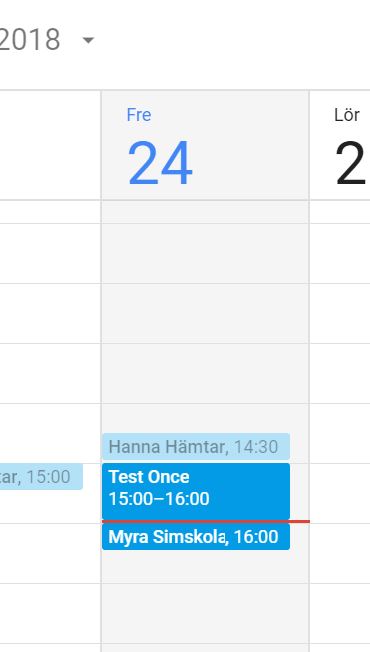
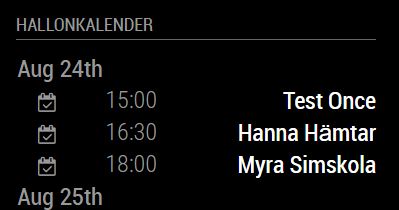
          0_1535119248176_Calender1.JPG

          0_1535119257163_Calender2.JPG

          M 1 Reply Last reply Reply Quote 0
          • M Offline
            MajorC Project Sponsor @Mr_Moore
            last edited by

            @Mr_Moore said in Recurring events Calender:

            @bhepler everything looks ok in Google Calender. See snapshots from Google and Mirror. Two reccuring events and one with only this day.

            0_1535119248176_Calender1.JPG

            0_1535119257163_Calender2.JPG

            Did you solve this problem? I have the same one at the moment.

            S 1 Reply Last reply Reply Quote 0
            • S Offline
              sdetweil @MajorC
              last edited by

              @MajorC did u install the temp calendar fixes from the troubleshooting section?

              Sam

              How to add modules

              learning how to use browser developers window for css changes

              1 Reply Last reply Reply Quote 0
              • M Offline
                MajorC Project Sponsor
                last edited by

                Sorry, what? Can you provide me a link?

                S 1 Reply Last reply Reply Quote 0
                • S Offline
                  sdetweil @MajorC
                  last edited by sdetweil

                  @MajorC temp calendar fixes from the troubleshooting section?

                  the troubleshooting section of the forum, the topics are pinned to the top

                  ================================================================

                  note

                  these temp fixes were for 2.12

                  all the fixes are now in 2.13 (or the latest develop branch, see below)

                  Sam

                  How to add modules

                  learning how to use browser developers window for css changes

                  D 1 Reply Last reply Reply Quote 0
                  • D Offline
                    dawookie1979 @sdetweil
                    last edited by

                    @sdetweil did you manage to fix this? I have similar issues, mine being 1 hour early ;)

                    S 1 Reply Last reply Reply Quote 0
                    • S Offline
                      sdetweil @dawookie1979
                      last edited by sdetweil

                      @dawookie1979 if you load the develop branch, it has all the fixes

                      if manual install

                      cd ~/MagicMirror
                      git checkout develop
                      

                      if my install script

                      cd ~/MagicMiror
                      git fetch origin develop:develop
                      git checkout develop
                      

                      restart MM normally

                      if u see that package-lock.json has changed, preventing the checkout, do
                      git checkout package-lock.json

                      then restart the above

                      Sam

                      How to add modules

                      learning how to use browser developers window for css changes

                      D 1 Reply Last reply Reply Quote 0
                      • D Offline
                        dawookie1979 @sdetweil
                        last edited by

                        @sdetweil thanks for that, but I get error. Your local changes to the following files… please commit or stash them before? What do I need to do

                        S 1 Reply Last reply Reply Quote 0
                        • S Offline
                          sdetweil @dawookie1979
                          last edited by

                          @dawookie1979 what files?
                          need the names

                          Sam

                          How to add modules

                          learning how to use browser developers window for css changes

                          D 1 Reply Last reply Reply Quote 0
                          • D Offline
                            dawookie1979 @sdetweil
                            last edited by

                            @sdetweil error: Your local changes to the following files would be overwritten by checkout:
                            modules/default/calendar/calendar.js
                            modules/default/weatherforecast/weatherforecast.js
                            Please commit your changes or stash them before you switch branches.
                            Aborting

                            S 1 Reply Last reply Reply Quote 0
                            • S Offline
                              sdetweil @dawookie1979
                              last edited by

                              @dawookie1979 those are mm files.

                              some users don’t understand that you should never change those files to prevent the very problem u are having.

                              you put variables in the config section of the module entry in config.js to adjust how the module operates

                              see the link below in my signature on how to add modules.

                              the command

                              git diff filename 
                              

                              will show u all the changes you have made.
                              write them down, and transfer those to config.js for each module
                              calendar and weatherforecast

                              then we can work on the next step

                              Sam

                              How to add modules

                              learning how to use browser developers window for css changes

                              D 1 Reply Last reply Reply Quote 0
                              • D Offline
                                dawookie1979 @sdetweil
                                last edited by dawookie1979

                                @sdetweil i have made the changes to the files, but it says this

                                code_text
                                

                                diff --git a/modules/default/weatherforecast/weatherforecast.js b/modules/default/weatherforecast/weatherforecast.js
                                index 83389911…d6dc98ac 100644
                                — a/modules/default/weatherforecast/weatherforecast.js
                                +++ b/modules/default/weatherforecast/weatherforecast.js
                                @@ -293,13 +293,10 @@ Module.register(“weatherforecast”, {
                                this.hide(this.config.animationSpeed, { lockString: this.identifier });
                                return;
                                }

                                            params += "&cnt=" + (this.config.maxNumberOfDays < 1 || this.config.maxNumberOfDays > 17 ? 7 : this.config.maxNumberOfDays);
                                
                                •           params += "&units=" + this.config.units;
                                            params += "&lang=" + this.config.lang;
                                            params += "&APPID=" + this.config.appid;
                                  
                                •           return params;
                                    },


                                but there is no gap between these entries?```

                                S 1 Reply Last reply Reply Quote 0
                                • S Offline
                                  sdetweil @dawookie1979
                                  last edited by

                                  @dawookie1979 ok, looks like you changed the code in the weatherforecast module…

                                  so, you can save/restore that… how about the calendar file

                                  Sam

                                  How to add modules

                                  learning how to use browser developers window for css changes

                                  D 1 Reply Last reply Reply Quote 0
                                  • D Offline
                                    dawookie1979 @sdetweil
                                    last edited by

                                    @sdetweil i have done calendar file, how do i get an original weatherforcast.js file? or restore it?

                                    S 1 Reply Last reply Reply Quote 0
                                    • S Offline
                                      sdetweil @dawookie1979
                                      last edited by

                                      @dawookie1979 do

                                      git stash
                                      

                                      you may have to register your name and email with the git commands shown from stash

                                      Sam

                                      How to add modules

                                      learning how to use browser developers window for css changes

                                      D 1 Reply Last reply Reply Quote 0
                                      • D Offline
                                        dawookie1979 @sdetweil
                                        last edited by

                                        @sdetweil I have sorted it now, I just deleted the stuck file, and did the upgrade/update to 2.14 and all is good. My calendar is now fixed. Thank you for your help

                                        1 Reply Last reply Reply Quote 0

                                        Hello! It looks like you're interested in this conversation, but you don't have an account yet.

                                        Getting fed up of having to scroll through the same posts each visit? When you register for an account, you'll always come back to exactly where you were before, and choose to be notified of new replies (either via email, or push notification). You'll also be able to save bookmarks and upvote posts to show your appreciation to other community members.

                                        With your input, this post could be even better 💗

                                        Register Login

                                        • 1 / 1
                                        • First post
                                          Last post
                                        Enjoying MagicMirror? Please consider a donation!
                                        MagicMirror created by Michael Teeuw.
                                        Forum managed by Sam, technical setup by Karsten.
                                        This forum is using NodeBB as its core | Contributors
                                        Contact | Privacy Policy