MagicMirror Forum
    • Recent
    • Tags
    • Unsolved
    • Solved
    • MagicMirror² Repository
    • Documentation
    • 3rd-Party-Modules
    • Donate
    • Discord
    • Register
    • Login
    A New Chapter for MagicMirror: The Community Takes the Lead
    Read the statement by Michael Teeuw here.

    Http Stream

    Scheduled Pinned Locked Moved Requests
    10 Posts 4 Posters 2.2k Views 4 Watching
    Loading More Posts
    • Oldest to Newest
    • Newest to Oldest
    • Most Votes
    Reply
    • Reply as topic
    Log in to reply
    This topic has been deleted. Only users with topic management privileges can see it.
    • W Offline
      wuermchen
      last edited by

      Hello,
      I want to show a video stream when the doorbell rings. Unfortunately, the camera only sends an Http stream.

      http://192.168.168.6/media/?action=stream?user=test&pwd=testf&resolution=128

      I tried MMM-RTSPStream, the mirror only plays rtsp streams.

      1 Reply Last reply Reply Quote 0
      • JerryPJ Offline
        JerryP
        last edited by JerryP

        This works whit a webcam online. so I think this wel work also. whits type of doorbell you use?

        		{
        		module: "MMM-RTSPStream",
        		disabled: false, //false, true
        		position: "middle",
        		config: {
        			autoStart: true,
        			rotateStreams: false,
        			rotateStreamTimeout: 20,
        			moduleWidth: 468,
        			moduleHeight: 320,
        			localPlayer: "vlc", // "omxplayer" or "vlc"
        			remotePlayer: 'none',
        			showSnapWhenPaused: false,
        			remoteSnaps: false,
        			  stream1: {
        			  name: 'DoorBell',
        			  url: 'http://192.168.168.6/media/?action=stream?user=test&pwd=testf&resolution=128',
        			  protocol: "tcp",
        			  frameRate: 25,
        			  muted: true,
        			},
        }},
        
        S 1 Reply Last reply Reply Quote 1
        • S Do not disturb
          sdetweil @JerryP
          last edited by

          @jerryp please use code blocks for config info

          mark the text, and then hit the </> button above the editor

          Sam

          How to add modules

          learning how to use browser developers window for css changes

          JerryPJ 1 Reply Last reply Reply Quote 0
          • JerryPJ Offline
            JerryP @sdetweil
            last edited by

            @sdetweil I know, and I use the code button. only I made a typ(O) so de code blok was not showing.

            S 1 Reply Last reply Reply Quote 0
            • S Do not disturb
              sdetweil @JerryP
              last edited by

              @jerryp no problem, thanks for fixing and it helps for others to see

              Sam

              How to add modules

              learning how to use browser developers window for css changes

              1 Reply Last reply Reply Quote 0
              • W Offline
                wuermchen
                last edited by

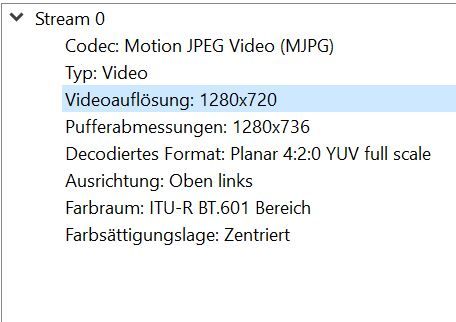
                I tried the settings. Unfortunately no success. I have a mini spy cam. The stream runs on VLC on the WinPC. But not on the Raspberry VLC. Unbenannt.JPG .
                1 Reply Last reply Reply Quote 0
                • W Offline
                  wuermchen
                  last edited by

                  I tried the stream on a Raspberry pi3 and it works. the settings are the same as on the Raspberry Pi4 (MagicMirror). I uninstalled and reinstalled VLC, unfortunately to no avail.
                  Does anyone have any idea what the stream is not running on the Pi4?

                  bugsounetB 1 Reply Last reply Reply Quote 0
                  • bugsounetB Offline
                    bugsounet Banned @wuermchen
                    last edited by

                    @wuermchen

                    1. close MagicMirror and open VLC in your pi
                    2. open your link with vlc (in your pi)
                    3. verify if works ?
                    • if not works :
                      • catch error (if it say error) and solve it
                      • change output video setting in Tools > preferencies > Video > output
                      • close VLC and reopen it for retry play your link
                    • It 's work ?
                      • close VLC again
                      • Retry with magicmirror
                    1 Reply Last reply Reply Quote 0
                    • W Offline
                      wuermchen
                      last edited by

                      following error message :

                      pi@raspberrypi:~ $ vlc http://admin:pass@192.168.188.6/media/?action=stream
                      VLC media player 3.0.12 Vetinari (revision 3.0.12-1-0-gd147bb5e7e)
                      [01273b58] main libvlc: VLC wird mit dem Standard-Interface ausgeführt. Benutzen Sie 'cvlc', um VLC ohne Interface zu verwenden.
                      libEGL warning: DRI2: failed to authenticate
                      qt5ct: using qt5ct plugin
                      qt5ct: D-Bus global menu: no
                      qt5ct: D-Bus system tray: no
                      [b391b6b0] mmal_codec decoder: VCSM init succeeded: CMA
                      [b391b6b0] mmal_codec decoder error: MMAL error 2 "ENOSPC"
                      [b391b6b0] mmal_codec decoder error: MMAL error 2 "ENOSPC"
                      [b391b6b0] mmal_codec decoder error: MMAL error 2 "ENOSPC"
                      [b391b6b0] mmal_codec decoder error: MMAL error 2 "ENOSPC"
                      [b391b6b0] mmal_codec decoder error: MMAL error 2 "ENOSPC"
                      [b391b6b0] mmal_codec decoder error: MMAL error 2 "ENOSPC"
                      [b391b6b0] mmal_codec decoder error: MMAL error 2 "ENOSPC"
                      [b391b6b0] mmal_codec decoder error: MMAL error 2 "ENOSPC"
                      [b391b6b0] mmal_codec decoder error: MMAL error 2 "ENOSPC"
                      [b391b6b0] mmal_codec decoder error: MMAL error 2 "ENOSPC"
                      [b391b6b0] mmal_codec decoder error: MMAL error 2 "ENOSPC"
                      [b391b6b0] mmal_codec decoder error: MMAL error 2 "ENOSPC"
                      [b391b6b0] mmal_codec decoder error: MMAL error 2 "ENOSPC"
                      [b391b6b0] mmal_codec decoder error: MMAL error reported by ctrl
                      [b391b6b0] main decoder error: buffer deadlock prevented


                      I can’t do anything with the error message

                      1 Reply Last reply Reply Quote 0
                      • W Offline
                        wuermchen
                        last edited by

                        I tried all the settings. without success

                        1 Reply Last reply Reply Quote 0

                        Hello! It looks like you're interested in this conversation, but you don't have an account yet.

                        Getting fed up of having to scroll through the same posts each visit? When you register for an account, you'll always come back to exactly where you were before, and choose to be notified of new replies (either via email, or push notification). You'll also be able to save bookmarks and upvote posts to show your appreciation to other community members.

                        With your input, this post could be even better 💗

                        Register Login

                        • 1 / 1
                        • First post
                          Last post
                        Enjoying MagicMirror? Please consider a donation!
                        MagicMirror created by Michael Teeuw.
                        Forum managed by Sam, technical setup by Karsten.
                        This forum is using NodeBB as its core | Contributors
                        Contact | Privacy Policy
