Read the statement by Michael Teeuw here.
Show IP camera in Magic Mirror
-
Hello everybody,
can someone help me to display my “Reolink” IP camera on the MagicMirror?
Have already tried a couple of modules but without success.- MMM-iFrame
- MMM-RTSPStream
What worked with the module “MMM-iFarme”, if I insert the “rtsp-stream” link from Reolink in the config, and then start MagicMirror, MagicMirror and the VLC player start separately with the stream.
Could someone show me an example config?
-
RTSPStream is broken and won’t be supported anymore. Do you know if the camera is using h.264?
If so, you could use OMXPlayer directly, bypassing MM, like I do. If it’s H.265, It can be handled by VLC or FFMPeg, but I don’t know how that would work.
-
@BKeyport yes it is a h.264, it is a Reolink IP camera RLC-410-5MP.
I cannot install an OMXPlayer on RaspianOS because the system runs on a Proxmox server.
Is there another way to just show a screenshot of the IP camera? -
@drx1984 try with MMM-FreeboxTV?
-
@Cr4z33 said in Show IP camera in Magic Mirror:
MMM-FreeboxTV
you mean the module MMM-FreeBox-Monitor?
Doesn’t work either. -
@drx1984 Ahh! I originally had one of those in use. Using OMXPlayer directly is likely the best option.
What I’ve done is block out a section of my screen using a custom module that’s not published, then, using a bash script, I launch OMX Player with a command line like:
omxplayer --avdict rtsp_transport:tcp --live --orientation [rotation] --win "[X1 Y1 X2 Y2]" rtsp://[URL]“Rotation” is the rotation of your monitor, 0 (Normal), 90 (right portrait), 180 (upside down), 270 (left portrait)
“X1” is the left X position NOT CONSIDERING ROTATION.
“X2” is the right X position NOT CONSIDERING ROTATION.
“Y1” is the top Y position NOT CONSIDERING ROTATION.
“Y2” is the bottom Y position NOT CONSIDERING ROTATION.omxplayer will then launch on top of the mirror screen.
Example:
omxplayer --avdict rtsp_transport:tcp --live --orientation 90 --win "1500 325 1915 1075" rtsp://U:P@A/2/h265/majorMy screen is rotated right portrait, so I rotate OMX to match. (90)
The window I need cut out is 700x415 pixels, my resolution is 1080x1920. You’ll notice I have it 5px off the edge to assure I see everything, and I’ve got it in the upper right corner of my display. my camera I use now instead of the Reolink is using that URL, even though it puts out a H264 stream at the moment (I’m looking for an option to go to H265 as h264 uses flash for display) -
I am using iFrame. But also using BlueIris to stream the IP camera to a http site, makes things much easier, plus I can get motion from BlueIris.
{ module: 'MMM-iFrame', position: 'bottom_left', // This can be any of the regions. config: { // See 'Configuration options' for more information. url: ["http://192.XXX.X.XXX:XXXX/mjpg/CAM1/video.mjpg"], updateInterval: 0.5 * 60 * 1000, // rotate URLs every 30 seconds width: "1200px", // Optional. Default: 100% height: "600px" //Optional. Default: 100px } }, -
I now have MMM-FreeboxTV working displaying my IP Camera.
Here’s the trick:
Edit streamsConfig.json and strip out everything but channel 2.
Channel 2 should be:
"2": "rtsp://[url]"Then: in config.js
{
	module: 'MMM-FreeboxTV',
	position: 'top_right',
	config: {
		debug: false,
		autoReplay: true,
		fullscreen: false,
		width: [to taste],
		height: [to taste],
		onStart: 2,
		onStartDelay: 5000,
		streams: "streamsConfig.json"
	}
},
PS: Because of my module size, I needed to still use my unlisted block module. :(
-
-
@jasondreher Unfortunately, iframe does not work with Reolink cameras.
-
@drx1984 you didn’t follow my directions. The system expects the channels in the json file.
-
@BKeyport Good morning thanks,
Everything works fine locally now.
But when I call up my MagicMirror via a browser on another computer via an IP address, there is no cam stream.
I think it only works locally?
Is there any other solution? Or at least display a picture from the IP camera? -
Sadly, no. Other programs had a option for a remote feed, like using OMXPlayer locally, and mmfpeg remotely, but those are abandoned.
-
@drx1984 That’s too bad. Hope there is a solution for Reolink. Any confirmed camera brand that does work with MMM-FreeboxTV?
-
@goprojojo If it works with VLC, it’ll work with Freebox. go to https://www.ispyconnect.com/man.aspx?n=Reolink to get the URL you’ll need, and try it on VLC.
-
@bkeyport Got my streamsConfig.json set (also tried without [])
 and free box set in config.js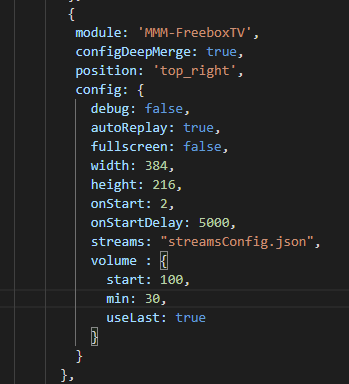
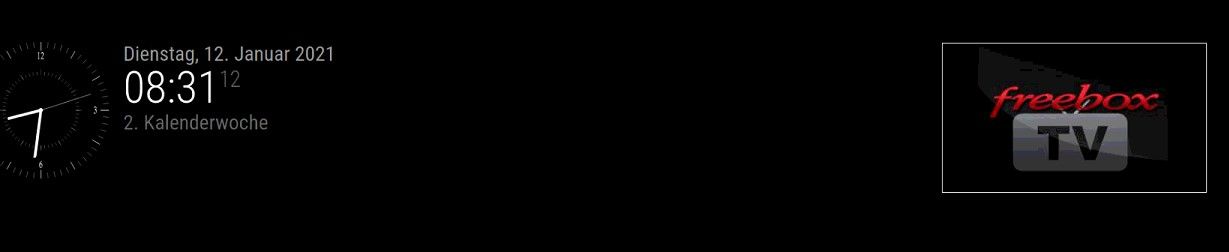
but only displays
Any idea? -
Anyone happen to know where I can find MMM-FreeboxTV?



Hello! It looks like you're interested in this conversation, but you don't have an account yet.
Getting fed up of having to scroll through the same posts each visit? When you register for an account, you'll always come back to exactly where you were before, and choose to be notified of new replies (either via email, or push notification). You'll also be able to save bookmarks and upvote posts to show your appreciation to other community members.
With your input, this post could be even better 💗
Register Login