Read the statement by Michael Teeuw here.
Changing MMM-Traffic into using TomTom API
-
Hi Guys,
Since the Mapbox API is very inaccurate in my region, I want to use the TomTom API.
I am completely new to developing modules, so I am trying to change an existing one.
I tried it with this one: MMM-TrafficThe first thing I change is the API Link, for the first tests, I removed the vars from the Link and replaced them with a static API request.
Another thing I changed was theself.duration = Math.round(json.routes[0].duration / 60);into:
self.duration = Math.round(json.routes[0].travelTimeInSeconds / 60);I uploaded an extinct of the API Return here
But after the changes, the Modules just shows its “Loading” Phrase, so I guess I missed something.
I would appreciate any type of help and I will provide further information if needed :)
-
@rxldavid the data is not the same from the two apis…
so, you either have to change EVERYTHING that touches the data OR, after receiving change the layout to match the old format.
json is pretty nice to work with …
use the validator here https://codebeautify.org/jsonvalidator?/jsonvalidate
click the top left button and it will format the data in a nice readable formatloading… is the initial message, til the actual data arrives…
so, the data didn’t arriveI assume that the request for the data is done in the node_helper
u can write messages to the console and see them in the window where u start MM
during development, use npm start >somefile.txt
and then u can see all the messages in somefile.txt
I use ssh connection to pi, so I can edit on my desktop
when using windows desktop i use bitvise ssh client or winscp
as they provide a networked disk page like file explorer so I can just doubleclick to edit,when using linux, most of the file browsers will allow access to ssh connected systems the same way…
-
@sdetweil
hi,
I changed the API Return, there is an option to get it back in JSON.
What do you mean with write message to the console? & where/when should I execute “npm start >somefile.txt” -
write message to console
console,log(“some message”+variable+…) -
@rxldavid u probably use pm2, so
pm2 stop allthen
cd ~/MagicMirrorthen u can
npm start >somefile.txtctrl-c to end
repeat til working
-
@rxldavid the json data u posted is not valid… something is missing after the trailing comma
-
@sdetweil
I know, it was just an extinct, since it used private Data,
I updated it to the full return with random Data -
@rxldavid if u put it thru the formatter
{ "formatVersion": "0.0.12", "routes": [ { "summary": { "lengthInMeters": 1147, "travelTimeInSeconds": 140, "trafficDelayInSeconds": 0, "trafficLengthInMeters": 0, "departureTime": "2021-09-19T17:16:54+02:00", "arrivalTime": "2021-09-19T17:19:14+02:00" }, "legs": [ { "summary": { "lengthInMeters": 1147, "travelTimeInSeconds": 140, "trafficDelayInSeconds": 0, "trafficLengthInMeters": 0, "departureTime": "2021-09-19T17:16:54+02:00", "arrivalTime": "2021-09-19T17:19:14+02:00" }, "points": [ { "latitude": 52.5093, "longitude": 13.42937 }, { "latitude": 52.50904, "longitude": 13.42913 }, { "latitude": 52.50895, "longitude": 13.42904 }, { "latitude": 52.50868, "longitude": 13.4288 }, { "latitude": 52.5084, "longitude": 13.42857 }, { "latitude": 52.50816, "longitude": 13.42839 }, { "latitude": 52.50791, "longitude": 13.42825 }, { "latitude": 52.50757, "longitude": 13.42772 }, { "latitude": 52.50752, "longitude": 13.42785 }, { "latitude": 52.50742, "longitude": 13.42809 }, { "latitude": 52.50735, "longitude": 13.42824 }, { "latitude": 52.5073, "longitude": 13.42837 }, { "latitude": 52.50696, "longitude": 13.4291 }, { "latitude": 52.50673, "longitude": 13.42961 }, { "latitude": 52.50619, "longitude": 13.43092 }, { "latitude": 52.50608, "longitude": 13.43116 }, { "latitude": 52.50574, "longitude": 13.43195 }, { "latitude": 52.50564, "longitude": 13.43218 }, { "latitude": 52.50528, "longitude": 13.43299 }, { "latitude": 52.50513, "longitude": 13.43336 }, { "latitude": 52.505, "longitude": 13.43366 }, { "latitude": 52.50464, "longitude": 13.43451 }, { "latitude": 52.50451, "longitude": 13.43482 }, { "latitude": 52.50444, "longitude": 13.43499 }, { "latitude": 52.50418, "longitude": 13.43564 }, { "latitude": 52.50364, "longitude": 13.4369 }, { "latitude": 52.50343, "longitude": 13.43738 }, { "latitude": 52.5033, "longitude": 13.43767 }, { "latitude": 52.50275, "longitude": 13.43873 } ] } ], "sections": [ { "startPointIndex": 0, "endPointIndex": 28, "sectionType": "TRAVEL_MODE", "travelMode": "car" } ] } ] } -
@sdetweil
this is also the view Tomtom provided me.
but I don’t get what I need to change.
right now I got the following error in the console:
[19.09.2021 17:22.10.688] [ERROR] Failed to fetch git data for MMM-Traffic: Erro r: block timeout reached -
@rxldavid that is from the updateNotifcation module which has a bug … fixed in next release
after u got the data, then what did u do?
-
@sdetweil
Sorry, Tomtom provides a website which returns the data.
So it wasn’t my MagicMirror returning it -
@rxldavid javascript provides a built in library call JSON
which provides 2 useful functions
parse (text) = converts to javascript object
stringify(object,routine(most if the time u would use null ),indentation ) = returns string of textso then u could
console.log("mesage="+JSON.stringify(pointer_to_data_returned_from_api))to see it on the console (or somefile.txt if u redirect to a file)
-
@sdetweil
I do know I think this project is too hard for me lol
I now changed this:getCommute: function (api_url) { var self = this; fetch('https://api.tomtom.com/routing/1/calculateRoute/4x.xxx%2C9.xxx%3A4x.xxx%2C9.xx/json?avoid=unpavedRoads&key=<key>') .then(console.log('API SUCESS') .then(json => { self.duration = Math.round(json.routes[0].duration / 60); self.errorMessage = self.errorDescription = undefined; self.loading = false; self.updateDom(); }) .catch(e => { self.errorMessage = payload.error.message; self.errorDescription = payload.error.description; self.loading = false; self.updateDom(); }); },Now the "loading does not even appear I don’t know if that’s good or bad, but I cant even see my (console.log(‘API SUCESS’) in the .txt
-
@rxldavid ah, you are doing this in the modulename.js side, not node_helper…
all messages in the modulename are shown in the developers window console
ctrl-shift-i on the MM screen,
select the console tab in the window that pops up
u can filter to messages from a module by adding some unique part of the module name to the filter field (middle above the list of messages)
-
This post is deleted! -
@sdetweil
So I forgot to close a bracket, so now its again showing the Loading screen.
I get the following error:
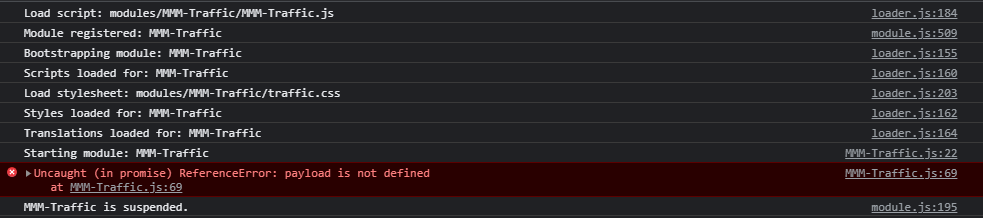
What does the :69 mean?Edit: this is line 69
.catch(e => { Line 69 self.errorMessage = payload.error.message; self.errorDescription = payload.error.description; self.loading = false; self.updateDom(); }); -
@sdetweil
The Same Error accured for Line 70, so I both commented those 2 lines.
Now I get no Error, and the Loading disappeared, it now says:

Hello! It looks like you're interested in this conversation, but you don't have an account yet.
Getting fed up of having to scroll through the same posts each visit? When you register for an account, you'll always come back to exactly where you were before, and choose to be notified of new replies (either via email, or push notification). You'll also be able to save bookmarks and upvote posts to show your appreciation to other community members.
With your input, this post could be even better 💗
Register Login