MagicMirror Forum
    • Recent
    • Tags
    • Unsolved
    • Solved
    • MagicMirror² Repository
    • Documentation
    • 3rd-Party-Modules
    • Donate
    • Discord
    • Register
    • Login
    A New Chapter for MagicMirror: The Community Takes the Lead
    Read the statement by Michael Teeuw here.

    Changing MMM-Traffic into using TomTom API

    Scheduled Pinned Locked Moved Development
    17 Posts 2 Posters 7.0k Views 2 Watching
    Loading More Posts
    • Oldest to Newest
    • Newest to Oldest
    • Most Votes
    Reply
    • Reply as topic
    Log in to reply
    This topic has been deleted. Only users with topic management privileges can see it.
    • S
      sdetweil @rxlDavid
      last edited by

      @rxldavid the json data u posted is not valid… something is missing after the trailing comma

      Sam

      How to add modules

      learning how to use browser developers window for css changes

      R 1 Reply Last reply
      Reply Quote 0
      • R
        rxlDavid @sdetweil
        last edited by

        @sdetweil
        I know, it was just an extinct, since it used private Data,
        I updated it to the full return with random Data

        S 1 Reply Last reply
        Reply Quote 0
        • S
          sdetweil @rxlDavid
          last edited by

          @rxldavid if u put it thru the formatter

          {
            "formatVersion": "0.0.12",
            "routes": [
              {
                "summary": {
                  "lengthInMeters": 1147,
                  "travelTimeInSeconds": 140,
                  "trafficDelayInSeconds": 0,
                  "trafficLengthInMeters": 0,
                  "departureTime": "2021-09-19T17:16:54+02:00",
                  "arrivalTime": "2021-09-19T17:19:14+02:00"
                },
                "legs": [
                  {
                    "summary": {
                      "lengthInMeters": 1147,
                      "travelTimeInSeconds": 140,
                      "trafficDelayInSeconds": 0,
                      "trafficLengthInMeters": 0,
                      "departureTime": "2021-09-19T17:16:54+02:00",
                      "arrivalTime": "2021-09-19T17:19:14+02:00"
                    },
                    "points": [
                      {
                        "latitude": 52.5093,
                        "longitude": 13.42937
                      },
                      {
                        "latitude": 52.50904,
                        "longitude": 13.42913
                      },
                      {
                        "latitude": 52.50895,
                        "longitude": 13.42904
                      },
                      {
                        "latitude": 52.50868,
                        "longitude": 13.4288
                      },
                      {
                        "latitude": 52.5084,
                        "longitude": 13.42857
                      },
                      {
                        "latitude": 52.50816,
                        "longitude": 13.42839
                      },
                      {
                        "latitude": 52.50791,
                        "longitude": 13.42825
                      },
                      {
                        "latitude": 52.50757,
                        "longitude": 13.42772
                      },
                      {
                        "latitude": 52.50752,
                        "longitude": 13.42785
                      },
                      {
                        "latitude": 52.50742,
                        "longitude": 13.42809
                      },
                      {
                        "latitude": 52.50735,
                        "longitude": 13.42824
                      },
                      {
                        "latitude": 52.5073,
                        "longitude": 13.42837
                      },
                      {
                        "latitude": 52.50696,
                        "longitude": 13.4291
                      },
                      {
                        "latitude": 52.50673,
                        "longitude": 13.42961
                      },
                      {
                        "latitude": 52.50619,
                        "longitude": 13.43092
                      },
                      {
                        "latitude": 52.50608,
                        "longitude": 13.43116
                      },
                      {
                        "latitude": 52.50574,
                        "longitude": 13.43195
                      },
                      {
                        "latitude": 52.50564,
                        "longitude": 13.43218
                      },
                      {
                        "latitude": 52.50528,
                        "longitude": 13.43299
                      },
                      {
                        "latitude": 52.50513,
                        "longitude": 13.43336
                      },
                      {
                        "latitude": 52.505,
                        "longitude": 13.43366
                      },
                      {
                        "latitude": 52.50464,
                        "longitude": 13.43451
                      },
                      {
                        "latitude": 52.50451,
                        "longitude": 13.43482
                      },
                      {
                        "latitude": 52.50444,
                        "longitude": 13.43499
                      },
                      {
                        "latitude": 52.50418,
                        "longitude": 13.43564
                      },
                      {
                        "latitude": 52.50364,
                        "longitude": 13.4369
                      },
                      {
                        "latitude": 52.50343,
                        "longitude": 13.43738
                      },
                      {
                        "latitude": 52.5033,
                        "longitude": 13.43767
                      },
                      {
                        "latitude": 52.50275,
                        "longitude": 13.43873
                      }
                    ]
                  }
                ],
                "sections": [
                  {
                    "startPointIndex": 0,
                    "endPointIndex": 28,
                    "sectionType": "TRAVEL_MODE",
                    "travelMode": "car"
                  }
                ]
              }
            ]
          }
          

          Sam

          How to add modules

          learning how to use browser developers window for css changes

          R 1 Reply Last reply
          Reply Quote 0
          • R
            rxlDavid @sdetweil
            last edited by

            @sdetweil
            this is also the view Tomtom provided me.
            but I don’t get what I need to change.
            right now I got the following error in the console:
            [19.09.2021 17:22.10.688] [ERROR] Failed to fetch git data for MMM-Traffic: Erro r: block timeout reached

            S 1 Reply Last reply
            Reply Quote 0
            • S
              sdetweil @rxlDavid
              last edited by

              @rxldavid that is from the updateNotifcation module which has a bug … fixed in next release

              after u got the data, then what did u do?

              Sam

              How to add modules

              learning how to use browser developers window for css changes

              R 1 Reply Last reply
              Reply Quote 0
              • R
                rxlDavid @sdetweil
                last edited by

                @sdetweil
                Sorry, Tomtom provides a website which returns the data.
                So it wasn’t my MagicMirror returning it

                S 1 Reply Last reply
                Reply Quote 0
                • S
                  sdetweil @rxlDavid
                  last edited by

                  @rxldavid javascript provides a built in library call JSON

                  which provides 2 useful functions

                  parse (text) = converts to javascript object
                  stringify(object,routine(most if the time u would use null ),indentation ) = returns string of text

                  so then u could

                  console.log("mesage="+JSON.stringify(pointer_to_data_returned_from_api))
                  

                  to see it on the console (or somefile.txt if u redirect to a file)

                  Sam

                  How to add modules

                  learning how to use browser developers window for css changes

                  R 1 Reply Last reply
                  Reply Quote 0
                  • R
                    rxlDavid @sdetweil
                    last edited by rxlDavid

                    @sdetweil
                    I do know I think this project is too hard for me lol
                    I now changed this:

                      getCommute: function (api_url) {
                        var self = this;
                        fetch('https://api.tomtom.com/routing/1/calculateRoute/4x.xxx%2C9.xxx%3A4x.xxx%2C9.xx/json?avoid=unpavedRoads&key=<key>')
                    	  .then(console.log('API SUCESS')
                          .then(json => {
                            self.duration = Math.round(json.routes[0].duration / 60);
                            self.errorMessage = self.errorDescription = undefined;
                            self.loading = false;
                            self.updateDom();
                          })
                          .catch(e => {
                            self.errorMessage = payload.error.message;
                            self.errorDescription = payload.error.description;
                            self.loading = false;
                            self.updateDom();
                          });
                    
                      },
                    

                    Now the "loading does not even appear I don’t know if that’s good or bad, but I cant even see my (console.log(‘API SUCESS’) in the .txt

                    S 1 Reply Last reply
                    Reply Quote 0
                    • S
                      sdetweil @rxlDavid
                      last edited by

                      @rxldavid ah, you are doing this in the modulename.js side, not node_helper…

                      all messages in the modulename are shown in the developers window console

                      ctrl-shift-i on the MM screen,

                      select the console tab in the window that pops up

                      u can filter to messages from a module by adding some unique part of the module name to the filter field (middle above the list of messages)

                      Sam

                      How to add modules

                      learning how to use browser developers window for css changes

                      R 1 Reply Last reply
                      Reply Quote 0
                      • R
                        rxlDavid
                        last edited by

                        This post is deleted!
                        R 1 Reply Last reply
                        Reply Quote 0
                        • R
                          rxlDavid @sdetweil
                          last edited by rxlDavid

                          @sdetweil
                          So I forgot to close a bracket, so now its again showing the Loading screen.
                          I get the following error:
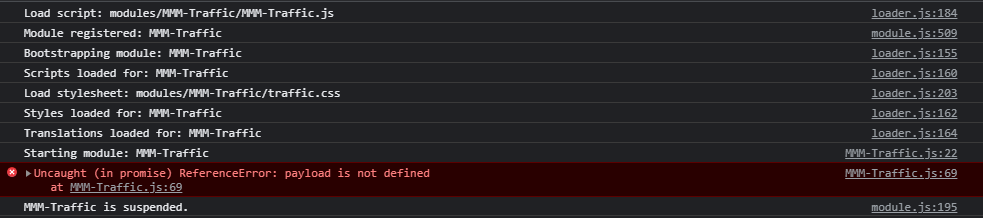
                          Screenshot_2.png
                          What does the :69 mean?

                          Edit: this is line 69

                           .catch(e => {
                                  Line 69 self.errorMessage = payload.error.message;
                                  self.errorDescription = payload.error.description;
                                  self.loading = false;
                                  self.updateDom();
                                });
                          
                          1 Reply Last reply
                          Reply Quote 0
                          • R
                            rxlDavid @rxlDavid
                            last edited by rxlDavid

                            @sdetweil
                            The Same Error accured for Line 70, so I both commented those 2 lines.
                            Now I get no Error, and the Loading disappeared, it now says:

                            Screenshot_4.png

                            1 Reply Last reply
                            Reply Quote 0

                            Hello! It looks like you're interested in this conversation, but you don't have an account yet.

                            Getting fed up of having to scroll through the same posts each visit? When you register for an account, you'll always come back to exactly where you were before, and choose to be notified of new replies (either via email, or push notification). You'll also be able to save bookmarks and upvote posts to show your appreciation to other community members.

                            With your input, this post could be even better 💗

                            Register Login

                            • 1 / 1
                            • First post
                              Last post
                            Enjoying MagicMirror? Please consider a donation!
                            MagicMirror created by Michael Teeuw.
                            Forum managed by Sam, technical setup by Karsten.
                            This forum is using NodeBB as its core | Contributors
                            Contact | Privacy Policy