Read the statement by Michael Teeuw here.
Calendar Module intermittently stop working
-
@pastormingle ok, that’s the dev window. now need the other logs
-
@sdetweil
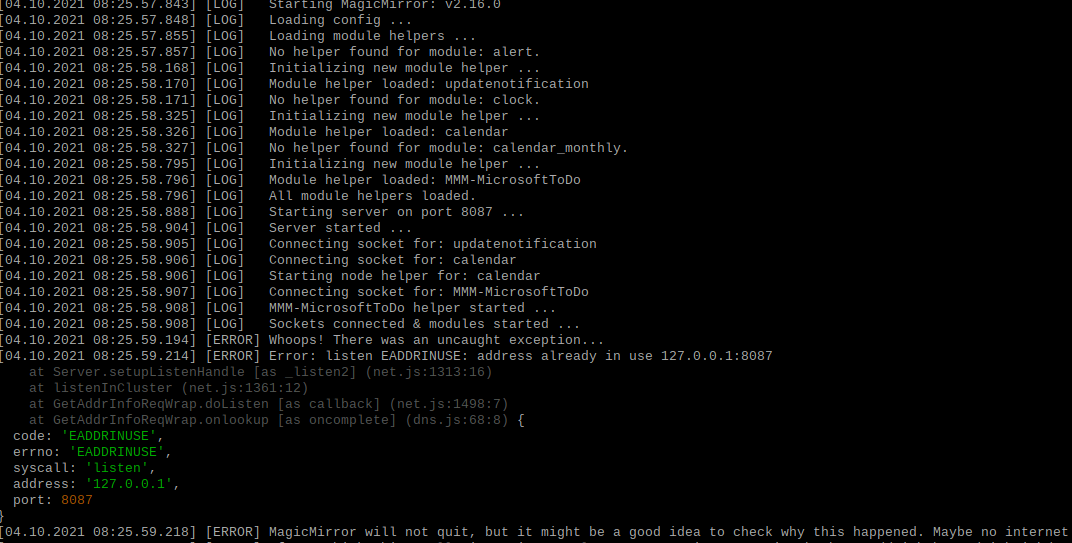 i am getting the following error on the IP and port I changed it but still the same error.
 -
do
pm2 status
pm2 stop all
pm2 start x
where x is
the number of the row in pm2 status output
or the name in the row -
@sdetweil OK… not sure what this is giving me… Now I have only the one instance started…But I still don’t see an error. listen EADDRINUSE: address already in use 127.0.0.1:8087
-
@pastormingle did u do npm start someplace??
dops -ef | grep npm -
@sdetweil yes… so i am setup using rdp into the PI and then open up a terminal window then do a npm start in the MM directory.
-
-
@pastormingle but u have pm2 doing the start, so don’t need manual npm start
-
@sdetweil ok i am lost here… Thanks for being patient with me… Yes PM2 start it so I should do that?
-
@pastormingle pm2 should start it at boot… that is what it is for…
if not, then fix it with my fixuppm2.sh script from
https://github.com/sdetweil/MagicMirror_scripts
pm2’s job is to start at boot, and KEEP running if it fails…
there are lots of command options
pm2 --help
start, stop,m restart, logs, flush , save
u name it -
@sdetweil thanks for all the help… I have it working now… Just went out and copied a new ics link and that seem to fix it…
-
@pastormingle weird… but glad u got it working

Hello! It looks like you're interested in this conversation, but you don't have an account yet.
Getting fed up of having to scroll through the same posts each visit? When you register for an account, you'll always come back to exactly where you were before, and choose to be notified of new replies (either via email, or push notification). You'll also be able to save bookmarks and upvote posts to show your appreciation to other community members.
With your input, this post could be even better 💗
Register Login