MagicMirror Forum
    • Recent
    • Tags
    • Unsolved
    • Solved
    • MagicMirror² Repository
    • Documentation
    • 3rd-Party-Modules
    • Donate
    • Discord
    • Register
    • Login
    A New Chapter for MagicMirror: The Community Takes the Lead
    Read the statement by Michael Teeuw here.

    Calendar Module intermittently stop working

    Scheduled Pinned Locked Moved Solved Troubleshooting
    19 Posts 2 Posters 5.6k Views 2 Watching
    Loading More Posts
    • Oldest to Newest
    • Newest to Oldest
    • Most Votes
    Reply
    • Reply as topic
    Log in to reply
    This topic has been deleted. Only users with topic management privileges can see it.
    • S Do not disturb
      sdetweil @pastormingle
      last edited by

      @pastormingle uh. could you be a bit more descriptive?

      Sam

      How to add modules

      learning how to use browser developers window for css changes

      P 1 Reply Last reply Reply Quote 0
      • P Offline
        pastormingle @sdetweil
        last edited by

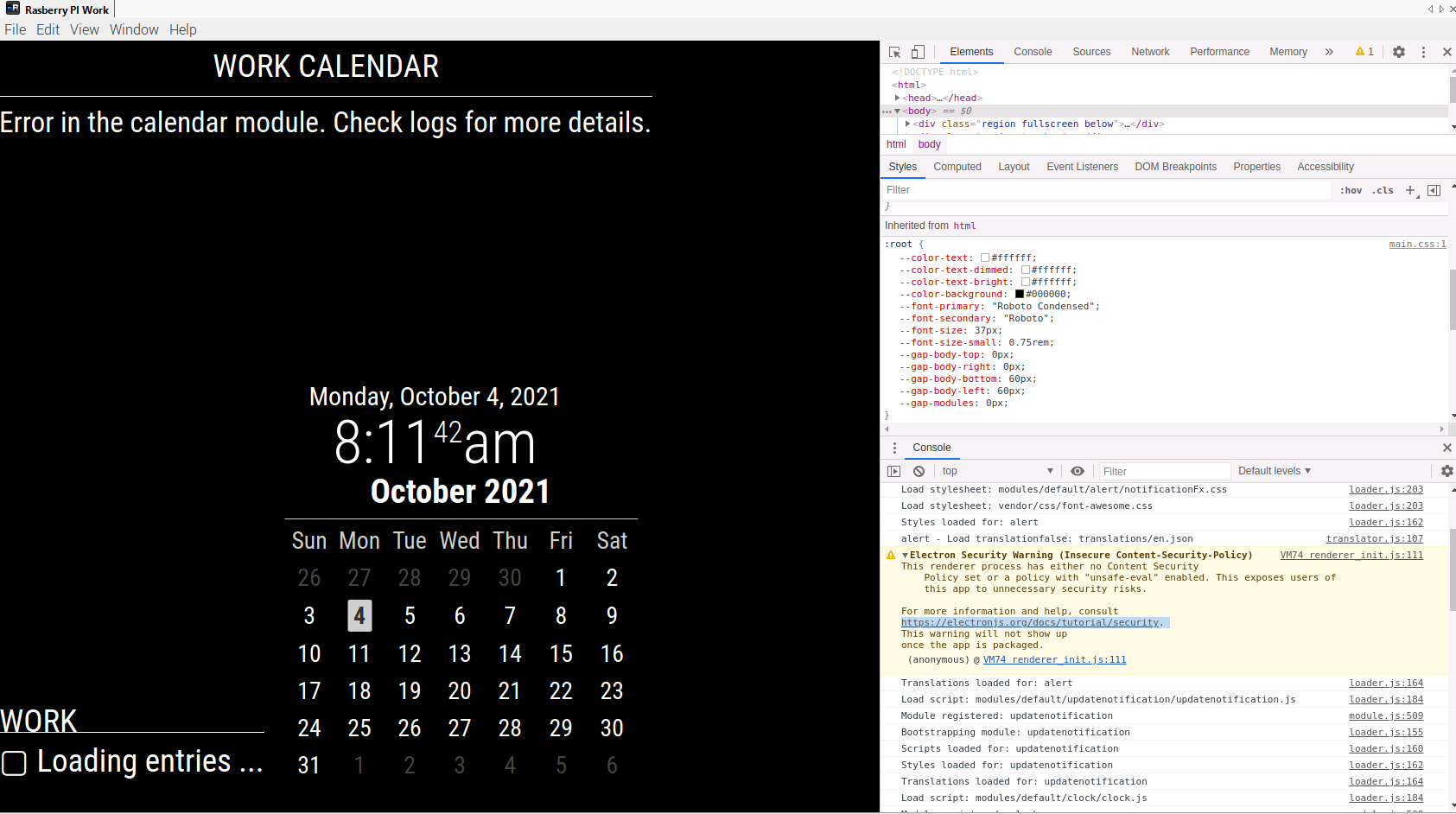
        @sdetweil I am getting the following error "Error in the calendar module. Check logs for more details. I don’t see an error log for the calendar to see what the issue might be… After a few minutes, it will display the calendar. Then after a couple of seconds display the same error again.

        S 1 Reply Last reply Reply Quote 0
        • S Do not disturb
          sdetweil @pastormingle
          last edited by

          @pastormingle logs is the output where u start mm. or in the browser log

          ctrl-shift-i, select the console tab

          Sam

          How to add modules

          learning how to use browser developers window for css changes

          P 1 Reply Last reply Reply Quote 0
          • P Offline
            pastormingle @sdetweil
            last edited by

            @sdetweil i check the install log and nothing in it about errors… I also open the debug console but not sure what I am looking for in it.

            S 1 Reply Last reply Reply Quote 0
            • S Do not disturb
              sdetweil @pastormingle
              last edited by sdetweil

              @pastormingle red text, or set filter to cal (for calendar)

              and it’s not install log, it’s runtime log

              two places

              the node_helpers report in the
              terminal window where u start mm

              either npm start
              or using pm2
              if pm2, it captures the output
              pm2 logs --lines=100
              to display both error (red text) or mormal ( white text)

              Sam

              How to add modules

              learning how to use browser developers window for css changes

              P 1 Reply Last reply Reply Quote 0
              • P Offline
                pastormingle @sdetweil
                last edited by

                @sdetweil 56dd1567-9441-41ef-8e75-6c33c25c48e5-image.png

                S 1 Reply Last reply Reply Quote 0
                • S Do not disturb
                  sdetweil @pastormingle
                  last edited by

                  @pastormingle ok, that’s the dev window. now need the other logs

                  Sam

                  How to add modules

                  learning how to use browser developers window for css changes

                  P 1 Reply Last reply Reply Quote 0
                  • P Offline
                    pastormingle @sdetweil
                    last edited by

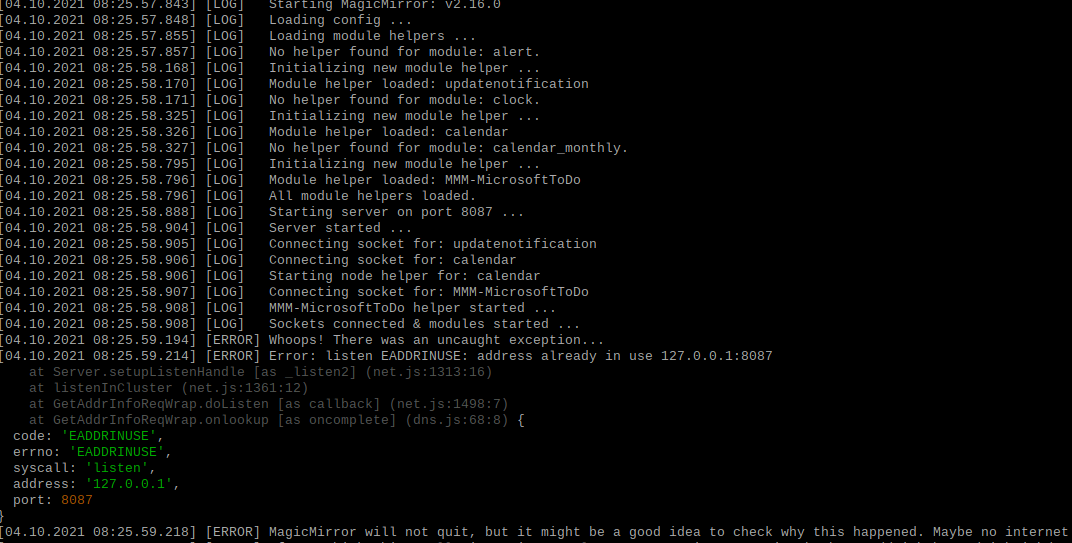
                    @sdetweil fb32ef1c-1281-43b3-82ee-ecae493dfc42-image.png i am getting the following error on the IP and port I changed it but still the same error.

                    S 1 Reply Last reply Reply Quote 0
                    • S Do not disturb
                      sdetweil @pastormingle
                      last edited by

                      @pastormingle

                      do

                      pm2 status

                      pm2 stop all

                      pm2 start x

                      where x is
                      the number of the row in pm2 status output
                      or the name in the row

                      Sam

                      How to add modules

                      learning how to use browser developers window for css changes

                      P 1 Reply Last reply Reply Quote 0
                      • P Offline
                        pastormingle @sdetweil
                        last edited by

                        @sdetweil OK… not sure what this is giving me… Now I have only the one instance started…But I still don’t see an error. listen EADDRINUSE: address already in use 127.0.0.1:8087

                        S 1 Reply Last reply Reply Quote 0
                        • S Do not disturb
                          sdetweil @pastormingle
                          last edited by

                          @pastormingle did u do npm start someplace??
                          do

                          ps -ef | grep npm
                          

                          Sam

                          How to add modules

                          learning how to use browser developers window for css changes

                          P 1 Reply Last reply Reply Quote 0
                          • P Offline
                            pastormingle @sdetweil
                            last edited by

                            @sdetweil yes… so i am setup using rdp into the PI and then open up a terminal window then do a npm start in the MM directory.

                            P S 2 Replies Last reply Reply Quote 0
                            • P Offline
                              pastormingle @pastormingle
                              last edited by

                              @pastormingle 4036053c-4840-40a0-9b49-0be246227a01-image.png

                              1 Reply Last reply Reply Quote 0
                              • S Do not disturb
                                sdetweil @pastormingle
                                last edited by

                                @pastormingle but u have pm2 doing the start, so don’t need manual npm start

                                Sam

                                How to add modules

                                learning how to use browser developers window for css changes

                                P 1 Reply Last reply Reply Quote 0
                                • P Offline
                                  pastormingle @sdetweil
                                  last edited by

                                  @sdetweil ok i am lost here… Thanks for being patient with me… Yes PM2 start it so I should do that?

                                  S 1 Reply Last reply Reply Quote 0
                                  • S Do not disturb
                                    sdetweil @pastormingle
                                    last edited by

                                    @pastormingle pm2 should start it at boot… that is what it is for…

                                    if not, then fix it with my fixuppm2.sh script from

                                    https://github.com/sdetweil/MagicMirror_scripts

                                    pm2’s job is to start at boot, and KEEP running if it fails…

                                    there are lots of command options

                                    pm2 --help

                                    start, stop,m restart, logs, flush , save
                                    u name it

                                    Sam

                                    How to add modules

                                    learning how to use browser developers window for css changes

                                    P 1 Reply Last reply Reply Quote 0
                                    • P Offline
                                      pastormingle @sdetweil
                                      last edited by

                                      @sdetweil thanks for all the help… I have it working now… Just went out and copied a new ics link and that seem to fix it…

                                      S 1 Reply Last reply Reply Quote 0
                                      • S Do not disturb
                                        sdetweil @pastormingle
                                        last edited by

                                        @pastormingle weird… but glad u got it working
                                        Sam

                                        How to add modules

                                        learning how to use browser developers window for css changes

                                        1 Reply Last reply Reply Quote 0

                                        Hello! It looks like you're interested in this conversation, but you don't have an account yet.

                                        Getting fed up of having to scroll through the same posts each visit? When you register for an account, you'll always come back to exactly where you were before, and choose to be notified of new replies (either via email, or push notification). You'll also be able to save bookmarks and upvote posts to show your appreciation to other community members.

                                        With your input, this post could be even better 💗

                                        Register Login

                                        • 1 / 1
                                        • First post
                                          Last post
                                        Enjoying MagicMirror? Please consider a donation!
                                        MagicMirror created by Michael Teeuw.
                                        Forum managed by Sam, technical setup by Karsten.
                                        This forum is using NodeBB as its core | Contributors
                                        Contact | Privacy Policy