MagicMirror Forum
    • Recent
    • Tags
    • Unsolved
    • Solved
    • MagicMirror² Repository
    • Documentation
    • 3rd-Party-Modules
    • Donate
    • Discord
    • Register
    • Login
    A New Chapter for MagicMirror: The Community Takes the Lead
    Read the statement by Michael Teeuw here.

    Are you tired of editing config.js, or have trouble doing it, see my new module

    Scheduled Pinned Locked Moved Utilities
    293 Posts 28 Posters 400.9k Views 31 Watching
    Loading More Posts
    • Oldest to Newest
    • Newest to Oldest
    • Most Votes
    Reply
    • Reply as topic
    Log in to reply
    This topic has been deleted. Only users with topic management privileges can see it.
    • D Offline
      Dinschal @sdetweil
      last edited by

      @sdetweil first off all good morning ;)

      a section where you can edit the css sections of the modules… like the size or something else…

      S 1 Reply Last reply Reply Quote 0
      • S Offline
        sdetweil @Dinschal
        last edited by

        @dinschal did u set the position in the positions section?

        can u add debug:true to my module config

        copy back the prior config.js

        start mm like this

        cd ~/MagicMirror
        npm start >somefile.txt
        

        then do the change again
        press save

        then stop mm (ctrl-q)
        and send me the somefile.txt
        and the two config file, prior and new
        and the defaults.js from the module folder
        via email. my email is this same userid at gmail

        u will have to rename the .js files to
        like .txt as js files are not allowed

        Sam

        How to add modules

        learning how to use browser developers window for css changes

        1 Reply Last reply Reply Quote 0
        • S Offline
          sdetweil @Dinschal
          last edited by

          @dinschal ah, I think that would be very difficult.

          unless it was a text box w the same thing u would put in custom.css

          Sam

          How to add modules

          learning how to use browser developers window for css changes

          1 Reply Last reply Reply Quote 0
          • S Offline
            sdetweil @sdetweil
            last edited by

            @sdetweil one thing on position.

            I write them out in the same order by
            position:

            all the top_left together, then the top_right, etc
            using the module position order value, u can adjust the order of a module in a position list
            ( I add order: to the module info, so I can continue to keep them that way)

            as mm shows them that way

            they may NOT be in the same location( line number) in the new file

            Sam

            How to add modules

            learning how to use browser developers window for css changes

            D 1 Reply Last reply Reply Quote 0
            • D Offline
              Dinschal @sdetweil
              last edited by

              @sdetweil you got mail ;)

              S 1 Reply Last reply Reply Quote 0
              • S Offline
                sdetweil @Dinschal
                last edited by

                @dinschal I replied

                Sam

                How to add modules

                learning how to use browser developers window for css changes

                D 1 Reply Last reply Reply Quote 0
                • D Offline
                  Dinschal @sdetweil
                  last edited by

                  @sdetweil yeah i have to search the right one :D

                  1 Reply Last reply Reply Quote 0
                  • A Offline
                    Alyx
                    last edited by

                    Hi Sam,

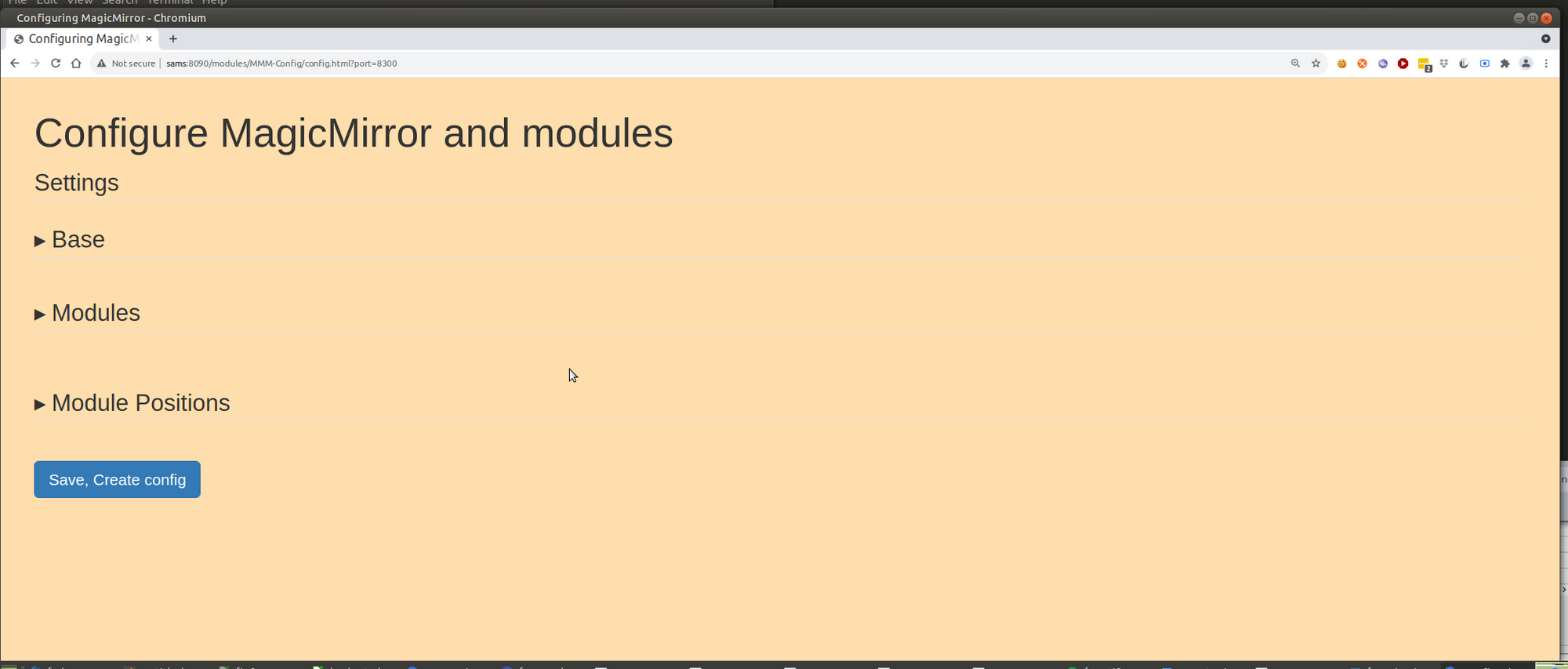
                    I installed this just there on a fresh image and MM install. All good except my web-view is blank. Well the title comes up with the light brown background but there’s no content beyond that.

                    Do I need to begin installing other modules in tandem with this?

                    S 1 Reply Last reply Reply Quote 0
                    • S Offline
                      sdetweil @Alyx
                      last edited by

                      @alyx no… should work as is for the defaults…

                      let me look

                      Sam

                      How to add modules

                      learning how to use browser developers window for css changes

                      A 1 Reply Last reply Reply Quote 0
                      • A Offline
                        Alyx @sdetweil
                        last edited by

                        @sdetweil Sure what file/ image do you want to see?

                        S 1 Reply Last reply Reply Quote 0
                        • S Offline
                          sdetweil @Alyx
                          last edited by

                          @alyx hang on… let me test here… I am working on other fixes…

                          Sam

                          How to add modules

                          learning how to use browser developers window for css changes

                          A 1 Reply Last reply Reply Quote 0
                          • A Offline
                            Alyx @sdetweil
                            last edited by

                            @sdetweil no worries cheers buddy lemme know if you need anything

                            S 1 Reply Last reply Reply Quote 0
                            • S Offline
                              sdetweil @Alyx
                              last edited by

                              @alyx did you do the npm install in the module folder?? I need libs installed

                              http://mmip:mmport/modules/MMM-Config/review
                              

                              I got
                              Screenshot at 2021-11-10 12-54-31.png

                              Sam

                              How to add modules

                              learning how to use browser developers window for css changes

                              A 1 Reply Last reply Reply Quote 0
                              • A Offline
                                Alyx @sdetweil
                                last edited by

                                @sdetweil Yep I did it within the MMM-Config directory, did it again there with no luck. Got some audit issues for npm but nothing big

                                A S 2 Replies Last reply Reply Quote 0
                                • A Offline
                                  Alyx @Alyx
                                  last edited by

                                  @alyx actually i had a harder look, does this seem important?

                                  smartmirror@smartmirror-ThinkCentre-M72e:~/MagicMirror/modules/MMM-Config$ sudo npm install
                                  npm WARN lifecycle mmm-config@1.0.0~postinstall: cannot run in wd mmm-config@1.0.0 node exec_script.js ./postinstall:postinstall.cmd (wd=/home/smartmirror/MagicMirror/modules/MMM-Config)
                                  npm WARN mmm-config@1.0.0 No repository field.
                                  npm WARN optional SKIPPING OPTIONAL DEPENDENCY: fsevents@2.3.2 (node_modules/fsevents):
                                  npm WARN notsup SKIPPING OPTIONAL DEPENDENCY: Unsupported platform for fsevents@2.3.2: wanted {“os”:“darwin”,“arch”:“any”} (current: {“os”:“linux”,“arch”:“x64”})

                                  audited 136 packages in 1.22s

                                  7 packages are looking for funding
                                  run npm fund for details

                                  found 3 moderate severity vulnerabilities
                                  run npm audit fix to fix them, or npm audit for details
                                  smartmirror@smartmirror-ThinkCentre-M72e:~/MagicMirror/modules/MMM-Config$

                                  S 2 Replies Last reply Reply Quote 0
                                  • S Offline
                                    sdetweil @Alyx
                                    last edited by

                                    @alyx ok, add debug:true

                                    to my module def in config.js

                                    (stop any pm2 version running, pm2 stop all)

                                    then start MM like this
                                    npm start >somefile.txt

                                    there are all kinds of interesting problems with other modules, but none on the base that I know of.

                                    send me the somefile.txt and the defaults. js from the MMM-Config folder… it is constructed from the modules installed

                                    same userid as here at gmail

                                    Sam

                                    How to add modules

                                    learning how to use browser developers window for css changes

                                    A 1 Reply Last reply Reply Quote 0
                                    • S Offline
                                      sdetweil @Alyx
                                      last edited by sdetweil

                                      @alyx no… all useless messages we cannot do anything about

                                      wait… is this windows?

                                      Sam

                                      How to add modules

                                      learning how to use browser developers window for css changes

                                      1 Reply Last reply Reply Quote 0
                                      • S Offline
                                        sdetweil @Alyx
                                        last edited by sdetweil

                                        @alyx said in Are you tired of editing config.js, or have trouble doing it, see my new module:

                                        sudo npm install

                                        NEVER EVER use sudo on any MM command…

                                        delete my module folder and git clone and then npm install

                                        Sam

                                        How to add modules

                                        learning how to use browser developers window for css changes

                                        1 Reply Last reply Reply Quote 0
                                        • A Offline
                                          Alyx @sdetweil
                                          last edited by

                                          @sdetweil So I did as you said and the npm run is stuck loading for a while and the text file is empty.

                                          Now I’m running in server mode if that matters? I used npm run server >somefile.txt

                                          S 1 Reply Last reply Reply Quote 0
                                          • S Offline
                                            sdetweil @Alyx
                                            last edited by sdetweil

                                            @alyx but you used sudo, which messed things up… permissions as root when we need user level…

                                            please delete my module folder, and reinstall without sudo…

                                            you MAY have messed up the rest of the MM files too…

                                            linux has very strict permissions

                                            the postinstall failed which moves files to the right places…

                                            Sam

                                            How to add modules

                                            learning how to use browser developers window for css changes

                                            A 1 Reply Last reply Reply Quote 0

                                            Hello! It looks like you're interested in this conversation, but you don't have an account yet.

                                            Getting fed up of having to scroll through the same posts each visit? When you register for an account, you'll always come back to exactly where you were before, and choose to be notified of new replies (either via email, or push notification). You'll also be able to save bookmarks and upvote posts to show your appreciation to other community members.

                                            With your input, this post could be even better 💗

                                            Register Login

                                            • 1
                                            • 2
                                            • 5
                                            • 6
                                            • 7
                                            • 8
                                            • 9
                                            • 14
                                            • 15
                                            • 7 / 15
                                            • First post
                                              Last post
                                            Enjoying MagicMirror? Please consider a donation!
                                            MagicMirror created by Michael Teeuw.
                                            Forum managed by Sam, technical setup by Karsten.
                                            This forum is using NodeBB as its core | Contributors
                                            Contact | Privacy Policy