MagicMirror Forum
    • Recent
    • Tags
    • Unsolved
    • Solved
    • MagicMirror² Repository
    • Documentation
    • 3rd-Party-Modules
    • Donate
    • Discord
    • Register
    • Login
    A New Chapter for MagicMirror: The Community Takes the Lead
    Read the statement by Michael Teeuw here.

    MMM-Domoticz-ext: interact with Domoticz

    Scheduled Pinned Locked Moved Utilities
    121 Posts 14 Posters 101.5k Views 16 Watching
    Loading More Posts
    • Oldest to Newest
    • Newest to Oldest
    • Most Votes
    Reply
    • Reply as topic
    Log in to reply
    This topic has been deleted. Only users with topic management privileges can see it.
    • S Offline
      Shaitan
      last edited by

      Hi @goedh452,
      Your mod is so great, but I think you already know that ;-).
      Like the others, this is exactly what I was looking for.

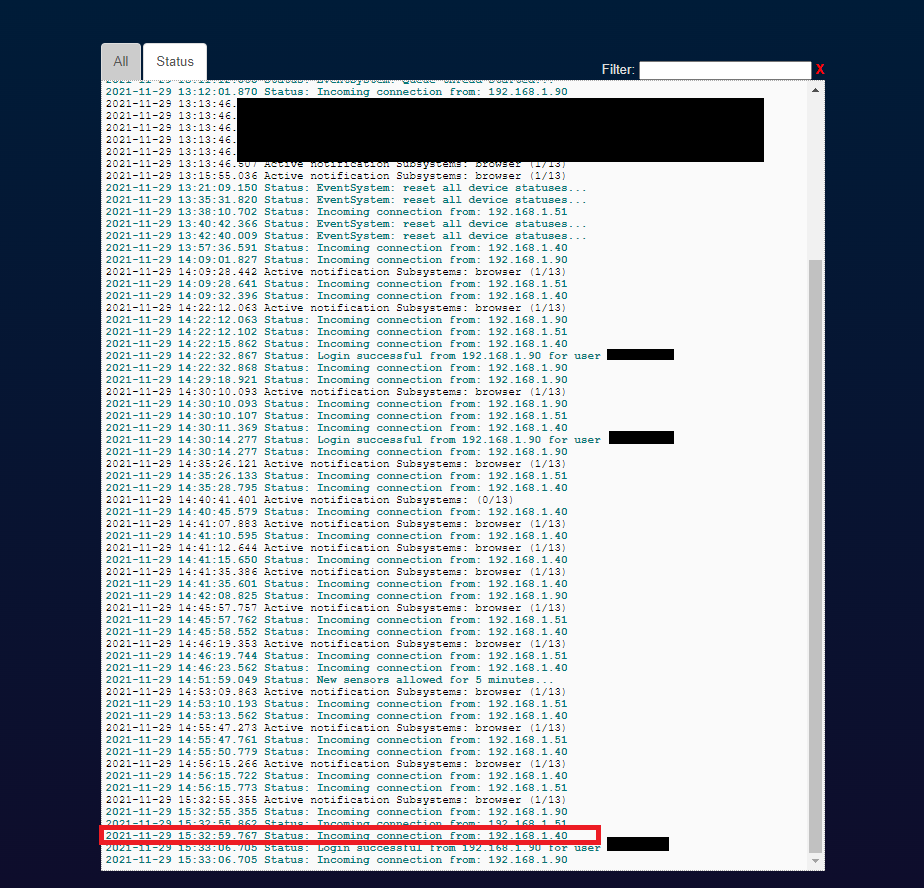
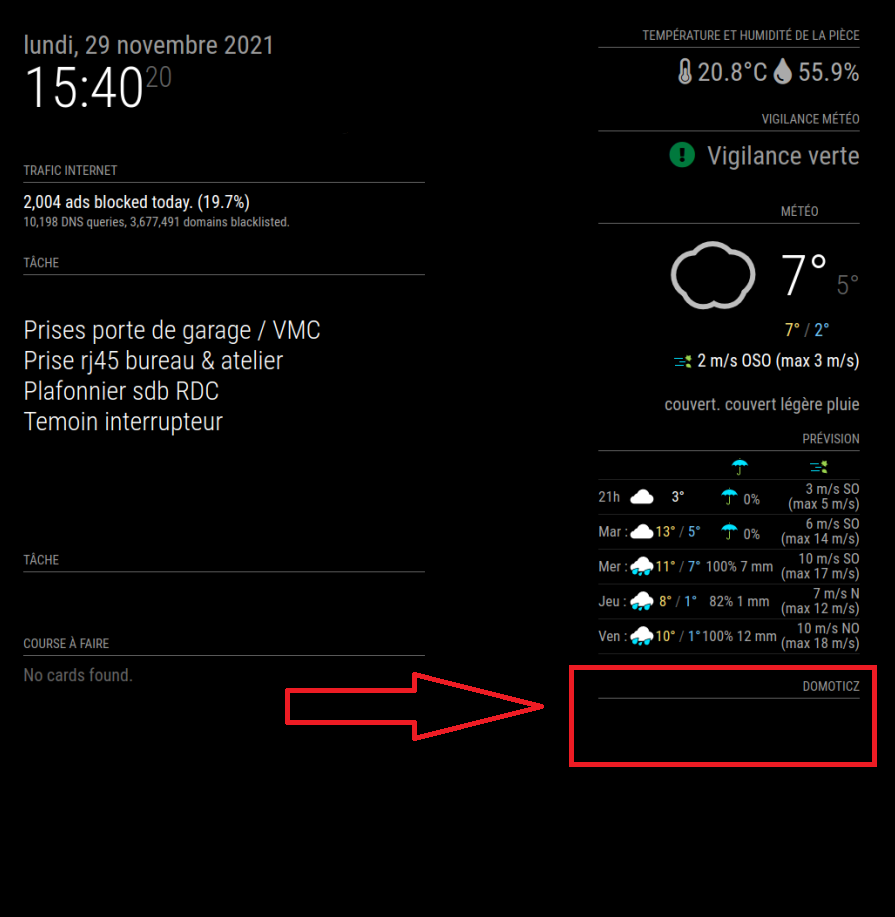
      But after installing it, it doesn’t display anything, just the title on my MM. I notice in the domoticz log that he contacts him but I do not know if it is a problem of connection or reception of data…

      Thank a lot for your help

      Here are the informations and screenshots :

      Domoticz ip : 192.168.1.3
      MM’s ip : 192.168.1.40

      My Config.js

      		{
      			module: "MMM-Domoticz-ext",
      			header: "Domoticz",
      			position: "top_right",
      			config: {
      			  apiBase: "192.168.1.3",
      			  apiPort: "8080",
      			  updateInterval: 5,
      			  animationSpeed: 0,
      			  displayType: "all",
      			  horizontal: true,
      			  dashboardColumnCount: 2,
      			  showTotals: true,
      			  dashboardRooms: [ "1", "2" ],
      			}
      		},
      

      My json for IDX 1

      {
      	"ActTime" : xxxxxx,
      	"AstrTwilightEnd" : "xxxxx",
      	"AstrTwilightStart" : "xxxxx",
      	"CivTwilightEnd" : "xxxxxx",
      	"CivTwilightStart" : "xxxxx",
      	"DayLength" : "xxxxxx",
      	"NautTwilightEnd" : "xxxxx",
      	"NautTwilightStart" : "xxxxx",
      	"ServerTime" : "xxxxxxxxx",
      	"SunAtSouth" : "xxxxx",
      	"Sunrise" : "xxxxx",
      	"Sunset" : "xxxxx",
      	"app_version" : "2021.1",
      	"result" : 
      	[
      		{
      			"AddjMulti" : 1.0,
      			"AddjMulti2" : 1.0,
      			"AddjValue" : 0.0,
      			"AddjValue2" : 0.0,
      			"BatteryLevel" : 255,
      			"CustomImage" : 0,
      			"Data" : "21.4 C, 56 %",
      			"Description" : "",
      			"DewPoint" : "12.26",
      			"Favorite" : 0,
      			"HardwareDisabled" : false,
      			"HardwareID" : 2,
      			"HardwareName" : "DHT 22 ext",
      			"HardwareType" : "Dummy (Does nothing, use for virtual switches only)",
      			"HardwareTypeVal" : 15,
      			"HaveTimeout" : false,
      			"Humidity" : 56,
      			"HumidityStatus" : "Comfortable",
      			"ID" : "14051",
      			"LastUpdate" : "2021-11-29 15:03:03",
      			"Name" : "DHT22 ext",
      			"Notifications" : "false",
      			"PlanID" : "0",
      			"PlanIDs" : 
      			[
      				0
      			],
      			"Protected" : false,
      			"ShowNotifications" : true,
      			"SignalLevel" : 3,
      			"SubType" : "THGN122/123/132, THGR122/228/238/268",
      			"Temp" : 21.399999999999999,
      			"Timers" : "false",
      			"Type" : "Temp + Humidity",
      			"TypeImg" : "temperature",
      			"Unit" : 1,
      			"Used" : 1,
      			"XOffset" : "0",
      			"YOffset" : "0",
      			"idx" : "1",
      			"trend" : 2
      		}
      	],
      	"status" : "OK",
      	"title" : "Devices"
      }
      

      My Setting on Domoticz
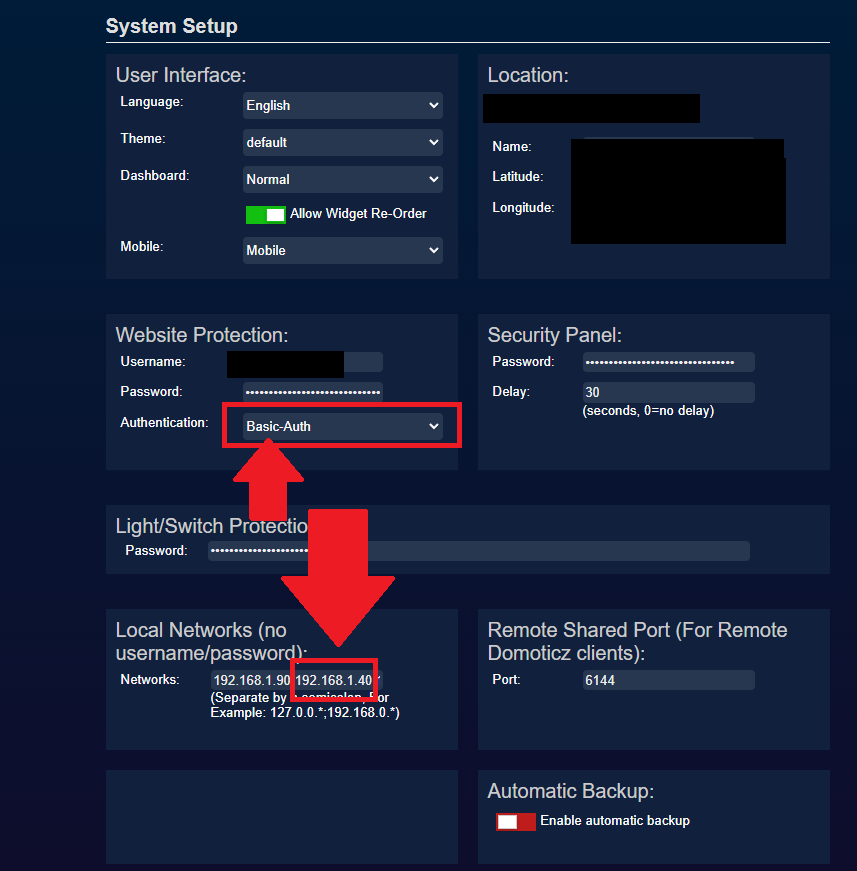
      Domo.png

      Log domoticz
      Log domoticz.png

      My MM
      MM.png

      G 1 Reply Last reply Reply Quote 0
      • G Offline
        goedh452 @Shaitan
        last edited by goedh452

        @shaitan

        Hi, thanks for the compliment!

        At first glance, I do not see any reason why it doesn’t work. Could you try opening the mirror in a browser on a computer: :8080.

        Then open the monitor with F12 and see if the module generates error messages. Post the error messages here please.

        1 Reply Last reply Reply Quote 0
        • S Offline
          Shaitan
          last edited by Shaitan

          This is what you want @goedh452 ? There are only these errors
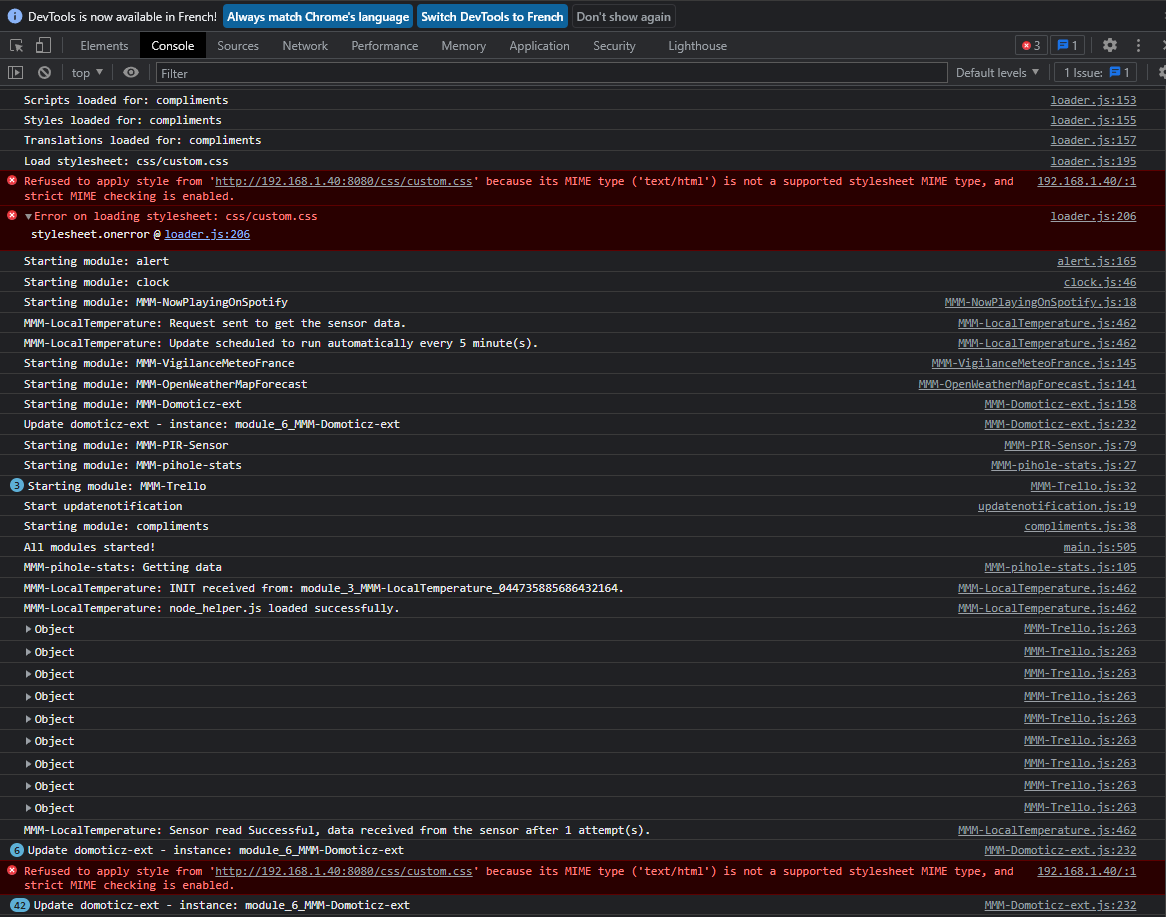
          Nouvelle e bitmap.png

          S G 2 Replies Last reply Reply Quote 0
          • S Offline
            sdetweil @Shaitan
            last edited by

            @shaitan by default custom.css doesn’t exist… if you used my install script I would have created an empty one

            but u can do this

            touch ~/MagicMirror/css/custom.css
            

            Sam

            How to add modules

            learning how to use browser developers window for css changes

            S 1 Reply Last reply Reply Quote 0
            • S Offline
              Shaitan @sdetweil
              last edited by Shaitan

              Hi @sdetweil
              the new file has been created, but nothing on the MM’s screen… But this errors are been vanish !

              S 1 Reply Last reply Reply Quote 0
              • S Offline
                sdetweil @Shaitan
                last edited by

                @shaitan cool… black screen, maybe this
                https://forum.magicmirror.builders/topic/15778/fix-for-black-screen-in-2-16-and-later

                Sam

                How to add modules

                learning how to use browser developers window for css changes

                S 1 Reply Last reply Reply Quote 0
                • S Offline
                  Shaitan @sdetweil
                  last edited by

                  @sdetweil
                  sorry I misled you. with your command the errors have disappeared, but the display of my MM is the same as before. there is no black screen

                  S 1 Reply Last reply Reply Quote 0
                  • S Offline
                    sdetweil @Shaitan
                    last edited by

                    @shaitan ok, I can’t help with the module operation… have no system like that

                    Sam

                    How to add modules

                    learning how to use browser developers window for css changes

                    S 1 Reply Last reply Reply Quote 0
                    • S Offline
                      Shaitan @sdetweil
                      last edited by

                      @sdetweil thanks anyway for this errors ! Less is the better !

                      1 Reply Last reply Reply Quote 1
                      • G Offline
                        goedh452 @Shaitan
                        last edited by

                        @shaitan

                        Ok, so the module doesn’t produce any errors. I’ll dive into it to see what is causing the problem.

                        S 2 Replies Last reply Reply Quote 0
                        • S Offline
                          Shaitan @goedh452
                          last edited by

                          @goedh452 ok thank you !

                          1 Reply Last reply Reply Quote 0
                          • S Offline
                            Shaitan @goedh452
                            last edited by

                            @goedh452
                            I started from zero to be sure that it is not a problem between your module and another program on my pi.
                            So I did a new installation of MM on another Raspberry Pi with a clean raspian.

                            Above, there is only your modules installed (I just copy my config.js from my other MM).
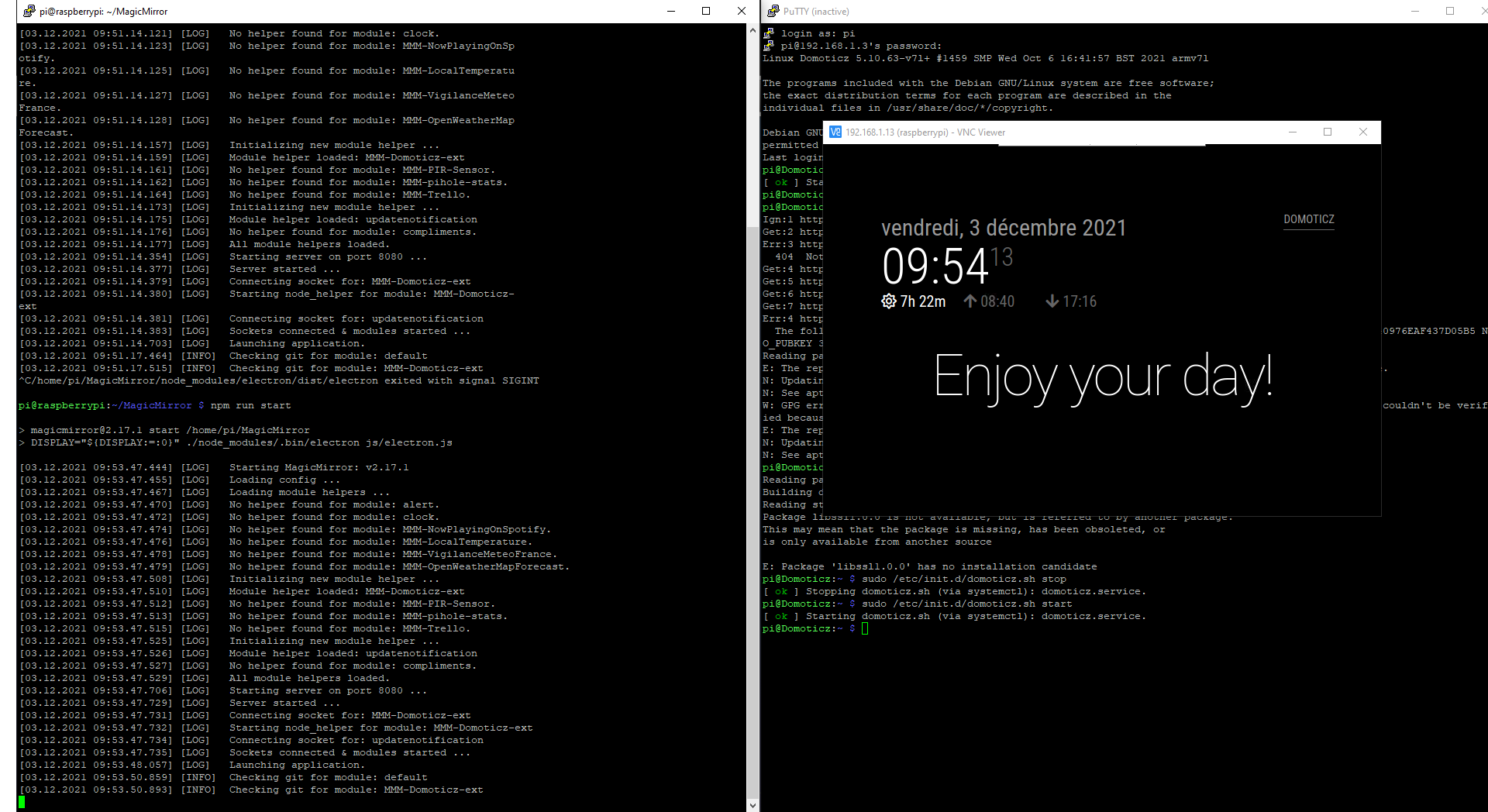
                            Here is the MM launch screen with SSH :
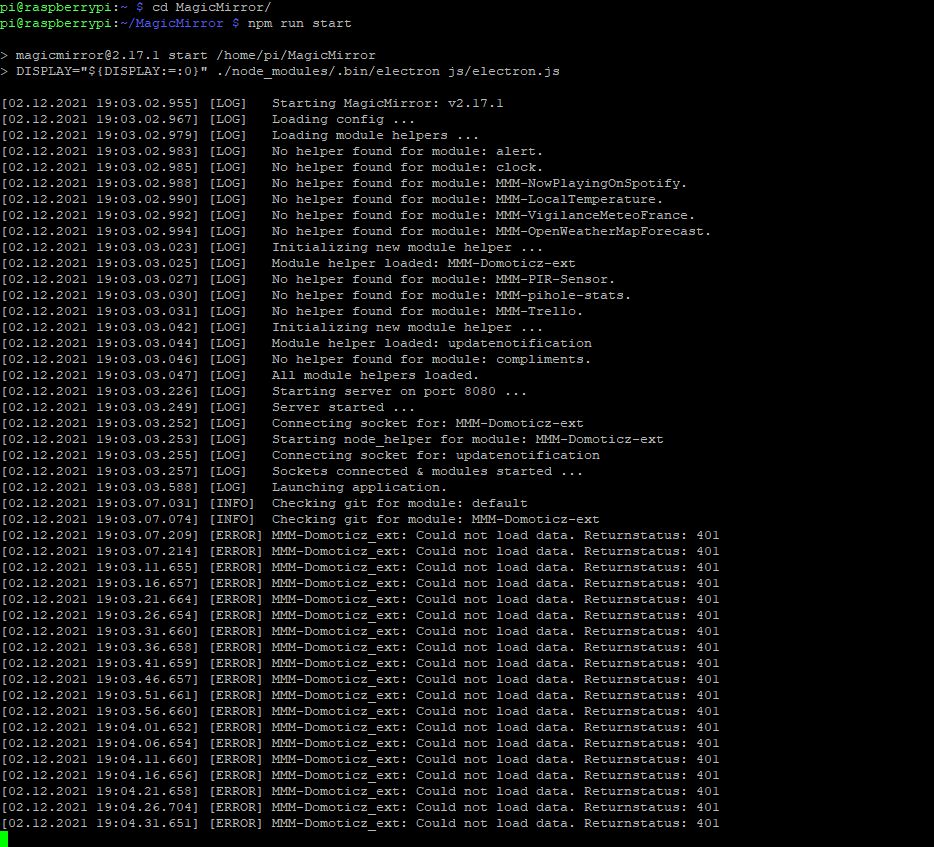
                            Nouvelle ie bitmap.png

                            G 1 Reply Last reply Reply Quote 0
                            • G Offline
                              goedh452 @Shaitan
                              last edited by

                              @shaitan

                              The errors indicate that Domiticz cannot be reached. Would it be possible to temporarily disable the authentication in Domoticz and test it again?

                              S 1 Reply Last reply Reply Quote 0
                              • S Offline
                                Shaitan @goedh452
                                last edited by

                                @goedh452 I don’t know how to remove the authentication on domoticz, I just added its IP to the whitelist and I got this:Nouvelle ie bitmap.png

                                G S 2 Replies Last reply Reply Quote 0
                                • G Offline
                                  goedh452 @Shaitan
                                  last edited by

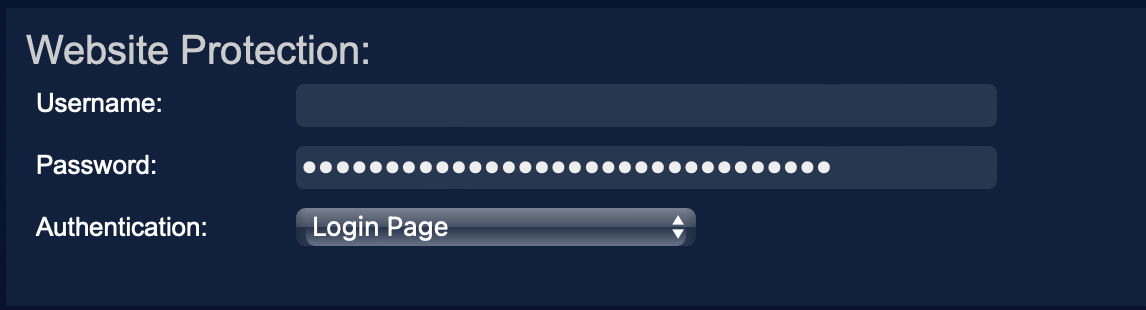
                                  @shaitan

                                  Just remove the username en password and save the settings.Schermafbeelding 2021-12-06 om 13.47.23.png

                                  S 1 Reply Last reply Reply Quote 0
                                  • S Offline
                                    Shaitan @goedh452
                                    last edited by

                                    @goedh452 Same screen

                                    S 1 Reply Last reply Reply Quote 0
                                    • S Offline
                                      sdetweil @Shaitan
                                      last edited by

                                      @shaitan said in MMM-Domoticz-ext: interact with Domoticz:

                                      I just added its IP to the whitelist

                                      I just want to add for this and other folks…

                                      when integrating multiple systems , 1st thing to do is disable all ip filtering/firewalls
                                      in MagicMirror this is

                                      address:"0.0.0.0", // let any outside system connect , "localhost" means ONLY apps INSIDE this same machine can connect
                                      ipWhitelist:[],   // no restrictions on specific systems connecting.
                                      

                                      once working, then u can add back whatever u might need… ,

                                      and if it impacts the integration, then u will know as it is the last change…

                                      Sam

                                      How to add modules

                                      learning how to use browser developers window for css changes

                                      1 Reply Last reply Reply Quote 0
                                      • F Offline
                                        Fabaude
                                        last edited by

                                        Hello and thank you for this great module,
                                        The installation and the settings went well but I can’t see my action buttons on my touch mirror.
                                        The overview change buttons work well!
                                        I integrated it into a page of MMM-Caroussel and MMM-GoogleAssistant operates my devices well but I cannot control the lights and others with touch buttons!
                                        I hope to be clear and in the right place.

                                        If you have any ideas…
                                        Fab

                                        G 1 Reply Last reply Reply Quote 0
                                        • G Offline
                                          goedh452 @Fabaude
                                          last edited by

                                          @fabaude

                                          Could you post your config of the module please? And are buttons not displayed at all or aren’t they working when you click them?

                                          F 1 Reply Last reply Reply Quote 0
                                          • F Offline
                                            Fabaude @goedh452
                                            last edited by

                                            @goedh452
                                            I don’t know where the buttons should be? Are these the icons on my dashboard?
                                            Here is my config and thank you.

                                            {
                                            				    module: 'MMM-Domoticz-ext' ,
                                            				    header: "DOMOTICZ" ,
                                            				    position: "middle_center" ,
                                            
                                            				    config: {
                                            					    apiBase: "xxx.xxx.x.xx" ,
                                            					    apiPort: "xxxx" ,
                                            					    updateInterval: 10 ,
                                            					    animationSpeed: 0 ,
                                            					    displayType: "actions" ,
                                            					    alwaysShowDashboard: false ,
                                            					    alwaysShowActions: true ,
                                            					    showButtons: true ,
                                            					    showTotals: true ,
                                            					    showIcons: true ,
                                            					    dashboardRooms: [ "1","2","3","4","5","6","7","8","9","10","11","12","13" ],
                                            					    
                                            					    buttonAllLabel: "Tous" ,
                                            					    buttonTypeLabel: "Par Types d'appareils" ,
                                            					    buttonRoomLabel: "Par Pièces" ,
                                            				        buttonBothLabel: "Par Types/Pièces" , 
                                            					    buttonFloorLabel: "Par Types/Niveaux" ,
                                            					    buttonDashboardLabel: "Tableau de Bord" ,
                                            					    horizontal: true ,
                                            					    
                                            					    columnCount: 15 ,
                                            					    dashboardColumnCount: 15 ,
                                            					    maxTitleLenght: 25 ,
                                            					    switchLabel: "Lumières" ,
                                            					    dimmerLabel: "Interrupteurs" ,
                                            					    temperatureLabel: "Température Intérieure" ,
                                            					    humidityLabel: "Humidité" ,
                                            					    usageLabel: "Electricité Maison" ,
                                            					    
                                            					    rooms: [
                                            						    { idx: "7" , name: "Cellier" },
                                            						    { idx: "6" , name: "Buanderie" },
                                            						    { idx: "1" , name: "Salon" },
                                            						    { idx: "2" , name: "Salle à Manger" },
                                            						    { idx: "3" , name: "Cuisine" }, 
                                            						    { idx: "8" , name: "Ch.Parents" },
                                            						    { idx: "9" , name: "Ch.Adèle" },
                                            						    { idx: "10" , name: "Ch.Louis" },
                                            						   	{ idx: "4" , name: "Bureau" },
                                            						    { idx: "11" , name: "Salle de Bain" },
                                            						    { idx: "12" , name: "Salle d'Eau" },
                                            						    { idx: "13" , name: "Couloir-Entrée" },
                                            						    { idx: "5" , name: "Terrasse" },
                                            						    						    
                                            					    ],
                                            
                                            					    floors: [
                                            						     { name: "Rez de Chaussée" ,
                                            							    rooms: [ "1" , "2" , "3" , "6" , "7" , "8" , "11" , "13" ]
                                            						    },
                                            						     { name: "Etage" ,
                                            							    rooms: [ "4" , "9" , "10" , "12" ]
                                            						    },
                                            						     { name: "Extérieurs" ,
                                            							    rooms: [ "5" ]
                                            						    },
                                            					    ],
                                            
                                            					    utilities: {
                                            						    utilityLabel: "Electricité Générale Maison" ,
                                            						    showLabel: true ,
                                            						    devices: [
                                            						    { idx: "119" ,
                                            						      deviceHeader: "Consommation Electrique" ,
                                            						      useHeaderSymbol: false ,
                                            						      headerSymbol: "plug" ,
                                            						      counterTodayLabel: "Aujourd'hui" ,
                                            						      counterTodayAppendText: "Kwh" ,
                                            						      gaugeMinValue: -3000 ,
                                            						      gaugeMaxValue: 3000 ,
                                            						      gaugeAppendText: "Watts" ,
                                            						      gaugeWidth: 190 ,
                                            						      lineWidth: 20 ,
                                            						      markerWidth: 20 ,
                                            						      markerColor: "#F4D03F"
                                            						    },
                                            						    
                                            						    { idx: "121" ,
                                            						      deviceHeader: "Consommation Electrique Nette" ,
                                            						      useHeaderSymbol: false ,
                                            						      headerSymbol: "plug" ,
                                            						      counterTodayLabel: "Aujourd'hui" ,
                                            						      counterTodayAppendText: "Kwh" ,
                                            						      gaugeMinValue: -3000 ,
                                            						      gaugeMaxValue: 3000 ,
                                            						      gaugeAppendText: "Watts" ,
                                            						      gaugeWidth: 190 ,
                                            						      lineWidth: 20 ,
                                            						      markerWidth: 20 ,
                                            						      markerColor: "#F4D03F"
                                            						    } ,
                                            
                                            						    { idx: "117" ,
                                            						      deviceHeader: "Production Solaire" ,
                                            						      useHeaderSymbol: false ,
                                            						      headerSymbol: "sun" ,
                                            						      counterTodayLabel: "Aujourd'hui" ,
                                            						      counterTodayAppendText: "Kwh" ,
                                            						      gaugeMinValue: 0 ,
                                            						      gaugeMaxValue: 3000 ,
                                            						      gaugeAppendText: "Watts" ,
                                            						      gaugeWidth: 190 ,
                                            						      lineWidth: 20 ,
                                            						      markerWidth: 20 ,
                                            						      markerColor: "#70db70"
                                            						    },
                                            
                                            						    { idx: "43" ,
                                            						      deviceHeader: "Production Eau Chaude" ,
                                            						      useHeaderSymbol: false ,
                                            						      headerSymbol: "faucet" ,
                                            						      counterTodayLabel: "Aujourd'hui" ,
                                            						      counterTodayAppendText: "Kwh" , 
                                            						      gaugeMinValue: 0 ,
                                            						      gaugeMaxValue: 2800 ,
                                            						      gaugeAppendText: "Watts" ,
                                            						      gaugeWidth: 190 ,
                                            						      lineWidth: 20 ,
                                            						      markerWidth: 20 ,
                                            						      markerColor: "#1E90FF"
                                            						    },
                                            						    { idx: "46" ,
                                            						      deviceHeader: "Pompe à Chaleur" ,
                                            						      useHeaderSymbol: false ,
                                            						      headerSymbol: "hot-tub" ,
                                            						      counterTodayLabel: "Aujourd'hui" ,
                                            						      counterTodayAppendText: "Kwh" ,
                                            						      gaugeMinValue: 0 ,
                                            						      gaugeMaxValue: 2000 ,
                                            						      gaugeAppendText: "Watts" ,
                                            						      gaugeWidth: 190 ,
                                            						      lineWidth: 20 ,
                                            						      markerWidth: 20 ,
                                            						      markerColor: "#f4763f"
                                            						    } ,
                                            						    
                                            						    
                                            						    ],
                                            					    },
                                            
                                            						    custonGauges: {
                                            								    headerLabel: "Autres" ,
                                            								    showLabel: true ,
                                            								    devices: [
                                            									    { idx: "25" ,
                                            							  deviceHeader: "Voltage" ,
                                            							  useHeaderSymbol: true ,
                                            							  headerSymbol: "bolt" ,
                                            							  gaugeAppendText: "volts" ,
                                            							  gaugeMinValue: 210 ,
                                            							  gaugeMaxValue: 260 ,
                                            							  gaugeWidth: 150 ,
                                            							  lineWidth: 16 ,
                                            							  markerWidth: 16 ,
                                            							  markerColor: "#f4763f" 
                                            							},
                                            									    ],
                                            								    }, 
                                            							weather: {
                                            										devices: [ "140" ],
                                            										weatherLabel: "Températures", 
                                            										gaugewidth: 60,
                                            										gaugeAppendText: "°C",
                                            									},
                                            									
                                            									Actions: [
                                            											{ label: "Lumiere Exter Cuisine Shelly",
                                            											url: "http://xxx.xxx.x.xx:xxxx/json.htm?type=command&param=switchlight&idx=66&switchcmd=On"
                                            											} ,
                                            											{ label: "Lumiere Exter Cuisine Shelly",
                                            											url: "http://xxx.xxx.x.xx:xxxx/json.htm?type=command&param=switchlight&idx=66&switchcmd=Off"
                                            											} ,
                                            											{ label: "Lumiere Exter Entree Shelly",
                                            											url: "http://xxx.xxx.x.xx:xxxx/json.htm?type=command&param=switchlight&idx=62&switchcmd=On"
                                            											} ,
                                            											{ label: "Lumiere Exter Entree Shelly",
                                            											url: "http://xxx.xxx.x.xx:xxxx/json.htm?type=command&param=switchlight&idx=62&switchcmd=Off"
                                            											} ,	
                                            											{ label: "Prise Commandée 1",
                                            											url: "http://xxx.xxx.x.xx:xxxx/json.htm?type=command&param=switchlight&idx=69&switchcmd=Toggle"
                                            											} ,
                                            											],					 				    
                                            						},
                                            					},
                                            
                                            G 1 Reply Last reply Reply Quote 0

                                            Hello! It looks like you're interested in this conversation, but you don't have an account yet.

                                            Getting fed up of having to scroll through the same posts each visit? When you register for an account, you'll always come back to exactly where you were before, and choose to be notified of new replies (either via email, or push notification). You'll also be able to save bookmarks and upvote posts to show your appreciation to other community members.

                                            With your input, this post could be even better 💗

                                            Register Login

                                            • 1
                                            • 2
                                            • 3
                                            • 4
                                            • 5
                                            • 6
                                            • 7
                                            • 5 / 7
                                            • First post
                                              Last post
                                            Enjoying MagicMirror? Please consider a donation!
                                            MagicMirror created by Michael Teeuw.
                                            Forum managed by Sam, technical setup by Karsten.
                                            This forum is using NodeBB as its core | Contributors
                                            Contact | Privacy Policy