Read the statement by Michael Teeuw here.
Clock format
-
@sdetweil Sorry, I tired to use block but again, 1st time so it didn’t work. But this si what I have:
language: "en", locale: "en-US", logLevel: ["INFO", "LOG", "WARN", "ERROR"], // Add "DEBUG" for even more logging timeFormat: 12, units: "imperial" -
@louise and what do you have in the clock config?
-
@sdetweil /* global SunCalc */
/* Magic Mirror
-
Module: Clock
-
By Michael Teeuw https://michaelteeuw.nl
-
MIT Licensed.
*/
Module.register(“clock”, {
// Module config defaults.
defaults: {
displayType: “digital”, // options: digital, analog, bothtimeFormat: config.timeFormat, timezone: null, displaySeconds: true, showPeriod: true, showPeriodUpper: false, clockBold: false, showDate: true, showTime: true, showWeek: false, dateFormat: "dddd, LL", /* specific to the analog clock */ analogSize: "175px", analogFace: "simple", // options: 'none', 'simple', 'face-###' (where ### is 001 to 012 inclusive) analogPlacement: "bottom", // options: 'top', 'bottom', 'left', 'right' analogShowDate: "top", // OBSOLETE, can be replaced with analogPlacement and showTime, options: false, 'top', or 'bottom' secondsColor: "#888888", showSunTimes: false, showMoonTimes: false, lat: 47.630539, lon: -122.344147},
// Define required scripts.
getScripts: function () {
return [“moment.js”, “moment-timezone.js”, “suncalc.js”];
},
// Define styles.
getStyles: function () {
return [“clock_styles.css”];
},
// Define start sequence.
start: function () {
Log.info("Starting module: " + this.name);// Schedule update interval. this.second = moment().second(); this.minute = moment().minute(); // Calculate how many ms should pass until next update depending on if seconds is displayed or not const delayCalculator = (reducedSeconds) => { const EXTRA_DELAY = 50; // Deliberate imperceptible delay to prevent off-by-one timekeeping errors if (this.config.displaySeconds) { return 1000 - moment().milliseconds() + EXTRA_DELAY; } else { return (60 - reducedSeconds) * 1000 - moment().milliseconds() + EXTRA_DELAY; } }; // A recursive timeout function instead of interval to avoid drifting const notificationTimer = () => { this.updateDom(); // If seconds is displayed CLOCK_SECOND-notification should be sent (but not when CLOCK_MINUTE-notification is sent) if (this.config.displaySeconds) { this.second = moment().second(); if (this.second !== 0) { this.sendNotification("CLOCK_SECOND", this.second); setTimeout(notificationTimer, delayCalculator(0)); return; } } // If minute changed or seconds isn't displayed send CLOCK_MINUTE-notification this.minute = moment().minute(); this.sendNotification("CLOCK_MINUTE", this.minute); setTimeout(notificationTimer, delayCalculator(0)); }; // Set the initial timeout with the amount of seconds elapsed as reducedSeconds so it will trigger when the minute changes setTimeout(notificationTimer, delayCalculator(this.second)); // Set locale. moment.locale(config.language);},
// Override dom generator.
getDom: function () {
const wrapper = document.createElement(“div”);
wrapper.classList.add(“clockGrid”);/************************************ * Create wrappers for analog and digital clock */ const analogWrapper = document.createElement("div"); analogWrapper.className = "clockCircle"; const digitalWrapper = document.createElement("div"); digitalWrapper.className = "digital"; digitalWrapper.style.gridArea = "center"; /************************************ * Create wrappers for DIGITAL clock */ const dateWrapper = document.createElement("div"); const timeWrapper = document.createElement("div"); const secondsWrapper = document.createElement("sup"); const periodWrapper = document.createElement("span"); const sunWrapper = document.createElement("div"); const moonWrapper = document.createElement("div"); const weekWrapper = document.createElement("div"); // Style Wrappers dateWrapper.className = "date normal medium"; timeWrapper.className = "time bright large light"; secondsWrapper.className = "seconds dimmed"; sunWrapper.className = "sun dimmed small"; moonWrapper.className = "moon dimmed small"; weekWrapper.className = "week dimmed medium"; // Set content of wrappers. // The moment().format("h") method has a bug on the Raspberry Pi. // So we need to generate the timestring manually. // See issue: https://github.com/MichMich/MagicMirror/issues/181 let timeString; const now = moment(); if (this.config.timezone) { now.tz(this.config.timezone); } let hourSymbol = "HH"; if (this.config.timeFormat !== 12) { hourSymbol = "h"; } if (this.config.clockBold) { timeString = now.format(hourSymbol + '[<span class="bold">]mm[</span>]'); } else { timeString = now.format(hourSymbol + ":mm"); } if (this.config.showDate) { dateWrapper.innerHTML = now.format(this.config.dateFormat); digitalWrapper.appendChild(dateWrapper); } if (this.config.displayType !== "analog" && this.config.showTime) { timeWrapper.innerHTML = timeString; secondsWrapper.innerHTML = now.format("ss"); if (this.config.showPeriodUpper) { periodWrapper.innerHTML = now.format("A"); } else { periodWrapper.innerHTML = now.format("a"); } if (this.config.displaySeconds) { timeWrapper.appendChild(secondsWrapper); } if (this.config.showPeriod && this.config.timeFormat !== 24) { timeWrapper.appendChild(periodWrapper); } digitalWrapper.appendChild(timeWrapper); } /** * Format the time according to the config * * @param {object} config The config of the module * @param {object} time time to format * @returns {string} The formatted time string */ function formatTime(config, time) { let formatString = hourSymbol + ":mm"; if (config.showPeriod && config.timeFormat !== 12) { formatString += config.showPeriodUpper ? "A" : "a"; } return moment(time).format(formatString); } /**************************************************************** * Create wrappers for Sun Times, only if specified in config */ if (this.config.showSunTimes) { const sunTimes = SunCalc.getTimes(now, this.config.lat, this.config.lon); const isVisible = now.isBetween(sunTimes.sunrise, sunTimes.sunset); let nextEvent; if (now.isBefore(sunTimes.sunrise)) { nextEvent = sunTimes.sunrise; } else if (now.isBefore(sunTimes.sunset)) { nextEvent = sunTimes.sunset; } else { const tomorrowSunTimes = SunCalc.getTimes(now.clone().add(1, "day"), this.config.lat, this.config.lon); nextEvent = tomorrowSunTimes.sunrise; } const untilNextEvent = moment.duration(moment(nextEvent).diff(now)); const untilNextEventString = untilNextEvent.hours() + "h " + untilNextEvent.minutes() + "m"; sunWrapper.innerHTML = '<span class="' + (isVisible ? "bright" : "") + '"><i class="fa fa-sun-o" aria-hidden="true"></i> ' + untilNextEventString + "</span>" + '<span><i class="fa fa-arrow-up" aria-hidden="true"></i> ' + formatTime(this.config, sunTimes.sunrise) + "</span>" + '<span><i class="fa fa-arrow-down" aria-hidden="true"></i> ' + formatTime(this.config, sunTimes.sunset) + "</span>"; digitalWrapper.appendChild(sunWrapper); } /**************************************************************** * Create wrappers for Moon Times, only if specified in config */ if (this.config.showMoonTimes) { const moonIllumination = SunCalc.getMoonIllumination(now.toDate()); const moonTimes = SunCalc.getMoonTimes(now, this.config.lat, this.config.lon); const moonRise = moonTimes.rise; let moonSet; if (moment(moonTimes.set).isAfter(moonTimes.rise)) { moonSet = moonTimes.set; } else { const nextMoonTimes = SunCalc.getMoonTimes(now.clone().add(1, "day"), this.config.lat, this.config.lon); moonSet = nextMoonTimes.set; } const isVisible = now.isBetween(moonRise, moonSet) || moonTimes.alwaysUp === true; const illuminatedFractionString = Math.round(moonIllumination.fraction * 100) + "%"; moonWrapper.innerHTML = '<span class="' + (isVisible ? "bright" : "") + '"><i class="fa fa-moon-o" aria-hidden="true"></i> ' + illuminatedFractionString + "</span>" + '<span><i class="fa fa-arrow-up" aria-hidden="true"></i> ' + (moonRise ? formatTime(this.config, moonRise) : "...") + "</span>" + '<span><i class="fa fa-arrow-down" aria-hidden="true"></i> ' + (moonSet ? formatTime(this.config, moonSet) : "...") + "</span>"; digitalWrapper.appendChild(moonWrapper); } if (this.config.showWeek) { weekWrapper.innerHTML = this.translate("WEEK", { weekNumber: now.week() }); digitalWrapper.appendChild(weekWrapper); } /**************************************************************** * Create wrappers for ANALOG clock, only if specified in config */ if (this.config.displayType !== "digital") { // If it isn't 'digital', then an 'analog' clock was also requested // Calculate the degree offset for each hand of the clock if (this.config.timezone) { now.tz(this.config.timezone); } const second = now.seconds() * 6, minute = now.minute() * 6 + second / 60, hour = ((now.hours() % 12) / 12) * 360 + 90 + minute / 12; // Create wrappers analogWrapper.style.width = this.config.analogSize; analogWrapper.style.height = this.config.analogSize; if (this.config.analogFace !== "" && this.config.analogFace !== "simple" && this.config.analogFace !== "none") { analogWrapper.style.background = "url(" + this.data.path + "faces/" + this.config.analogFace + ".svg)"; analogWrapper.style.backgroundSize = "100%"; // The following line solves issue: https://github.com/MichMich/MagicMirror/issues/611 // analogWrapper.style.border = "1px solid black"; analogWrapper.style.border = "rgba(0, 0, 0, 0.1)"; //Updated fix for Issue 611 where non-black backgrounds are used } else if (this.config.analogFace !== "none") { analogWrapper.style.border = "2px solid white"; } const clockFace = document.createElement("div"); clockFace.className = "clockFace"; const clockHour = document.createElement("div"); clockHour.id = "clockHour"; clockHour.style.transform = "rotate(" + hour + "deg)"; clockHour.className = "clockHour"; const clockMinute = document.createElement("div"); clockMinute.id = "clockMinute"; clockMinute.style.transform = "rotate(" + minute + "deg)"; clockMinute.className = "clockMinute"; // Combine analog wrappers clockFace.appendChild(clockHour); clockFace.appendChild(clockMinute); if (this.config.displaySeconds) { const clockSecond = document.createElement("div"); clockSecond.id = "clockSecond"; clockSecond.style.transform = "rotate(" + second + "deg)"; clockSecond.className = "clockSecond"; clockSecond.style.backgroundColor = this.config.secondsColor; clockFace.appendChild(clockSecond); } analogWrapper.appendChild(clockFace); } /******************************************* * Update placement, respect old analogShowDate even if its not needed anymore */ if (this.config.displayType === "analog") { // Display only an analog clock if (this.config.analogShowDate === "top") { wrapper.classList.add("clockGrid--bottom"); } else if (this.config.analogShowDate === "bottom") { wrapper.classList.add("clockGrid--top"); } else { //analogWrapper.style.gridArea = "center"; } } else if (this.config.displayType === "both") { wrapper.classList.add("clockGrid--" + this.config.analogPlacement); } wrapper.appendChild(analogWrapper); wrapper.appendChild(digitalWrapper); // Return the wrapper to the dom. return wrapper;}
});
-
-
@sdetweil on the code block
has to be a blank line before and after
and the character was ~ not `did u do that manually, type in the chars of hit the </> after selecting the text ?
-
@sdetweil I just did a ctrl a then copy and pasted
-
NEVER change the CODE
in config.js
		{
			module: "clock",
			position: "top_left"
		},
whatever u need to configure goes inside a config:{} section,…
if not there, add one
{ module: "clock", position: "top_left", config: { .... whatever } }, -
@sdetweil I didn’t think I did change anything.
-
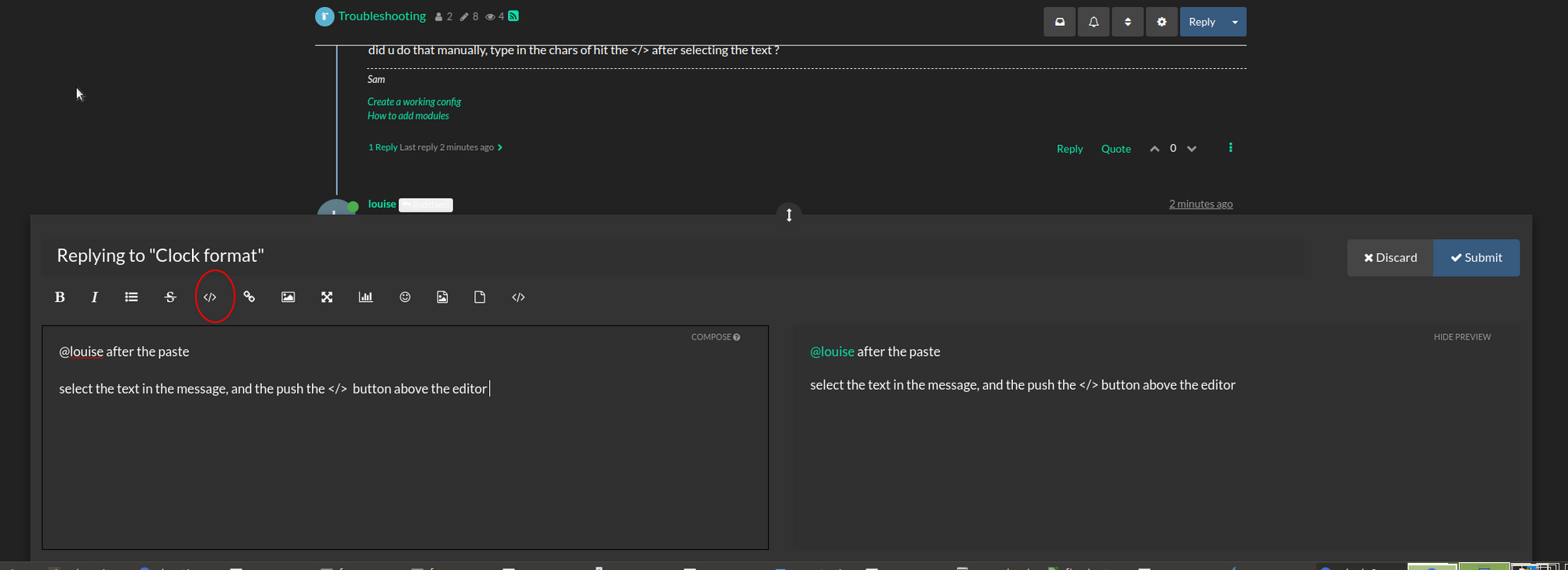
@louise after the paste
select the text in the message, and the push the </> button above the editor
-
@sdetweil OH, that’s what you meant by block.
But as far as changing anything in the code I didn’t, except the 12 and imperial -
deleted sam -
@louise said in Clock format:
anything in the code I didn’t, except the 12 and imperial
then u changed something
NEVER edit the source files… ALL changes go thru config.js
the design is that things u specify in config.js override thing in the source code… so you NEVER have to touch the source file.
if you DON’T specify something, then the module default setting will be used…
(each module should document what that is… ) -
@louise again you are pasting the source code… and missed a step,
after the paste into the message here, SELECT the text AGAIN, and then push the code button
we want to see what settings are in config.js for clock, not clock.js
-
aaaaa
-
@louise I forgot to take out private stuff again
-
@louise nope, still don’t want to see the code
edit your ~/MagicMirror/config/config.js
find the section that says
module:"clock"and copy from the line above that is
{to the macthing line below
that is}and paste THAT, and then select it all (ctrl a)
and then it the buttonplease read the two topics below in my signature…
-
@sdetweil This?
	{
		module: "clock",
		position: "top_left"
	},```
code_text
module: "clock", position: "top_left" },``` code_text -
@louise hmm… still not sure what the problem is
select/copy from config.js
replay to message here
paste text
ctrl-a (select all)
(it will have my userid in the select of the reply )
press code block buttonI just did this and got
@louise { module: "clock", position: "top_left" }, -
@sdetweil Would it be easier if I just started over?
-
@louise said in Clock format:
Would it be easier if I just started over?
with what? ignore what is above
-
@sdetweil Just a new install of Magic Mirror, rename this as MagicMirror1 and do a new install.
Hello! It looks like you're interested in this conversation, but you don't have an account yet.
Getting fed up of having to scroll through the same posts each visit? When you register for an account, you'll always come back to exactly where you were before, and choose to be notified of new replies (either via email, or push notification). You'll also be able to save bookmarks and upvote posts to show your appreciation to other community members.
With your input, this post could be even better 💗
Register Login