MagicMirror Forum
    • Recent
    • Tags
    • Unsolved
    • Solved
    • MagicMirror² Repository
    • Documentation
    • 3rd-Party-Modules
    • Donate
    • Discord
    • Register
    • Login
    A New Chapter for MagicMirror: The Community Takes the Lead
    Read the statement by Michael Teeuw here.

    config.js help

    Scheduled Pinned Locked Moved Solved Troubleshooting
    18 Posts 5 Posters 5.1k Views 5 Watching
    Loading More Posts
    • Oldest to Newest
    • Newest to Oldest
    • Most Votes
    Reply
    • Reply as topic
    Log in to reply
    This topic has been deleted. Only users with topic management privileges can see it.
    • D Offline
      DaVinki
      last edited by

      Hey all.

      Another newbie her, but with some small coding experience. Could anyone please help me out? I Have tried to add several modules to config.js, and with some troubleshooting I was able to start MM without any errors. However, some modules won’t just show on MM. I Had a look at the { and }, and they all seem to add up.

      In below code, the MyCalendar works as should, but MyDutchWeather does not seem to load.

      		{
      			module: "clock",
      			position: "top_left"
      		},
      		{
      		module: "MMM-MyCalendar",
      		position: "top_left",	// This can be any of the regions. Best results in left or right regions.
      		config: {
      	colored: false,
      	timeformat: "HH:mm",
      	maximumNumberOfDays: 31,
      	calendars: [
      		{
      			url: 'https://calendar.google.com/calendar/ical/d.ics 
      			symbol: 'calendar',
      		},
      	],
      }
      	},
      
      {
        module: 'MMM-MyDutchWeather',
        position: 'top_left',
        header: 'My Dutch Weather',
        config: {
      	  latitude: 52.057499,			// Latitude of your city
      	  longitude: 4.49306,			// Longitude of your city
      	  apiKey: 9041487188,			// API Key - Get for free at http://weerlive.nl/api/toegang/index.php
      	  showIcons: true,			// Display Icons or Text
      	  showExtra: true,			// Display additional weather information
      	  maxWidth: "500px"			// Max width wrapper
        }
      },
      {
      

      I Have never done it before, so I think I can do it.

      1 Reply Last reply Reply Quote 0
      • D Offline
        dazza120
        last edited by dazza120

        Try removing that space where i have put a big space here and is no other modules are below this remove { get rid of me See if that helps

        },
        A BIG SPACE HERE
        {
          module: 'MMM-MyDutchWeather',
          position: 'top_left',
          header: 'My Dutch Weather',
          config: {
        	  latitude: 52.057499,			// Latitude of your city
        	  longitude: 4.49306,			// Longitude of your city
        	  apiKey: 9041487188,			// API Key - Get for free at http://weerlive.nl/api/toegang/index.php
        	  showIcons: true,			// Display Icons or Text
        	  showExtra: true,			// Display additional weather information
        	  maxWidth: "500px"			// Max width wrapper
          }
        },
        {Get Rid of Me
        
        D 1 Reply Last reply Reply Quote 0
        • D Offline
          DaVinki @dazza120
          last edited by

          @dazza120 Hi,

          Thanks for the quick reply. I Tested this, but the result is the same.

          I Have never done it before, so I think I can do it.

          D 1 Reply Last reply Reply Quote 0
          • D Offline
            dazza120 @DaVinki
            last edited by

            @DaVinki change position to bottom_left And see if that works

            D 1 Reply Last reply Reply Quote 0
            • D Offline
              DaVinki @dazza120
              last edited by

              @dazza120 I was just having another look at it, and moved it to top_right, since there are no modules running in that area at the moment. No success.
              I changed all quotation marks from single to double, like ‘top_left’ to “top_right” in the module, position and header lines, no success.
              Running “npm run config:check” gives no errors. Running “rpm start dev” gives no errors. Double checked all { and [ with their corresponding } and ] in a text editor.
              Checked if perhaps the module has any dependencies, which is not the case.
              I have this issue with several modules, no errors, but they just don’t show in MM itself.

              Is there perhaps some sort of logging which I can check?

              I Have never done it before, so I think I can do it.

              D 1 Reply Last reply Reply Quote 0
              • D Offline
                dazza120 @DaVinki
                last edited by

                @DaVinki @sdetweil is the man for that he will be along at some point and he’ll have you up and running

                D 1 Reply Last reply Reply Quote 0
                • D Offline
                  DaVinki @dazza120
                  last edited by

                  @dazza120 OK, I’ll wait and see what he can come up with. Thanks for your time and quick replies.

                  I Have never done it before, so I think I can do it.

                  S mumblebajM 2 Replies Last reply Reply Quote 0
                  • S Do not disturb
                    sdetweil @DaVinki
                    last edited by sdetweil

                    @DaVinki hm… i installed the module and copied your config and it shows up just below my calendar on the left without any other changes

                    Sam

                    How to add modules

                    learning how to use browser developers window for css changes

                    D 1 Reply Last reply Reply Quote 0
                    • D Offline
                      DaVinki @sdetweil
                      last edited by

                      @sdetweil Hi Sam,

                      So, I am not going nuts, there is no issue in the code, but somewhere else. Is there any logging I can check?

                      I Have never done it before, so I think I can do it.

                      S 1 Reply Last reply Reply Quote 0
                      • mumblebajM Offline
                        mumblebaj Module Developer @DaVinki
                        last edited by

                        @DaVinki If you do a shift + ctrl + i it will open a panel on the right. Scroll up on the Consol and see for any red lines, which would indicate errors. It could also be that there are conflicts with other modules.

                        Check out my modules at: https://github.com/mumblebaj?tab=repositories
                        Check my blog-post: https://mumblebaj.xyz/
                        Check my MM Container: https://hub.docker.com/repository/docker/mumblebaj/magicmirror/general

                        1 Reply Last reply Reply Quote 0
                        • S Do not disturb
                          sdetweil @DaVinki
                          last edited by sdetweil

                          @DaVinki just for testting, can u move the module block to the top of the list in config.js?

                          the modules are placed in order of appearance in the config file…

                          mine is date/time, calendar, then MMM-MyDutchWeather
                          trying to get a pic uploaded…
                          With Weather

                          Sam

                          How to add modules

                          learning how to use browser developers window for css changes

                          1 Reply Last reply Reply Quote 0
                          • D Offline
                            DaVinki
                            last edited by

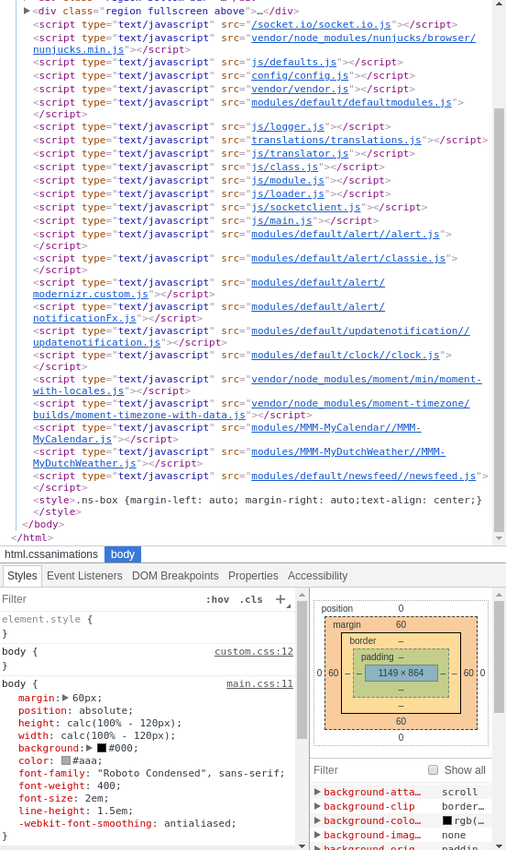
                            Just had a look at it, but I can’t find anything weird:
                            0_1563894302168_screen.png

                            I Have never done it before, so I think I can do it.

                            S 1 Reply Last reply Reply Quote 0
                            • S Do not disturb
                              sdetweil @DaVinki
                              last edited by

                              @DaVinki that is the elements tab, select the console tab please

                              Sam

                              How to add modules

                              learning how to use browser developers window for css changes

                              D 1 Reply Last reply Reply Quote 0
                              • D Offline
                                DaVinki @sdetweil
                                last edited by DaVinki

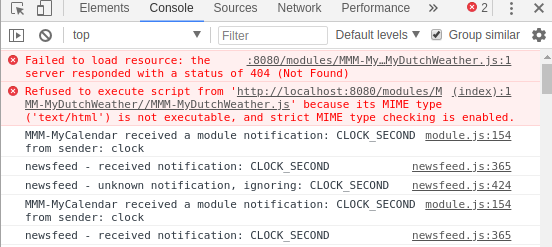
                                @sdetweil And there we have it. Just wondering. the server it is referring to, is that local server, or the server from which data is pulled from?
                                0_1563894678728_screen2.png

                                I Have never done it before, so I think I can do it.

                                S 1 Reply Last reply Reply Quote 0
                                • S Do not disturb
                                  sdetweil @DaVinki
                                  last edited by sdetweil

                                  @DaVinki

                                  server is the local system… the mirror is a web page, trying to load the javascript from a ‘server’ (local)

                                  the name is MMM-MyDutchWeather, you have it coded somewhere as

                                  MMM-**My_**MyDutchWeather (1st error)

                                  can you
                                  from the MagicMirror/modules folder do

                                  ls
                                  

                                  and show the results here

                                  Sam

                                  How to add modules

                                  learning how to use browser developers window for css changes

                                  D 1 Reply Last reply Reply Quote 0
                                  • D Offline
                                    DaVinki @sdetweil
                                    last edited by

                                    @sdetweil Solved.

                                    Did you know that the git command to download from git repositories is also case sensitive? :face_with_tears_of_joy:

                                    I Have never done it before, so I think I can do it.

                                    S 1 Reply Last reply Reply Quote 0
                                    • S Do not disturb
                                      sdetweil @DaVinki
                                      last edited by sdetweil

                                      @DaVinki yes… that is why you push the button and copy the url to your cut/paste cache

                                      glad u got it solved!

                                      Sam

                                      How to add modules

                                      learning how to use browser developers window for css changes

                                      1 Reply Last reply Reply Quote 0
                                      • D Offline
                                        drone001
                                        last edited by

                                        you forgot the comma after (position: “top_left”)

                                        1 Reply Last reply Reply Quote 0

                                        Hello! It looks like you're interested in this conversation, but you don't have an account yet.

                                        Getting fed up of having to scroll through the same posts each visit? When you register for an account, you'll always come back to exactly where you were before, and choose to be notified of new replies (either via email, or push notification). You'll also be able to save bookmarks and upvote posts to show your appreciation to other community members.

                                        With your input, this post could be even better 💗

                                        Register Login

                                        • 1 / 1
                                        • First post
                                          Last post
                                        Enjoying MagicMirror? Please consider a donation!
                                        MagicMirror created by Michael Teeuw.
                                        Forum managed by Sam, technical setup by Karsten.
                                        This forum is using NodeBB as its core | Contributors
                                        Contact | Privacy Policy