Read the statement by Michael Teeuw here.
Show date below time and date info on several lines
-
Hi!
Just thought I would share how I put the date below the time for the default Clock module using only CSS - no need to modify or create your own clock module!
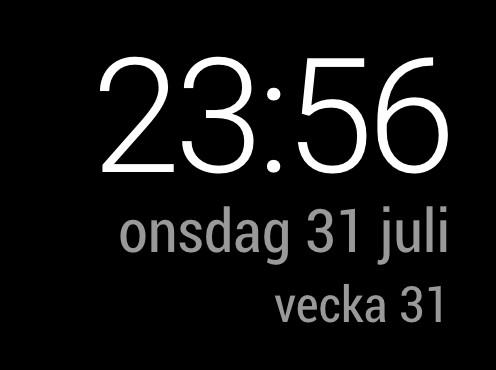
custom.css
/*
    CLOCK
*/

#module_2_clock > div > div {
    display: flex;
    flex-direction: column;
}

/* Date */
#module_2_clock > div > div > div.date {
    order: 2;
}

/* Time */
#module_2_clock > div > div > div.time {
    order: 1;

    font-family: Roboto, sans-serif;
    font-weight: 300;
    font-size: 80px;
    line-height: 75px;
    letter-spacing: -3px;
    color: #fff;
}
Also, to show the week on a separate line and make it a little bit smaller, use HTML tags within brackets when setting the date format, like this:
config.js
{
  module: "clock",
  position: "top_right",
  config: {
    displaySeconds: false,
    dateFormat: "dddd D MMMM[< br/ >< small >vecka] W[< /small >]",
  }
},
NOTE: Since the forum is sanitising HTML, remove all the spaces from the tags above in
< small >,< /small >and< br/ >to make it work.Hope this can inspire and help someone! :)

Hello! It looks like you're interested in this conversation, but you don't have an account yet.
Getting fed up of having to scroll through the same posts each visit? When you register for an account, you'll always come back to exactly where you were before, and choose to be notified of new replies (either via email, or push notification). You'll also be able to save bookmarks and upvote posts to show your appreciation to other community members.
With your input, this post could be even better 💗
Register Login