MagicMirror Forum
    • Recent
    • Tags
    • Unsolved
    • Solved
    • MagicMirror² Repository
    • Documentation
    • 3rd-Party-Modules
    • Donate
    • Discord
    • Register
    • Login
    A New Chapter for MagicMirror: The Community Takes the Lead
    Read the statement by Michael Teeuw here.

    Clean installation of MM 2.9.0 on an Orange Pi PC sbc, armbian buster

    Scheduled Pinned Locked Moved Tutorials
    24 Posts 3 Posters 9.1k Views 3 Watching
    Loading More Posts
    • Oldest to Newest
    • Newest to Oldest
    • Most Votes
    Reply
    • Reply as topic
    Log in to reply
    This topic has been deleted. Only users with topic management privileges can see it.
    • S Offline
      sdetweil @qu1que
      last edited by

      @qu1que what install process did you use?

      the base,

      my updated?
      https://forum.magicmirror.builders/topic/10171/anyone-want-to-try-updated-installer

      Sam

      How to add modules

      learning how to use browser developers window for css changes

      S 1 Reply Last reply Reply Quote 0
      • qu1queQ Offline
        qu1que Project Sponsor
        last edited by

        @sdetweil your process is for raspberry? I’ve just follow these steps on orange pi PC:

        • Donwload buster server image from armbian web
        • Update & Upgrade, configure locales, etc.
        • Install full desktop from armbian-config
        • I’ve followed these steps from MM github:
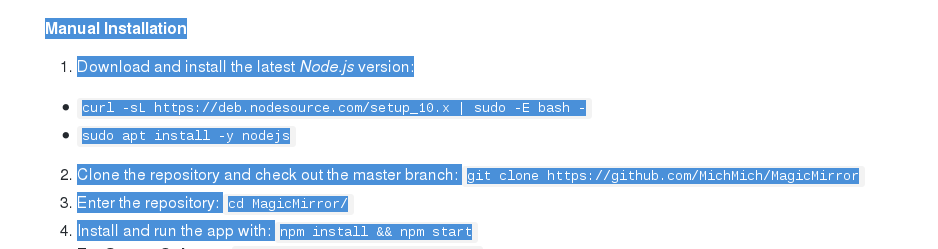
        0_1570662353756_Sen titulo.png

        • Finally rename ~/MagicMirror/config/config.js.sample to config.js

        That’s all.

        S 1 Reply Last reply Reply Quote 0
        • S Offline
          sdetweil @qu1que
          last edited by

          @qu1que ok, even more manual…

          my script does all that plus pm2. and screen saver turn off…
          any os… mac, ubuntu, pi stretch, buster, pi0 thru pi 4, odroid, jetson nano, sure others…

          Sam

          How to add modules

          learning how to use browser developers window for css changes

          qu1queQ 1 Reply Last reply Reply Quote 1
          • qu1queQ Offline
            qu1que Project Sponsor @sdetweil
            last edited by

            @sdetweil

            Oh! I’ve forgot to turn off screen saver…:anguished_face:

            Maybe tomorrow I can try your script and tell if it works too on this board.

            S 1 Reply Last reply Reply Quote 0
            • S Offline
              sdetweil @qu1que
              last edited by

              @qu1que cool, that would be good feedback

              Sam

              How to add modules

              learning how to use browser developers window for css changes

              qu1queQ 1 Reply Last reply Reply Quote 0
              • qu1queQ Offline
                qu1que Project Sponsor @sdetweil
                last edited by

                @sdetweil I’m going to try your installation script on the Orange Pi PC.

                Do I only have to launch this command?

                bash -c “$(curl -sL https://www.dropbox.com/s/rlh710ng0zwv3vp/raspberry.sh?dl=0)”

                S 1 Reply Last reply Reply Quote 0
                • S Offline
                  sdetweil @qu1que
                  last edited by

                  @qu1que Yes, that’s it

                  Sam

                  How to add modules

                  learning how to use browser developers window for css changes

                  1 Reply Last reply Reply Quote 0
                  • qu1queQ Offline
                    qu1que Project Sponsor
                    last edited by

                    Well. MM installed Perfect with @sdetweil script on an Orange Pi PC board.
                    Very good Job!

                    S 1 Reply Last reply Reply Quote 0
                    • S Offline
                      sdetweil @qu1que
                      last edited by

                      @qu1que Thx. And set the screen saver?

                      Sam

                      How to add modules

                      learning how to use browser developers window for css changes

                      1 Reply Last reply Reply Quote 0
                      • qu1queQ Offline
                        qu1que Project Sponsor
                        last edited by qu1que

                        @sdetweil yes, On installation scirpt last step, I’ve disabled screensaver. It’s a good idea to include that option.

                        S 1 Reply Last reply Reply Quote 0
                        • S Offline
                          sdetweil @qu1que
                          last edited by

                          @qu1que Mine does what the original does, just fixes and more platforms.

                          Soon as it passes test, I will submit to replace original

                          Sam

                          How to add modules

                          learning how to use browser developers window for css changes

                          qu1queQ 1 Reply Last reply Reply Quote 0
                          • qu1queQ Offline
                            qu1que Project Sponsor @sdetweil
                            last edited by

                            @sdetweil I have another sbc called “La Frite” (http://wiki.loverpi.com/sbc:libre-computer-aml-s805x-ac), I could try your script on it too. When I’ve find some free time. I’ll tell you when I can

                            S 1 Reply Last reply Reply Quote 0
                            • S Offline
                              sdetweil @qu1que
                              last edited by sdetweil

                              @qu1que That would be great! Thanks

                              Is that an arm processor?
                              Show me the output of

                              uname -a
                              

                              Sam

                              How to add modules

                              learning how to use browser developers window for css changes

                              1 Reply Last reply Reply Quote 0
                              • qu1queQ Offline
                                qu1que Project Sponsor
                                last edited by

                                @sdetweil I’m not at home now, but yes, it’s ARM. Take a look at the specifications:

                                http://wiki.loverpi.com/specs:sbc:libre-aml-s805x-specs-libre-computer-specification

                                1 Reply Last reply Reply Quote 0
                                • qu1queQ Offline
                                  qu1que Project Sponsor
                                  last edited by

                                  @sdetweil

                                  Hi! Finally I’ve get working the MM installation on “La Frite” board using your script. The only issue is that I’ve had to download your raspberry.sh script from the dropbox link and copy on home folder of that board, give execution permissions and execute it. Works fine!! (only basic installation, no modules).

                                  Thanks again for your work

                                  S 1 Reply Last reply Reply Quote 0
                                  • S Offline
                                    sdetweil @qu1que
                                    last edited by

                                    @qu1que great!, thanks… you had to download cause no network on that board?

                                    Sam

                                    How to add modules

                                    learning how to use browser developers window for css changes

                                    qu1queQ 1 Reply Last reply Reply Quote 0
                                    • qu1queQ Offline
                                      qu1que Project Sponsor @sdetweil
                                      last edited by

                                      @sdetweil

                                      Not exactly, that board has ethernet connection and so, internet connection. The problem is that when I run the command bash -c “$(curl -sL https://www.dropbox.com/s/rlh710ng0zwv3vp/raspberry.sh?dl=0)” it shows me an error similar like this (I don’t remember exactly):

                                      #!/bin/bash not found (or something similar)

                                      S 1 Reply Last reply Reply Quote 0
                                      • S Offline
                                        sdetweil @qu1que
                                        last edited by

                                        @qu1que ah. Thanks. Bash is optional on your system …hmmmm

                                        Sam

                                        How to add modules

                                        learning how to use browser developers window for css changes

                                        qu1queQ 1 Reply Last reply Reply Quote 0
                                        • qu1queQ Offline
                                          qu1que Project Sponsor @sdetweil
                                          last edited by

                                          @sdetweil

                                          no no, bash is the default shell used in that system, O.S. is debian for arm64, but maybe the problem is an syntax error, I don’t know, the thing is that using the raspberry.sh script on local works perfect

                                          S 1 Reply Last reply Reply Quote 0
                                          • S Offline
                                            sdetweil @qu1que
                                            last edited by

                                            @qu1que oh. Maybe it’s the darned quotes. Sometimes the cut/paste makes them Ms office word doc quotes, which don’t work in Linux bash shell

                                            Sam

                                            How to add modules

                                            learning how to use browser developers window for css changes

                                            qu1queQ 1 Reply Last reply Reply Quote 0

                                            Hello! It looks like you're interested in this conversation, but you don't have an account yet.

                                            Getting fed up of having to scroll through the same posts each visit? When you register for an account, you'll always come back to exactly where you were before, and choose to be notified of new replies (either via email, or push notification). You'll also be able to save bookmarks and upvote posts to show your appreciation to other community members.

                                            With your input, this post could be even better 💗

                                            Register Login

                                            • 1
                                            • 2
                                            • 2 / 2
                                            • First post
                                              Last post
                                            Enjoying MagicMirror? Please consider a donation!
                                            MagicMirror created by Michael Teeuw.
                                            Forum managed by Sam, technical setup by Karsten.
                                            This forum is using NodeBB as its core | Contributors
                                            Contact | Privacy Policy