Read the statement by Michael Teeuw here.
MMM-CountUP (COVID19 example)
-
@sdetweil yes used yours and reverted back to 3 for the month and now showing correct number of days
-
@Bromley47 so pm2 restart mmstart
-
@sdetweil that worked thanks again for your valued assistance I will get the hang of this one day (I’ve got plenty of time!)
-
@sdetweil I’m using your fixed repo on two installs of MagicMirror, both completely up to date. One shows the correct number of days, hours, minutes and seconds, and the second does not. I copied my config from the working one to the not working one to ensure they are the same, and even deleted and reinstalled your repo on the not working one just now. I’m really confused by this.

Not working on left; working on right. Date I’m basing this on is 2020-03-17. Any ideas what could be wrong?
-
@sonicgoose I think on the left is the original repo, not my updated version
Please do git remote -v from the module folder to see the source repo
-
@sdetweil You’re right, it is the original. But how? I removed the entire folder and did a git pull again from your repo!
-
@sdetweil Well I don’t get it but I just did an rm -R on modules/MMM-CountUp again and once again did a git clone from your repo and now it works fine. Thanks for your help.
-
||
|| bibaldo’s repo has integrated the fix i provided, I am closing my repo
|| May 8, 2020
|| -
Anyone know how to make the header font bigger.
I have the rest of it figured out and working just can not find the Header part.
This is what I have tried.color: orange; font-size: 60px; }AND
color: orange; font-size: 60px; } -
@plainbroke module header?
-
@sdetweil
Sorry, brain fart.
Yes module header.
Did you find something?
I looked for an hour and then tried these.
But no go…
It is still really little and gray..countUP tr td.header { color: orange; font-size: 60px; } .countUP .header { color: orange; font-size: 60px; } -
@plainbroke after all this time???
again the dev window elements tab would have shown you this in secondselements tab, click the arrow, navigate over the web page to the header you want to change, click
the html tree is there and you can see the classes etc assigned
you can test the styles in the upper right window, it will prompt you thru itfont-size:.modulename .module-header { styles } -
@sdetweil
Yea I know, but I can not for the life of me see what you see.
It is so frustrating for me, to not be able to do the dev window elements.
It looks like Chinese to me…
I will have to see if a bigger screen helps.
I will plug my laptop into the 42 inch tv screen and see if that helps any…
Plus with pages running 40+ modules it takes so long to come back around, I sometimes just give up… and try what has worked in the past…
Thanks for you patience with me. -
@sdetweil
It shows me nothing but dynamic weather in elements window. Then a bunch of .js
I am guessing I will have to stop all other modules except the one I want look at, to figure this out on my own.
Is that correct? -
@plainbroke
im not quite sure I understandusing the sample config
I used the arrow, to navigate to the header… (pointer in left pink box)
it opened the html page to that element (middle pink box, you can see the class=module-header)
you can test the styles in the top right pink box
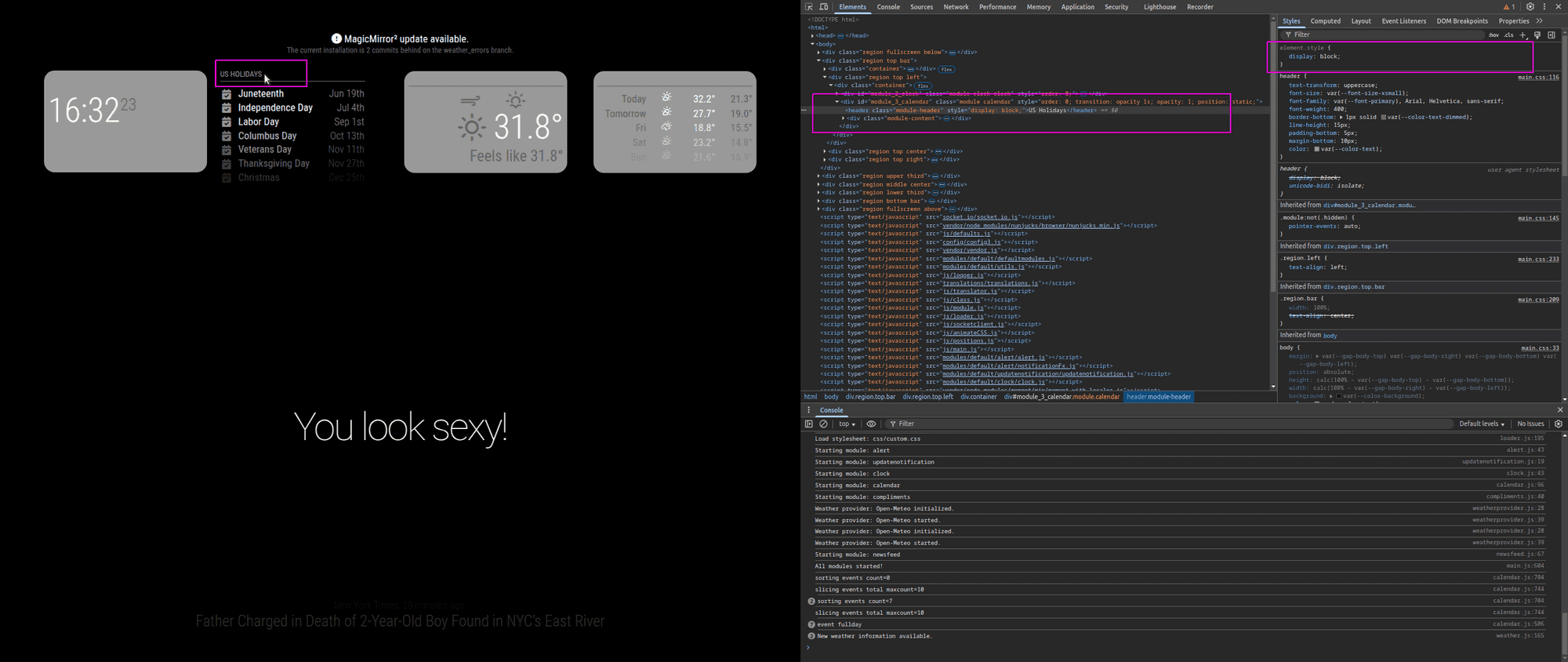
if you have something that updates frequently, (clock tick on 1 second)
you can temp disable second (displaySeconds:false in clock config) hit f5 to refresh that page the it won’t update except on minute (as an example) -
@sdetweil
Ok I found that and put it in my custom.css.CountUp .module_header{ font-size: 65px; }With no change.
What am I not seeing or doing wrong with my code. ???
Once I finally find the answer it did not work…
I am burnt out today. I will attack it again tomorrow.I have learned how to enlarge gif files. and If they put a css file I pretty much can find the correct thing to enlarge the fonts i want then. but this does not work well for me I click on the thing I want highlighted and it does for a split second then goes away never showing anything different in the html side… Maybe I should look at this from an html editor side of the file and I can see it then… Probably not able to do that though… I will keep trying to figure it out each time before I bug the forum for answers.
-
-
@plainbroke you can see the module name in the html too, in green box
css has to match
. means class=
# means id=
no prefix means html element, table, p, img, div, span …
stuff to the left of the { is the selector clause
it ‘selects’ the elements the styles between the {} apply to
-
@sdetweil
I really am burn’t out I saw that right below it that I needed to use the full module name for the header. MMM-CountDown was the same way… All I had to do was change the Down to UP and I would have had it… Oh well, at least I learned something today with the window thing… I just have too much going on, on my mirror for it to show things in the elements window…
I will install the ones I have trouble with one at a time on my spare mirror I just got running on a Le Potato. That thing is a trip to get up and running. I made an image of its base up and running, complete with MM running with no modules. that way it only takes 5 minutes or less to get it back to minimum setup.
Again thank you for your patients.
Jeff -
@plainbroke no problem… just trying to give you the tools to stop guessing.
guessing is a time and energy killer…
and it hard to work on a system with 10 or 20 modules all acting at the same time…
focus on one at a time.

Hello! It looks like you're interested in this conversation, but you don't have an account yet.
Getting fed up of having to scroll through the same posts each visit? When you register for an account, you'll always come back to exactly where you were before, and choose to be notified of new replies (either via email, or push notification). You'll also be able to save bookmarks and upvote posts to show your appreciation to other community members.
With your input, this post could be even better 💗
Register Login