MagicMirror Forum
    • Recent
    • Tags
    • Unsolved
    • Solved
    • MagicMirror² Repository
    • Documentation
    • 3rd-Party-Modules
    • Donate
    • Discord
    • Register
    • Login
    A New Chapter for MagicMirror: The Community Takes the Lead
    Read the statement by Michael Teeuw here.

    Trying to write my own Module...

    Scheduled Pinned Locked Moved Development
    31 Posts 5 Posters 21.4k Views 5 Watching
    Loading More Posts
    • Oldest to Newest
    • Newest to Oldest
    • Most Votes
    Reply
    • Reply as topic
    Log in to reply
    This topic has been deleted. Only users with topic management privileges can see it.
    • strawberry 3.141S Offline
      strawberry 3.141 Project Sponsor Module Developer @nbrenn
      last edited by

      @nbrenn

      1. yes the xmlhttprequest is also better known as ajax request
      2. for each channel a row will be created and for name and watts a column will be created with their specific values
      3. the data will still be displayed, but without any custom styling

      Please create a github issue if you need help, so I can keep track

      1 Reply Last reply Reply Quote 0
      • nbrennN Offline
        nbrenn
        last edited by

        I’m trying to display just the names where the watts that are != 0. I want both the values greater than 0 and the values less than 0 (in order to include the negative values from the solar generation).

        I attempted to modify the getDom. It is displaying every names in the .XML and shows the watts value only if it is != 0. But how do I also remove the names that are 0? The output currently looks like the following:

        Power Panel        66
        Outlets            20
        Heat Pump
        Oven   
        East Solar Panel  -70
        West Solar Panel  -50
        
        getDom: function(){
                var wrapper = document.createElement("div");
                if(!this.loaded) {
                        wrapper.innerHTML = "Loading...";
                        return wrapper;
                }
                if(this.xml !== null){
                 var table = document.createElement("table");
                 table.classList.add("xsmall", "table");
                 var channels = this.xml.getElementsByTagName("channel");
                 for(var i = 0; i < channels.length; i++){
                   var row = document.createElement("tr");
                   for(var n = 0; n < channels[i].children.length; n++){
                        if(channels[i].children[n].tagName === "name" || channels[i].children[n].tagName === "watts"){
                        var element = document.createElement("td");
                        element.classList.add(channels[i].children[n].tagName);
                        if (channels[i].children[n].textContent != 0){
        			element.innerHTML = channels[i].children[n].textContent;
        			row.appendChild(element);
        			}
                        
                        }
                   table.appendChild(row);
                   }
                 }
                 wrapper.appendChild(table);
                } else {
                        console.log("Returned no Data");
                        wrapper.innerHTML = "NO DATA";
                }
                return wrapper;
           },
        
        1 Reply Last reply Reply Quote 0
        • mochmanM Offline
          mochman Module Developer
          last edited by

          Looks like you need to modify your other if/then statement. The one you’ve modified checks both the name and watts to see if they are !=0. Since the name always !=0, it’s displayed.

          1 Reply Last reply Reply Quote 0
          • nbrennN Offline
            nbrenn
            last edited by

            It looks like the values are not updating. (The wattage values didn’t change at all overnight).

            Should the line:

            setInterval(this.getCurrentData(), this.config_interval);
            

            be changed to:

            setInterval(this.getCurrentData(), this.interval);
            

            Are we calling the interval variable in the config incorrectly?

            Thanks!

            strawberry 3.141S 1 Reply Last reply Reply Quote 0
            • strawberry 3.141S Offline
              strawberry 3.141 Project Sponsor Module Developer @nbrenn
              last edited by strawberry 3.141

              @nbrenn this.config.interval

              Please create a github issue if you need help, so I can keep track

              1 Reply Last reply Reply Quote 2
              • nbrennN Offline
                nbrenn
                last edited by nbrenn

                For posterity, I modified the if statement as follows, to remove the row items that have a 0 for wattage:

                if (channels[i].children[n].textContent != 0) {
                     element.innterHTML = channels[i].children[n].textContent;
                     row.appendChild(element);
                     table.appendChild(row);
                }
                else {
                     table.removeChild(row);
                }
                
                1 Reply Last reply Reply Quote 1
                • mochmanM Offline
                  mochman Module Developer
                  last edited by

                  Glad it all worked out for you!

                  1 Reply Last reply Reply Quote 0
                  • nbrennN Offline
                    nbrenn
                    last edited by

                    I’m working on getting historical data (my API has a function getHistoricalData). The XML looks like the following:

                    <Time Time="2016-11-03 00:00:00">
                    <channel channel="194882" name="Main Power Main Panel">
                    <kWh>0.319</kWh>
                    </channel>
                    <channel channel="194885" name="Outlet 1">
                    <kWh>0.000</kWh>
                    </channel>
                    <channel channel="194886" name="Solar Panel 1">
                    <kWh>-5.737</kWh>
                    </channel>
                    <channel channel="194887" name="Solar Panel 2">
                    <kWh>-4.877</kWh>
                    </channel>
                    

                    The difference between this XML output, and the XML output from my getCurrentData call, is that name is not it’s own element. With the old function, <name> was in brackets. Now, it is name = ....

                    Would be getDom be the same as it was for getCurrentData, or is it different since it’s name= and not it’s own <name> ... </name>

                    1 Reply Last reply Reply Quote 0
                    • mochmanM Offline
                      mochman Module Developer
                      last edited by

                      You’re going to have to modify the code to get that info. Take a look here for info on how it’s done.

                      nbrennN 2 Replies Last reply Reply Quote 0
                      • nbrennN Offline
                        nbrenn @mochman
                        last edited by

                        @mochman Thanks for sharing the link to the w3 schools page! I managed to get it working by following the example on the website. Glad I learned something in the process! Happy New Year!

                        1 Reply Last reply Reply Quote 0
                        • nbrennN Offline
                          nbrenn @mochman
                          last edited by nbrenn

                          @mochman ->

                          How would I go about formatting my table? I would like to have each column have it’s own title, like “Load” and “kWh”. Is it also possible to put them into a tabulated table?

                          My getDOM currently looks like the following:

                          getDom: function(){
                                  var wrapper = document.createElement("div");
                                  if(!this.loaded) {
                                          wrapper.innerHTML = "Loading...";
                                          return wrapper;
                                  }
                                  if(this.xml !== null){
                          	 var table = document.createElement("table");
                                   table.classList.add("xsmall", "table");
                                   var channels = this.xml.getElementsByTagName("channel");
                                   for(var i = 0; i < channels.length; i++){
                          	   var row = document.createElement("tr");
                                     for(var n = 0; n < channels[i].children.length; n++){
                          		name = channels[i].getAttribute('name');
                          		if(channels[i].children[n].tagName === "kWh"){
                                          var element = document.createElement("td");
                          		element.classList.add(channels[i].children[n].tagName);
                          		if (channels[i].children[n].textContent != 0){
                          			element.innerHTML = name + channels[i].children[n].textContent;
                          			row.appendChild(element);
                          			table.appendChild(row);
                          			}
                          		}


                                     }
                                   }
                                   wrapper.appendChild(table);
                                  } else {
                                          console.log("Returned no Data");
                                          wrapper.innerHTML = "NO DATA";
                                  }
                                  return wrapper;
                             },
                          
                             parseXML: function(xmlStr){
                                  return ( new window.DOMParser() ).parseFromString(xmlStr, "text/xml");
                             }
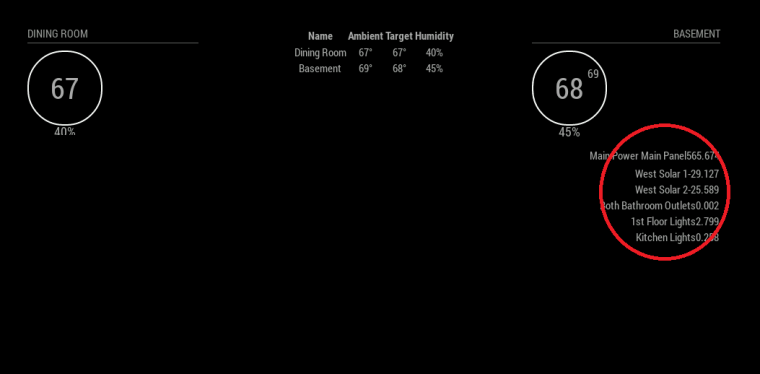
                          

                          0_1484333787480_screenshot.png

                          1 Reply Last reply Reply Quote 0
                          • mochmanM Offline
                            mochman Module Developer
                            last edited by

                            You should just need to put

                            var row = document.createElement("tr");
                            var header = document.createElement("th");
                            var header2 = document.createElement("th");
                            header.innerHTML = "Load";
                            row.appendChild(header);
                            header2.innerHTML = "KWh";
                            row.appendChild(header2);
                            table.appendChild(row);
                            

                            before

                            var channels = this.xml.getElementsByTagName("channel");
                            

                            You can add a title by modifying your config.js file to add a header.
                            The documentation for that is here.

                            nbrennN 2 Replies Last reply Reply Quote 0
                            • nbrennN Offline
                              nbrenn @mochman
                              last edited by

                              @mochman Thanks a lot! I’ll take a look at the documentation and try your suggestion.

                              Have a good weekend!

                              1 Reply Last reply Reply Quote 0
                              • nbrennN Offline
                                nbrenn @mochman
                                last edited by

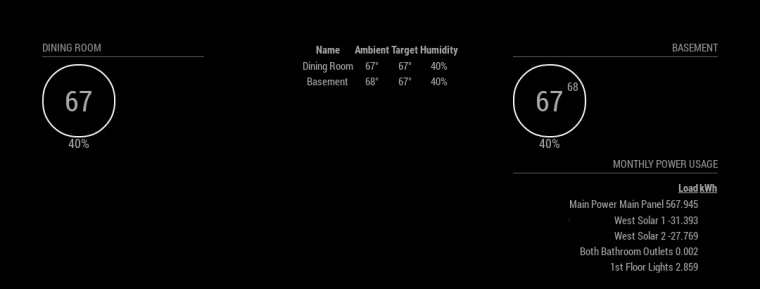
                                @mochman I have another question. As shown below in the attached image, I am appending the name to the kWh values. How do I put the name into the Load column and the numbers into their kWh column?

                                In this case, the “name” is in the same object as the channel, so that’s why I extracted it the way I do in my code… I have the name as a variable, but I can’t seem to put it into it’s own column.
                                0_1484344461715_loadkhw2 (1).jpg

                                Code:

                                   getDom: function(){
                                        var wrapper = document.createElement("div");
                                        if(!this.loaded) {
                                                wrapper.innerHTML = "Loading...";
                                                return wrapper;
                                        }
                                        if(this.xml !== null){
                                	 var table = document.createElement("table");   
                                	 var row = document.createElement("tr");   
                                	 var header = document.createElement("th");
                                	 var header2 = document.createElement("th");
                                	 header.innerHTML = "Load";
                                	 row.appendChild(header);
                                	 header2.innerHTML = "kWh";
                                	 row.appendChild(header2);
                                	 table.appendChild(row);
                                
                                	 table.classList.add("xsmall", "table");
                                         var channels = this.xml.getElementsByTagName("channel");	 
                                
                                         for(var i = 0; i < channels.length; i++){	   	
                                		var row = document.createElement("tr");
                                           for(var n = 0; n < channels[i].children.length; n++){
                                		name = channels[i].getAttribute('name');
                                		if(channels[i].children[n].tagName === "kWh"){
                                                	var element = document.createElement("td");
                                			element.classList.add(channels[i].children[n].tagName);
                                		if (channels[i].children[n].textContent != 0){
                                			element.innerHTML = name + " " + channels[i].children[n].textContent;
                                
                                			row.appendChild(element);
                                			table.appendChild(row);
                                			}
                                		}          	   
                                           }
                                         }
                                         wrapper.appendChild(table);
                                        } else {
                                                console.log("Returned no Data");
                                                wrapper.innerHTML = "NO DATA";
                                        }
                                        return wrapper;
                                   },
                                
                                1 Reply Last reply Reply Quote 0
                                • nbrennN Offline
                                  nbrenn
                                  last edited by

                                  I am trying to begin the next iteration of my module.

                                  I have the real-time energy usage, and monthly power usage being displayed in a list in the top left and right corners of my mirror.

                                  I am hoping to do something similar to the following:

                                  • Take a value from my Monthly Usage, and then display it in the center of my mirror with a sentence like, “Your monthly power usage is: XXX Watts”.

                                  Since this monthly energy usage module is in the top right of my mirror, how would I extract a value or variable from that module and then display it into the center of the mirror.

                                  So basically, I have a long list of power usages being displayed on my mirror, but I would like to display a sentence or two about that data on another part of my mirror - extracting a value from the module and displaying it in the center of the mirror. Can this be done using the same .js code in the module, and just modifying the .css?

                                  strawberry 3.141S 1 Reply Last reply Reply Quote 1
                                  • strawberry 3.141S Offline
                                    strawberry 3.141 Project Sponsor Module Developer @nbrenn
                                    last edited by

                                    @nbrenn the easiest solution without messing with the css around is to create a second module, which is litening on the broadcasts you will send with the data in it from your module you already have

                                    Please create a github issue if you need help, so I can keep track

                                    1 Reply Last reply Reply Quote 2

                                    Hello! It looks like you're interested in this conversation, but you don't have an account yet.

                                    Getting fed up of having to scroll through the same posts each visit? When you register for an account, you'll always come back to exactly where you were before, and choose to be notified of new replies (either via email, or push notification). You'll also be able to save bookmarks and upvote posts to show your appreciation to other community members.

                                    With your input, this post could be even better 💗

                                    Register Login

                                    • 1
                                    • 2
                                    • 2 / 2
                                    • First post
                                      Last post
                                    Enjoying MagicMirror? Please consider a donation!
                                    MagicMirror created by Michael Teeuw.
                                    Forum managed by Sam, technical setup by Karsten.
                                    This forum is using NodeBB as its core | Contributors
                                    Contact | Privacy Policy