Read the statement by Michael Teeuw here.
Creating Custom Voice Commands for Hello-Lucy...?
-
Being my first foray into the world of Magic Mirror, I’ve been having a blast customizing everything for the mirror I’m building for my girlfriend for her birthday. After some tinkering, I finally got the Hello-Lucy module up and running with custom colors, sounds and text with some ‘trial and error’ on various snippets of code. While checking out the contents of every single file in the module’s directory, I came across the .lm and .dic files, as well as the “checkCommands.json”, “sentences.json” and “words.json” files. If I’m not mistaken, there should be a way to create custom voice commands with these files and the help of the website http://www.speech.cs.cmu.edu/tools/ which according to the header in the .lm file was originally used to create the specific voice commands used in the module…does that sound about right to anyone? I know the github includes a guide for adding modules but it doesn’t cover new words or commands using more than two words (only the ‘show/hide’ pairs are listed) and something tells me that edits to other .js files are needed as well to prompt the execution of new commands…
In my attempt thus far, I went to the site I linked above and input new words to generate the content to be included in both the .lm and .dic files but when I inserted them where they seemed like they should go and added new commands in the “checkCommands.json” file, it broke Lucy. In a panic, I reverted all three files to their previous state.
Basically, I want to add new ways of implementing the same command - for example: instead of saying “show compliments” and “hide compliments” I want to be able to say “cheer me up” and “thanks, I feel better”, respectively. I’d also like to add a few new ways of saying certain words to get a better ‘catch’ during the recognition process, which should theoretically improve the success rate. As an example - and this will make zero sense to anyone that hasn’t looked at the .dic file before - the word “history” is represented phonetically as both [HH IH S T ER IY] and [HH IH S T R IY], the first being said as ‘his-stir-ee’ and the second as “hiss-tree” to account for two different ways one may say the word. However, I believe that adding [HH IH S T AR IY] and [HH IH S T AO IY] (spoken as ‘his-star-ee’ and ‘his-story’) would broaden the ability to recognize the word. And I also think that just adding that to the .dic file should cover the alternate ways of saying words.
Anyway, this may either be the start of a long and fruitful discussion or someone who already knows all of this will chime in and help with some direction. Either way, I’m happy to be a part of this community finally (been stalking for a month now while waiting for all the stuff I ordered to arrive).
-
Well, I can certainly add some custom commands for you (4 word maximum) but what result are you looking for? “Cheer me up” would do what? All Lucy does is send SHOW/HIDE notifications.
Know that Lucy does struggle with certain accents and will never be as accurate as an Echo or Google Home.
I will do what I can for you but I wasn’t planning on doing anything major to Lucy. I will consider accepting a PR but I suggest you inform me first before you do any work so there is no miscommunication.
-
@Mykle1 Thanks for your response, I was hoping I would hear from you! I’m not looking to add any additional functionality per se, or even to be able to show/hide new modules - I mainly would like to expand the word/sentence list that is used to show and hide modules already included in the list of modules Hello-Lucy can show/hide.
So to answer your question, one example is that I would like to be able to say “cheer me up” in order to show the compliments module then say “thanks I feel better” to hide it again. And ideally, I would be able to add other more unique phrases to show and hide other modules already in the list rather than say “show” and “hide” before every one.
As the saying goes, “give a man a fish and he’ll be fed for a day, teach a man to fish and he’ll be fed for life” - and in that spirit, I’m mainly trying to figure out:
a) how the Hello-Lucy module accomplishes the show/hide tasks and
b) which files do what within that functionality
so I can copy paste existing code and change it up to do this. I’m not proficient at coding but I know enough to be able to figure out how lines relate to each other and other files to some degree. I think I’ve figured out which files do what and how to generate new content for the .lm and .dic files using the tools on the http://www.speech.cs.cmu.edu/tools/ website…I just need a bit of direction to know which lines of code do what so I can expand the word/sentence list.However, from what you said, it sounds like it is programmed to work based on using the specific combination of “show” or “hide” and then a keyword for each module so it may not be so easy to add phrases too different from this - in other words, it may be easy to add the phrase “show TIME” and “hide TIME” to show/hide the clock (instead of ‘show clock’ and ‘hide clock’) but it may not be so easy to add the phrase 'what time is it" to show the clock module. The reason I think it may still be possible is that there are other phrases in the code like “go to sleep” and “please wake up” which means it should be relatively simple to use other phrases to show and hide modules rather than every show/hide command to require “Show” or “Hide” at the beginning. Does that make sense?
I guess I’m mainly looking to understand how all the files work together so that I can fiddle around with them on my end and try to change things up a bit but depending on how everything works, this may not be such an easy task for me. The way I see it, the functionality to show and hide modules is present and the functionality to understand phrases (up to four words) is present - I’d like to combine them in different ways so I can add as many custom commands as I see fit to perform the same tasks already present in the code.
-
@Doctor0ctoroc so, lucy uses the pocketsphinx_continuous_node model, which returns text strings from the sound wav reco, using the open source (carnagie mellon) sphinx engine.
reco is nothing magic, is brute force compare signals against anticipated models (examples).
now, the MM module major function is run in the browser, and due to all kinds of restrictions, physical and security,
the browser cannot directly access a lot of stuff. (files, hardware…)
(if I get the image editor on Linux to work , i’ll finish the text, but the notifications go to all modules,
the SOCKET notifications only between module and helper… if helper sends and there is more than one browser connected, ALL browsers get the message at once)
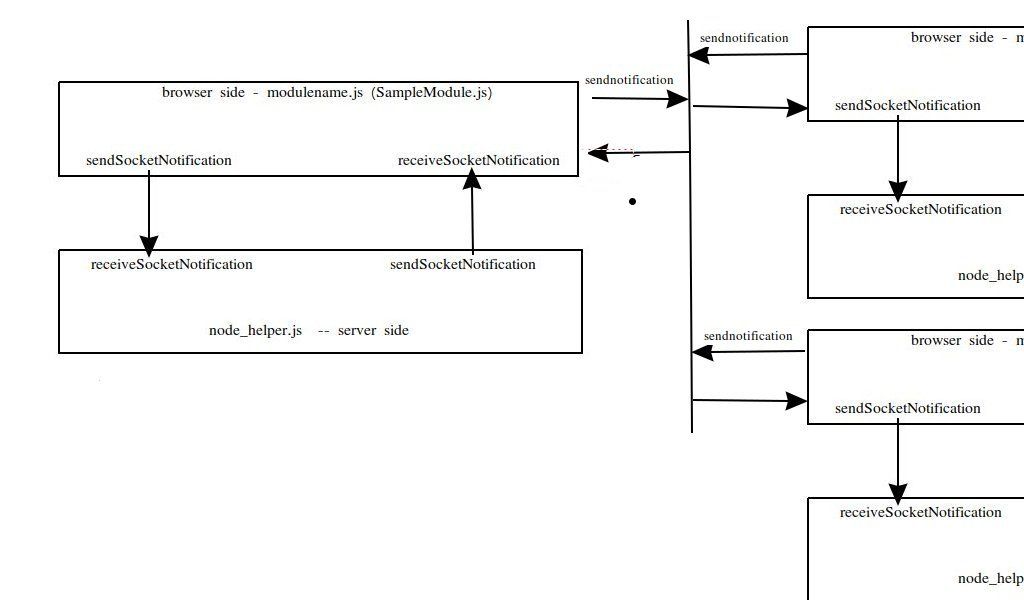
module looks like this, with another off to the side
in the MM model, there is a server side component (node_helper) which CAN access files and hardware etc…
so, the helper interfaces to the voice reco module and then sends the words up to the browser component (we call it the modulename.js) cause its filename matches the module name
MM passes the config to the modulename.js, and if there is a helper, and it needs info from the config, the modulename.js sends it down to the helper sometime
the pocketsphinx library interfaces to the software that interfaces to the mic, so all that is hidden except for the config.
the library is looking for ‘hotwords’…we once recorded EVERY sound and passed it to the server for processing(under powered local systems), this really put load on the networks, and there are security and privacy concerns… so now we listen for the hotword (‘hey you’, ‘alexa’, ‘computer’, whatever) and then start capturing the short phrases, to process)…
making a hotword a ‘phrase’ makes accurate detection of ALL the sounds a lot more difficult.
-
@sdetweil Thanks for the breakdown. So does the pocketsphink library have a particular set of full words already defined (ie no new words can be added on our end) and does it compare specific combinations of phonetic symbols to that library to determine what words are being spoken or does the engine strictly recognize phonetic symbols and it can recognize any word as long as that word is associated with a locally defined string of phonetic symbols?
In other words, does the library already have the word “history” and it is defined by specific combinations of phonetic symbols so when it detects any of those combinations it ‘hears’ the word “history” or does it simply ‘listen’ for symbols in the phonetic alphabet and upon hearing a combination defined anywhere (in the .dic file, for example), it can ‘hear’ the word? Based on the fact that “Jarvis” is a word already recognized by the Hello-Lucy module, I would think that is a unique enough word that it wouldn’t be included in a full library of all words that sphinx can recognize and that in order to recognize when a user says “Jarvis”, it would have to work by picking up the combination of phonetic symbols that represents the word (in the .dic file it appears as JH AA R V AH S).
If this is the case, then as long as the tools on the sphnx website are used to generate the content in the .dic and .lm files (I assume the .lm file works in conjunction with the .dic file in terms of recognizing phonetic symbols), new words should be able to be added to those files for use with Hello-Lucy. Then, it would just be a matter of adding the code to the relevant .js and .json files included with Hello-Lucy to determine the commands associated with those words and certain combinations of them with any other words defined in the .lm and .dic files. Looking at the code for Hello-Lucy’s functionality, it appears that the words.json and sentences.json files define full words and phrases used in commands, then the primary .js file issues commands based on those.
Am I on the right track or am I missing something?
-
@Doctor0ctoroc the tool uses a compiler of sorts to build the dictionary and language model
this is an unlimited vocabulary voice reco engine.you can make is a limited vocabulary type by changing the dictionary
see the lmtool info
http://www.speech.cs.cmu.edu/tools/FAQ.html -
@sdetweil Okay cool - so it does seem like the tool generates pronunciations (strings of phonetic symbols) based on a dictionary of actual words but can also create pronunciations for new words (like proper names, eg Jarvis) so long as they are not too complicated (or over 35 characters) - however, it seems that it is less reliable to create pronunciations based on uncommon words than it is to create pronunciations for existing words. And the tool is also used to create complete sets of words to be referenced locally, if I’m not mistaken. This would mean that I can theoretically create a text file including all of the new words I want to add and upload it to both the lmtool and lextool, then I would add the output content to the .lm and .dic files included with Hello-Lucy. I think…
I may just create copies of all the related files in Hello-Lucy and do some experimenting with the option to revert back to the copied files.
-
@Doctor0ctoroc yep, you got it
-
@sdetweil said in Creating Custom Voice Commands for Hello-Lucy...?:
@Doctor0ctoroc yep, you got it
Yes! So now that I got a handle on that, I need to figure out how the .js and .json files utilize the local sphinx library.
@Mykle1 - can you lend a hand here? From the looks of it, I believe that the words.json and sentences.json files contain a reference list of all of the words and phrases used in the checkCommands.json file, and they’re referenced by the node_helper.js and Hello-Lucy.js files to implement the hide/show commands, yes? Something like that? A basic hierarchy should suffice to point me int he right direction.
-
@Doctor0ctoroc its builds the library from the sentences and words files…
then calls lmtool to generate the lm & dic files -
@sdetweil So are the .lm and .dic files generated in real time? Like, does whatever is added to the words.json and sentences.json files propagate into the .lm and .dic files or are you saying that both the words and sentences files are the basis for generating the .lm and .dic files through the sphinx tool?
-
@Doctor0ctoroc on module startup
-
@Doctor0ctoroc module sends a message to node_helper “START”
and then u can read the code in node_helper -
@sdetweil Ah, that’s fantastic. That would explain why when I changed “Hello Lucy” to “Hey Jarvis” in the Hello-Lucy.js and config file, it was added to the .dic and .lm file…I thought it was included in there from the get go (assuming the code was written to include an alternative, ‘familiar’ AI name that users might want) but all this time, it was my change of the code that put it in there - and it totally works when I say “Hey Jarvis” instead of “Hello Lucy”!
So there’s no need to even edit the .lm or .dic files directly then?
-
@Doctor0ctoroc no, they are generated each time the module starts
-
I think, for your purposes, you can simply do this, although I have not tested it:
-
In sentences.js file add your command(s). “CHEER ME UP” and “THANKS I FEEL BETTER” (MUST ALL BE CAPS)./
-
In checkCommands.json Sample -->
["SHOW","COMMAND","","","true","MMM-ModuleName",""],
["HIDE","COMMAND","","","false","MMM-ModuleName",""],
Changed to
["CHEER","ME","UP","","true","compliments",""],
["THANKS","I","FEEL","BETTER","false","compliments",""],
This should now make sense to you. I used the hide/show pairs mostly because I found the success rate higher when using shorter commands. I’ve “learned” how to talk to Lucy so my success rate is pretty darn good. I know others that have struggled for success.
Using what @sdetweil has told you and this simple format above, you should be on your way.
-
-
Ok, I just tested this and it works. You may find some commands work better than others. You’ll have to do some experimenting.
-
@Doctor0ctoroc said in Creating Custom Voice Commands for Hello-Lucy...?:
when I changed “Hello Lucy” to “Hey Jarvis” in the Hello-Lucy.js
You would only need to change it in the config entry
-
@Mykle1 said in Creating Custom Voice Commands for Hello-Lucy...?:
@Doctor0ctoroc said in Creating Custom Voice Commands for Hello-Lucy...?:
when I changed “Hello Lucy” to “Hey Jarvis” in the Hello-Lucy.js
You would only need to change it in the config entry
Ah, good to know so I’m not being redundant. And thanks for the direction on the coding, that helps a lot! Do I need to add the extra words to the words.json file as well?
-
@Doctor0ctoroc said in Creating Custom Voice Commands for Hello-Lucy...?:
Do I need to add the extra words to the words.json file as well?
No sir. Re-read the instructions in my post above


Hello! It looks like you're interested in this conversation, but you don't have an account yet.
Getting fed up of having to scroll through the same posts each visit? When you register for an account, you'll always come back to exactly where you were before, and choose to be notified of new replies (either via email, or push notification). You'll also be able to save bookmarks and upvote posts to show your appreciation to other community members.
With your input, this post could be even better 💗
Register Login