MagicMirror Forum
    • Recent
    • Tags
    • Unsolved
    • Solved
    • MagicMirror² Repository
    • Documentation
    • 3rd-Party-Modules
    • Donate
    • Discord
    • Register
    • Login
    A New Chapter for MagicMirror: The Community Takes the Lead
    Read the statement by Michael Teeuw here.

    MMM-Todoist

    Scheduled Pinned Locked Moved Troubleshooting
    23 Posts 4 Posters 8.4k Views 4 Watching
    Loading More Posts
    • Oldest to Newest
    • Newest to Oldest
    • Most Votes
    Reply
    • Reply as topic
    Log in to reply
    This topic has been deleted. Only users with topic management privileges can see it.
    • StoffbeuteluweS Offline
      Stoffbeuteluwe Project Sponsor
      last edited by

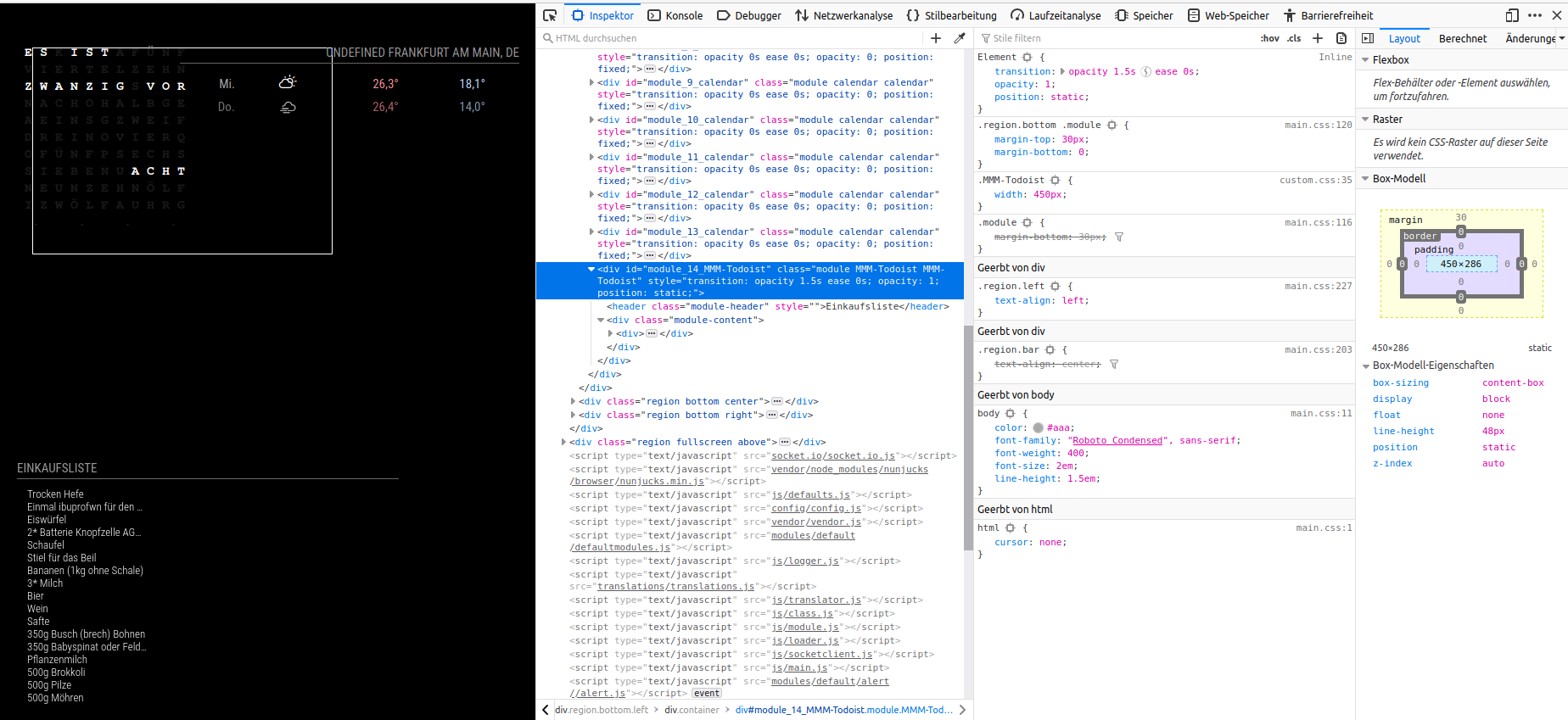
      Hello, does anybody know how to remove this empty space ?Pic1.png

      1 Reply Last reply Reply Quote 0
      • B Offline
        bdream
        last edited by

        @Stoffbeuteluwe good question as I had same in my mind.

        I added in custom.css

         .MMM-Todoist {
        	width:450px;
         }
         
         .MMM-Todoist .small {
        	font-size: 13px;
        	line-height: 15px;
         }
        
        .MMM-Todoist .priority{
        	width: 0px;
        	border-right: 0px;
         }
        

        A test without success was also with

        .MMM-Todoist .spacerCell {
            width: 0px;
        }
        

        I assume it’s about any with .divTable or .divTableCell but don’t know how to handle and I gave up :face_with_cold_sweat:

        May you find a solution :crossed_fingers:

        –
        cheers, bdream

        1 Reply Last reply Reply Quote 0
        • S Offline
          sdetweil
          last edited by

          the fastest way to learn what css needs to/can be changed, is to. open the developers window, select the elements tab and navigate the Dom to the element u want to modify.

          it’s css class tree is shown on the bottom of the dev window. nearer the element on the right.
          the individual classes are shown on the right, nearer to element on the top.
          one can add/edit/remove css entries to change the displayed behavior.

          once u figure out what u need (styles) and where (what element) it’s easy to create a custom css entry that looks like that

          Sam

          How to add modules

          learning how to use browser developers window for css changes

          1 Reply Last reply Reply Quote 0
          • B Offline
            bdream
            last edited by

            oh Sam! what you are explaining here (…select the elements tab and navigate the Dom…), sound all Greek to me :man_zombie:
            How to do it via ssh?

            –
            cheers, bdream

            S 1 Reply Last reply Reply Quote 0
            • S Offline
              sdetweil @bdream
              last edited by

              @bdream cannot. must do. on mirror app

              Sam

              How to add modules

              learning how to use browser developers window for css changes

              1 Reply Last reply Reply Quote 0
              • B Offline
                bdream
                last edited by

                sounds that the blocking point.
                lets see if I get an keyboard connectet. That will be the right way?

                –
                cheers, bdream

                1 Reply Last reply Reply Quote 0
                • B Offline
                  bdream
                  last edited by

                  @sdetweil Sam, can you please guide me a bit.
                  Just connected the keyboard but as estimated after short thinking there is nothing I can do while MM is running … but I guess I need it running.

                  –
                  cheers, bdream

                  S 1 Reply Last reply Reply Quote 0
                  • S Offline
                    sdetweil @bdream
                    last edited by sdetweil

                    @bdream

                    before starting examine the ~/MagicMirror/index.html file, this is the layout of the page, and all content is inserted into these positions (position: of module definition in config.js)

                    hit keyboard keys, ctrl, shift and letter i.

                    dev window. opens on right side of screen
                    select the tab labeled elements
                    expand the tree to locate the module content. (module position is important)

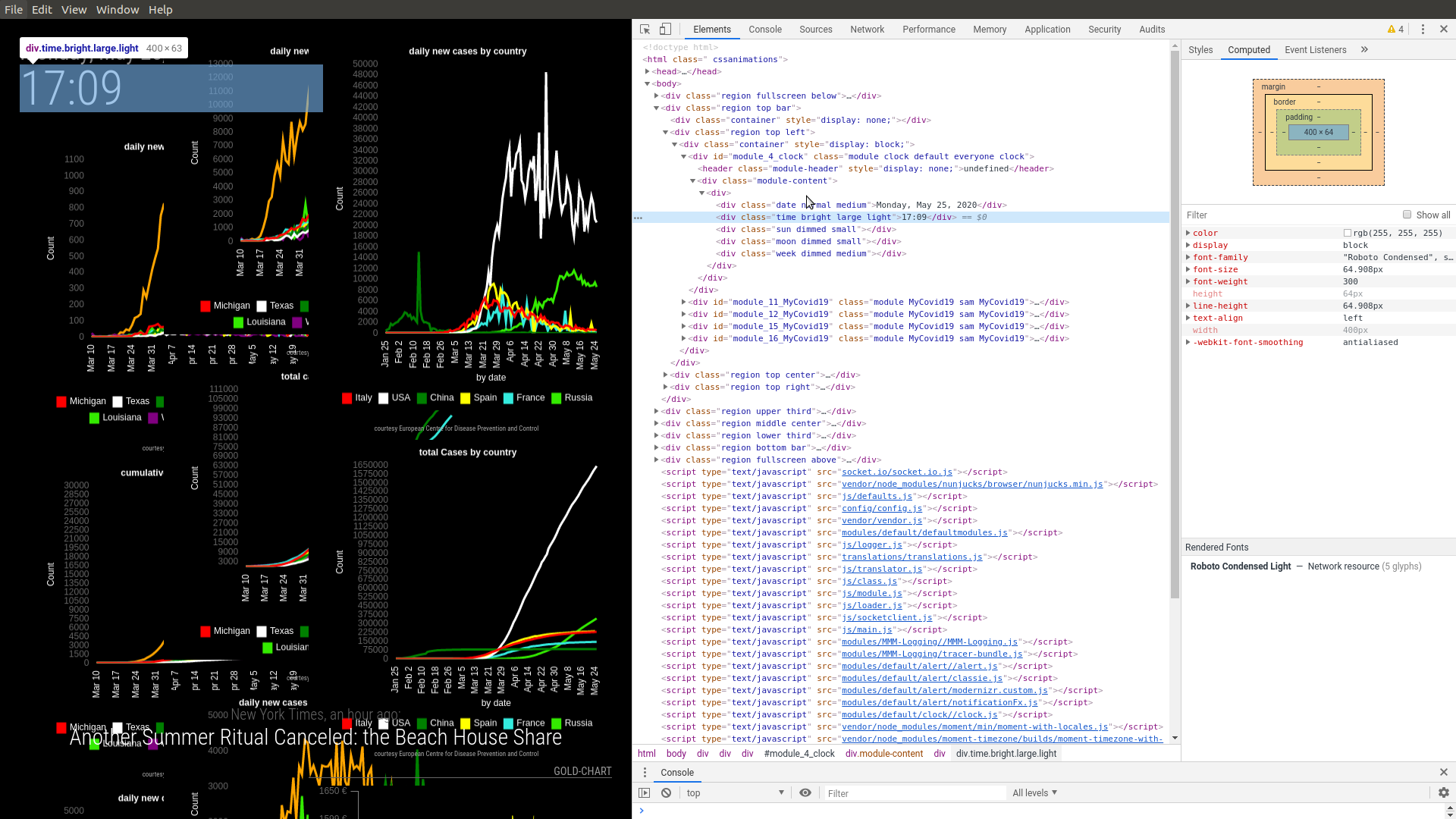
                    look at time value,
                    Screenshot at 2020-05-25 17-09-40.png

                    then select the time value in dom tree
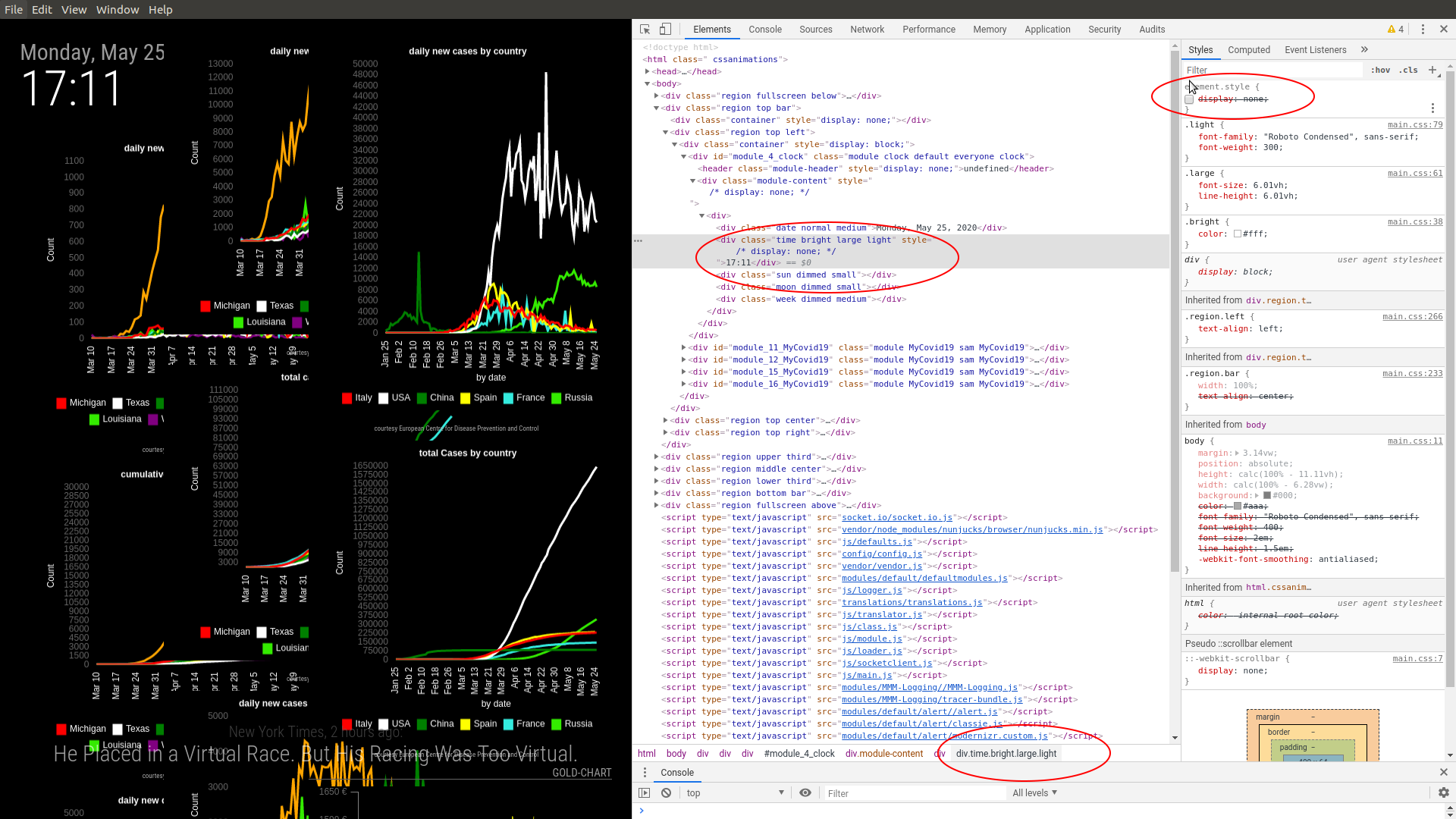
                    Screenshot at 2020-05-25 17-11-54.png

                    notice the class list, bottom of the screen circled, and the individual classes are shown on the right, top is closest to the element, bottom is closest to t main.css

                    u can edit the top right, and add element styles.

                    Sam

                    How to add modules

                    learning how to use browser developers window for css changes

                    1 Reply Last reply Reply Quote 0
                    • B Offline
                      bdream
                      last edited by

                      should “hit keyboard keys, ctrl, shift and letter i” be possible while my MM is running?
                      Doesn’t work…

                      –
                      cheers, bdream

                      S 1 Reply Last reply Reply Quote -1
                      • S Offline
                        sdetweil @bdream
                        last edited by

                        @bdream must be while mm is running
                        you can do it on a remote browser too (forgot that) using chrome

                        Windows PC to pi server

                        Sam

                        How to add modules

                        learning how to use browser developers window for css changes

                        S 1 Reply Last reply Reply Quote 0
                        • S Offline
                          sdetweil @sdetweil
                          last edited by

                          @bdream all 3 keys at once

                          Sam

                          How to add modules

                          learning how to use browser developers window for css changes

                          1 Reply Last reply Reply Quote 0
                          • B Offline
                            bdream
                            last edited by

                            @sdetweil 8f033e0d-f5e0-4e19-89cd-c47a4108de3f-grafik.png
                            such an awesome tool MagicMirror is.
                            Every time I’m in contact with this forum I learn new nice things.

                            Can’t see how to fix this the empty space mentioned by @Stoffbeuteluwe

                            –
                            cheers, bdream

                            S 1 Reply Last reply Reply Quote 0
                            • S Offline
                              sdetweil @bdream
                              last edited by sdetweil

                              @bdream keep expanding, you have the whole module content selected there, get to the little part that needs to move

                              Sam

                              How to add modules

                              learning how to use browser developers window for css changes

                              1 Reply Last reply Reply Quote 0
                              • B Offline
                                bdream
                                last edited by

                                I see what you mean.
                                It’s tricky as I use MMM-Carousel and every time I click to expand it switch back.

                                Have commented out MMM-Carousel and see that
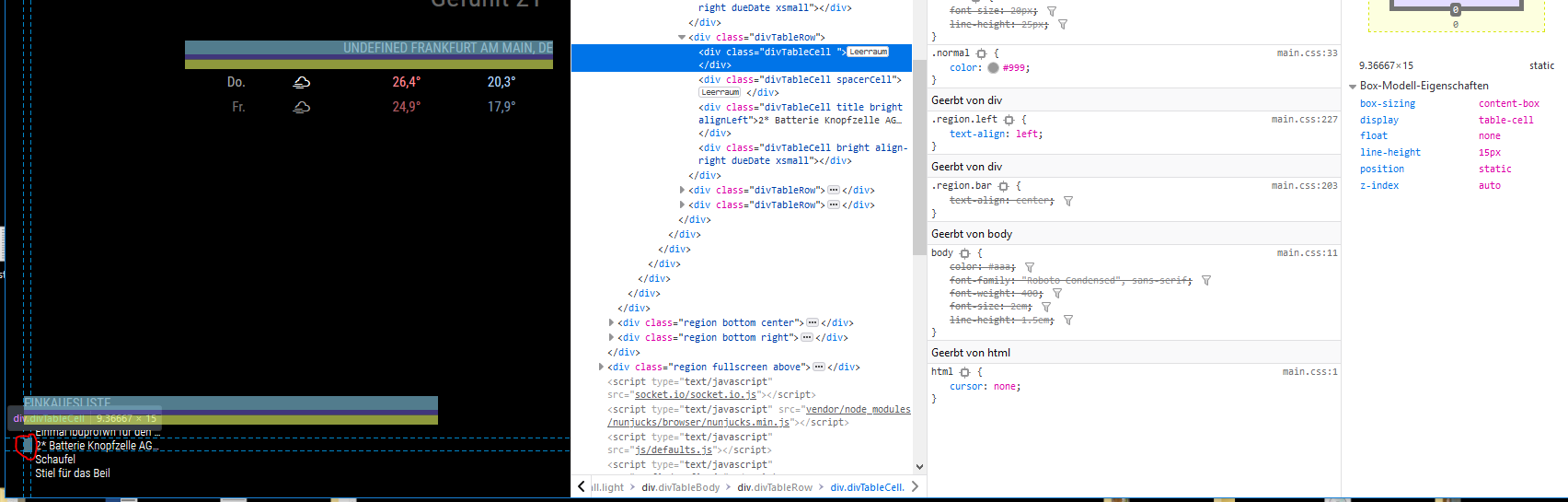
                                cec1a4c5-f39c-4aca-88b1-0c95726fc317-grafik.png

                                Don’t know how to get the red round marked off

                                –
                                cheers, bdream

                                S 2 Replies Last reply Reply Quote 0
                                • S Offline
                                  sdetweil @bdream
                                  last edited by sdetweil

                                  @bdream expand the other divTableRows

                                  Sam

                                  How to add modules

                                  learning how to use browser developers window for css changes

                                  1 Reply Last reply Reply Quote 0
                                  • S Offline
                                    sdetweil @bdream
                                    last edited by

                                    @bdream said in MMM-Todoist:

                                    It’s tricky as I use MMM-Carousel and every time I click to expand it switch back.

                                    yes, sometimes you have to just use the one module to be able to explore effectively

                                    Sam

                                    How to add modules

                                    learning how to use browser developers window for css changes

                                    1 Reply Last reply Reply Quote 0
                                    • B Offline
                                      bdream
                                      last edited by

                                      @sdetweil don’t know what exactly I’m looking for :face_with_monocle:
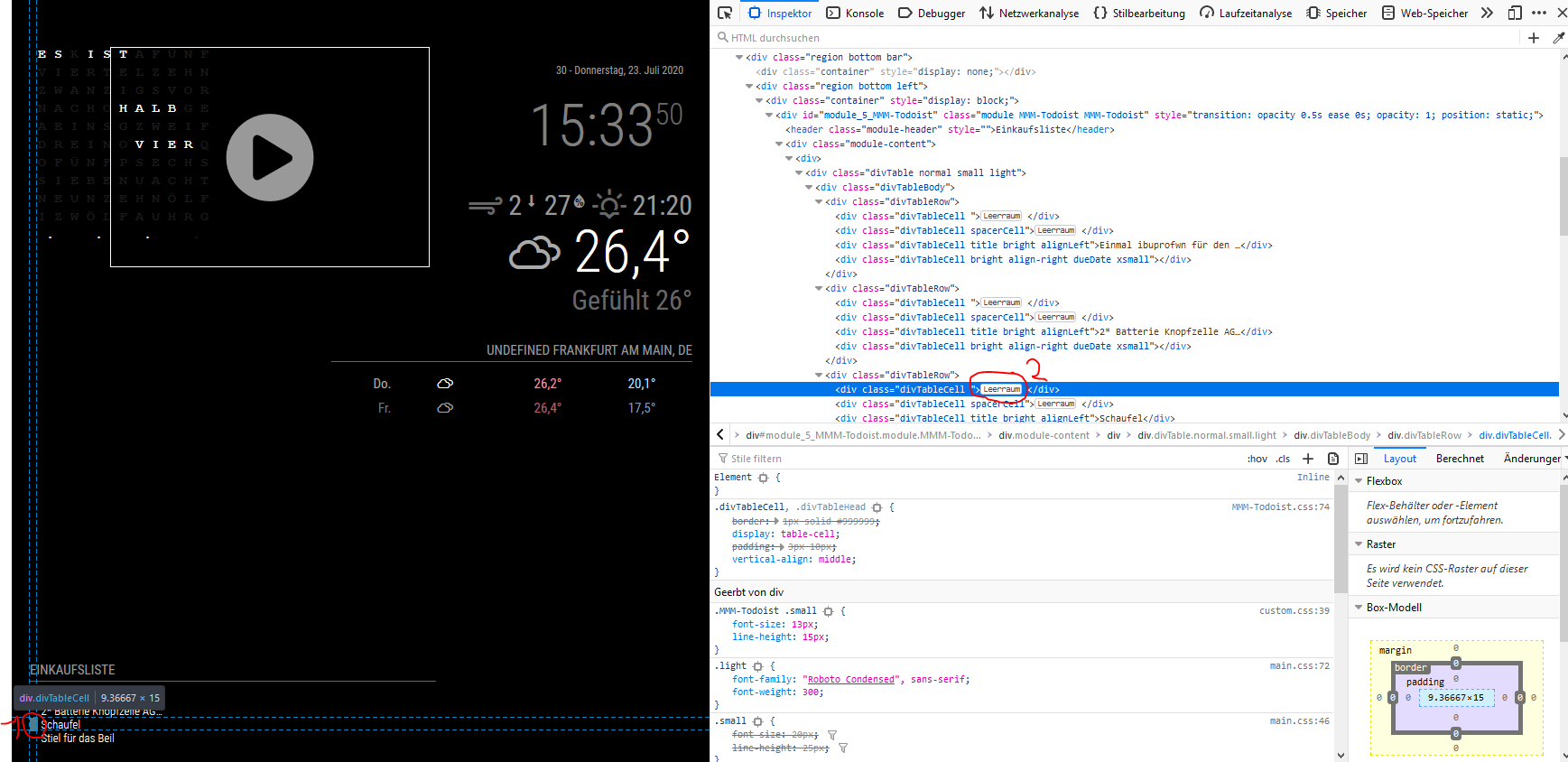
                                      b536ed9c-7d84-40db-97ea-1b5c81ac7257-grafik.png

                                      I assume 1 (marked in red 1) is exactly the space I want to get rid off.
                                      And ! seems to me related to 2 (marked in red 2) , what in english is [space]

                                      Could it be I have to do any in custom.css regarding the both lines with spacecells in it?
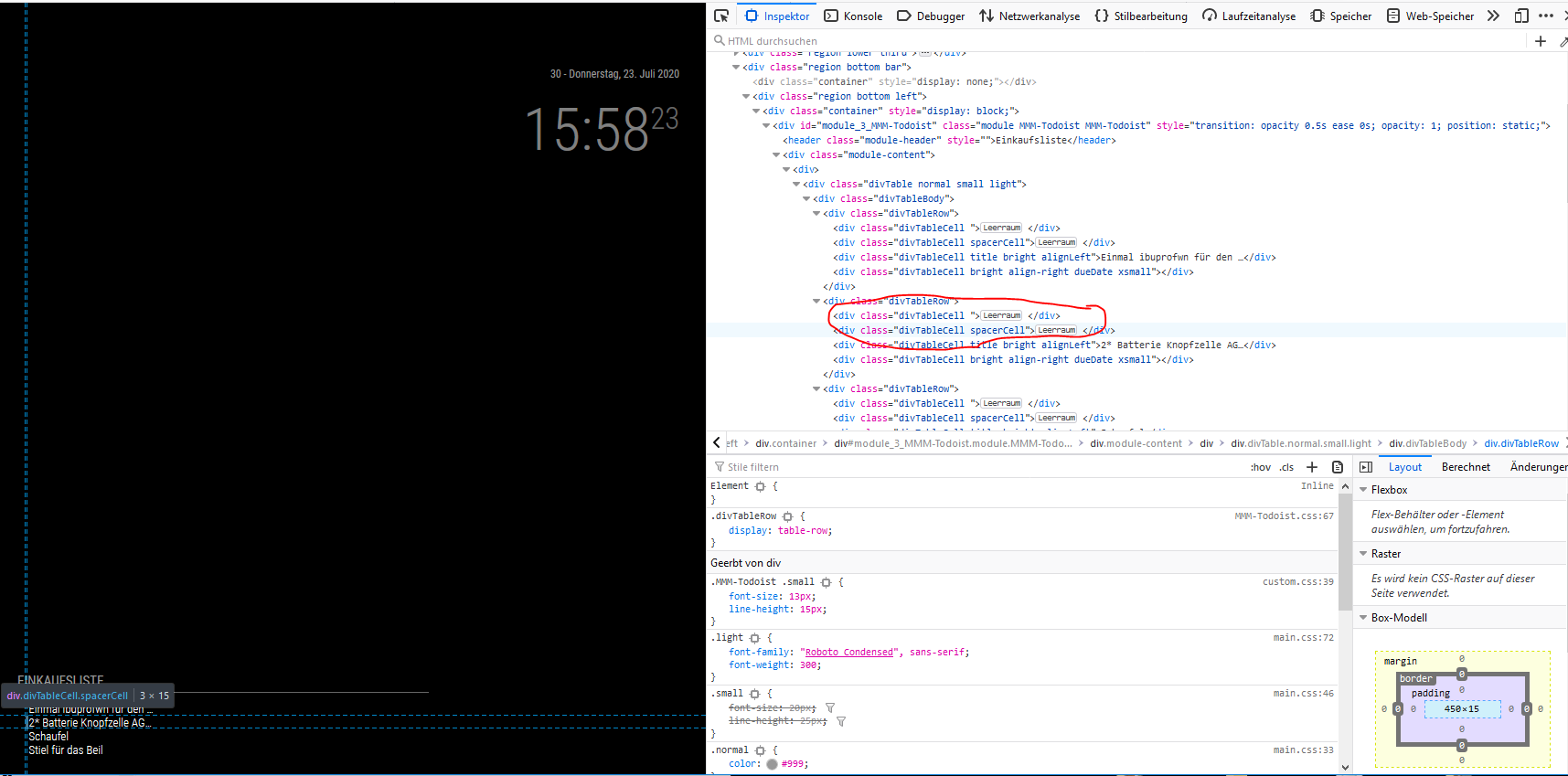
                                      b58ba976-881c-4d43-9b3d-1d4f460a1eab-grafik.png

                                      –
                                      cheers, bdream

                                      S 1 Reply Last reply Reply Quote 0
                                      • S Offline
                                        sdetweil @bdream
                                        last edited by sdetweil

                                        @bdream remember the whole point of this exercise was to find the element and figure out how to hide it.
                                        but I don’t see a spacerCell class defined anywhere. you should move the left edge of the dev window further left, to get the class display vertical… (like in my previous images)

                                        u can define a spacerCell class in custom.css and then be able to edit it here, but maybe this would be enough

                                        .MMM-Todoist .spacerCell {
                                        display: none;
                                        }

                                        Sam

                                        How to add modules

                                        learning how to use browser developers window for css changes

                                        1 Reply Last reply Reply Quote 0
                                        • B Offline
                                          bdream
                                          last edited by

                                          @sdetweil Thanks Sam! Idea was good but not the right point.
                                          I will work a bit on it and deep dive but first look shows there will nothing I can use to work with custom.css

                                          –
                                          cheers, bdream

                                          1 Reply Last reply Reply Quote 0
                                          • C Offline
                                            cbrooker
                                            last edited by cbrooker

                                            Hi All,

                                            I just saw this thread and think I can offer some assistance. I wrote and maintain the MMM-Todoist module.

                                            That space that you’re seeing is where the Todo Priority would be displayed if you set a priority.

                                            Like this (the red bar):

                                            9f14d8f5-5067-4de5-944a-9e44d60d449c-image.png

                                            If you have no need for that and want to remove the space the quickest “hack” you can do is:

                                            1. Open /modules/MMM-Todoist/MMM-Todoist.js
                                            2. Comment out these 2 lines:
                                            divRow.appendChild(this.addPriorityIndicatorCell(item));
                                            divRow.appendChild(this.addColumnSpacerCell());
                                            

                                            Line 592 and 593.

                                            1. Save and reload MagicMirror.
                                            2. Do a local commit (git commit -a)

                                            That will remove the space however, every time you update module you might have to deal with a merge conflict.

                                            More advanced:
                                            You could also fork the repo, clone the new repo into your modules folder make, the changes, commit, push. You could then pull the upstream changes when you wanted to update.

                                            1 Reply Last reply Reply Quote 0

                                            Hello! It looks like you're interested in this conversation, but you don't have an account yet.

                                            Getting fed up of having to scroll through the same posts each visit? When you register for an account, you'll always come back to exactly where you were before, and choose to be notified of new replies (either via email, or push notification). You'll also be able to save bookmarks and upvote posts to show your appreciation to other community members.

                                            With your input, this post could be even better 💗

                                            Register Login

                                            • 1
                                            • 2
                                            • 1 / 2
                                            • First post
                                              Last post
                                            Enjoying MagicMirror? Please consider a donation!
                                            MagicMirror created by Michael Teeuw.
                                            Forum managed by Sam, technical setup by Karsten.
                                            This forum is using NodeBB as its core | Contributors
                                            Contact | Privacy Policy