MagicMirror Forum
    • Recent
    • Tags
    • Unsolved
    • Solved
    • MagicMirror² Repository
    • Documentation
    • 3rd-Party-Modules
    • Donate
    • Discord
    • Register
    • Login
    A New Chapter for MagicMirror: The Community Takes the Lead
    Read the statement by Michael Teeuw here.

    How to add custom birthdays to the calendar module?

    Scheduled Pinned Locked Moved Troubleshooting
    27 Posts 4 Posters 9.0k Views 5 Watching
    Loading More Posts
    • Oldest to Newest
    • Newest to Oldest
    • Most Votes
    Reply
    • Reply as topic
    Log in to reply
    This topic has been deleted. Only users with topic management privileges can see it.
    • D Offline
      doogy_rev
      last edited by

      @sdetweil said in How to add custom birthdays to the calendar module?:

      https://devhints.io/moment

      That sounds great and yes that’s kinda what I was looking for, the month cross over sounds good, This is how I have the default where it will only show the next 5 holidays so have the birthdays work the same way (or as near as), then past birthdays for the month drop off the list
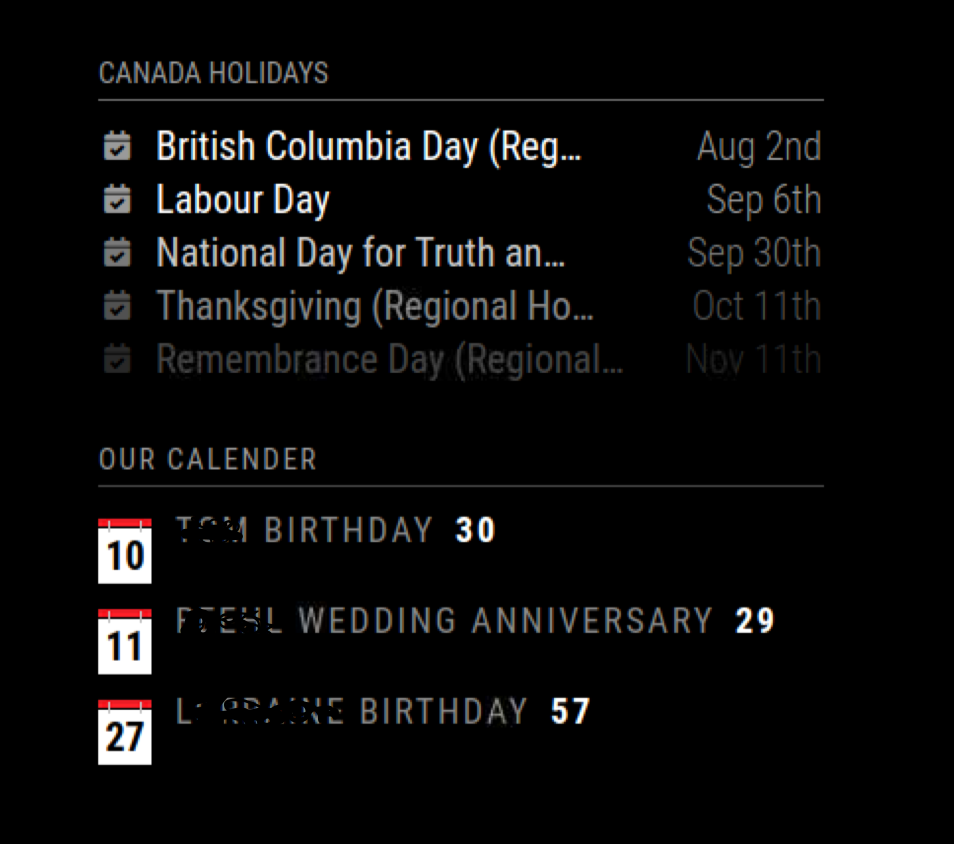
      Screen Shot 2021-07-10 at 11.07.44 AM.png

      S 1 Reply Last reply Reply Quote 0
      • S Offline
        sdetweil @doogy_rev
        last edited by

        @doogy_rev ok, git pull , review the README

        by default it operates on current month only

        Sam

        How to add modules

        learning how to use browser developers window for css changes

        1 Reply Last reply Reply Quote 0
        • D Offline
          doogy_rev
          last edited by

          Installed and working :-) Thanks for looking at this for me!

          I am going to play with the CSS and change some of the colours a bit. I did notice the following . .

          • If birthdays are shared date, then the second/third entry is in bold (see screen shot Aug 12th)

          • when you specify number of entires it adds additional, I specified 5, but 6 are showing

          • is it possible to have date aligned right and keep age after the name “doogyrev Birthday [45] Oct 1st”

          • where do I change font to not be all uppercase?
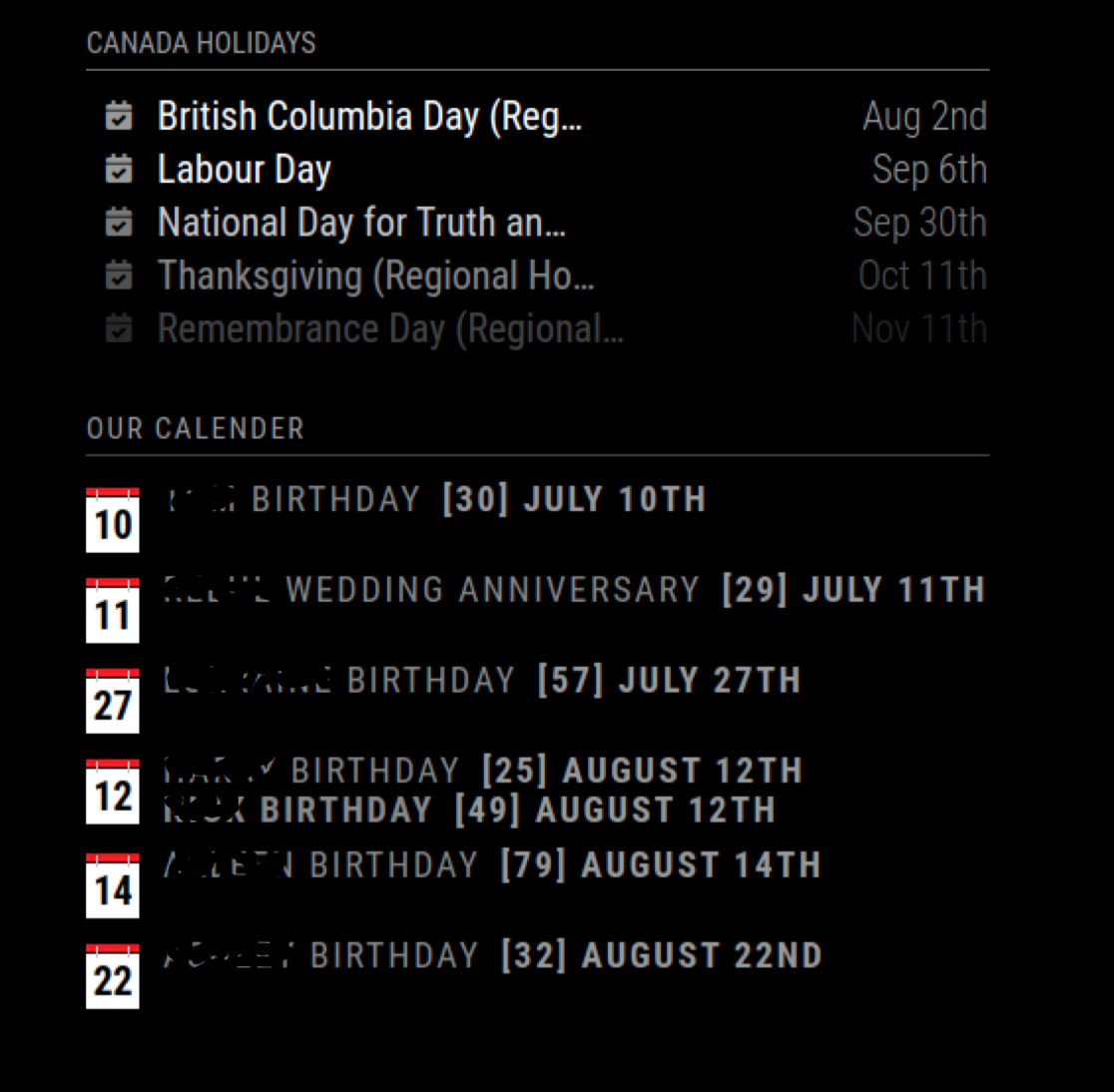
          Screen Shot 2021-07-10 at 3.14.37 PM.png

          S 2 Replies Last reply Reply Quote 0
          • S Offline
            sdetweil @doogy_rev
            last edited by sdetweil

            @doogy_rev all the stuff is in css.

            body has a transform uppercase
            this is built as a table.

            also read this
            https://forum.magicmirror.builders/topic/14862/help-with-a-couple-css-issues?_=1625955346969

            and if u change the css file, just hit f5 or ctrl-r

            Sam

            How to add modules

            learning how to use browser developers window for css changes

            1 Reply Last reply Reply Quote 0
            • D Offline
              doogy_rev
              last edited by

              Thanks Again, I appreciate the help and assistance!!

              I will check that out. I am what I class as a non-technical-technical . . . i.e I know a small amount, probably enough to be dangerous . .TBH, I am just chuffed I have managed to maintain my Mirror for the last 5years . . lol

              I might be back if I can’t work it out :-)

              S 1 Reply Last reply Reply Quote 0
              • S Offline
                sdetweil @doogy_rev
                last edited by

                @doogy_rev no problem…
                this last with the date next to the age, they are in teh same table cell, so I might have to make another column

                I didn’t do the css for this.

                Sam

                How to add modules

                learning how to use browser developers window for css changes

                1 Reply Last reply Reply Quote 0
                • D Offline
                  doogy_rev
                  last edited by

                  I figured they were in the same cell since the colours are linked, but that’s beyond my feeble abilities …haha

                  This is where I am at, going to make some new icons to match the default, I found the one used, so just need to change the colours.
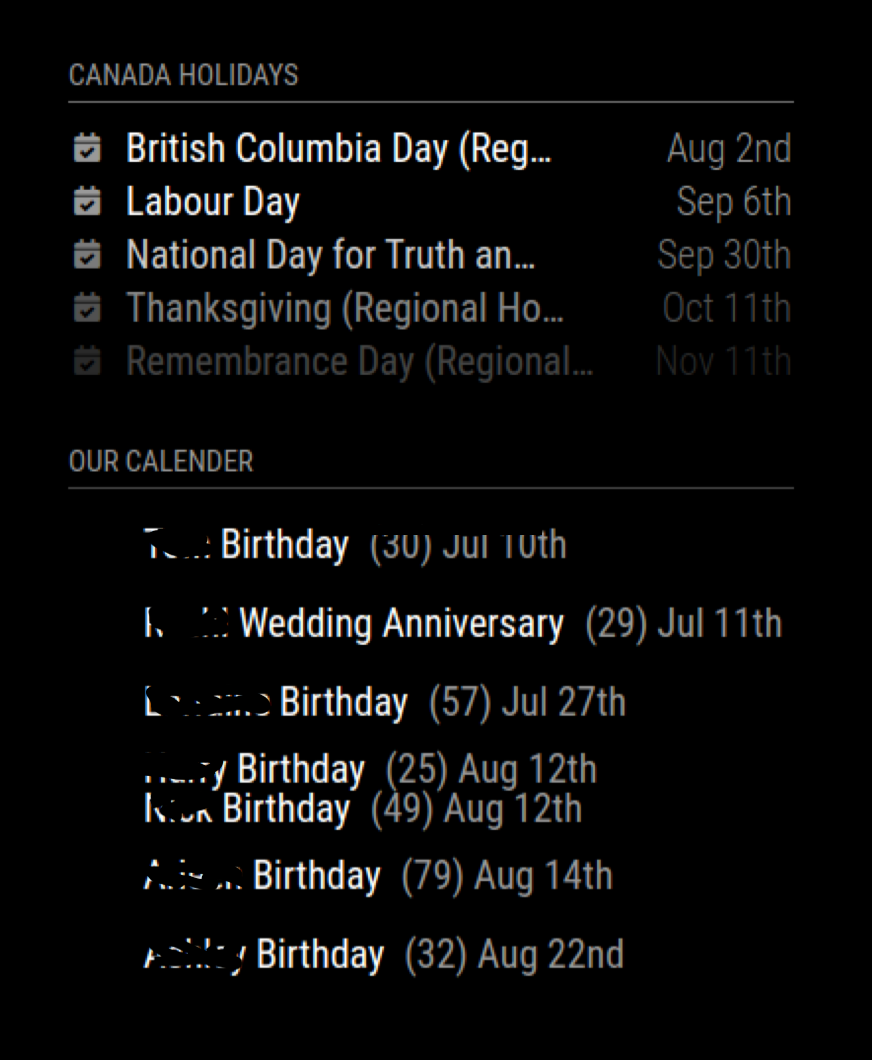
                  Screen Shot 2021-07-10 at 6.21.19 PM.png

                  how do I change the cell height? I removed the existing icon and the cell height stayed the same? even changing the vertical height in the css made no difference. Also I assume the “Aug 12th” double entry’s are in the same cell, is it possible to put them in individual?

                  S 1 Reply Last reply Reply Quote 0
                  • S Offline
                    sdetweil @doogy_rev
                    last edited by

                    @doogy_rev yeh, two on the same day, should only have the date once…

                    for width I would look at google table cell width via css.

                    Sam

                    How to add modules

                    learning how to use browser developers window for css changes

                    1 Reply Last reply Reply Quote 1
                    • S Offline
                      sdetweil @doogy_rev
                      last edited by

                      @doogy_rev fixed double date on same day and count plus 1

                      git pull

                      Sam

                      How to add modules

                      learning how to use browser developers window for css changes

                      D 1 Reply Last reply Reply Quote 0
                      • D Offline
                        doogy_rev @sdetweil
                        last edited by

                        @sdetweil

                        Unless I have done something dumb (which is entirely possible) this is whatI get, Count +1 seems to work (I am 1 entry less) but double date just removed the date not adding entry to a new table line.
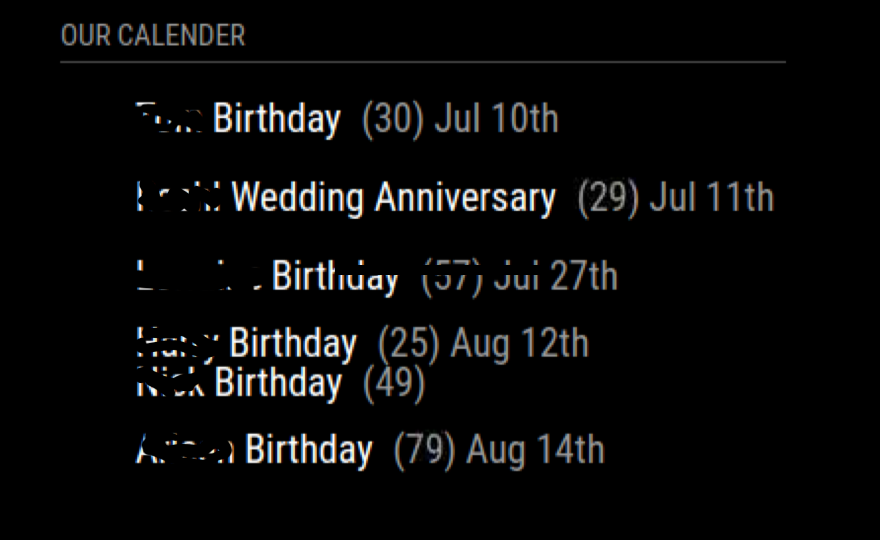
                        Screen Shot 2021-07-10 at 7.56.36 PM.png

                        S 2 Replies Last reply Reply Quote 0
                        • S Offline
                          sdetweil @doogy_rev
                          last edited by

                          @doogy_rev correct, the second person on the same birthday doesn’t get the date.

                          Sam

                          How to add modules

                          learning how to use browser developers window for css changes

                          1 Reply Last reply Reply Quote 0
                          • S Offline
                            sdetweil @doogy_rev
                            last edited by

                            @doogy_rev does this look better…age and date split into separate columns

                            names in one column,
                            age in next
                            and date in next (only if dateformat is specified)

                            no changes to css

                            Screenshot at 2021-07-11 08-41-38.png

                            Sam

                            How to add modules

                            learning how to use browser developers window for css changes

                            D 1 Reply Last reply Reply Quote 0
                            • D Offline
                              doogy_rev @sdetweil
                              last edited by

                              @sdetweil that looks awesome, exactly how I was wanting it to look

                              D 1 Reply Last reply Reply Quote 0
                              • D Offline
                                doogy_rev @doogy_rev
                                last edited by

                                although, thinking about it would it look better if of the age was directly following the name, and the date is fixed to the far right . .

                                doogyrev (47)___________Oct 12th
                                Dave (26)________________Jan 1st

                                vs

                                doogyrev______(47) Oct 12th
                                Dave
                                _____(26)______Jan 1st

                                If that ^^ makes sense?

                                S 1 Reply Last reply Reply Quote 0
                                • S Offline
                                  sdetweil @doogy_rev
                                  last edited by sdetweil

                                  @doogy_rev I didn’t change the css, but the age is now in a separate td, also sep from the date

                                  so try this

                                  git pull

                                  also ACTUALLY fixed the count… I was counting things that wouldn’t display… oops…

                                  Sam

                                  How to add modules

                                  learning how to use browser developers window for css changes

                                  D 1 Reply Last reply Reply Quote 0
                                  • D Offline
                                    doogy_rev @sdetweil
                                    last edited by

                                    @sdetweil This is what I have now…

                                    Screen Shot 2021-07-11 at 7.31.15 AM.png

                                    just wondering if this makes more sense? (quick photoshop)
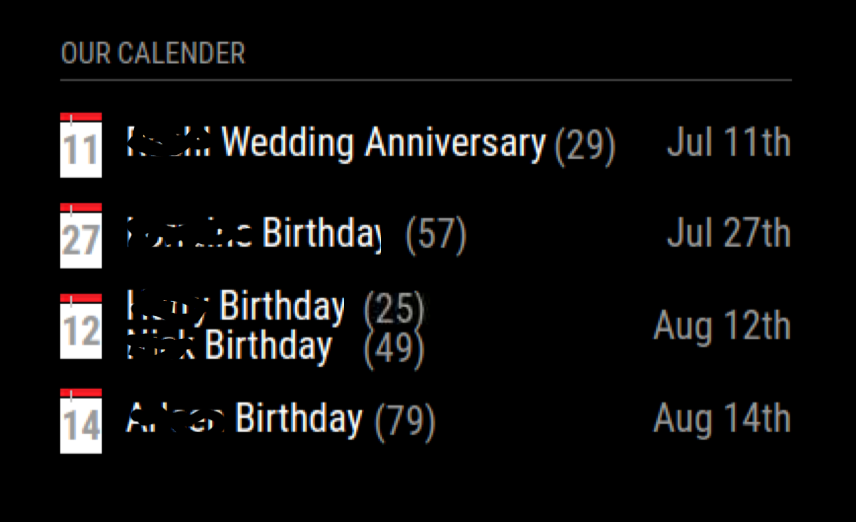
                                    Screen Shot 2021-07-11 at 7.31.15 AM copy.png

                                    Sorry if I am being a PITA

                                    S 1 Reply Last reply Reply Quote 0
                                    • S Offline
                                      sdetweil @doogy_rev
                                      last edited by

                                      @doogy_rev i understand… i am thinking if there is a way to fix this and still get this functionality, which I like better…

                                      Sam

                                      How to add modules

                                      learning how to use browser developers window for css changes

                                      D 1 Reply Last reply Reply Quote 0
                                      • D Offline
                                        doogy_rev @sdetweil
                                        last edited by

                                        @sdetweil If it was set back to 2 tables columns

                                        Column 1 = Name + Age + Align Left
                                        Column 2 = Date + Align right

                                        Would that work? Guess it depends if you can put Name + Age in the same cell space

                                        S 1 Reply Last reply Reply Quote 0
                                        • S Offline
                                          sdetweil @doogy_rev
                                          last edited by

                                          @doogy_rev I know HOW it should be done. question is what can I do to THIS code, without rewriting it

                                          Sam

                                          How to add modules

                                          learning how to use browser developers window for css changes

                                          1 Reply Last reply Reply Quote 0

                                          Hello! It looks like you're interested in this conversation, but you don't have an account yet.

                                          Getting fed up of having to scroll through the same posts each visit? When you register for an account, you'll always come back to exactly where you were before, and choose to be notified of new replies (either via email, or push notification). You'll also be able to save bookmarks and upvote posts to show your appreciation to other community members.

                                          With your input, this post could be even better 💗

                                          Register Login

                                          • 1
                                          • 2
                                          • 1 / 2
                                          • First post
                                            Last post
                                          Enjoying MagicMirror? Please consider a donation!
                                          MagicMirror created by Michael Teeuw.
                                          Forum managed by Sam, technical setup by Karsten.
                                          This forum is using NodeBB as its core | Contributors
                                          Contact | Privacy Policy