Read the statement by Michael Teeuw here.
MMM-NewPIR v3
-
that is go here and ask for open dialogue https://github.com/MichMich/MagicMirror/issues/2130
-
I do not think that this issue in github is the correct place to have a dialogue about this topic. Either have it here in the forum or create a new issue there, but dont put non-issue related discussions into tickets.
-
Yes you are right. I would just like dialogue to start.
-
@rejas : LOL ! :clapping_hands: :clapping_hands: :clapping_hands:
No dialogue possible, so I decide to BAN all my module when using original MagicMirror app
I will recode another MagicMirror (with change !)
After … it will be the user’s choice … follow me or not !See : There
@rejas : make as you want … you can BAN me if you want :)
it’s not a problem for me !I do ANY of my module for me in first ! so it’s not a problem ;)
as long as it works for me, I don’t care!
I just share my workso :zipper-mouth_face: !!!
-
@dvbit as you can see there isn’t a dialogue possible with bugsounet. Even though @michmich made a step forward to him and had his PR merged he still wants to make his own version of MM with some secure stuff to not allow other users to run his modules on the original code. Not to mention his signature.
Tell me @dvbit, is that a person you want to work with or where you want to trust your your personal data that you put into the Google-Assistant module of his? I sure don’t and thats my choice in the OpenSource world. As is his choice to behave like that.
Don’t forget, it was @MichMich that did all the work before that, starting Magic@Miror, doing the forums, maintaining the code. He is still around and is open for discussion and ideas. That’s the kind of person I want to work with and where I want to put my efforts into that.
-
I’ve been a few days of and ran through my timelines and found this dispute here and on GitHub and must say I feel kind of sad and disappointed. Since the day I joint this community nearly a year ago it always felt like home. Everybody was helpful and patient, I always felt mutual respect and appreciation. Not to mention all those fantastic contributors with their modules and programming skills and those with various other knowledge they happily share. While I can understand @Bugsounet for waiting for @MichMich response quite some time and his engagement, I also see MichMich point which he laid out on GitHub. I don’t know what both have exchanged on other, private, channels but I can’t understand why such a dispute leads to such a extreme reaction. In the end it is the community that gets punished, when great modules are withdrawn and support is ceased. That’s sad!
As @Bugsounet is insistently not willing to contribute any more and to support, I have no other choice than to drop this module here and return to the old one. It is really a pitty and I do this very heavy hearted but travelers shouldn’t be halted.
I wish you all the best and great success with your own fork -I say this absolutely honestly- but still hope to see you here around again one day. -
@Fozi No one know my problem with mich. (hein rejas, so stop tell bad things)
So, I will recode another MagicMirror system… After it will be user choice… Fallow me in the new adventure with all @bugsounet module or… Mich Migic mirror without Any of my modules
Actually I do a mix of npm library and my magic mirror app (personal… I have to replace all patch of MagicMirror corrected…)
-
@Bugsounet said in MMM-NewPIR v3:
the hardest part is to anticipate the slightest possible error so as not to crash everything (and even crash MM)
If you can’t do it, i will do it soon :)
I finish other new module before ;)so planned to this module:
- Last presence
- color feature
- HDMI CEC support
under coding :)
-
V3.1.0 is out !
- added : HDMI CEC support and other mode for turn on/off your screen
mode: 1 - use vgencmd (RPI only)
mode: 2 - use dpms (version RPI)
mode: 3 - use tvservice (RPI only)
mode: 4 - use HDMI CEC
mode: 5 - use dpms (linux version for debian, ubuntu, …)
mode: 0 - disabled and turnOffDisplay toosee new configuration of the screen field
- added: display last presence time
- added: auto updater script (npm run update)
- added: notify if update of npm library is available
- added: compatibility with MMM-UpdateNotification for automatic update
- deleted: configMerge script and use MM version integred (
configDeepMerge: true,)
-
v3.1.2 is out !
I have coded TouchScreen feature
TouchScreen Feature
You can use this feature with a mouse or your touch screen
One Click on the screen: Will wake up the screen or restart your shutdown timerDouble Click on the screen: Will turn off your screen
Edit: see next release
-
v3.1.3 is out !
Touch Screen feature change
TouchScreen Feature
You can use this feature with a mouse or your touch screen
- One Click on the NewPIR Area: will restart your shutdown timer
- Long Click on the screen: Will turn off your screen or Will turn on if needed (Toogle)
if you want to use it:
enable useTouch feature in
screen: {}fieldCSS value correct
Correct a bug if no other module in the same position is set (module not displayed)
Update of
@bugsounet/screennpm libraryCounter will send bad value on start (lost one sec.)
-
Hi, can i use this module without a sensor? As yes is everyone here who can explain me how i must go on to start the module without a sensor…
And…what sensor must i have that i can realize this module. Have anyone a link where i can buy it?
Best regards
-
Hello,
takes PIR sensor HC-SR501 it works on , perso
I ordered to see a Doppler Microwave Sensor RCWL-0516 to replace HC SR501
see topic
https://forum.magicmirror.builders/topic/11704/update-replaced-my-pir-sensor-with-a-doppler-microwave-sensor
( more aesthetic ) -
v3.1.5 is out!
added: many mode for touch screen use
added: delayed activating screensee ReadMe File for more informations
-
@pakal41 I can assure you that the Doppler sensor will work 😃
-
@Bugsounet With new version of MagicMirror I decides to try this module.
Running rpi4 with HC-SR501 sensor.
Can you please explain me how exactly ecoMode working. I have some problems with that enabled true. I’m still trying to figure out exactly problem but no luck. I’m using MMM-Globe by Eunanibus and its not reloading (not showing ) after monitor is turn on and sometime even monitor doesn’t wont to turn on. Should I just keep this option false? With ecoMode false at the moment everything is working fine.
Anyway, great work and thank you for your contribution. -
@lolo ecoMode Feature hide all modules (disable modules), after maybe your globe module have a bug on disable/resume (this fonction is a function coded in the core of MM)
-
Thx. Even one my module have problem with that. For now I will keep it as false.
-
It’s working :smiling_face_with_open_mouth:
After a couple of tries with all available PIR Modules it’s working with MMM-NewPIR perfect!
Many thanks! -
…Ohh no.
Getting update notification for MMM-NewPIR.
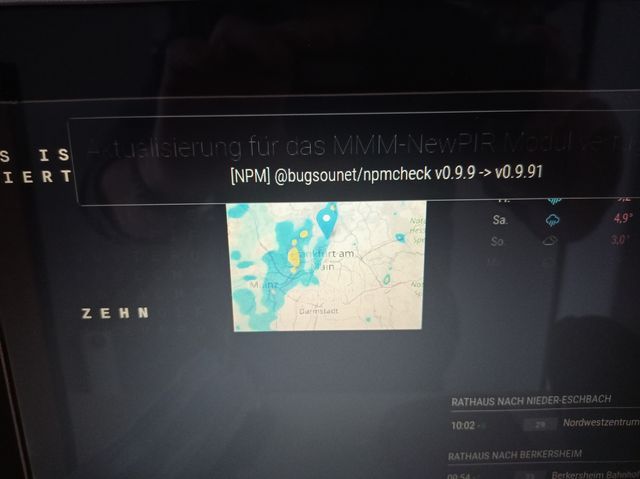
I’m trying in MagicMirror/modules/MMM-NewPIR
git pullbut get the message “it’s actual already”
Notification message still there.
Any idea please?


Hello! It looks like you're interested in this conversation, but you don't have an account yet.
Getting fed up of having to scroll through the same posts each visit? When you register for an account, you'll always come back to exactly where you were before, and choose to be notified of new replies (either via email, or push notification). You'll also be able to save bookmarks and upvote posts to show your appreciation to other community members.
With your input, this post could be even better 💗
Register Login