Read the statement by Michael Teeuw here.
Display waste bins in color
-
Hello everyone, I have created a Google waste calendar. Now I wanted to ask how I can do it with the CSS that for example the bio bin is displayed in brown and the residual waste bin in gray and the glass box in blue, for example.
Would be nice if you could tell me where I can change that and how …? Thank you
German:
Hallo Zusammen, ich habe mir einen Google Abfallkalender erstellt. Nun wollte ich fragen wie ich es hinbekomme mit dem CSS das mir zb die Biotonne in braun angeziegt wird und die Restmülltonne in grau und Glasbox zb in blau.Wäre nett wenn ihr mir mitteilen könnte wo ich das verändern kann und wie…? Danke Euch
-
@kusselin Hi it is possible with both JavaScript and CSS. Based on bin type you can either create css class like .biobin or .residualbin and in that class have image background of that bin type or you can directly assign image source to bin type. It would be easier if you post some code here…
Below is quick example with .css
body {
   background-color: #cccccc;
}

.bin{
height:350px;
width:300px;
background-size: cover;

}
.biobin{
background-image: url("https://cdn0.iconfinder.com/data/icons/garbage-items-cartoon-style/512/al396_14-512.png");
}
.residualbin {
background-image: url("https://safe.onoffmarket.com/data/item/201201/1325650700_l1")
}


< div class=" bin biobin">bio bin
< /div>
< div class="bin residualbin"> residual bin
< /div>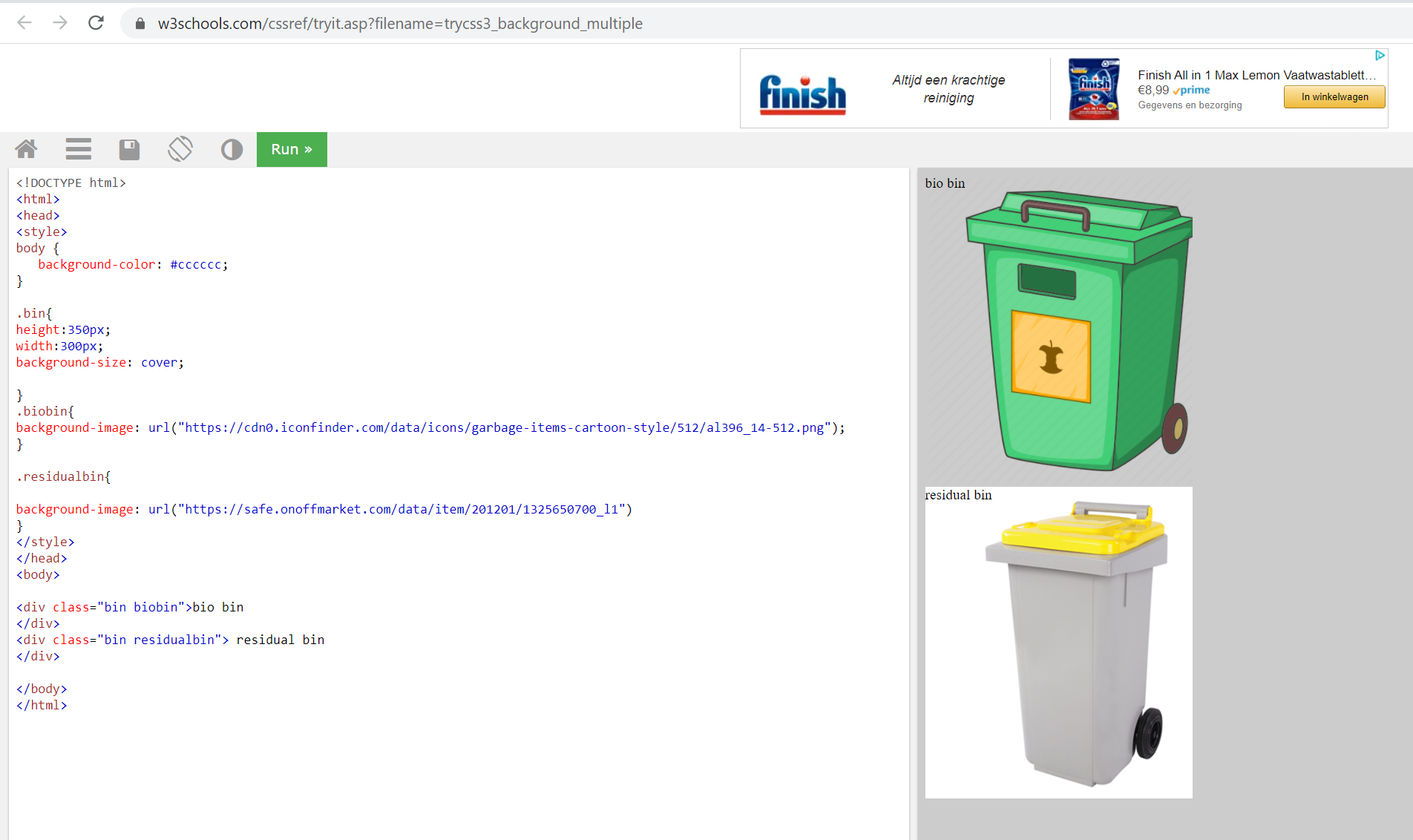
-
@ashishtank said in Display waste bins in color:
Hi it is possible with both JavaScript and CSS. Based on bin type you can either create css class like .biobin or .residualbin and in that class have image background of that bin type or you can directly assign image source to bin type. It would be easier if you post some code here…
Below is quick example with .cssHello, thank you for the info!
What code should I post? what you write here is great with the bins … it looks a bit like Fhem.Where does that have to go? ind the costum.css?
Greeting
The standard Google calendar then shows, for example, “in 23 days” and you can then display the text in blue, for example, for the glass box … gray for residual waste and green for paper ??
-
@kusselin can you post screenshot of what you have right now ? If you have created your own module then it will go into that module’s css. if you are using other module and want to display it over there then you can put it in custom.css.
Here logic is based on data you need to assign the css class to html elements and then they will show the visuals.
-
hi ashistank,
i have the standard calender what come with MagicMirror when you install it.
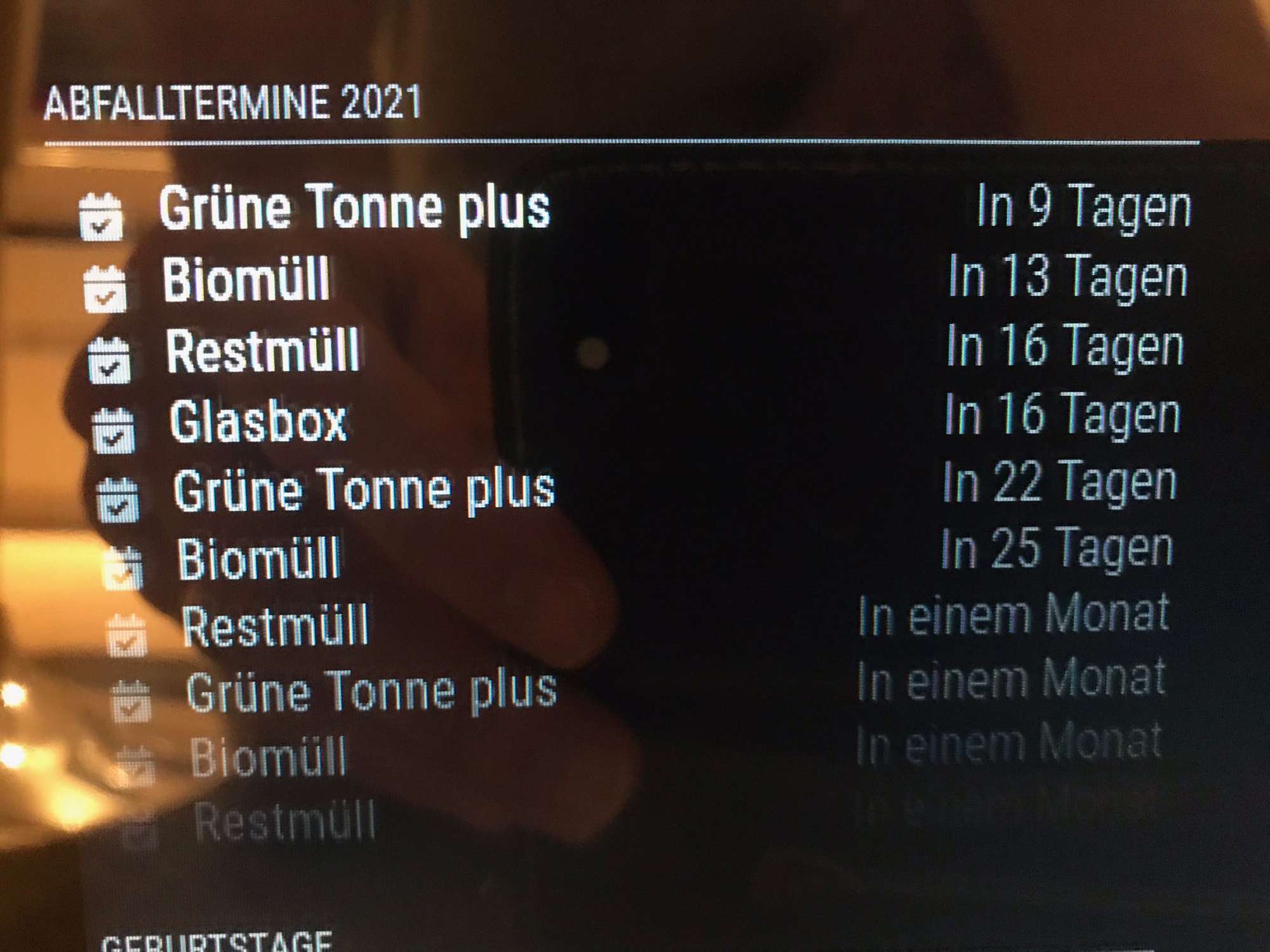
there you see now…
Biotonne…in 5 Tagen
Restmüll…in 10 Tagenand the font i will not in white…i will Biotonne in brown and Restmüll the colour in grey
what musst i do in what css item??
Best regards
here a picture…glasbox the font in blue bio in brown rest in grey paper in green…what must i do in what css?
-
@kusselin Hi it is already possible with default calendar module. Sorry was not aware of that feature. while looking at code I found that you can configure your custom class and font color based on title of the event using custom events property in config.
{
	module: "calendar",
	header: "NL Holidays",
	position: "top_left",
	config: {
		calendars: [
			{
				symbol: "calendar-check",
				url: "webcal://www.calendarlabs.com/ical-calendar/ics/101/Netherlands_Holidays.ics",
			}
		],
		customEvents: [
			 {
				"keyword": "Christmas Day",
				"symbol": "calendar-icon-christmas",
				"color": "red"
			 },
			 {
				"keyword": "Easter Sunday",
				"symbol": "calendar-icon-easter",
				"color": "blue"
			 }
		]
	}
}
you will need to add below css classes in custom.css, Make sure to name your css class with .fa- but while adding it in config remove it. in above config symbols calendar-icon-christmas and calendar-icon-easter are css classes with out .fa-
.fa-calendar-icon-christmas
{
	background-image: url('https://cdn.iconscout.com/icon/premium/png-256-thumb/christmas-ball-1429333-1209909.png');
	width: 20px;
	height: 20px;
	background-size: contain;
	background-repeat: no-repeat;
}
.fa-calendar-icon-easter
{
	background-image: url('https://icons.iconarchive.com/icons/iconka/easter-egg-bunny/256/green-love-icon.png');
	width: 20px;
	height: 20px;
	background-size: contain;
	background-repeat: no-repeat;
}
below should be output. Same way you can do it for different bins based on title of the event (Biotonne or Restmüll)
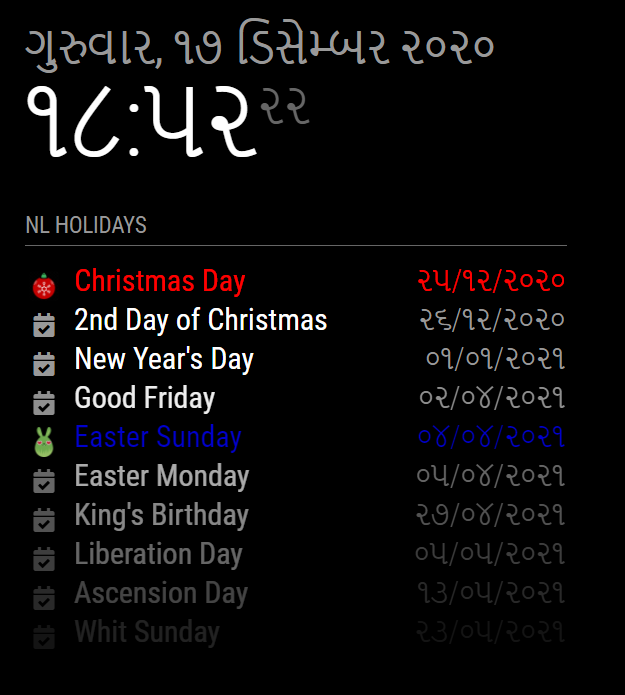
-
@ashishtank said in Display waste bins in color:
Hi I will get back to you on this, it will not possible with only css but you also need to do some changes in javascript file to assign correct css class to the first checbox icon based on the bin type text.
ohjeee o.k. thank you very much
-
@kusselin Edited my answer above.
-
Hi very thanks to you for the css… but i will only that the text an the standard icon for calender like in my photo is in the color…you know what i mean? No fa-icon in the christmas look …
best regards
-
@kusselin Sorry I did not understand. do you want to have standard icons but with different color for icon and text ?
-
@ashishtank said in Display waste bins in color:
Sorry I did not understand. do you want to have standard icons but with different color for icon and text ?
yes so is it!
-
@kusselin Sorry was occupied with something. The symbol is optional, if you do not provide it then it will take the default icon.
Below is my config and output, Notice the new year’s day.customEvents: [ { "keyword": "Christmas Day", "symbol": "calendar-icon-christmas", "color": "red" }, { "keyword": "New Year's Day", "color": "yellow" }, { "keyword": "Easter Sunday", "symbol": "calendar-icon-easter", "color": "blue" } ]
-
@ashishtank said in Display waste bins in color:
Sorry was occupied with something. The symbol is optional, if you do not provide it then it will take the default icon.
Below is my config and output, Notice the new year’s day.Hi no problem … I want something … thank you very much.
But does the config have to be copied into the custom.css or the normal css?
EDIT: I have this copied in my costum .css but the colours are not displayed :-)
what make i wrong?
/*****************************************************
 * Magic Mirror                                      *
 * Custom CSS                                        *
 *                                                   *
 * By Michael Teeuw http://michaelteeuw.nl           *
 * MIT Licensed.                                     *
 *                                                   *
 * Add any custom CSS below.                         *
 * Changes to this files will be ignored by GIT. *
 *****************************************************/

 body {
   zoom: 70%;
   margin: 5px;
  position: absolute;
  height: calc(100% - 10px);
  width: calc(100% - 10px);
 }

customEvents: [
	 {
		"keyword": "Grüne Tonne plus",
		"color": "green"
	 },
	 {
		"keyword": "Biomüll",
		"color": "brown"
	 },
	 {
		"keyword": "Restmüll",
		"color": "gray"
	 }
	 {
		"keyword": "Glasbox",
		"color": "blue"
	 }
	]
Green bin plus and glass box, etc. are the names of the words in the Google Calendar
-
@kusselin The config is JSON and should never be added to css. you need to add this in config.js
onfor calendars check below for new year’s day{ module: "calendar", header: "NL Holidays", position: "top_left", config: { calendars: [ { symbol: "calendar-check", url: "webcal://www.calendarlabs.com/ical-calendar/ics/101/Netherlands_Holidays.ics" } ], customEvents: [ { "keyword": "Christmas Day", "symbol": "calendar-icon-christmas", "color": "red" }, { "keyword": "New Year's Day", "color": "yellow" }, { "keyword": "Easter Sunday", "symbol": "calendar-icon-easter", "color": "blue" } ] } }, -
Can You help me please in the config.js…
here is my code but ist not show :
{ module: "calendar", header: "Abfalltermine 2021", position: "top_left", config: { calendars: [ { symbol: "calendar-check", url: "https://xxxxxxxxxxxxxxxxxxxxxxxxxxxxxxxxxxxxxxxxxxxxxxxxxxxxxx" } ], customEvents: [ { "keyword": "Grüne Tonne plus", "color": "green" }, { "keyword": "Biomüll", "color": "brown" }, { "keyword": "Restmüll", "color": "gray" } { "keyword": "Glasbox", "color": "blue" } ] } }, -
@kusselin : looks like you are missing comma in your config.js

-
@kusselin said in Display waste bins in color:
customEvents: [
{
“keyword”: “Grüne Tonne plus”,
“color”: “green”
},
{
“keyword”: “Biomüll”,
“color”: “brown”
},
{
“keyword”: “Restmüll”,
“color”: “gray”
}
{
“keyword”: “Glasbox”,
“color”: “blue”
}
]now the code is so, but the colours are not displayed :-(
{
			module: "calendar",
			header: "Abfalltermine 2021",
			position: "top_left",
			config: {
				calendars: [
					{
						symbol: "calendar-check",
						url: "https://xxxxxxxxxxxxxxxxxxxxxxxxxxxxxxxxxxxxxxxxxxxxxxxxxxxxxxxxxx"
					}

				],

				customEvents: [
	 {
		"keyword": "Grüne Tonne plus",
		"color": "green"
	 },
	 {
		"keyword": "Biomüll",
		"color": "brown"
	 },
	 {
		"keyword": "Restmüll",
		"color": "gray"
	 },
	 {
		"keyword": "Glasbox",
		"color": "blue"
	 }
	]


	}
},
-
@kusselin Can you check if your code is reaching here ?
- Open dev tool using ctrl + shift + i
- Go to sources tab
- Press control + P to get the files list
- Type calendar.js
- Keep break point at below position and also few more breakpoints before it.
- Press F5 to reload the Magic Mirror
- If it hits break point, you can press F10 to step to each line and you can press F8 to continue execution (if it reaches to highlighted line then it should work)
Also check if there are any errors in console.


-
Hi, its very difficult but i will try it
I can do this with mozilla browser… right?
In my config.js i no error because when an error is there the MM doesn‘t start then
Is the code so correct… with the Biotonne usw.
This is the word same in the google calender
Must i open the dev console when MM is running?
-
@kusselin you can open dev tools in Mozilla browser as well (key might be different). Yes MM should be running.

Hello! It looks like you're interested in this conversation, but you don't have an account yet.
Getting fed up of having to scroll through the same posts each visit? When you register for an account, you'll always come back to exactly where you were before, and choose to be notified of new replies (either via email, or push notification). You'll also be able to save bookmarks and upvote posts to show your appreciation to other community members.
With your input, this post could be even better 💗
Register Login