Read the statement by Michael Teeuw here.
Change the way calendar presents day and time
-
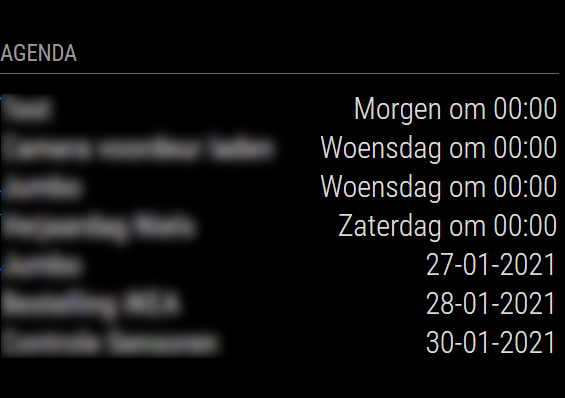
After a new installation something goes wrong with the standard calendar module that I use with Apple calendar. As you can see in the photo, there are two different ways to present the date, namely “Wednesday at 00:00” and “27-01-2021”. I would like each calendar note to be displayed as “dd-mm-yy” or “dd-mm”.
Unfortunately, I cannot do that, not even by changing the dateFormat in the config.js file. Can someone tell me how to change this so all dates are presented the same way?
-
If I’m remembering correct (I don’t use the module anymore), it’s having to do with absolute dates. All three of these need to be set…
// Force Absolute to Absolute all the time, michmich *really* hates solid dates, apparently. timeformat: "absolute", getRelative: 0, urgency: 0 , -
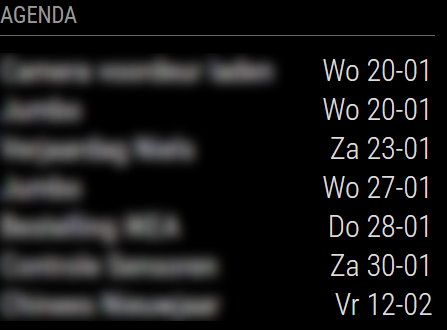
@BKeyport Thanks for your suggestion! I now use the code below which results in what is shown in the image. Exactly what I wanted :-)
			config: {
                                fade: false,
                                maximumEntries: 7,
                                displaySymbol: false,
   				timeFormat: 'absolute',
   				dateFormat: 'ddd D MMM',
  				fullDayEventDateFormat: 'dd DD-MM',
 				urgency: 0,
				calendars: [

Hello! It looks like you're interested in this conversation, but you don't have an account yet.
Getting fed up of having to scroll through the same posts each visit? When you register for an account, you'll always come back to exactly where you were before, and choose to be notified of new replies (either via email, or push notification). You'll also be able to save bookmarks and upvote posts to show your appreciation to other community members.
With your input, this post could be even better 💗
Register Login