Read the statement by Michael Teeuw here.
MMM-Domoticz-ext: interact with Domoticz
-
Description:
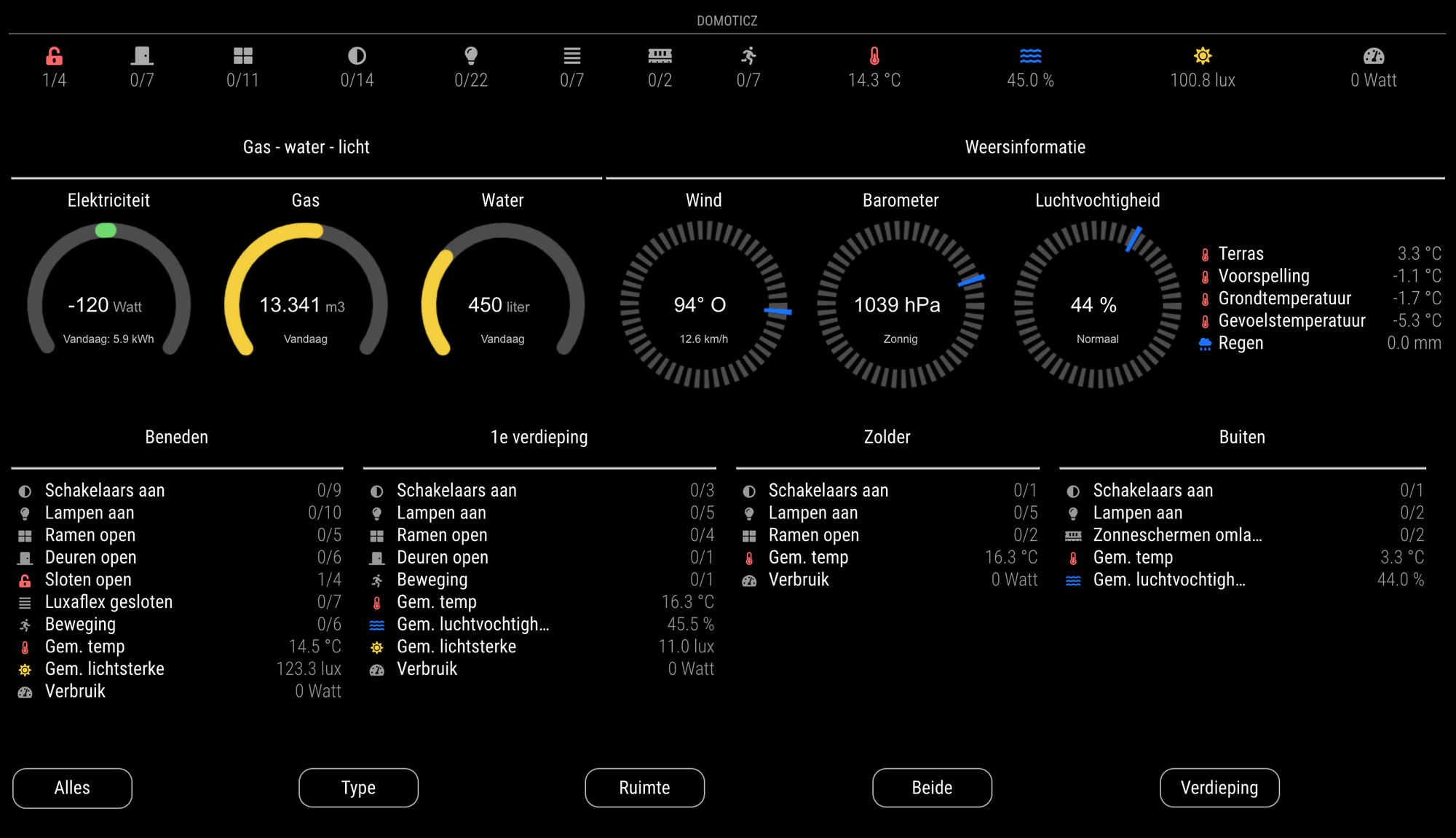
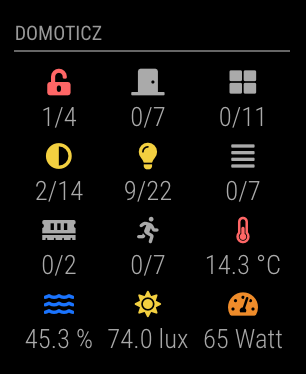
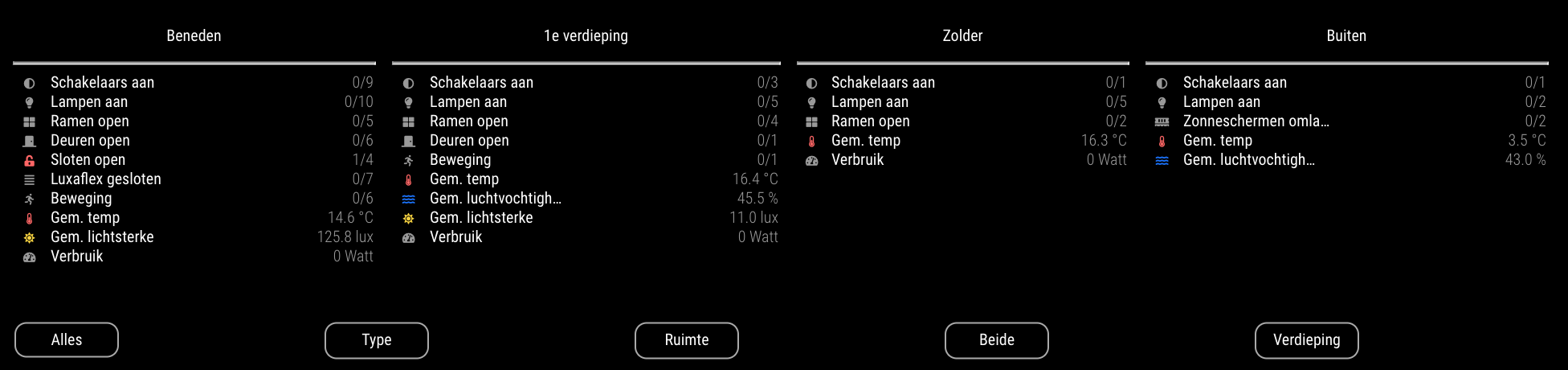
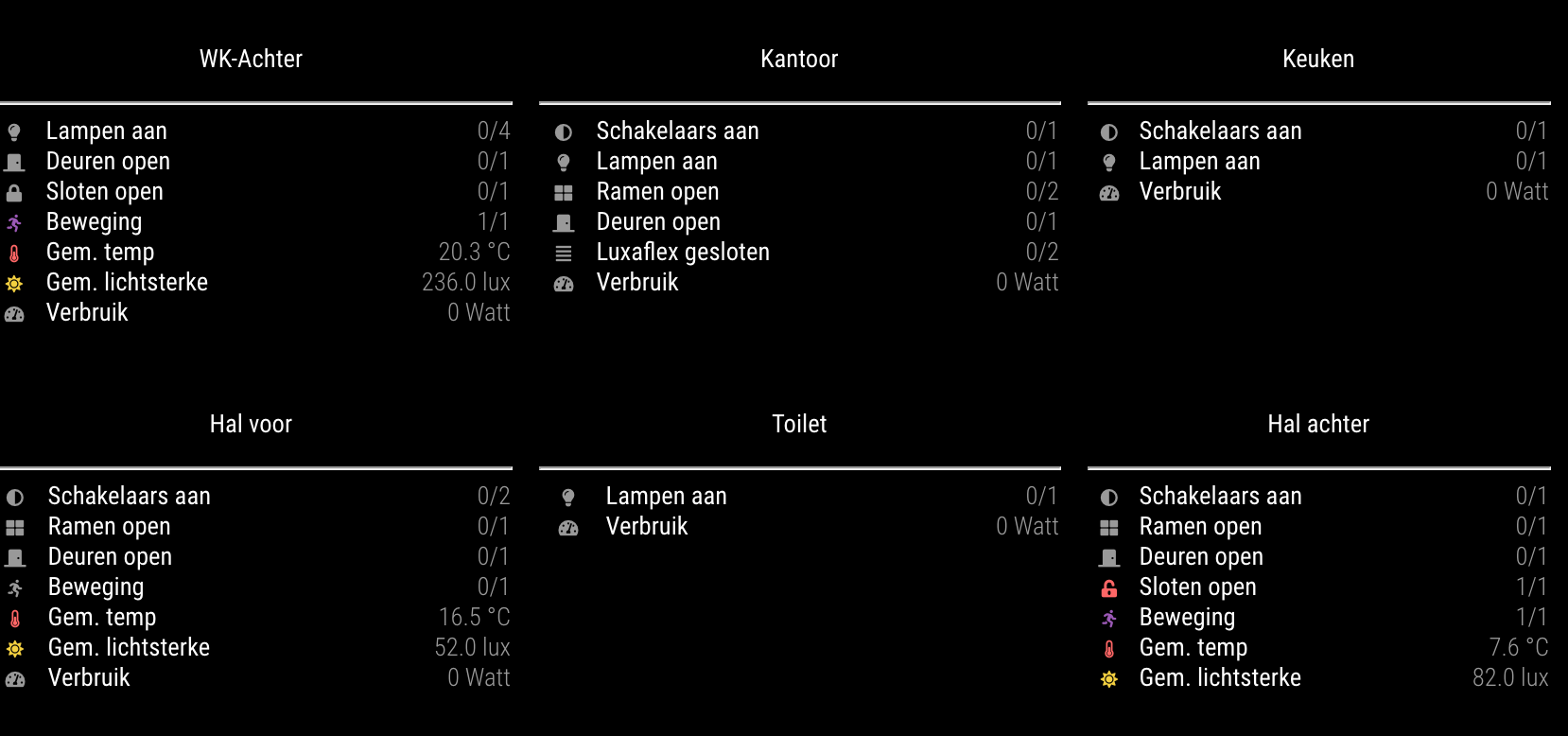
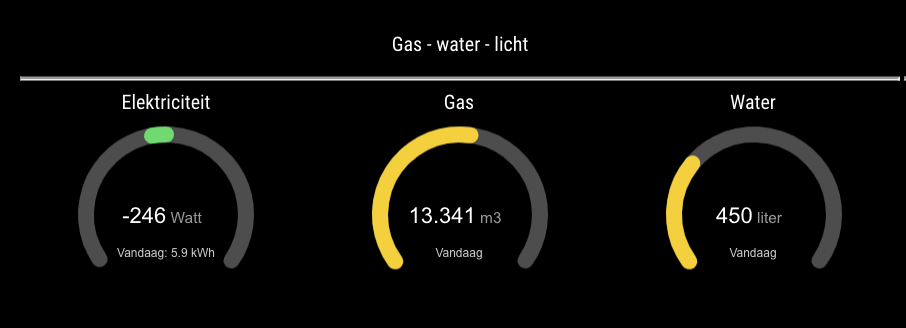
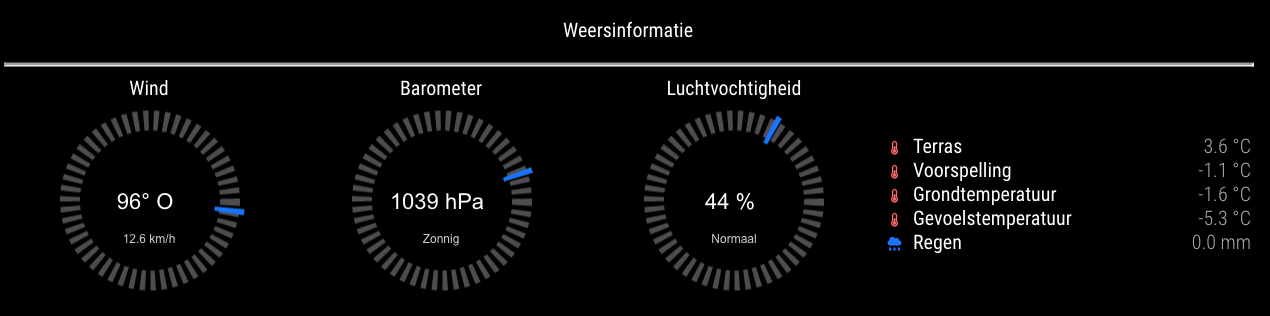
I created a module to display information from Domoticz in different layouts. If your mirror has touch capability buttons can be used to either switch layout of send commands to Domoticz. The module is based on my setup and developing it got a bit out of hand, so maybe it’s a bit buggy. Let me know!
MMM-Domoticz-ext: A highly configurable module for displaying domoticz information and performing actions on Domoticz. The module contains the following functionality:
- Switch states per room, type, both or floor
- Utility information
- Weather information
- Buttons to change overview
- Action buttons to perform actions on domoticz
- Integration with touch screen and MMM-Page-Selector
Screenshots:
Download:
https://github.com/goedh452/MMM-Domoticz-ext -
@goedh452 said in MMM-Domoticz-ext: interact with Domoticz:
Screenshots:
I added the default simple config, and the module fails to start with the error: cannot find module ‘xmlhttprequest’
any ideas what could be the cause? (url + port settings should be ok)
-
Thanks for this plugin. Somehow I don’t get to work…
So here is my [mp2 logs mm] output.
Let me know if you need to know more of my setup. (it’s a recent ~clean install from last januari.)pi@raspberrypi:~/MagicMirror/config $ pm2 logs mm [TAILING] Tailing last 15 lines for [mm] process (change the value with --lines option) /home/pi/.pm2/logs/mm-out.log last 15 lines: 0|mm | [04.04.2021 18:18.21.887] [LOG] Loading module helpers ... 0|mm | [04.04.2021 18:18.21.892] [LOG] No helper found for module: alert. 0|mm | [04.04.2021 18:18.22.164] [LOG] Initializing new module helper ... 0|mm | [04.04.2021 18:18.22.166] [LOG] Module helper loaded: updatenotification 0|mm | [04.04.2021 18:18.22.170] [LOG] No helper found for module: clock. 0|mm | [04.04.2021 18:18.22.955] [LOG] Initializing new module helper ... 0|mm | [04.04.2021 18:18.22.957] [LOG] Module helper loaded: calendar 0|mm | [04.04.2021 18:18.22.966] [LOG] Loading module helpers ... 0|mm | [04.04.2021 18:18.22.968] [LOG] No helper found for module: alert. 0|mm | [04.04.2021 18:18.22.971] [LOG] Initializing new module helper ... 0|mm | [04.04.2021 18:18.22.974] [LOG] Module helper loaded: updatenotification 0|mm | [04.04.2021 18:18.22.977] [LOG] No helper found for module: clock. 0|mm | [04.04.2021 18:18.22.979] [LOG] Initializing new module helper ... 0|mm | [04.04.2021 18:18.22.980] [LOG] Module helper loaded: calendar 0|mm | [04.04.2021 18:18.23.449] [LOG] Launching application. /home/pi/.pm2/logs/mm-error.log last 15 lines: 0|mm | at Object. (/home/pi/MagicMirror/modules/MMM-Domoticz-ext/node_helper.js:2:22) 0|mm | at Module._compile (internal/modules/cjs/loader.js:968:30) 0|mm | at Object.Module._extensions..js (internal/modules/cjs/loader.js:986:10) { 0|mm | code: 'MODULE_NOT_FOUND', 0|mm | requireStack: [ 0|mm | '/home/pi/MagicMirror/modules/MMM-Domoticz-ext/node_helper.js', 0|mm | '/home/pi/MagicMirror/js/app.js', 0|mm | '/home/pi/MagicMirror/js/electron.js', 0|mm | '/home/pi/MagicMirror/node_modules/electron/dist/resources/default_app.asar/main.js', 0|mm | undefined 0|mm | ] 0|mm | } 0|mm | [04.04.2021 18:18.23.022] [ERROR] MagicMirror will not quit, but it might be a good idea to check why this happened. Maybe no internet connection? 0|mm | [04.04.2021 18:18.23.025] [ERROR] If you think this really is an issue, please open an issue on GitHub: https://github.com/MichMich/MagicMirror/issues 0|mm | [04.04.2021 18:18.23.499] [WARN] (electron) The default value of app.allowRendererProcessReuse is deprecated, it is currently "false". It will change to be "true" in Electron 9. For more information please check electron/electron#18397 -
@najtram need more lines of output…
pm2 logs --lines=50
-
0|mm | [04.04.2021 22:05.52.374] [LOG] 0|mm | Starting MagicMirror: v2.14.0 0|mm | [04.04.2021 22:05.52.387] [LOG] 0|mm | Loading config ... 0|mm | [04.04.2021 22:05.52.408] [LOG] 0|mm | Loading module helpers ... 0|mm | [04.04.2021 22:05.52.416] [LOG] 0|mm | No helper found for module: alert. 0|mm | [04.04.2021 22:05.52.709] [LOG] 0|mm | Initializing new module helper ... 0|mm | [04.04.2021 22:05.52.712] [LOG] 0|mm | Module helper loaded: updatenotification 0|mm | [04.04.2021 22:05.52.716] [LOG] No helper found for module: clock. 0|mm | [04.04.2021 22:05.53.495] [LOG] 0|mm | Initializing new module helper ... 0|mm | [04.04.2021 22:05.53.497] [LOG] 0|mm | Module helper loaded: calendar 0|mm | [04.04.2021 22:05.53.506] [ERROR] 0|mm | WARNING! Could not load config file. Starting with default configuration. Error found: Error: Cannot find module 'xmlhttprequest' 0|mm | Require stack: 0|mm | - /home/pi/MagicMirror/modules/MMM-Domoticz-ext/node_helper.js 0|mm | - /home/pi/MagicMirror/js/app.js 0|mm | - /home/pi/MagicMirror/js/electron.js 0|mm | - /home/pi/MagicMirror/node_modules/electron/dist/resources/default_app.asar/main.js 0|mm | - 0|mm | [04.04.2021 22:05.53.508] [LOG] Loading module helpers ... 0|mm | [04.04.2021 22:05.53.514] [LOG] No helper found for module: alert. 0|mm | [04.04.2021 22:05.53.517] [LOG] 0|mm | Initializing new module helper ... 0|mm | [04.04.2021 22:05.53.519] [LOG] Module helper loaded: updatenotification 0|mm | [04.04.2021 22:05.53.522] [LOG] 0|mm | No helper found for module: clock. 0|mm | [04.04.2021 22:05.53.526] [LOG] Initializing new module helper ... 0|mm | [04.04.2021 22:05.53.529] [LOG] Module helper loaded: calendar 0|mm | [04.04.2021 22:05.53.536] [ERROR] 0|mm | App threw an error during load 0|mm | [04.04.2021 22:05.53.550] [ERROR] 0|mm | Error: Cannot find module 'xmlhttprequest' 0|mm | Require stack: 0|mm | - /home/pi/MagicMirror/modules/MMM-Domoticz-ext/node_helper.js 0|mm | - /home/pi/MagicMirror/js/app.js 0|mm | - /home/pi/MagicMirror/js/electron.js 0|mm | - /home/pi/MagicMirror/node_modules/electron/dist/resources/default_app.asar/main.js 0|mm | - 0|mm | at Module._resolveFilename (internal/modules/cjs/loader.js:798:15) 0|mm | at Function../lib/common/reset-search-paths.ts.Module._resolveFilename (electron/js2c/browser_init.js:7718:16) 0|mm | at Function.Module._resolveFilename (/home/pi/MagicMirror/node_modules/module-alias/index.js:49:29) 0|mm | at Module._load (internal/modules/cjs/loader.js:691:27) 0|mm | at Function.Module._load (electron/js2c/asar.js:748:26) 0|mm | at Module.require (internal/modules/cjs/loader.js:853:19) 0|mm | at require (internal/modules/cjs/helpers.js:74:18) 0|mm | at Object.<anonymous> (/home/pi/MagicMirror/modules/MMM-Domoticz-ext/node_helper.js:2:22) 0|mm | at Module._compile (internal/modules/cjs/loader.js:968:30) 0|mm | at Object.Module._extensions..js (internal/modules/cjs/loader.js:986:10) 0|mm | [04.04.2021 22:05.53.553] [ERROR] Whoops! There was an uncaught exception... 0|mm | [04.04.2021 22:05.53.568] [ERROR] 0|mm | Error: Cannot find module 'xmlhttprequest' 0|mm | Require stack: 0|mm | - /home/pi/MagicMirror/modules/MMM-Domoticz-ext/node_helper.js 0|mm | - /home/pi/MagicMirror/js/app.js 0|mm | - /home/pi/MagicMirror/js/electron.js 0|mm | - /home/pi/MagicMirror/node_modules/electron/dist/resources/default_app.asar/main.js 0|mm | - 0|mm | at Module._resolveFilename (internal/modules/cjs/loader.js:798:15) 0|mm | at Function../lib/common/reset-search-paths.ts.Module._resolveFilename (electron/js2c/browser_init.js:7718:16) 0|mm | at Function.Module._resolveFilename (/home/pi/MagicMirror/node_modules/module-alias/index.js:49:29) 0|mm | at Module._load (internal/modules/cjs/loader.js:691:27) 0|mm | at Function.Module._load (electron/js2c/asar.js:748:26) 0|mm | at Module.require (internal/modules/cjs/loader.js:853:19) 0|mm | at require (internal/modules/cjs/helpers.js:74:18) 0|mm | at Object.<anonymous> (/home/pi/MagicMirror/modules/MMM-Domoticz-ext/node_helper.js:2:22) 0|mm | at Module._compile (internal/modules/cjs/loader.js:968:30) 0|mm | at Object.Module._extensions..js (internal/modules/cjs/loader.js:986:10) { 0|mm | code: 'MODULE_NOT_FOUND', 0|mm | requireStack: [ 0|mm | '/home/pi/MagicMirror/modules/MMM-Domoticz-ext/node_helper.js', 0|mm | '/home/pi/MagicMirror/js/app.js', 0|mm | '/home/pi/MagicMirror/js/electron.js', 0|mm | '/home/pi/MagicMirror/node_modules/electron/dist/resources/default_app.asar/main.js', 0|mm | undefined 0|mm | ] 0|mm | } 0|mm | [04.04.2021 22:05.53.570] [ERROR] MagicMirror will not quit, but it might be a good idea to check why this happened. Maybe no internet connection? 0|mm | [04.04.2021 22:05.53.572] [ERROR] If you think this really is an issue, please open an issue on GitHub: https://github.com/MichMich/MagicMirror/issues 0|mm | [04.04.2021 22:05.54.078] [LOG] 0|mm | Launching application. 0|mm | [04.04.2021 22:05.54.124] [WARN] 0|mm | (electron) The default value of app.allowRendererProcessReuse is deprecated, it is currently "false". It will change to be "true" in Electron 9. For more information please check https://github.com/electron/electron/issues/18397 -
@najtram npm install xmlhttprequest
this is a side effect of not documenting the requirements, and depending on mm to supply them.
the Domoticz module should add this to their package.json
-
Thanks for this solution. To be clear my MagicMirror is working on a different Pi than the Domoticz Pi. So could you help me out with two hints.
1 should I install the xmlhttprequest in the MagicMirror Pi or the Domoticz?
2 in which directory should i execute this npm install ?Thanks again, this looks promising!
-
You should install it on the pi which runs Magic Mirror. I’ll add a package.json later. That is the right way to do it indeed.
-
Thanks for both your support. I excecuted it in the MagicMirror directory. And it is working!!! This is really awesome!
Thanks for the great module!
-
@goedh452 nice add-on thank you.
I am able to get simple things to work ok, but can’t get gauges to display. I assume the communication with my Domoticz server is all working, as number of lights on etc. gets displayed and there are no errors in the log for devices not being found. If I use a non-existent device or wrong type of device, then the Domoticz module just displays Loading.
Do I need another dependency for gauges?
Also having done a git pull to install package.json this causes Magic Mirror to error, but all is fine if I remove package.json
0|mm  |     at Module.require (internal/modules/cjs/loader.js:1032:19)
0|mm  |     at require (internal/modules/cjs/helpers.js:72:18)
0|mm  |     at loadModule (/home/pi/MagicMirror/js/app.js:126:19) {
0|mm  |   path: '/home/pi/MagicMirror/modules/MMM-Domoticz-ext/package.json'
0|mm  | }
0|mm  | [05.04.2021 15:22.59.747] [ERROR]
I also get a git error, I don’t know if this matters or not:
0|mm  | [05.04.2021 15:36.09.261] [INFO]  Checking git for module: MMM-VoiceAssistant
0|mm  | [05.04.2021 15:36.09.263] [INFO]  Checking git for module: MMM-Domoticz-ext
0|mm  | [05.04.2021 15:36.10.881] [ERROR] Failed to fetch git data for MMM-Domoticz-ext: Error: block timeout reached
0|mm  | [05.04.2021 15:36.11.972] [ERROR]
Thanks, exciting package, a lot of options to make sense of along with the complexities of my Domoticz, having a heat pump there are lots of energies and temperatures that I would like to be able to monitor.
-
Which gauges are you trying to display, utilities or weather? I tested the utilities with energy monitors that are collected to Domoticz with a P1 USB cable. You too?
The module should autodetect the type and disregard types it doesn’t know. Maybe this mechanism isn’t working as it should be for the gauges. I’ll look into this.
Regarding the git-error: I added the package.json for the dependencies. I’m not very experienced with GitHub and more of a hobby programmer. I guess there is something wrong with the package.json. Any input is welcome!
-
@goedh452 thanks, my skill is also amateur, but I now know that there is no gauge dependency missing.
I have a whole range of energy values captured in my Domoticz - Owl current meter, Nibe heat pump, Solaredge PV panels, I guess none of them are the same type as your P1 USB cable (not something I use/have).
I guess I would really want a flexible gauge that I can use with a number of my Domoticz captured values, so your Javascript is a great inspiration/start to create such gauges.
I will fork your git and then if I actually create something it will hopefully add to your package. As a hobby not sure when I will get around it :-(.
-
You could send me the json result of you sensors and I’ll see what I can do. The result is obtained via this URL:
http://<IPADRESS_DOMOTICZ>:<PORT_DOMOTICZ>/json.htm?type=devices&rid=<IDX_DEVICE>
-
@goedh452 thank you very much, a couple of examples below.
My Owl device measures watts, but each time I change the batteries it get a new idx, so I use a Lua script in Domoticz to capture the values and post-process before displaying as a Solar below:
{
   "ActTime" : 1617792992,
   "AstrTwilightEnd" : "22:07",
   "AstrTwilightStart" : "04:07",
   "CivTwilightEnd" : "20:30",
   "CivTwilightStart" : "05:44",
   "DayLength" : "13:31",
   "NautTwilightEnd" : "21:16",
   "NautTwilightStart" : "04:59",
   "ServerTime" : "2021-04-07 11:56:32",
   "SunAtSouth" : "13:07",
   "Sunrise" : "06:21",
   "Sunset" : "19:53",
   "app_version" : "4.10717",
   "result" : [
      {
         "AddjMulti" : 1.0,
         "AddjMulti2" : 1.0,
         "AddjValue" : 0.0,
         "AddjValue2" : 0.0,
         "BatteryLevel" : 255,
         "CounterToday" : "6.210 kWh",
         "CustomImage" : 0,
         "Data" : "39023.996 kWh",
         "Description" : "",
         "EnergyMeterMode" : "",
         "Favorite" : 1,
         "HardwareID" : 3,
         "HardwareName" : "DUMMY",
         "HardwareType" : "Dummy (Does nothing, use for virtual switches only)",
         "HardwareTypeVal" : 15,
         "HaveTimeout" : false,
         "ID" : "00014179",
         "LastUpdate" : "2021-04-07 11:56:30",
         "Name" : "Solar",
         "Notifications" : "false",
         "PlanID" : "0",
         "PlanIDs" : [ 0 ],
         "Protected" : false,
         "ShowNotifications" : true,
         "SignalLevel" : "-",
         "SubType" : "kWh",
         "SwitchTypeVal" : 0,
         "Timers" : "false",
         "Type" : "General",
         "TypeImg" : "current",
         "Unit" : 1,
         "Usage" : "1409.4 Watt",
         "Used" : 1,
         "XOffset" : "0",
         "YOffset" : "0",
         "idx" : "298"
      }
   ],
   "status" : "OK",
   "title" : "Devices"
}
The raw Owl device returns 3 power readings, one from each current clamp:
{ "ActTime" : 1617793340, "AstrTwilightEnd" : "22:07", "AstrTwilightStart" : "04:07", "CivTwilightEnd" : "20:30", "CivTwilightStart" : "05:44", "DayLength" : "13:31", "NautTwilightEnd" : "21:16", "NautTwilightStart" : "04:59", "ServerTime" : "2021-04-07 12:02:20", "SunAtSouth" : "13:07", "Sunrise" : "06:21", "Sunset" : "19:53", "app_version" : "4.10717", "result" : [ { "AddjMulti" : 1.0, "AddjMulti2" : 1.0, "AddjValue" : 0.0, "AddjValue2" : 0.0, "BatteryLevel" : 100, "CustomImage" : 0, "Data" : "506 Watt, 138 Watt, 1863 Watt", "Description" : "", "Favorite" : 0, "HardwareID" : 1, "HardwareName" : "RFXCOM", "HardwareType" : "RFXCOM - RFXtrx433 USB 433.92MHz Transceiver", "HardwareTypeVal" : 1, "HaveTimeout" : false, "ID" : "6700", "LastUpdate" : "2021-04-07 12:02:12", "Name" : "Owl", "Notifications" : "true", "PlanID" : "0", "PlanIDs" : [ 0 ], "Protected" : false, "ShowNotifications" : true, "SignalLevel" : 7, "SubType" : "CM113, Electrisave", "Timers" : "false", "Type" : "Current", "TypeImg" : "current", "Unit" : 0, "Used" : 1, "XOffset" : "0", "YOffset" : "0", "displaytype" : 1, "idx" : "1286" } ], "status" : "OK", "title" : "Devices" } -
Thanks! I’ll look into it. A quick glance indicates that the subtype of the solar device is ‘kWh’ and the module scans for a subtype ‘Energy’. This is easy to modify in the code. The Owl device is a bit more complicated since it has the data-attribute, but does not split this into 3 separate attributes.
I’ll let you know if I’ve something for you to test!
-
Could you please pull the latest code from GitHub and check if the Solar device works now?
-
@goedh452 thanks, I had a go but it just display “Loading…” under the DOMOTICZ module label.
I have simplified my config.js to just have this in the Domoticz module:
{ module: "MMM-Domoticz-ext", header: "Domoticz", position: "top_center", config: { apiBase: "192.168.89.174", apiPort: "8080", updateInterval: 10, displayType: "all", rooms: [ { idx: "3" } ], utilities: { devices: [ "301" ], utilityLabel: "Solar", counterTodayLabel: "Vandaag", gaugeWidth: 200, gaugeEnergyMinValue: -3000, gaugeEnergyMaxValue: 3000, gaugeEnergyAppendText: "Watt", useColors: true, }, } }, -
Would it be possible to hide the sub headers?
The Utilities title doesn’t fit my minimal approach. The titles of the gauges tells enough (for me)

-
I tried:
p.title.bright.domoCenterCell {
  display: none;
}

hr.domoDivider {
  display: none;
}
in custom.css… that worked. → Solved!
-
@najtram Ow great! I was thinking of making it an option, but if this solves it for you that’s fine of course.

Hello! It looks like you're interested in this conversation, but you don't have an account yet.
Getting fed up of having to scroll through the same posts each visit? When you register for an account, you'll always come back to exactly where you were before, and choose to be notified of new replies (either via email, or push notification). You'll also be able to save bookmarks and upvote posts to show your appreciation to other community members.
With your input, this post could be even better 💗
Register Login