MagicMirror Forum
    • Recent
    • Tags
    • Unsolved
    • Solved
    • MagicMirror² Repository
    • Documentation
    • 3rd-Party-Modules
    • Donate
    • Discord
    • Register
    • Login
    A New Chapter for MagicMirror: The Community Takes the Lead
    Read the statement by Michael Teeuw here.

    where can i set a colour for up/down in MMM-ServerStatus?

    Scheduled Pinned Locked Moved Troubleshooting
    20 Posts 5 Posters 5.6k Views 5 Watching
    Loading More Posts
    • Oldest to Newest
    • Newest to Oldest
    • Most Votes
    Reply
    • Reply as topic
    Log in to reply
    This topic has been deleted. Only users with topic management privileges can see it.
    • S Offline
      sdetweil @chris47803
      last edited by

      @chris47803 did u read the README? clearly documents what to do

      Sam

      How to add modules

      learning how to use browser developers window for css changes

      1 Reply Last reply Reply Quote 0
      • C Offline
        chris47803
        last edited by

        I read it, but I don’t speak English very well. I don’t understand it though.
        It says:
        | upColor | String. Set a color for up / online results. This gets passed directly to the color setting of the<span>tag so it can be anything you can use in HTML / CSS styling (e.g.," green “or” # 00ff00 ").
        In which file do I have to enter the color?

        S 1 Reply Last reply Reply Quote 0
        • S Offline
          sdetweil @chris47803
          last edited by

          @chris47803 those settings go in the module entry in config.js

          Sam

          How to add modules

          learning how to use browser developers window for css changes

          1 Reply Last reply Reply Quote 0
          • C Offline
            chris47803
            last edited by

            Thank you.
            I understand that, but where exactly do I have to enter what?
            Can you please help me?

                {
                    module: "MMM-ServerStatus",
                    header: "Network Devices",   // Can be anything you want, or blank
                    position: "top_right",       // Choose a position
                    config: {
                        hosts: [    // For example
            { ip: "192.168.2.2", name: "Fritz!Box"},
            { ip: "192.168.2.1", name: "Huelsen DC"},
            { ip: "192.168.2.5", name: "NAS 542"},
            { ip: "192.168.2.24", name: "Christian PC"},
            { ip: "192.168.2.23", name: "Marion PC"},
            { ip: "192.168.2.30", name: "Nikolai PC"},
            { ip: "192.168.2.34", name: "Wohnzimmer PC"},
            { ip: "192.168.2.29", name: "Christian NB"},
            { ip: "192.168.2.28", name: "Christian NB"},
            { ip: "192.168.2.37", name: "Nikolai NB"},
            { ip: "192.168.2.44", name: "Magic Mirror"},
            { ip: "192.168.2.27", name: "Christian A40"},
            { ip: "192.168.2.38", name: "Christian Tab A7"},
            { ip: "192.168.2.31", name: "Nikolai Honor 20 Pro"},
            { ip: "192.168.2.36", name: "Nikolai Honor"},
            { ip: "192.168.2.25", name: "Christian HTC"},
            { ip: "192.168.2.21", name: "Marion A40"},
            { ip: "192.168.2.104", name: "Drucker Schwarz"},
            { ip: "192.168.2.110", name: "Drucker Farbe"},
            { ip: "192.168.2.41", name: "Maxico Luftbefeuchter"},
            { ip: "192.168.2.48", name: "LG TV"},
            { ip: "192.168.2.35", name: "Link2Home Balkon"},
            { ip: "192.168.2.47", name: "Link2Home Schlafzimmer-Licht"},
            { ip: "192.168.2.45", name: "Link2Home Strauch"},
            { ip: "192.168.2.20", name: "Link2Home Garage"},
            { ip: "192.168.2.43", name: "Link2Home-Rose"},
            { ip: "192.168.2.32", name: "Unbekannt"},
            { ip: "192.168.2.33", name: "Unbekannt"},
            { ip: "192.168.2.50", name: "Unbekannt"},
            { ip: "192.168.2.40", name: "Unbekannt"}, 
            { ip: "192.168.2.39", name: "Unbekannt"},
            { ip: "192.168.2.46", name: "Unbekannt"},
            { ip: "192.168.2.26", name: "Unbekannt"}
            
                        ],
                    },
                },
            
            S 1 Reply Last reply Reply Quote 0
            • S Offline
              sdetweil @chris47803
              last edited by

              @chris47803 anywhere inside the config:{} section of the module.

              before or after the list of hosts.

              read the ‘how to add modules’ link in my signature below

              Sam

              How to add modules

              learning how to use browser developers window for css changes

              1 Reply Last reply Reply Quote 0
              • C Offline
                chris47803
                last edited by

                Many thanks for your response. But I can program badly in English and even worse. If I put it this way, Magic Mirror won’t start anymore.

                {
                        module: "MMM-ServerStatus",
                        header: "Network Devices",   // Can be anything you want, or blank
                        position: "top_right",       // Choose a position
                        config: {
                        upColor: "green",
                            hosts: [    // For example
                { ip: "192.168.2.2", name: "Fritz!Box"},
                { ip: "192.168.2.1", name: "Huelsen DC"},
                { ip: "192.168.2.5", name: "NAS 542"},
                { ip: "192.168.2.24", name: "Christian PC"},
                { ip: "192.168.2.23", name: "Marion PC"},
                { ip: "192.168.2.30", name: "Nikolai PC"},
                
                S 1 Reply Last reply Reply Quote 0
                • S Offline
                  sdetweil @chris47803
                  last edited by

                  @chris47803 do

                  cd ~/MagicMirror
                  npm run config:check
                  

                  report the error…

                  Sam

                  How to add modules

                  learning how to use browser developers window for css changes

                  1 Reply Last reply Reply Quote 0
                  • C Offline
                    chris47803
                    last edited by

                    [13.03.2021 15:34.45.242] [INFO] Checking file… /home/pi/MagicMirror/config/ config.js
                    [13.03.2021 15:34.45.360] [ERROR] Your configuration file contains syntax errors :(
                    [13.03.2021 15:34.45.363] [ERROR] Line 182 col 2 Parsing error: Unexpected token ]

                    S 1 Reply Last reply Reply Quote 0
                    • S Offline
                      sdetweil @chris47803
                      last edited by

                      @chris47803 said in where can i set a colour for up/down in MMM-ServerStatus?:

                      Line 182 col 2 Parsing error: Unexpected token ]

                      so, what is on line 181?

                      Sam

                      How to add modules

                      learning how to use browser developers window for css changes

                      1 Reply Last reply Reply Quote 0
                      • C Offline
                        chris47803
                        last edited by

                        On line ist ]

                        its the end from modules: [

                        	]
                        };
                        
                        /*************** DO NOT EDIT THE LINE BELOW ***************/
                        if (typeof module !== "undefined") {module.exports = config;}
                        
                        1 Reply Last reply Reply Quote 0
                        • C Offline
                          chris47803
                          last edited by chris47803

                          Magic Mirror will now start again. But no color is displayed

                              {
                                  module: "MMM-ServerStatus",
                                  header: "MagicMirror status",   // Can be anything you want, or blank
                                  position: "top_right",       // Choose a position
                                  config: {
                                  upColor: "green",
                                      hosts: [    // For example
                          { ip: "192.168.2.2", name: "Fritz!Box"},
                          { ip: "192.168.2.1", name: "Huelsen DC"},
                          { ip: "192.168.2.5", name: "NAS 542"},
                          { ip: "192.168.2.24", name: "Christian PC"},
                          { ip: "192.168.2.23", name: "Marion PC"},
                          { ip: "192.168.2.30", name: "Nikolai PC"},
                          { ip: "192.168.2.34", name: "Wohnzimmer PC"},
                          { ip: "192.168.2.29", name: "Christian NB"},
                          { ip: "192.168.2.28", name: "Christian NB"},
                          { ip: "192.168.2.37", name: "Nikolai NB"},
                          { ip: "192.168.2.44", name: "Magic Mirror"},
                          { ip: "192.168.2.27", name: "Christian A40"},
                          { ip: "192.168.2.38", name: "Christian Tab A7"},
                          { ip: "192.168.2.31", name: "Nikolai Honor 20 Pro"},
                          { ip: "192.168.2.36", name: "Nikolai Honor"},
                          { ip: "192.168.2.25", name: "Christian HTC"},
                          { ip: "192.168.2.21", name: "Marion A40"},
                          { ip: "192.168.2.104", name: "Drucker Schwarz"},
                          { ip: "192.168.2.110", name: "Drucker Farbe"},
                          { ip: "192.168.2.41", name: "Maxico Luftbefeuchter"},
                          { ip: "192.168.2.48", name: "LG TV"},
                          { ip: "192.168.2.35", name: "Link2Home Balkon"},
                          { ip: "192.168.2.47", name: "Link2Home Schlafzimmer-Licht"},
                          { ip: "192.168.2.45", name: "Link2Home Strauch"},
                          { ip: "192.168.2.20", name: "Link2Home Garage"},
                          { ip: "192.168.2.43", name: "Link2Home-Rose"},
                          { ip: "192.168.2.32", name: "Unbekannt"},
                          { ip: "192.168.2.33", name: "Unbekannt"},
                          { ip: "192.168.2.50", name: "Unbekannt"},
                          { ip: "192.168.2.40", name: "Unbekannt"}, 
                          { ip: "192.168.2.39", name: "Unbekannt"},
                          { ip: "192.168.2.46", name: "Unbekannt"},
                          { ip: "192.168.2.26", name: "Unbekannt"}
                                      ],
                                  },
                              },
                          

                          [13.03.2021 16:08.46.280] [INFO] Checking file… /home/pi/MagicMirror/config/config.js
                          [13.03.2021 16:08.46.501] [INFO] Your configuration file doesn’t contain syntax errors :)

                          S 2 Replies Last reply Reply Quote 0
                          • S Offline
                            sdetweil @chris47803
                            last edited by

                            @chris47803 how about adding downColor: “red”,

                            i don’t know anything about the module myself…

                            Sam

                            How to add modules

                            learning how to use browser developers window for css changes

                            1 Reply Last reply Reply Quote 0
                            • S Offline
                              sdetweil @chris47803
                              last edited by

                              @chris47803 the module uses a template and does this

                              {% for host in pingResults %}
                              			{% if host.isAlive %}
                              				<span style="color: {{ config.upColor }};" class="fas fa-{{ config.upSymbol }}"></span> {{ host.name }} {{ config.upText }}
                              			{% else %}
                              				<span style="color: {{ config.downColor }};" class="fas fa-{{ config.downSymbol }}"></span> {{ host.name }} {{ config.downText }}
                              			{% endif %}
                              			<br />
                              		{% endfor %}
                              

                              Sam

                              How to add modules

                              learning how to use browser developers window for css changes

                              1 Reply Last reply Reply Quote 0
                              • C Offline
                                chris47803
                                last edited by

                                I got it. The color is for symbols only

                                Thank you

                                  {
                                        module: "MMM-ServerStatus",
                                        header: "Netzwerk",   // Can be anything you want, or blank
                                        position: "top_right",       // Choose a position
                                        config: {
                                        upColor: "#00ff00",
                                        downColor: "#ff0000",
                                        upSymbol: "globe",
                                        downSymbol: "globe",
                                            hosts: [    // For example
                                { ip: "192.168.2.2", name: "Fritz!Box"},
                                { ip: "192.168.2.1", name: "Huelsen DC"},
                                { ip: "192.168.2.5", name: "NAS 542"},
                                { ip: "192.168.2.24", name: "Christian PC"},
                                
                                S 1 Reply Last reply Reply Quote 0
                                • S Offline
                                  sdetweil @chris47803
                                  last edited by

                                  @chris47803 ah

                                  Sam

                                  How to add modules

                                  learning how to use browser developers window for css changes

                                  M 1 Reply Last reply Reply Quote 0
                                  • M Offline
                                    miniashman @sdetweil
                                    last edited by miniashman

                                    Is there a way to left-align the device/network names and right-align the status? current view looks centred
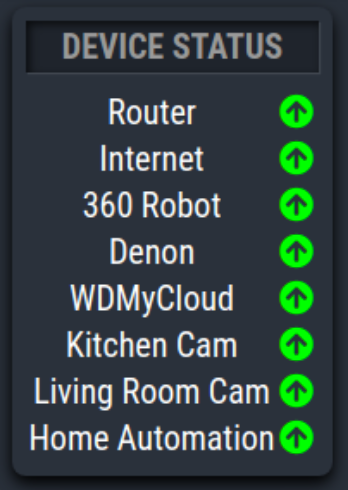
                                    Screen Shot 2021-04-17 at 10.54.30 AM.png .

                                    M 1 Reply Last reply Reply Quote 0
                                    • M Offline
                                      miniashman @miniashman
                                      last edited by

                                      Solved, i figured it out but going through how it works on other modules. Just incase anyone else needs to know this is what I added to custom.css

                                      
                                      .MMM-ServerStatus table td {
                                        text-align: left !important;
                                      }
                                      
                                      1 Reply Last reply Reply Quote 0
                                      • B Offline
                                        bdream
                                        last edited by

                                        Hey @miniashman great having your information here. That solved partwise my color problem, but I have shown my device, the colored icon and additional the word UP.
                                        I can’t find how to get rid of this word. I haven’t it in my config :angry_face:

                                                       {
                                                                module: "MMM-ServerStatus",
                                                                header: "",
                                                                position: "top_center",
                                                                config: {
                                                                        upSymbol: "thumbs-up",
                                                                        downColor:  "#ff0000",
                                                                        upColor:  "#00ff00",
                                                                        downColor: "thumbs-down",
                                                                        hosts: [
                                                                                { name: "door-bell", ip: "192.168.0.6" },
                                                                        ],
                                                                },
                                                        },


                                        Any help for me?

                                        –
                                        cheers, bdream

                                        S 1 Reply Last reply Reply Quote 0
                                        • S Offline
                                          sdetweil @bdream
                                          last edited by

                                          @bdream try

                                          upText:"",
                                          downText:""
                                          

                                          in the module config section

                                          Sam

                                          How to add modules

                                          learning how to use browser developers window for css changes

                                          1 Reply Last reply Reply Quote 0

                                          Hello! It looks like you're interested in this conversation, but you don't have an account yet.

                                          Getting fed up of having to scroll through the same posts each visit? When you register for an account, you'll always come back to exactly where you were before, and choose to be notified of new replies (either via email, or push notification). You'll also be able to save bookmarks and upvote posts to show your appreciation to other community members.

                                          With your input, this post could be even better 💗

                                          Register Login

                                          • 1 / 1
                                          • First post
                                            Last post
                                          Enjoying MagicMirror? Please consider a donation!
                                          MagicMirror created by Michael Teeuw.
                                          Forum managed by Sam, technical setup by Karsten.
                                          This forum is using NodeBB as its core | Contributors
                                          Contact | Privacy Policy