Read the statement by Michael Teeuw here.
Are you tired of editing config.js, or have trouble doing it, see my new module
-
@alyx i;m not sure what u mean by the alexaControl problem
u set it up once and then do Alexa Discover Devices.
they are there forever …(until u manually delete them)
now… IF the machine IP changes (like across a reboot)
then the ip address that alexa saved is no longer valid and alexa can’t find them
it does NOT save dns NAME, only IP address. -
@sdetweil
Yes thats what I mean I haven’t changed anything like that although. I just used the script and the generated config file. It seems alexa can no longer find the devices and is displaying them as offline -
@alyx the pi address changed (like powered off overnight and the ip lease expired
I set fixed (reservation) addresses for all my pi devices in my network router to avoid this problem
only way to fix is to delete and rediscover
alexa.amazon.com
smarthome tab
devices
at the bottom is forget all
(or u can delete them 1 by 1) -
@sdetweil I did delete and rediscover but the thing is they arent showing up in the discovery now lol
-
@alyx i delete, restart MM or reboot and then rediscover
its finicky for sure… and some newer alexa devices seem not to support the old wmeo plugs like they used to…
new show will not discover them, but older echo will
-
@sdetweil Ive rebooted the machine 3 times at this point ahah, I have an echo3 would that be considered new? I know the 4th gen is the latest
-
@alyx ok I found the issue, I commented out all the options in alexa and then ran them individually and etc.
Turns out the notification/ command and devices options werent configured correctly by the conf generator. after commenting those out I can now find them on alexa
-
@dinschal I have fixes for all the issues…
in my module folder go
git pull
rm -rf node_modules
git checkout new
npm install
give it a whirl… let me know
-
@sdetweil thanks sam… i will try it later… my frame has to dry :D first coat :D
-
@sdetweil Hi Sam i tried it again and the size of the analog clock wont change, same if i insert UTC+1 into the timezone… else looks pretty good…
thanks a lot ;)
-
@dinschal can u show me the generated config.js for clock? (just that module)
it changes the value in config.js when I change it in the form…
and send me the debug output again
-
@sdetweil oh no not the debug output again :D
give me just one second ;) -
@sdetweil there is no debug: true in the config anymore :( can i insert it myself?
i tried it, but it stopped here

-
@dinschal said in Are you tired of editing config.js, or have trouble doing it, see my new module:
same if i insert UTC+1 into the timezone
i debugged the clock module
UTC works
UTC +1 doesn’t
UTC -1 doesn’tso I am not sure what it wants
Etc/UTC+1 doesn’t
-
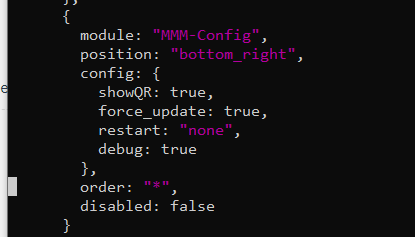
make sure there is a comma on the line before where u added debug:true to my module
-
@sdetweil in germany we have summertime and wintertime… so we have utc and utc +1 :D
-
@sdetweil i did it this way…
-
@dinschal said in Are you tired of editing config.js, or have trouble doing it, see my new module:
in germany we have summertime and wintertime… so we have utc and utc +1
yes, understand… the clock module should auto adjust…
we just changed to std time last sunday and the clock adjusted… actually , the system changed reported time
but I was saying I debugged using the timeZone option in config.js for clock, and cannot get any option other than ‘UTC’
to work…I don’t understand what string it expects
it has a time object and does
time_object.tz(config.timeZone)
to force the time to a particular timezone… except only UTC works for me.
-
@dinschal yes, looks good
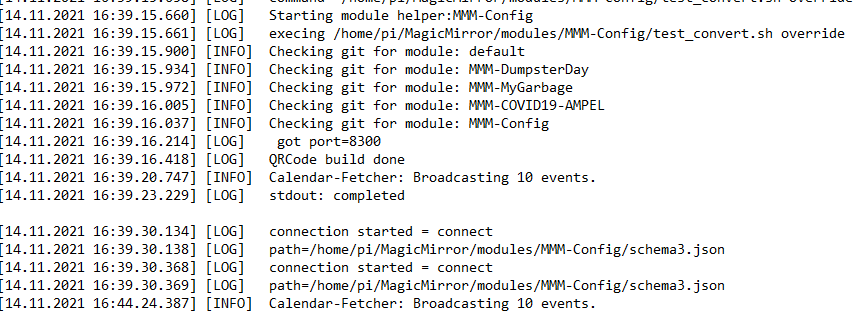
what does the debug output say? -
@sdetweil the output stopped @calendar-fetcher: Broadcasting 10 events
Hello! It looks like you're interested in this conversation, but you don't have an account yet.
Getting fed up of having to scroll through the same posts each visit? When you register for an account, you'll always come back to exactly where you were before, and choose to be notified of new replies (either via email, or push notification). You'll also be able to save bookmarks and upvote posts to show your appreciation to other community members.
With your input, this post could be even better 💗
Register Login