MagicMirror Forum
    • Recent
    • Tags
    • Unsolved
    • Solved
    • MagicMirror² Repository
    • Documentation
    • 3rd-Party-Modules
    • Donate
    • Discord
    • Register
    • Login
    A New Chapter for MagicMirror: The Community Takes the Lead
    Read the statement by Michael Teeuw here.

    FYI new weather_plus onecall module

    Scheduled Pinned Locked Moved Troubleshooting
    17 Posts 3 Posters 3.4k Views 2 Watching
    Loading More Posts
    • Oldest to Newest
    • Newest to Oldest
    • Most Votes
    Reply
    • Reply as topic
    Log in to reply
    This topic has been deleted. Only users with topic management privileges can see it.
    • S Offline
      scumbelly
      last edited by

      Hi,

      I downloading the new weather_plus onecall module to test it out.

      Once configured, etc. I rebooted and the screen area where I assigned it was blank.

      No loading error, nothing.

      I toggled the developers tool and saw 1 error (1 warning re: Electron security). Console showed an error for "Uncaught SyntaxError: Unexpected token ‘:’ module.js:43.

      I opened up the .js file and noticed that defaults had 2 showHumidity listed, one false and one true. I edited out the false showHumidity.

      The apiBase: was set as https:://api.openweathermap.org/data/, so I edited it to “https:://api.openweathermap.org/data/”,

      Ultimately I made additional changes to the .js
      - Define required scripts. Removed “font-awesome.css” (font-awesome already loaded).
      - Define required translations. deleted en&ro.json and made return false (en.json error).

      The weather_plus.css contains 2 addresses. I deleted these as 5.14.0 is a 404 error.

      @import url(“https://cdnjs.cloudflare.com/ajax/libs/font-awesome/5.14.0/css/font-awesome.min.css”);
      @import url(“https://cdnjs.cloudflare.com/ajax/libs/weather-icons/2.0.10/css/weather-icons.min.css”);

      I think that’s everything I did.

      My config is -

      {
      module: “weather_plus”,
      position: “top_right”,
      config: {
      lat: “xx.xxxxxx”,
      lon: “-xx.xxxxxx”,
      showWindDirectionAsArrow: false,
      appid: “bunchofnumbers”,
      }
      },

      I’m not sure if I had to do all the changes but it’s loading.

      Nice module Hangorazvan.

      Cheers

      ? 1 Reply Last reply Reply Quote 0
      • ? Offline
        A Former User @scumbelly
        last edited by A Former User

        This post is deleted!
        1 Reply Last reply Reply Quote 0
        • S Offline
          scumbelly
          last edited by

          @hango

          Hi.

          I deleted my existing weather_plus module and did a “git clone”.

          On the reboot the module came up “loading”.

          Developers Tool showed 2 errors and 1 warning.

          First error was “Failed to load resource the server responded with a staus of 404 font-awesome.min.css:1”
          Second error was “Error on loading stylesheet: modules/weather_plus/weather_plus.css loader.js:215”

          The warning was the Electron security message.

          I removed the 404 error "import url("https://cdnjs.cloudflare.com/ajax/libs/font-awesome/5.14.0/css/font-awesome.min.css");" from the .css file.

          On reboot the module loaded.

          I tried to visit “https://cdnjs.cloudflare.com/ajax” to update the link but a “resources not found” message was returned.

          Only “https://cdnjs.cloudflare.com/” exists.

          Cheers.

          ? 1 Reply Last reply Reply Quote 0
          • ? Offline
            A Former User @scumbelly
            last edited by

            This post is deleted!
            S 1 Reply Last reply Reply Quote 0
            • S Offline
              scumbelly @Guest
              last edited by scumbelly

              @hango

              Hi,

              The latest https://cdnjs.cloudflare.com/ajax/libs/font-awesome/5.15.3/css/fontawesome.min.css did not throw a 404 error

              https://cdnjs.cloudflare.com/ajax/libs/weather-icons/2.0.12/css/weather-icons.min.css returns a 404 error. For fun I tried 2.0.11 to no avail. However 2.0.10 still works.

              Another odd thing is that with showSun: true and onlyTemp: false there is no sunriseSunsetIcon displayed.

              Cheers.

              ? 1 Reply Last reply Reply Quote 0
              • ? Offline
                A Former User @scumbelly
                last edited by

                This post is deleted!
                S 1 Reply Last reply Reply Quote 0
                • S Offline
                  scumbelly @Guest
                  last edited by

                  @hango

                  O.K. The time is displayed just no icon.

                  Thanks for the information.

                  Regards.

                  ? 1 Reply Last reply Reply Quote 0
                  • ? Offline
                    A Former User @scumbelly
                    last edited by

                    This post is deleted!
                    S 2 Replies Last reply Reply Quote 0
                    • S Offline
                      scumbelly @Guest
                      last edited by

                      @hango

                      Hi,

                      Adding the space worked. Icon now presented.

                      Cheers.

                      cowboysdudeC 1 Reply Last reply Reply Quote 0
                      • cowboysdudeC Offline
                        cowboysdude Module Developer @scumbelly
                        last edited by

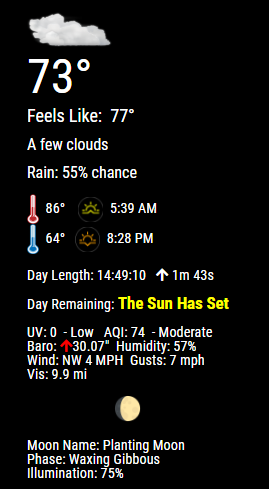
                        Capture.PNG

                        S 1 Reply Last reply Reply Quote 0
                        • S Offline
                          scumbelly @cowboysdude
                          last edited by

                          @cowboysdude

                          Nice. I think I saw that module in another post.

                          Has this module been made public?

                          Cheers.

                          1 Reply Last reply Reply Quote 0
                          • S Offline
                            scumbelly @Guest
                            last edited by

                            @hango

                            I powered off my test system for the day. Today, when I powered it up, everything loaded except the weather_plus module.

                            It is stuck at loading.

                            I toggled the dev tool and found no errors.

                            I guess I’ve got some investigating to do.

                            Cheers

                            S 1 Reply Last reply Reply Quote 0
                            • S Offline
                              scumbelly @scumbelly
                              last edited by

                              @hango

                              I have some data corruption. When I powered down last night - via a momentary switch, the system did not want to shutdown right away. It took multiple presses to get the system to shutdown.

                              Time to rebuild.

                              However, something I did was edit the .js file to change (“FEELS!”) to (“FEELS”) and edit the en translation from changed.\nPlease to changed. \Please

                              Later.

                              Cheers

                              ? 1 Reply Last reply Reply Quote 0
                              • ? Offline
                                A Former User @scumbelly
                                last edited by A Former User

                                This post is deleted!
                                S 1 Reply Last reply Reply Quote 0
                                • S Offline
                                  scumbelly @Guest
                                  last edited by

                                  @hango

                                  I changed a typo in a output string. It will not impact the performance.

                                  Cheers

                                  ? 1 Reply Last reply Reply Quote 0
                                  • ? Offline
                                    A Former User @scumbelly
                                    last edited by

                                    This post is deleted!
                                    S 1 Reply Last reply Reply Quote 0
                                    • S Offline
                                      scumbelly @Guest
                                      last edited by

                                      @hango

                                      O.K. Thanks for the explanation.

                                      Cheers

                                      1 Reply Last reply Reply Quote 0

                                      Hello! It looks like you're interested in this conversation, but you don't have an account yet.

                                      Getting fed up of having to scroll through the same posts each visit? When you register for an account, you'll always come back to exactly where you were before, and choose to be notified of new replies (either via email, or push notification). You'll also be able to save bookmarks and upvote posts to show your appreciation to other community members.

                                      With your input, this post could be even better 💗

                                      Register Login

                                      • 1 / 1
                                      • First post
                                        Last post
                                      Enjoying MagicMirror? Please consider a donation!
                                      MagicMirror created by Michael Teeuw.
                                      Forum managed by Sam, technical setup by Karsten.
                                      This forum is using NodeBB as its core | Contributors
                                      Contact | Privacy Policy