MagicMirror Forum
    • Recent
    • Tags
    • Unsolved
    • Solved
    • MagicMirror² Repository
    • Documentation
    • 3rd-Party-Modules
    • Donate
    • Discord
    • Register
    • Login
    A New Chapter for MagicMirror: The Community Takes the Lead
    Read the statement by Michael Teeuw here.

    MMM-SimpleBGSlideshow (yet another background slideshow module)

    Scheduled Pinned Locked Moved Utilities
    28 Posts 5 Posters 13.3k Views 6 Watching
    Loading More Posts
    • Oldest to Newest
    • Newest to Oldest
    • Most Votes
    Reply
    • Reply as topic
    Log in to reply
    This topic has been deleted. Only users with topic management privileges can see it.
    • M Offline
      MagicInMe
      last edited by

      I remade most of Darick Carpenter’s BackgroundSlideshow because the original was crashing my magic mirror with synchronous file system calls. This one has far fewer options, but has no dependencies and should be easier to implement and use.

      Installation

      There are no dependencies or node-modules required for this module. To install, run the following commands:

      cd ~/MagicMirror/modules/
      git clone https://github.com/scottdrichards/MMM-SimpleBGSlideshow
      

      Usage

      You can add the following to your main configuration file:

      {
          module: 'MMM-SimpleBGSlideshow',
          position: 'fullscreen_below',
          config: {
              imagePaths: ['images/'],
              slideshowSpeed: 15000,
              randomizeImageOrder: false,
          }
      }
      

      Configuration

      Parameter Usage Example
      imagePaths An array of paths for images to be taken from ["images","oldImages"]
      slideshowSpeed Number of milliseconds to show each image 10000
      sortImagesBy Sort the images by name, random, created (file creation, not image date taken), or modified created
      sortImagesDescending Sort the images in descending order true
      randomizeImageOrder Randomize the order to show images. Each image will still be shown once per rotation false
      recursiveSubDirectories Include subdirectories of image paths? false
      validImageFileExtensions Which image extensions to include. Make sure to only do extensions that the browser can render. "bmp,jpg,jpeg,gif,png"
      brightenText Brightens the all MagicMirror text for easier viewing true
      gradient An object that describes the gradient to be applied so that text/modules are easier to read. see below

      Here is how to configure the gradient object

      {
        direction: "linear", //vertical, horizontal, radial`
        opacity: 0.75, // 1 is black
        stop1: "40%", // linear first stop, radial start gradient
        stop2: "80%" // linear second start, radial end gradient (i.e., 120%)
      }
      

      See the project here: https://github.com/scottdrichards/MMM-SimpleBGSlideshow/

      S 1 Reply Last reply Reply Quote 0
      • S Do not disturb
        sdetweil @MagicInMe
        last edited by

        @magicinme all of THESE from node helper are dependencies

        const express = require("express");
        const Log = require("../../js/logger.js");
        const FSPromises = require("fs/promises");
        const pathModule = require("path");
        

        and should be listed in the package.json, IN CASE one of them were to go away
        as has happened in 2.15 and 2.16 with removal of request and associated packages
        and ical and its co dependencies…

        Sam

        How to add modules

        learning how to use browser developers window for css changes

        M 1 Reply Last reply Reply Quote 0
        • M Offline
          MagicInMe @sdetweil
          last edited by

          @sdetweil how would package.json have a listed dependency for fs and path (included in Node) or MagicMirror’s logger? I suppose express is a dependency I could maintain independently, but I rely upon the MM expressInstance.

          S 1 Reply Last reply Reply Quote 0
          • S Do not disturb
            sdetweil @MagicInMe
            last edited by sdetweil

            @magicinme do npm install --save in your module folder for those dependencies.

            then let npm install for your module figure out where to resolve them

            u might depend on the mm expess server INSTANCE but not the code to talk to that instance

            Sam

            How to add modules

            learning how to use browser developers window for css changes

            M 1 Reply Last reply Reply Quote 0
            • M Offline
              MagicInMe @sdetweil
              last edited by

              @sdetweil what’s the purpose of installing core node features as a module? Looking at npm path it says "This is an exact copy of the NodeJS ’path’ module published to the NPM registry. "

              Good point on express, I had thought I was just calling the express object but I do use express.static

              S 1 Reply Last reply Reply Quote 0
              • S Do not disturb
                sdetweil @MagicInMe
                last edited by

                @magicinme you may not ‘install’ it, as npm will resolve , but you document that you USE it, SO, if things change, you stuff still works…

                I don’t know where stuff is packaged, and don’t want to know

                Sam

                How to add modules

                learning how to use browser developers window for css changes

                M 1 Reply Last reply Reply Quote 0
                • M Offline
                  MagicInMe @sdetweil
                  last edited by

                  @sdetweil perhaps this is why https://www.npmjs.com/package/fs gets a million downloads a week even though it does nothing. I believe including core modules in package.json presents an unnecessary security risk (i.e., npm path is controlled by an individual). Unless there’s a way to include a package in package.json as a comment?

                  S 1 Reply Last reply Reply Quote 0
                  • S Do not disturb
                    sdetweil @MagicInMe
                    last edited by sdetweil

                    @magicinme no comments in json.

                    whatever… I have given everything I know and my advice on helping insure users don’t encounter problems.

                    the high download counts are from build systems recreating the env from scratch…

                    not users

                    Sam

                    How to add modules

                    learning how to use browser developers window for css changes

                    1 Reply Last reply Reply Quote 0
                    • R Offline
                      robertybob
                      last edited by

                      Does this module stretch images to fit the mirror? The original module had two different options for this, if I recall correctly

                      M 1 Reply Last reply Reply Quote 0
                      • M Offline
                        MagicInMe @robertybob
                        last edited by

                        @robertybob I currently have it so that it uses the css “cover” attribute which stretches to fill. Is that what you want?

                        1 Reply Last reply Reply Quote 0
                        • R Offline
                          rs
                          last edited by

                          Hi MagicInMe,

                          Thank you for sharing your work!

                          I’ve installed MMM-SimpleBGSlideshow but for some reason the background stays black, I double-checked the images in the correct folder and i use the full path in the config as well:

                          {
                          			module: 'MMM-SimpleBGSlideshow',
                          			position: 'fullscreen_below',
                          			config: {
                          				imagePaths: ['/home/pi/MagicMirror/modules/MMM-SimpleBGSlideshow/images'],
                          				slideshowSpeed: 15000,
                          				randomizeImageOrder: false,
                          			}
                          		},
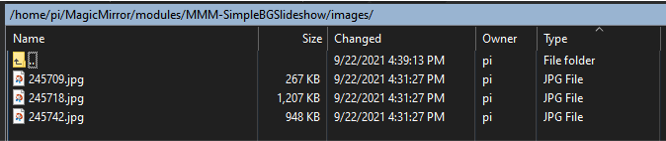
                          

                          alt text

                          but… no joy…

                          I clearly missing something basic here :)

                          I appreciate any thought!
                          Best,
                          Ram

                          S 1 Reply Last reply Reply Quote 0
                          • S Do not disturb
                            sdetweil @rs
                            last edited by sdetweil

                            @rs said in MMM-SimpleBGSlideshow (yet another background slideshow module):

                            MMM-SimpleBGSlideshow

                            the code says

                            imagePaths: [], // resolves relative to MM root. So ‘images’ => ~/MagicMirror/images

                            so, you cannot use the full absolute path

                            the folder MUST be in the MM folder tree…
                            like this, in your case

                            modules/MMM-SimpleBGSlideshow/images'
                            

                            you could use a linked folder to access outside the MM folder tree
                            (I do this for my server shared images path for the MMM-ImagesPhotos module)

                            see the ln command

                            Sam

                            How to add modules

                            learning how to use browser developers window for css changes

                            1 Reply Last reply Reply Quote 0
                            • R Offline
                              rs
                              last edited by

                              @sdetweil, many thanks for pointing me to the right direction, the working path was:

                              modules/MMM-SimpleBGSlideshow/images/
                              

                              Thanks again!
                              Cheers,
                              RS

                              1 Reply Last reply Reply Quote 0
                              • R Offline
                                rs
                                last edited by

                                now that i have it working I have one more question:

                                while the mirror runs, the content of the images folder changes from time to time; looking at the console output, the module capture the changes in the files, for example, adding and removing files from the images folder:

                                [23.09.2021 12:20.44.712] [INFO]  BGSS Sending update to 4690_module_0_MMM-SimpleBGSlideshow: + 1 images 
                                [23.09.2021 12:20.54.765] [INFO]  BGSS Sending update to 4690_module_0_MMM-SimpleBGSlideshow: + 1 images 
                                [23.09.2021 12:20.56.258] [ERROR] ENOENT: no such file or directory, stat 'modules/MMM-SimpleBGSlideshow/images/black.jpg'
                                [23.09.2021 12:20.56.761] [INFO]  BGSS Sending update to 4690_module_0_MMM-SimpleBGSlideshow:  - 1 images
                                [23.09.2021 12:21.05.666] [ERROR] ENOENT: no such file or directory, stat 'modules/MMM-SimpleBGSlideshow/images/MirrorMsg.png'
                                [23.09.2021 12:21.06.169] [INFO]  BGSS Sending update to 4690_module_0_MMM-SimpleBGSlideshow:  - 1 images
                                [23.09.2021 12:21.08.725] [INFO]  BGSS Sending update to 4690_module_0_MMM-SimpleBGSlideshow: + 1 images 
                                [23.09.2021 12:21.34.396] [ERROR] ENOENT: no such file or directory, stat 'modules/MMM-SimpleBGSlideshow/images/MirrorMsg.png'
                                [23.09.2021 12:21.34.900] [INFO]  BGSS Sending update to 4690_module_0_MMM-SimpleBGSlideshow:  - 1 images
                                [23.09.2021 12:21.45.058] [INFO]  BGSS Sending update to 4690_module_0_MMM-SimpleBGSlideshow: + 1 images 
                                [23.09.2021 12:22.09.272] [INFO]  BGSS Sending update to 4690_module_0_MMM-SimpleBGSlideshow: + 1 images 
                                [23.09.2021 12:22.28.684] [ERROR] ENOENT: no such file or directory, stat 'modules/MMM-SimpleBGSlideshow/images/MirrorMsg.png'
                                [23.09.2021 12:22.29.191] [INFO]  BGSS Sending update to 4690_module_0_MMM-SimpleBGSlideshow:  - 1 images
                                [23.09.2021 12:22.31.327] [ERROR] ENOENT: no such file or directory, stat 'modules/MMM-SimpleBGSlideshow/images/MirrorMsg2.png'
                                [23.09.2021 12:22.31.828] [INFO]  BGSS Sending update to 4690_module_0_MMM-SimpleBGSlideshow:  - 1 images
                                [23.09.2021 12:22.35.920] [INFO]  BGSS Sending update to 4690_module_0_MMM-SimpleBGSlideshow: + 1 images
                                

                                However, the image shown on the mirror doesn’t change and stays the same (slideshowSpeed: 5000); is there a way to force the module to refresh itself without stopping the mirror?

                                Thx again!

                                S R 2 Replies Last reply Reply Quote 0
                                • S Do not disturb
                                  sdetweil @rs
                                  last edited by

                                  @rs hm… the enoent means file not found

                                  and it doesn’t use the full path… weird…

                                  I don’t use that module myself.

                                  Sam

                                  How to add modules

                                  learning how to use browser developers window for css changes

                                  1 Reply Last reply Reply Quote 0
                                  • R Offline
                                    rs @rs
                                    last edited by

                                    @sdetweil said in MMM-SimpleBGSlideshow (yet another background slideshow module):

                                    @rs hm… the enoent means file not found

                                    and it doesn’t use the full path… weird…

                                    I don’t use that module myself.

                                    it is what it is then :)
                                    Thx anyways!

                                    S 1 Reply Last reply Reply Quote 0
                                    • S Do not disturb
                                      sdetweil @rs
                                      last edited by

                                      @rs I use this one,

                                      https://github.com/sdetweil/MMM-ImagesPhotos

                                      modified from original

                                      I don’t like my photos stretched etc…

                                      also has color or blur fill around pic

                                      uses only ONE source, ‘uploads’ folder in the module folder… I just symlink to another (my mounted server share) using the ln command

                                      Sam

                                      How to add modules

                                      learning how to use browser developers window for css changes

                                      R R 2 Replies Last reply Reply Quote 0
                                      • R Offline
                                        rs @sdetweil
                                        last edited by

                                        @sdetweil, agree, this is the one i finally use, it updates the shown photos when the folder content changes, good enough for my current needs!

                                        Cheers,
                                        RS

                                        S 1 Reply Last reply Reply Quote 0
                                        • S Do not disturb
                                          sdetweil @rs
                                          last edited by

                                          @rs i also have a module that shows a qr code and lets users upload pics from their phone (to the images location)…

                                          see
                                          https://github.com/sdetweil/uploadPics

                                          Sam

                                          How to add modules

                                          learning how to use browser developers window for css changes

                                          1 Reply Last reply Reply Quote 0
                                          • R Offline
                                            robertybob @sdetweil
                                            last edited by

                                            @sdetweil I’ve just tried out this module and the Readme on your github needs editing to point the installation link (git clone) to your one, rather than the original Github link :) Also, could you update the example in the Readme to detail exactly how to correctly size images? e.g.

                                            For percentage:

                                            maxWidth:"50%",
                                            

                                            or for pixel dimensions:

                                            maxWidth:"50",
                                            

                                            For novices like myself, it isn’t very clear :)

                                            I can’t for the life of me get the module to respect the sizes that I specify, it’s always too big, goes off the screen and isn’t central (despite me not changing the default position)

                                            {
                                            	module: "MMM-ImagesPhotos",
                                            	position: "middle_center",
                                            	config: {
                                            		opacity: 0.9,
                                            		animationSpeed: 500,
                                            		updateInterval: 11000,
                                            		maxWidth:"50%",
                                            		maxHeight:"70%",
                                            		backgroundColor: 'grey',  // not used if fill is true
                                            		fill: true,   // fill around image with blurred copy of image
                                            		blur: 10,   // only used if fill is true
                                            	}
                                            },
                                            
                                            S 1 Reply Last reply Reply Quote 0

                                            Hello! It looks like you're interested in this conversation, but you don't have an account yet.

                                            Getting fed up of having to scroll through the same posts each visit? When you register for an account, you'll always come back to exactly where you were before, and choose to be notified of new replies (either via email, or push notification). You'll also be able to save bookmarks and upvote posts to show your appreciation to other community members.

                                            With your input, this post could be even better 💗

                                            Register Login

                                            • 1
                                            • 2
                                            • 1 / 2
                                            • First post
                                              Last post
                                            Enjoying MagicMirror? Please consider a donation!
                                            MagicMirror created by Michael Teeuw.
                                            Forum managed by Sam, technical setup by Karsten.
                                            This forum is using NodeBB as its core | Contributors
                                            Contact | Privacy Policy