MagicMirror Forum
    • Recent
    • Tags
    • Unsolved
    • Solved
    • MagicMirror² Repository
    • Documentation
    • 3rd-Party-Modules
    • Donate
    • Discord
    • Register
    • Login
    A New Chapter for MagicMirror: The Community Takes the Lead
    Read the statement by Michael Teeuw here.

    MMM-MirrorMirrorOnTheWall - Alexa voice control to hide/show modules and display text/images

    Scheduled Pinned Locked Moved System
    184 Posts 25 Posters 364.6k Views 23 Watching
    Loading More Posts
    • Oldest to Newest
    • Newest to Oldest
    • Most Votes
    Reply
    • Reply as topic
    Log in to reply
    This topic has been deleted. Only users with topic management privileges can see it.
    • G Offline
      Gunwoody @joanaz
      last edited by

      @joanaz Thanks again. I think it’s uploaded ok - not that it’s helped me get it working. I can get just about any other module running on MagicMirror but not this one. I think it’s just a case of i’m not sure what folders should be where. When i run it with the module in the config file i just get a white screen and can’t ‘alt’ out of it - Pi seems to crash. I think i’ll just have to give up as i’ve been trying for 3 days to get this running :(

      J 1 Reply Last reply Reply Quote 0
      • J Offline
        joanaz @bartalluyn
        last edited by

        @bartalluyn is your code on Github? I’m quite interested in your Alexa Java client, it’d be great if it was a Mirror Module, so Alexa and Mirror can communicate directly without going through AWS IoT.

        1 Reply Last reply Reply Quote 0
        • J Offline
          joanaz @Gunwoody
          last edited by

          @Gunwoody sorry to hear that. This is quite advanced as you have to setup AWS IoT, Lambda and Alexa skill, so it does need you to have some experiences with programming and using AWS services. I’m thinking about how to simplify this and get it to work with multiple users, but thanks for trying.

          G 1 Reply Last reply Reply Quote 0
          • zman3Z Offline
            zman3
            last edited by

            I do not get why this is not working the src.zip has a layout of folders and in the root of zip I have index.js MirrorMirror.js and package.json

            but i still get

            START RequestId: dbde411d-ecaa-11e6-8bd7-9b2096d559c7 Version: $LATEST
            
            20:28:46
            Unable to import module 'index': Error at Function.Module._resolveFilename (module.js:325:15) at Function.Module._load (module.js:276:25) at Module.require (module.js:353:17) at require (internal/module.js:12:17) at Object. (/var/task/index.js:23:14) at Module._compile (module.js:409:26) at Object.Module._extensions..js (module.js:416:10) at Module.load (
            Unable to import module 'index': Error
            at Function.Module._resolveFilename (module.js:325:15)
            at Function.Module._load (module.js:276:25)
            at Module.require (module.js:353:17)
            at require (internal/module.js:12:17)
            at Object. (/var/task/index.js:23:14)
            at Module._compile (module.js:409:26)
            at Object.Module._extensions..js (module.js:416:10)
            at Module.load (module.js:343:32)
            at Function.Module._load (module.js:300:12)
            at Module.require (module.js:353:17)
            

            which looks like what it’s not finding index.js ?

            J 1 Reply Last reply Reply Quote 0
            • G Offline
              Gunwoody @joanaz
              last edited by

              @joanaz I haven’t really had much of an issue with Lambda, IOT etc. It’s more the local install on the pi. I think because your instructions jump from area to area it’s easy to miss or misintrepet a step. I might just do a full clean install and start from scratch. It’s just a shame because MagicMirror itself runs perfectly with any module i try. It’s just your that is determined to thwart me lol :)

              J 1 Reply Last reply Reply Quote 0
              • J Offline
                joanaz @zman3
                last edited by

                @zman3 you don’t have certs and node_modules?

                1 Reply Last reply Reply Quote 0
                • J Offline
                  joanaz @Gunwoody
                  last edited by

                  @Gunwoody i’ve never seen another mirror module which works with a Alexa skill

                  1 Reply Last reply Reply Quote 0
                  • zman3Z Offline
                    zman3
                    last edited by

                    yes i have those folders in the zip

                    1 Reply Last reply Reply Quote 0
                    • J Offline
                      joanaz
                      last edited by

                      For people struggling with setting up Lambda and Alexa Skill, here’s a good visual instructions for a different Skill. Use your judgment when dealing with differences with my skill.
                      https://github.com/alexa/skill-sample-nodejs-calendar-reader

                      Here’s Amazon’s instructions for setting up a AWS IoT device, it’ll also be slightly different when you setup your own device, but it’s good enough.

                      http://docs.aws.amazon.com/iot/latest/developerguide/iot-console-signin.html

                      1 Reply Last reply Reply Quote 0
                      • S Offline
                        savage_gr1nd
                        last edited by

                        So exactly which files need to be in the zip?
                        And also, when testing on the lambda site I get an error about alexa-sdk not being detected… are there other steps for installation? I’ve hit a wall

                        J 1 Reply Last reply Reply Quote 0
                        • S Offline
                          savage_gr1nd
                          last edited by

                          So redid everything. Same thing. When I test with my device and try to invoke it says there was a problem with the requested skills response…

                          1 Reply Last reply Reply Quote 0
                          • J Offline
                            joanaz @savage_gr1nd
                            last edited by

                            @savage_gr1nd you need to include node_modules in the src folder. run ‘npm install’ inside src folder.

                            1 Reply Last reply Reply Quote 0
                            • S Offline
                              savage_gr1nd
                              last edited by

                              Yea I did that. Then made the zip. The zip was too large and my page kept crashing so I used s3. Or will that not work?

                              J 1 Reply Last reply Reply Quote 0
                              • S Offline
                                savage_gr1nd
                                last edited by

                                And one more thing I’m confused on and it might be why, when putting the path to certs to keys.json is it the FULL path /home etc…?

                                1 Reply Last reply Reply Quote 0
                                • J Offline
                                  joanaz @savage_gr1nd
                                  last edited by

                                  @savage_gr1nd the zip shouldn’t be too large, mine was 5.1MB. I’m not sure what you are saying about path to certs and keys.json. have a look of my folder structure
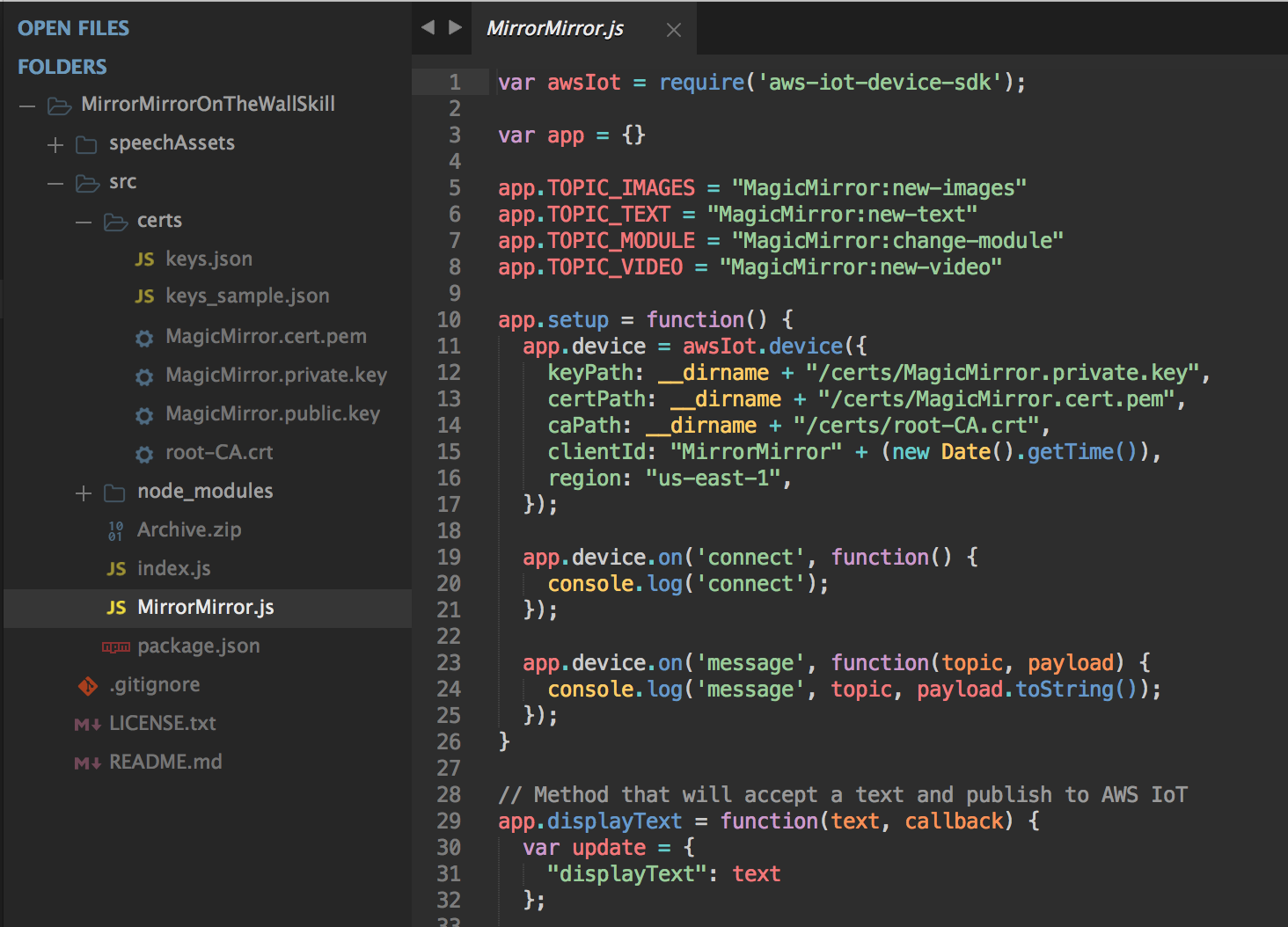
                                  0_1486617474942_Screen Shot 2017-02-09 at 00.16.26.png

                                  1 Reply Last reply Reply Quote 0
                                  • S Offline
                                    savage_gr1nd
                                    last edited by

                                    I figured out the path problem.
                                    But every module ever is in my folder. Which are required so I can delete the rest.

                                    1 Reply Last reply Reply Quote 0
                                    • S Offline
                                      savage_gr1nd
                                      last edited by

                                      I’m sorry lol
                                      More specific in my node_modules folder

                                      1 Reply Last reply Reply Quote 0
                                      • S Offline
                                        savage_gr1nd
                                        last edited by

                                        Okay I’m really sorry for bugging.
                                        But literally got everything figured out except why my file is too large. I deleted node_modules and redid npm installs on all 4 dependencies. The node folder alone is 69mb…
                                        How is yours 5.1mb…?

                                        Since mine is so big. The only error I get now in lambda is time out. I just don’t understand why mine is so large.

                                        J 1 Reply Last reply Reply Quote 0
                                        • S Offline
                                          savage_gr1nd @Journeytojah
                                          last edited by

                                          @Journeytojah did you ever get yours to work? That’s about the same error I was getting

                                          1 Reply Last reply Reply Quote 0
                                          • J Offline
                                            joanaz @savage_gr1nd
                                            last edited by

                                            @savage_gr1nd my node_modules is 24.2MB. How are you testing the lambda function? try something simple, like the hello intent first

                                            S 1 Reply Last reply Reply Quote 0

                                            Hello! It looks like you're interested in this conversation, but you don't have an account yet.

                                            Getting fed up of having to scroll through the same posts each visit? When you register for an account, you'll always come back to exactly where you were before, and choose to be notified of new replies (either via email, or push notification). You'll also be able to save bookmarks and upvote posts to show your appreciation to other community members.

                                            With your input, this post could be even better 💗

                                            Register Login

                                            • 1
                                            • 2
                                            • 6
                                            • 7
                                            • 8
                                            • 9
                                            • 10
                                            • 9 / 10
                                            • First post
                                              Last post
                                            Enjoying MagicMirror? Please consider a donation!
                                            MagicMirror created by Michael Teeuw.
                                            Forum managed by Sam, technical setup by Karsten.
                                            This forum is using NodeBB as its core | Contributors
                                            Contact | Privacy Policy