Read the statement by Michael Teeuw here.
OrangePi Zero 2 installation issues
-
hi,
Since the rp4 is hard to get atm, I got a orangpi zero 2 in stead and followed installation instructions here https://www.instructables.com/Orange-Pi-Magic-Mirror/ and here: https://docs.magicmirror.builders/getting-started/installation.html#manual-installation
When starting mm I get:
  ___  ____  _   _____             ____
 / _ \|  _ \(_) |__  /___ _ __ ___|___ \
| | | | |_) | |   / // _ \ '__/ _ \ __) |
| |_| |  __/| |  / /|  __/ | | (_) / __/
 \___/|_|   |_| /____\___|_|  \___/_____|

Welcome to Armbian 21.08.6 Focal with Linux 4.9.255-sun50iw9

System load:   24%           	Up time:       2 min
Memory usage:  11% of 964M   	IP:	       192.168.207.243
CPU temp:      56°C           	Usage of /:    4% of 58G

[ General system configuration (beta): armbian-config ]

Last login: Fri Dec 10 17:27:44 2021 from 192.168.207.6
michel@orangepizero2:~/MagicMirror$ npm run start

> magicmirror@2.17.1 start /home/michel/MagicMirror
> DISPLAY="${DISPLAY:=:0}" ./node_modules/.bin/electron js/electron.js

sh: 1: ./node_modules/.bin/electron: not found
npm ERR! code ELIFECYCLE
npm ERR! syscall spawn
npm ERR! file sh
npm ERR! errno ENOENT
npm ERR! magicmirror@2.17.1 start: `DISPLAY="${DISPLAY:=:0}" ./node_modules/.bin/electron js/electron.js`
npm ERR! spawn ENOENT
npm ERR!
npm ERR! Failed at the magicmirror@2.17.1 start script.
npm ERR! This is probably not a problem with npm. There is likely additional logging output above.

npm ERR! A complete log of this run can be found in:
npm ERR!     /home/michel/.npm/_logs/2021-12-10T16_46_30_202Z-debug.log
I tried:
~/MagicMirror$ sudo npm install electron

> electron@13.6.3 postinstall /home/michel/MagicMirror/node_modules/electron
> node install.js

Error: EACCES: permission denied, mkdtemp '/home/michel/MagicMirror/node_modules/electron/electron-download-oEbSjl'
npm WARN tsutils@3.21.0 requires a peer of typescript@>=2.8.0 || >= 3.2.0-dev || >= 3.3.0-dev || >= 3.4.0-dev || >= 3.5.0-dev || >= 3.6.0-dev || >= 3.6.0-beta || >= 3.7.0-dev || >= 3.7.0-beta but none is installed. You must install peer dependencies yourself.
npm WARN optional SKIPPING OPTIONAL DEPENDENCY: fsevents@2.3.2 (node_modules/fsevents):
npm WARN notsup SKIPPING OPTIONAL DEPENDENCY: Unsupported platform for fsevents@2.3.2: wanted {"os":"darwin","arch":"any"} (current: {"os":"linux","arch":"arm64"})

npm ERR! code ELIFECYCLE
npm ERR! errno 1
npm ERR! electron@13.6.3 postinstall: `node install.js`
npm ERR! Exit status 1
npm ERR!
npm ERR! Failed at the electron@13.6.3 postinstall script.
npm ERR! This is probably not a problem with npm. There is likely additional logging output above.

npm ERR! A complete log of this run can be found in:
npm ERR!     /root/.npm/_logs/2021-12-10T16_54_08_006Z-debug.log
My linux knowledge is not good enough to figure this one out. :(
Anyone who could help?
Cheers,
Michel
-
@michelw you used sudo on some command, in error ( do not use sudo for any mm related thing)
to get out of that
cd ~
sudo chown -R michel MagicMirror
also, use my script, it does everything
see
https://github.com/sdetweil/MagicMirror_scriptsu have to delete or rename the existing folder to use my script as it assumes start from scratch
-
@michelw also can u show the results of
uname -a -
@sdetweil said in OrangePi Zero 2 installation issues:
uname -a
sure:
michel@orangepizero2:~$ uname -a
Linux orangepizero2 4.9.255-sun50iw9 #2 SMP PREEMPT Thu Nov 18 08:53:39 UTC 2021 aarch64 aarch64 aarch64 GNU/Linux
Install log:
install starting - Fri Dec 10 19:02:14 CET 2021 installing on aarch64 processor system the os is Distributor ID: Ubuntu Description: Ubuntu 20.04.3 LTS Release: 20.04 Codename: focal Installing helper tools ... Reading package lists... Building dependency tree... Reading state information... pv is already the newest version (1.6.6-1). unzip is already the newest version (6.0-25ubuntu1). curl is already the newest version (7.68.0-1ubuntu2.7). git is already the newest version (1:2.25.1-1ubuntu3.2). build-essential is already the newest version (12.8ubuntu1.1). wget is already the newest version (1.20.3-1ubuntu2). 0 upgraded, 0 newly installed, 0 to remove and 0 not upgraded. Updating packages ... Hit:1 https://deb.nodesource.com/node_14.x focal InRelease Hit:3 http://ports.ubuntu.com focal InRelease Hit:4 http://ports.ubuntu.com focal-security InRelease Hit:5 http://ports.ubuntu.com focal-updates InRelease Hit:6 http://ports.ubuntu.com focal-backports InRelease Hit:2 http://mirror.armbian.de/apt focal InRelease Reading package lists... apt-get update completed ok apt-get upgrade started apt upgrade result =rc=0 Reading package lists... Building dependency tree... Reading state information... Calculating upgrade... 0 upgraded, 0 newly installed, 0 to remove and 0 not upgraded. Check current Node installation ... Node currently installed. Checking version number. Minimum Node version: v14.0.0 Installed Node version: v14.18.2 No Node.js upgrade necessary. Check current NPM installation ... NPM currently installed. Checking version number. Minimum npm version: V6.0.0 Installed npm version: V6.14.15 No npm upgrade necessary. Cloning MagicMirror ... Cloning MagicMirror Done! Installing dependencies ... > electron@13.6.3 postinstall /home/michel/MagicMirror/node_modules/electron > node install.js > magicmirror@2.17.1 install /home/michel/MagicMirror > echo "Installing vendor files ... " && cd vendor && npm install --loglevel=error Installing vendor files ... > @fortawesome/fontawesome-free@5.15.4 postinstall /home/michel/MagicMirror/vendor/node_modules/@fortawesome/fontawesome-free > node attribution.js Font Awesome Free 5.15.4 by @fontawesome - https://fontawesome.com License - https://fontawesome.com/license/free (Icons: CC BY 4.0, Fonts: SIL OFL 1.1, Code: MIT License) added 9 packages from 17 contributors and audited 9 packages in 11.215s found 0 vulnerabilities > magicmirror@2.17.1 postinstall /home/michel/MagicMirror > npm run install-fonts && echo "MagicMirror installation finished successfully! " > magicmirror@2.17.1 install-fonts /home/michel/MagicMirror > echo "Installing fonts ... " && cd fonts && npm install --loglevel=error Installing fonts ... added 1 package from 1 contributor and audited 1 package in 3.224s found 0 vulnerabilities MagicMirror installation finished successfully! added 292 packages from 243 contributors and audited 923 packages in 219.336s 19 packages are looking for funding run `npm fund` for details found 0 vulnerabilities Dependencies installation Done! fixing sandbox permissions setting up initial config.js Check plymouth installation ... plymouth is not installed. install and setup pm2 get the pm2 platform specific startup command startup command = sudo env PATH=$PATH:/usr/bin:/bin /usr/lib/node_modules/pm2/bin/pm2 startup systemd -u michel --hp /home/michel ------------- __/\\\\\\\\\\\\\____/\\\\____________/\\\\____/\\\\\\\\\_____ _\/\\\/////////\\\_\/\\\\\\________/\\\\\\__/\\\///////\\\___ _\/\\\_______\/\\\_\/\\\//\\\____/\\\//\\\_\///______\//\\\__ _\/\\\\\\\\\\\\\/__\/\\\\///\\\/\\\/_\/\\\___________/\\\/___ _\/\\\/////////____\/\\\__\///\\\/___\/\\\________/\\\//_____ _\/\\\_____________\/\\\____\///_____\/\\\_____/\\\//________ _\/\\\_____________\/\\\_____________\/\\\___/\\\/___________ _\/\\\_____________\/\\\_____________\/\\\__/\\\\\\\\\\\\\\\_ _\///______________\///______________\///__\///////////////__ Runtime Edition PM2 is a Production Process Manager for Node.js applications with a built-in Load Balancer. Start and Daemonize any application: $ pm2 start app.js Load Balance 4 instances of api.js: $ pm2 start api.js -i 4 Monitor in production: $ pm2 monitor Make pm2 auto-boot at server restart: $ pm2 startup To go further checkout: http://pm2.io/ ------------- [PM2] Init System found: systemd Platform systemd Template [Unit] Description=PM2 process manager Documentation=https://pm2.keymetrics.io/ After=network.target [Service] Type=forking User=michel LimitNOFILE=infinity LimitNPROC=infinity LimitCORE=infinity Environment=PATH=$PATH:/usr/bin:/bin:/bin:/usr/local/sbin:/usr/local/bin:/usr/sbin:/usr/bin Environment=PM2_HOME=/home/michel/.pm2 PIDFile=/home/michel/.pm2/pm2.pid Restart=on-failure ExecStart=/usr/lib/node_modules/pm2/bin/pm2 resurrect ExecReload=/usr/lib/node_modules/pm2/bin/pm2 reload all ExecStop=/usr/lib/node_modules/pm2/bin/pm2 kill [Install] WantedBy=multi-user.target Target path /etc/systemd/system/pm2-michel.service Command list [ 'systemctl enable pm2-michel' ] [PM2] Writing init configuration in /etc/systemd/system/pm2-michel.service [PM2] Making script booting at startup... [PM2] [-] Executing: systemctl enable pm2-michel... [PM2] [v] Command successfully executed. +---------------------------------------+ [PM2] Freeze a process list on reboot via: $ pm2 save [PM2] Remove init script via: $ pm2 unstartup systemd pm2 startup command done configure the pm2 config file for MagicMirror the user is not pi change mm.sh save copy of mm.sh change relative home path to hard coded path change pm2_MagicMirror.json now using this config file pm2_MagicMirror_new.json start MagicMirror via pm2 now save MagicMirror pm2 config now stop MagicMirror via pm2 now disable screensaver via gsettings was true and uint32 300 We're ready! Run pm2 start MagicMirror from the ~/MagicMirror directory to start your MagicMirror. install completed - Fri Dec 10 19:06:47 CET 2021 -
I forgot half of my post:
michel@orangepizero2:~$ cd MagicMirror/
michel@orangepizero2:~/MagicMirror$ pm2 start MagicMirror
[PM2] Applying action restartProcessId on app [MagicMirror](ids: [ 0 ])
[PM2] [MagicMirror](0) ✓
[PM2] Process successfully started
┌─────┬────────────────┬─────────────┬─────────┬─────────┬──────────┬────────┬──────┬───────────┬──────────┬──────────┬──────────┬──────────┐
│ id  │ name           │ namespace   │ version │ mode    │ pid      │ uptime │ ↺    │ status    │ cpu      │ mem      │ user     │ watching │
├─────┼────────────────┼─────────────┼─────────┼─────────┼──────────┼────────┼──────┼───────────┼──────────┼──────────┼──────────┼──────────┤
│ 0   │ MagicMirror    │ default     │ 2.17.1  │ fork    │ 4924     │ 0s     │ 30   │ online    │ 0%       │ 2.8mb    │ michel   │ disabled │
└─────┴────────────────┴─────────────┴─────────┴─────────┴──────────┴────────┴──────┴───────────┴──────────┴──────────┴──────────┴──────────┘
michel@orangepizero2:~/MagicMirror$
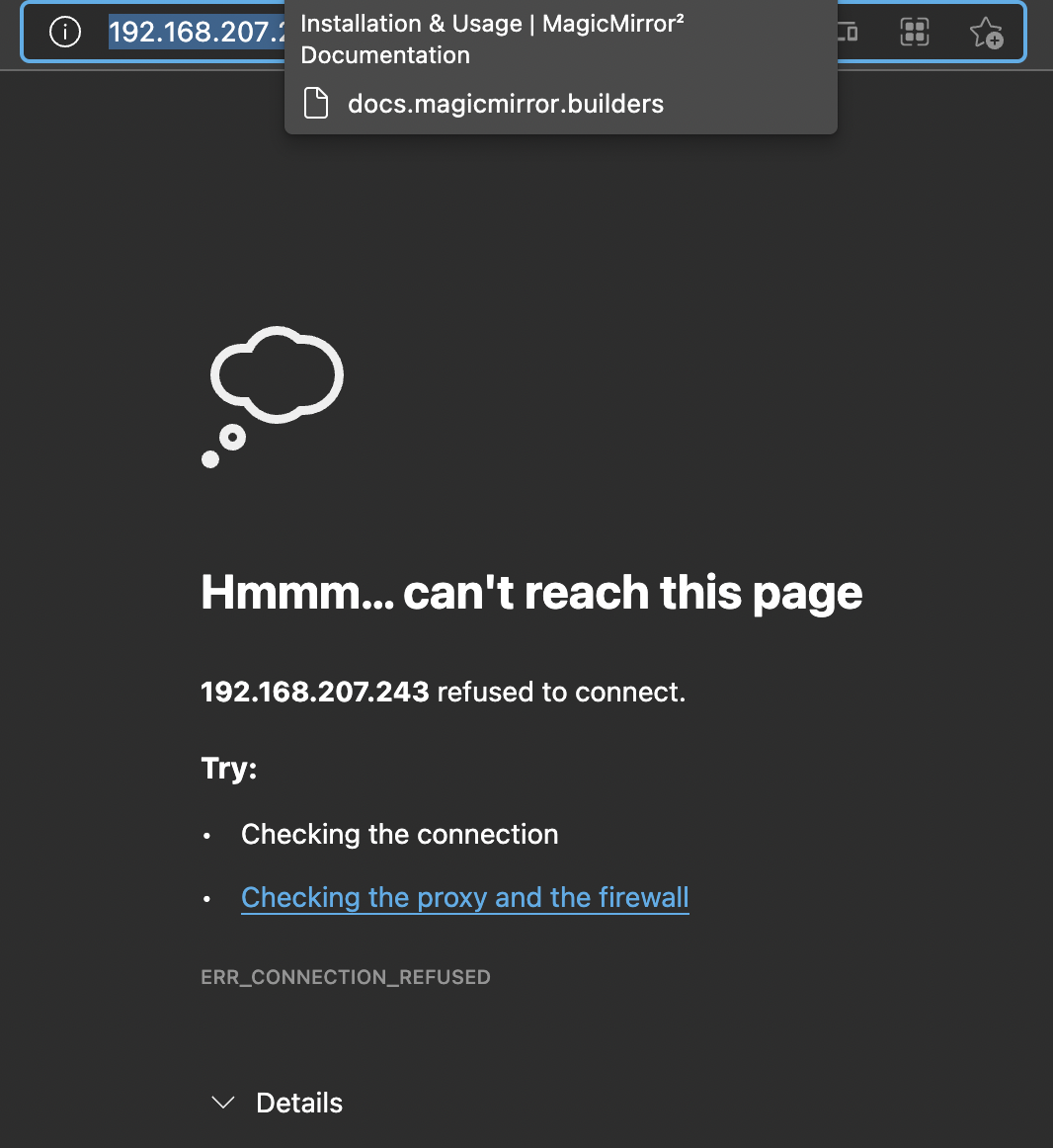
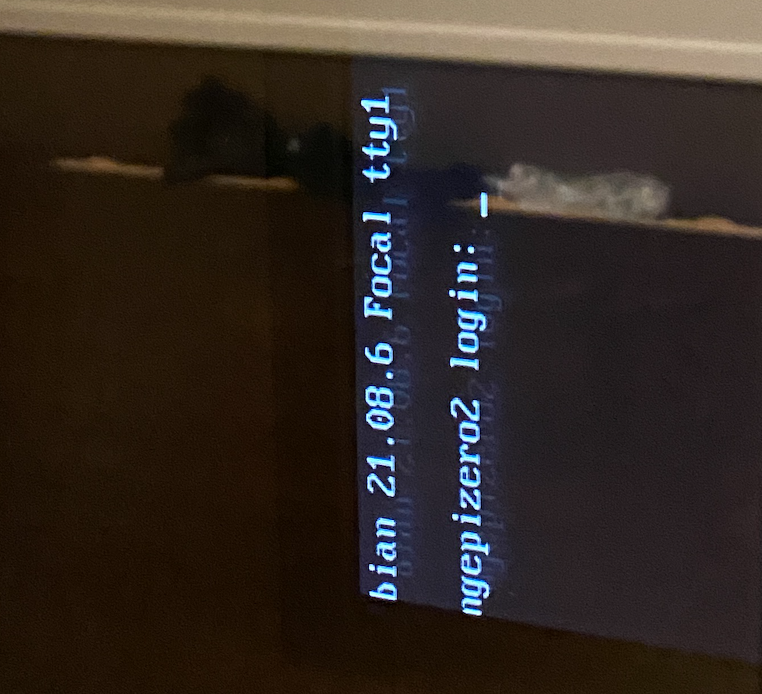
Nothing on the monitor (just cli) and nothing on: http://192.168.207.243:8080/ (the IP of the mirror)
-
When I run it manually:
michel@orangepizero2:~$ cd MagicMirror/
michel@orangepizero2:~/MagicMirror$ npm run start

> magicmirror@2.17.1 start /home/michel/MagicMirror
> DISPLAY="${DISPLAY:=:0}" ./node_modules/.bin/electron js/electron.js

[10.12.2021 19:23.11.092] [LOG]   Starting MagicMirror: v2.17.1
[10.12.2021 19:23.11.110] [LOG]   Loading config ...
[10.12.2021 19:23.11.124] [LOG]   Loading module helpers ...
[10.12.2021 19:23.11.129] [LOG]   No helper found for module: alert.
[10.12.2021 19:23.11.166] [LOG]   Initializing new module helper ...
[10.12.2021 19:23.11.170] [LOG]   Module helper loaded: updatenotification
[10.12.2021 19:23.11.172] [LOG]   No helper found for module: clock.
[10.12.2021 19:23.11.507] [LOG]   Initializing new module helper ...
[10.12.2021 19:23.11.510] [LOG]   Module helper loaded: calendar
[10.12.2021 19:23.11.513] [LOG]   No helper found for module: compliments.
[10.12.2021 19:23.11.515] [LOG]   No helper found for module: weather.
[10.12.2021 19:23.11.562] [LOG]   Initializing new module helper ...
[10.12.2021 19:23.11.564] [LOG]   Module helper loaded: newsfeed
[10.12.2021 19:23.11.566] [LOG]   All module helpers loaded.
[10.12.2021 19:23.11.788] [LOG]   Starting server on port 8080 ...
[10.12.2021 19:23.11.821] [LOG]   Server started ...
[10.12.2021 19:23.11.824] [LOG]   Connecting socket for: updatenotification
[10.12.2021 19:23.11.827] [LOG]   Connecting socket for: calendar
[10.12.2021 19:23.11.829] [LOG]   Starting node helper for: calendar
[10.12.2021 19:23.11.831] [LOG]   Connecting socket for: newsfeed
[10.12.2021 19:23.11.833] [LOG]   Starting node helper for: newsfeed
[10.12.2021 19:23.11.835] [LOG]   Sockets connected & modules started ...
/home/michel/MagicMirror/node_modules/electron/dist/electron exited with signal SIGSEGV
npm ERR! code ELIFECYCLE
npm ERR! errno 1
npm ERR! magicmirror@2.17.1 start: `DISPLAY="${DISPLAY:=:0}" ./node_modules/.bin/electron js/electron.js`
npm ERR! Exit status 1
npm ERR!
npm ERR! Failed at the magicmirror@2.17.1 start script.
npm ERR! This is probably not a problem with npm. There is likely additional logging output above.

npm ERR! A complete log of this run can be found in:
npm ERR!     /home/michel/.npm/_logs/2021-12-10T18_23_11_988Z-debug.log
michel@orangepizero2:~/MagicMirror$ cat /home/michel/.npm/_logs/2021-12-10T18_23_11_988Z-debug.log 0 info it worked if it ends with ok 1 verbose cli [ '/usr/bin/node', '/usr/bin/npm', 'run', 'start' ] 2 info using npm@6.14.15 3 info using node@v14.18.2 4 verbose run-script [ 'prestart', 'start', 'poststart' ] 5 info lifecycle magicmirror@2.17.1~prestart: magicmirror@2.17.1 6 info lifecycle magicmirror@2.17.1~start: magicmirror@2.17.1 7 verbose lifecycle magicmirror@2.17.1~start: unsafe-perm in lifecycle true 8 verbose lifecycle magicmirror@2.17.1~start: PATH: /usr/lib/node_modules/npm/node_modules/npm-lifecycle/node-gyp-bin:/home/michel/MagicMirror/node_modules/.bin:/usr/local/sbin:/usr/local/bin:/usr/sbin:/usr/bin:/sbin:/bin:/usr/games:/usr/local/games:/snap/bin 9 verbose lifecycle magicmirror@2.17.1~start: CWD: /home/michel/MagicMirror 10 silly lifecycle magicmirror@2.17.1~start: Args: [ 10 silly lifecycle '-c', 10 silly lifecycle 'DISPLAY="${DISPLAY:=:0}" ./node_modules/.bin/electron js/electron.js' 10 silly lifecycle ] 11 silly lifecycle magicmirror@2.17.1~start: Returned: code: 1 signal: null 12 info lifecycle magicmirror@2.17.1~start: Failed to exec start script 13 verbose stack Error: magicmirror@2.17.1 start: `DISPLAY="${DISPLAY:=:0}" ./node_modules/.bin/electron js/electron.js` 13 verbose stack Exit status 1 13 verbose stack at EventEmitter.<anonymous> (/usr/lib/node_modules/npm/node_modules/npm-lifecycle/index.js:332:16) 13 verbose stack at EventEmitter.emit (events.js:400:28) 13 verbose stack at ChildProcess.<anonymous> (/usr/lib/node_modules/npm/node_modules/npm-lifecycle/lib/spawn.js:55:14) 13 verbose stack at ChildProcess.emit (events.js:400:28) 13 verbose stack at maybeClose (internal/child_process.js:1058:16) 13 verbose stack at Process.ChildProcess._handle.onexit (internal/child_process.js:293:5) 14 verbose pkgid magicmirror@2.17.1 15 verbose cwd /home/michel/MagicMirror 16 verbose Linux 4.9.255-sun50iw9 17 verbose argv "/usr/bin/node" "/usr/bin/npm" "run" "start" 18 verbose node v14.18.2 19 verbose npm v6.14.15 20 error code ELIFECYCLE 21 error errno 1 22 error magicmirror@2.17.1 start: `DISPLAY="${DISPLAY:=:0}" ./node_modules/.bin/electron js/electron.js` 22 error Exit status 1 23 error Failed at the magicmirror@2.17.1 start script. 23 error This is probably not a problem with npm. There is likely additional logging output above. 24 verbose exit [ 1, true ] -
@michelw ok, you are running the desktop graphical version of the OS, right? you must , browser draws in graphics mode.
the number next to uptim ein the pm2 status is the restart count…
so, pm2 stop all
pm2 flush
pm2 start 0wait 15 seconds
then pm2 logs --lines=100
-
@michelw mm installs and runs on other aarch64 systems… , ubuntu 64 on arm, Jetson Nano and Raspi with the 64bit beta OS…
-
@sdetweil said in OrangePi Zero 2 installation issues:
@michelw ok, you are running the desktop graphical version of the OS, right? you must , browser draws in graphics mode.
Dang, that might be the issue…
I’ve installed this image now: https://redirect.armbian.com/orangepizero2/Buster_legacy then. That one should have desktop. https://www.armbian.com/orange-pi-zero-2/Ran your script again, but now it has issues with the missing chromium browser…
touch: cannot touch '/etc/chromium-browser/customizations/01-disable-update-check': No such file or directory
tee: /etc/chromium-browser/customizations/01-disable-update-check: No such file or directory
install starting - Fri Dec 10 21:09:23 CET 2021 installing on aarch64 processor system the os is Distributor ID: Debian Description: Debian GNU/Linux 10 (buster) Release: 10 Codename: buster Installing helper tools ... Reading package lists... Building dependency tree... Reading state information... build-essential is already the newest version (12.6). curl is already the newest version (7.64.0-4+deb10u2). git is already the newest version (1:2.20.1-2+deb10u3). pv is already the newest version (1.6.6-1). unzip is already the newest version (6.0-23+deb10u2). wget is already the newest version (1.20.1-1.1). 0 upgraded, 0 newly installed, 0 to remove and 0 not upgraded. Updating packages ... Hit:1 http://security.debian.org buster/updates InRelease Hit:2 http://deb.debian.org/debian buster InRelease Hit:3 http://deb.debian.org/debian buster-updates InRelease Hit:4 http://deb.debian.org/debian buster-backports InRelease Hit:5 http://armbian.12z.eu/apt buster InRelease Reading package lists... apt-get update completed ok apt-get upgrade started apt upgrade result =rc=0 Reading package lists... Building dependency tree... Reading state information... Calculating upgrade... 0 upgraded, 0 newly installed, 0 to remove and 0 not upgraded. Check current Node installation ... Node.js is not installed. Installing Node.js ... Node release info = ## Installing the NodeSource Node.js 14.x repo... ## Populating apt-get cache... + apt-get update Hit:1 http://deb.debian.org/debian buster InRelease Hit:2 http://deb.debian.org/debian buster-updates InRelease Hit:3 http://security.debian.org buster/updates InRelease Hit:4 http://deb.debian.org/debian buster-backports InRelease Hit:5 http://armbian.12z.eu/apt buster InRelease Reading package lists... ## Confirming "buster" is supported... + curl -sLf -o /dev/null 'https://deb.nodesource.com/node_14.x/dists/buster/Release' ## Adding the NodeSource signing key to your keyring... + curl -s https://deb.nodesource.com/gpgkey/nodesource.gpg.key | gpg --dearmor | tee /usr/share/keyrings/nodesource.gpg >/dev/null ## Creating apt sources list file for the NodeSource Node.js 14.x repo... + echo 'deb [signed-by=/usr/share/keyrings/nodesource.gpg] https://deb.nodesource.com/node_14.x buster main' > /etc/apt/sources.list.d/nodesource.list + echo 'deb-src [signed-by=/usr/share/keyrings/nodesource.gpg] https://deb.nodesource.com/node_14.x buster main' >> /etc/apt/sources.list.d/nodesource.list ## Running `apt-get update` for you... + apt-get update Hit:1 http://security.debian.org buster/updates InRelease Hit:2 http://deb.debian.org/debian buster InRelease Hit:3 http://deb.debian.org/debian buster-updates InRelease Hit:4 http://deb.debian.org/debian buster-backports InRelease Get:5 https://deb.nodesource.com/node_14.x buster InRelease [4,584 B] Hit:6 http://xogium.performanceservers.nl/apt buster InRelease Get:7 https://deb.nodesource.com/node_14.x buster/main armhf Packages [779 B] Get:8 https://deb.nodesource.com/node_14.x buster/main arm64 Packages [770 B] Fetched 6,133 B in 3s (1,867 B/s) Reading package lists... ## Run `sudo apt-get install -y nodejs` to install Node.js 14.x and npm ## You may also need development tools to build native addons: sudo apt-get install gcc g++ make ## To install the Yarn package manager, run: curl -sL https://dl.yarnpkg.com/debian/pubkey.gpg | gpg --dearmor | sudo tee /usr/share/keyrings/yarnkey.gpg >/dev/null echo "deb [signed-by=/usr/share/keyrings/yarnkey.gpg] https://dl.yarnpkg.com/debian stable main" | sudo tee /etc/apt/sources.list.d/yarn.list sudo apt-get update && sudo apt-get install yarn v14.18.2 Node.js installation Done! version=v14.18.2 Check current NPM installation ... NPM currently installed. Checking version number. Minimum npm version: V6.0.0 Installed npm version: V6.14.15 No npm upgrade necessary. Cloning MagicMirror ... Cloning MagicMirror Done! Installing dependencies ... > electron@13.6.3 postinstall /home/michel/MagicMirror/node_modules/electron > node install.js > magicmirror@2.17.1 install /home/michel/MagicMirror > echo "Installing vendor files ... " && cd vendor && npm install --loglevel=error Installing vendor files ... > @fortawesome/fontawesome-free@5.15.4 postinstall /home/michel/MagicMirror/vendor/node_modules/@fortawesome/fontawesome-free > node attribution.js Font Awesome Free 5.15.4 by @fontawesome - https://fontawesome.com License - https://fontawesome.com/license/free (Icons: CC BY 4.0, Fonts: SIL OFL 1.1, Code: MIT License) added 9 packages from 17 contributors and audited 9 packages in 10.954s found 0 vulnerabilities > magicmirror@2.17.1 postinstall /home/michel/MagicMirror > npm run install-fonts && echo "MagicMirror installation finished successfully! " > magicmirror@2.17.1 install-fonts /home/michel/MagicMirror > echo "Installing fonts ... " && cd fonts && npm install --loglevel=error Installing fonts ... added 1 package from 1 contributor and audited 1 package in 2.736s found 0 vulnerabilities MagicMirror installation finished successfully! added 292 packages from 243 contributors and audited 923 packages in 174.077s 19 packages are looking for funding run `npm fund` for details found 0 vulnerabilities Dependencies installation Done! fixing sandbox permissions setting up initial config.js Check plymouth installation ... plymouth is not installed. install and setup pm2 pm2 not installed, installing pm2 install result npm WARN deprecated uuid@3.4.0: Please upgrade to version 7 or higher. Older versions may use Math.random() in certain circumstances, which is known to be problematic. See https://v8.dev/blog/math-random for details. /usr/bin/pm2 -> /usr/lib/node_modules/pm2/bin/pm2 /usr/bin/pm2-docker -> /usr/lib/node_modules/pm2/bin/pm2-docker /usr/bin/pm2-dev -> /usr/lib/node_modules/pm2/bin/pm2-dev /usr/bin/pm2-runtime -> /usr/lib/node_modules/pm2/bin/pm2-runtime npm WARN optional SKIPPING OPTIONAL DEPENDENCY: fsevents@~2.3.2 (node_modules/pm2/node_modules/chokidar/node_modules/fsevents): npm WARN notsup SKIPPING OPTIONAL DEPENDENCY: Unsupported platform for fsevents@2.3.2: wanted {"os":"darwin","arch":"any"} (current: {"os":"linux","arch":"arm64"}) + pm2@5.1.2 added 180 packages from 200 contributors in 48.379s get the pm2 platform specific startup command startup command = sudo env PATH=$PATH:/usr/bin:/bin /usr/lib/node_modules/pm2/bin/pm2 startup systemd -u michel --hp /home/michel ------------- __/\\\\\\\\\\\\\____/\\\\____________/\\\\____/\\\\\\\\\_____ _\/\\\/////////\\\_\/\\\\\\________/\\\\\\__/\\\///////\\\___ _\/\\\_______\/\\\_\/\\\//\\\____/\\\//\\\_\///______\//\\\__ _\/\\\\\\\\\\\\\/__\/\\\\///\\\/\\\/_\/\\\___________/\\\/___ _\/\\\/////////____\/\\\__\///\\\/___\/\\\________/\\\//_____ _\/\\\_____________\/\\\____\///_____\/\\\_____/\\\//________ _\/\\\_____________\/\\\_____________\/\\\___/\\\/___________ _\/\\\_____________\/\\\_____________\/\\\__/\\\\\\\\\\\\\\\_ _\///______________\///______________\///__\///////////////__ Runtime Edition PM2 is a Production Process Manager for Node.js applications with a built-in Load Balancer. Start and Daemonize any application: $ pm2 start app.js Load Balance 4 instances of api.js: $ pm2 start api.js -i 4 Monitor in production: $ pm2 monitor Make pm2 auto-boot at server restart: $ pm2 startup To go further checkout: http://pm2.io/ ------------- [PM2] Init System found: systemd Platform systemd Template [Unit] Description=PM2 process manager Documentation=https://pm2.keymetrics.io/ After=network.target [Service] Type=forking User=michel LimitNOFILE=infinity LimitNPROC=infinity LimitCORE=infinity Environment=PATH=$PATH:/usr/bin:/bin:/bin:/usr/local/sbin:/usr/local/bin:/usr/sbin:/usr/bin Environment=PM2_HOME=/home/michel/.pm2 PIDFile=/home/michel/.pm2/pm2.pid Restart=on-failure ExecStart=/usr/lib/node_modules/pm2/bin/pm2 resurrect ExecReload=/usr/lib/node_modules/pm2/bin/pm2 reload all ExecStop=/usr/lib/node_modules/pm2/bin/pm2 kill [Install] WantedBy=multi-user.target Target path /etc/systemd/system/pm2-michel.service Command list [ 'systemctl enable pm2-michel' ] [PM2] Writing init configuration in /etc/systemd/system/pm2-michel.service [PM2] Making script booting at startup... [PM2] [-] Executing: systemctl enable pm2-michel... [PM2] [v] Command successfully executed. +---------------------------------------+ [PM2] Freeze a process list on reboot via: $ pm2 save [PM2] Remove init script via: $ pm2 unstartup systemd pm2 startup command done configure the pm2 config file for MagicMirror the user is not pi change mm.sh save copy of mm.sh change relative home path to hard coded path change pm2_MagicMirror.json now using this config file pm2_MagicMirror_new.json start MagicMirror via pm2 now save MagicMirror pm2 config now stop MagicMirror via pm2 now We're ready! Run pm2 start MagicMirror from the ~/MagicMirror directory to start your MagicMirror. install completed - Fri Dec 10 21:15:14 CET 2021I really need this to run on the orange pi zero 2 as I have no other option available. :(
-
@michelw that chrome issue is nothing. try to disable the click to update, if u have no mouse! duh.
but won’t affect you
-
@michelw show the pm2 logs --lines=50 output
should have been ok…
-
@sdetweil said in OrangePi Zero 2 installation issues:
pm2 logs --lines=50 output
michel@magicmirror:~/MagicMirror$ pm2 logs --lines=50 [TAILING] Tailing last 50 lines for [all] processes (change the value with --lines option) /home/michel/.pm2/pm2.log last 50 lines: PM2 | 2021-12-10T21:25:51: PM2 log: Stopping app:MagicMirror id:0 PM2 | 2021-12-10T21:25:51: PM2 log: App [MagicMirror:0] exited with code [0] via signal [SIGINT] PM2 | 2021-12-10T21:25:51: PM2 log: pid=19681 msg=process killed PM2 | 2021-12-10T21:25:51: PM2 log: App [MagicMirror:0] starting in -fork mode- PM2 | 2021-12-10T21:25:51: PM2 log: App [MagicMirror:0] online PM2 | 2021-12-10T21:25:56: PM2 log: App [MagicMirror:0] exited with code [1] via signal [SIGINT] PM2 | 2021-12-10T21:25:56: PM2 log: App [MagicMirror:0] starting in -fork mode- PM2 | 2021-12-10T21:25:56: PM2 log: App [MagicMirror:0] online PM2 | 2021-12-10T21:26:00: PM2 log: App [MagicMirror:0] exited with code [1] via signal [SIGINT] PM2 | 2021-12-10T21:26:00: PM2 log: App [MagicMirror:0] starting in -fork mode- PM2 | 2021-12-10T21:26:00: PM2 log: App [MagicMirror:0] online PM2 | 2021-12-10T21:26:05: PM2 log: App [MagicMirror:0] exited with code [1] via signal [SIGINT] PM2 | 2021-12-10T21:26:05: PM2 log: App [MagicMirror:0] starting in -fork mode- PM2 | 2021-12-10T21:26:05: PM2 log: App [MagicMirror:0] online PM2 | 2021-12-10T21:26:09: PM2 log: App [MagicMirror:0] exited with code [1] via signal [SIGINT] PM2 | 2021-12-10T21:26:09: PM2 log: App [MagicMirror:0] starting in -fork mode- PM2 | 2021-12-10T21:26:09: PM2 log: App [MagicMirror:0] online PM2 | 2021-12-10T21:26:14: PM2 log: App [MagicMirror:0] exited with code [1] via signal [SIGINT] PM2 | 2021-12-10T21:26:14: PM2 log: App [MagicMirror:0] starting in -fork mode- PM2 | 2021-12-10T21:26:14: PM2 log: App [MagicMirror:0] online PM2 | 2021-12-10T21:26:18: PM2 log: App [MagicMirror:0] exited with code [1] via signal [SIGINT] PM2 | 2021-12-10T21:26:18: PM2 log: App [MagicMirror:0] starting in -fork mode- PM2 | 2021-12-10T21:26:18: PM2 log: App [MagicMirror:0] online PM2 | 2021-12-10T21:26:23: PM2 log: App [MagicMirror:0] exited with code [1] via signal [SIGINT] PM2 | 2021-12-10T21:26:23: PM2 log: App [MagicMirror:0] starting in -fork mode- PM2 | 2021-12-10T21:26:23: PM2 log: App [MagicMirror:0] online PM2 | 2021-12-10T21:26:27: PM2 log: App [MagicMirror:0] exited with code [1] via signal [SIGINT] PM2 | 2021-12-10T21:26:27: PM2 log: App [MagicMirror:0] starting in -fork mode- PM2 | 2021-12-10T21:26:27: PM2 log: App [MagicMirror:0] online PM2 | 2021-12-10T21:26:32: PM2 log: App [MagicMirror:0] exited with code [1] via signal [SIGINT] PM2 | 2021-12-10T21:26:32: PM2 log: App [MagicMirror:0] starting in -fork mode- PM2 | 2021-12-10T21:26:32: PM2 log: App [MagicMirror:0] online PM2 | 2021-12-10T21:26:36: PM2 log: App [MagicMirror:0] exited with code [1] via signal [SIGINT] PM2 | 2021-12-10T21:26:36: PM2 log: App [MagicMirror:0] starting in -fork mode- PM2 | 2021-12-10T21:26:36: PM2 log: App [MagicMirror:0] online PM2 | 2021-12-10T21:26:41: PM2 log: App [MagicMirror:0] exited with code [1] via signal [SIGINT] PM2 | 2021-12-10T21:26:41: PM2 log: App [MagicMirror:0] starting in -fork mode- PM2 | 2021-12-10T21:26:41: PM2 log: App [MagicMirror:0] online PM2 | 2021-12-10T21:26:46: PM2 log: App [MagicMirror:0] exited with code [1] via signal [SIGINT] PM2 | 2021-12-10T21:26:46: PM2 log: App [MagicMirror:0] starting in -fork mode- PM2 | 2021-12-10T21:26:46: PM2 log: App [MagicMirror:0] online PM2 | 2021-12-10T21:26:50: PM2 log: App [MagicMirror:0] exited with code [1] via signal [SIGINT] PM2 | 2021-12-10T21:26:50: PM2 log: App [MagicMirror:0] starting in -fork mode- PM2 | 2021-12-10T21:26:50: PM2 log: App [MagicMirror:0] online PM2 | 2021-12-10T21:26:55: PM2 log: App [MagicMirror:0] exited with code [1] via signal [SIGINT] PM2 | 2021-12-10T21:26:55: PM2 log: App [MagicMirror:0] starting in -fork mode- PM2 | 2021-12-10T21:26:55: PM2 log: App [MagicMirror:0] online PM2 | 2021-12-10T21:26:59: PM2 log: App [MagicMirror:0] exited with code [1] via signal [SIGINT] PM2 | 2021-12-10T21:26:59: PM2 log: App [MagicMirror:0] starting in -fork mode- PM2 | 2021-12-10T21:26:59: PM2 log: App [MagicMirror:0] online /home/michel/.pm2/logs/MagicMirror-error.log last 50 lines: 0|MagicMir | npm ERR! A complete log of this run can be found in: 0|MagicMir | npm ERR! /home/michel/.npm/_logs/2021-12-10T20_26_41_486Z-debug.log 0|MagicMir | The futex facility returned an unexpected error code. 0|MagicMir | /home/michel/MagicMirror/node_modules/electron/dist/electron exited with signal SIGABRT 0|MagicMir | npm ERR! code ELIFECYCLE 0|MagicMir | npm ERR! errno 1 0|MagicMir | npm ERR! magicmirror@2.17.1 start: `DISPLAY="${DISPLAY:=:0}" ./node_modules/.bin/electron js/electron.js` 0|MagicMir | npm ERR! Exit status 1 0|MagicMir | npm ERR! 0|MagicMir | npm ERR! Failed at the magicmirror@2.17.1 start script. 0|MagicMir | npm ERR! This is probably not a problem with npm. There is likely additional logging output above. 0|MagicMir | 0|MagicMir | npm ERR! A complete log of this run can be found in: 0|MagicMir | npm ERR! /home/michel/.npm/_logs/2021-12-10T20_26_46_011Z-debug.log 0|MagicMir | The futex facility returned an unexpected error code. 0|MagicMir | /home/michel/MagicMirror/node_modules/electron/dist/electron exited with signal SIGABRT 0|MagicMir | npm ERR! code ELIFECYCLE 0|MagicMir | npm ERR! errno 1 0|MagicMir | npm ERR! magicmirror@2.17.1 start: `DISPLAY="${DISPLAY:=:0}" ./node_modules/.bin/electron js/electron.js` 0|MagicMir | npm ERR! Exit status 1 0|MagicMir | npm ERR! 0|MagicMir | npm ERR! Failed at the magicmirror@2.17.1 start script. 0|MagicMir | npm ERR! This is probably not a problem with npm. There is likely additional logging output above. 0|MagicMir | 0|MagicMir | npm ERR! A complete log of this run can be found in: 0|MagicMir | npm ERR! /home/michel/.npm/_logs/2021-12-10T20_26_50_521Z-debug.log 0|MagicMir | The futex facility returned an unexpected error code. 0|MagicMir | /home/michel/MagicMirror/node_modules/electron/dist/electron exited with signal SIGABRT 0|MagicMir | npm ERR! code ELIFECYCLE 0|MagicMir | npm ERR! errno 1 0|MagicMir | npm ERR! magicmirror@2.17.1 start: `DISPLAY="${DISPLAY:=:0}" ./node_modules/.bin/electron js/electron.js` 0|MagicMir | npm ERR! Exit status 1 0|MagicMir | npm ERR! 0|MagicMir | npm ERR! Failed at the magicmirror@2.17.1 start script. 0|MagicMir | npm ERR! This is probably not a problem with npm. There is likely additional logging output above. 0|MagicMir | 0|MagicMir | npm ERR! A complete log of this run can be found in: 0|MagicMir | npm ERR! /home/michel/.npm/_logs/2021-12-10T20_26_54_958Z-debug.log 0|MagicMir | The futex facility returned an unexpected error code. 0|MagicMir | /home/michel/MagicMirror/node_modules/electron/dist/electron exited with signal SIGABRT 0|MagicMir | npm ERR! code ELIFECYCLE 0|MagicMir | npm ERR! errno 1 0|MagicMir | npm ERR! magicmirror@2.17.1 start: `DISPLAY="${DISPLAY:=:0}" ./node_modules/.bin/electron js/electron.js` 0|MagicMir | npm ERR! Exit status 1 0|MagicMir | npm ERR! 0|MagicMir | npm ERR! Failed at the magicmirror@2.17.1 start script. 0|MagicMir | npm ERR! This is probably not a problem with npm. There is likely additional logging output above. 0|MagicMir | 0|MagicMir | npm ERR! A complete log of this run can be found in: 0|MagicMir | npm ERR! /home/michel/.npm/_logs/2021-12-10T20_26_59_382Z-debug.log /home/michel/.pm2/logs/MagicMirror-out.log last 50 lines: 0|MagicMir | > DISPLAY="${DISPLAY:=:0}" ./node_modules/.bin/electron js/electron.js 0|MagicMir | 0|MagicMir | [10.12.2021 21:26.58.491] [LOG] Starting MagicMirror: v2.17.1 0|MagicMir | [10.12.2021 21:26.58.507] [LOG] Loading config ... 0|MagicMir | [10.12.2021 21:26.58.521] [LOG] Loading module helpers ... 0|MagicMir | [10.12.2021 21:26.58.526] [LOG] No helper found for module: alert. 0|MagicMir | [10.12.2021 21:26.58.564] [LOG] Initializing new module helper ... 0|MagicMir | [10.12.2021 21:26.58.567] [LOG] Module helper loaded: updatenotification 0|MagicMir | [10.12.2021 21:26.58.570] [LOG] No helper found for module: clock. 0|MagicMir | [10.12.2021 21:26.58.905] [LOG] Initializing new module helper ... 0|MagicMir | [10.12.2021 21:26.58.907] [LOG] Module helper loaded: calendar 0|MagicMir | [10.12.2021 21:26.58.910] [LOG] No helper found for module: compliments. 0|MagicMir | [10.12.2021 21:26.58.912] [LOG] No helper found for module: weather. 0|MagicMir | [10.12.2021 21:26.58.960] [LOG] Initializing new module helper ... 0|MagicMir | [10.12.2021 21:26.58.962] [LOG] Module helper loaded: newsfeed 0|MagicMir | [10.12.2021 21:26.58.963] [LOG] All module helpers loaded. 0|MagicMir | [10.12.2021 21:26.59.187] [LOG] Starting server on port 8080 ... 0|MagicMir | [10.12.2021 21:26.59.221] [LOG] Server started ... 0|MagicMir | [10.12.2021 21:26.59.224] [LOG] Connecting socket for: updatenotification 0|MagicMir | [10.12.2021 21:26.59.227] [LOG] Connecting socket for: calendar 0|MagicMir | [10.12.2021 21:26.59.229] [LOG] Starting node helper for: calendar 0|MagicMir | [10.12.2021 21:26.59.231] [LOG] Connecting socket for: newsfeed 0|MagicMir | [10.12.2021 21:26.59.233] [LOG] Starting node helper for: newsfeed 0|MagicMir | [10.12.2021 21:26.59.234] [LOG] Sockets connected & modules started ... 0|MagicMir | 0|MagicMir | > magicmirror@2.17.1 start /home/michel/MagicMirror 0|MagicMir | > DISPLAY="${DISPLAY:=:0}" ./node_modules/.bin/electron js/electron.js 0|MagicMir | 0|MagicMir | [10.12.2021 21:27.03.032] [LOG] Starting MagicMirror: v2.17.1 0|MagicMir | [10.12.2021 21:27.03.053] [LOG] Loading config ... 0|MagicMir | [10.12.2021 21:27.03.070] [LOG] Loading module helpers ... 0|MagicMir | [10.12.2021 21:27.03.076] [LOG] No helper found for module: alert. 0|MagicMir | [10.12.2021 21:27.03.121] [LOG] Initializing new module helper ... 0|MagicMir | [10.12.2021 21:27.03.125] [LOG] Module helper loaded: updatenotification 0|MagicMir | [10.12.2021 21:27.03.129] [LOG] No helper found for module: clock. 0|MagicMir | [10.12.2021 21:27.03.543] [LOG] Initializing new module helper ... 0|MagicMir | [10.12.2021 21:27.03.546] [LOG] Module helper loaded: calendar 0|MagicMir | [10.12.2021 21:27.03.549] [LOG] No helper found for module: compliments. 0|MagicMir | [10.12.2021 21:27.03.552] [LOG] No helper found for module: weather. 0|MagicMir | [10.12.2021 21:27.03.609] [LOG] Initializing new module helper ... 0|MagicMir | [10.12.2021 21:27.03.611] [LOG] Module helper loaded: newsfeed 0|MagicMir | [10.12.2021 21:27.03.613] [LOG] All module helpers loaded. 0|MagicMir | [10.12.2021 21:27.03.893] [LOG] Starting server on port 8080 ... 0|MagicMir | [10.12.2021 21:27.03.939] [LOG] Server started ... 0|MagicMir | [10.12.2021 21:27.03.943] [LOG] Connecting socket for: updatenotification 0|MagicMir | [10.12.2021 21:27.03.947] [LOG] Connecting socket for: calendar 0|MagicMir | [10.12.2021 21:27.03.950] [LOG] Starting node helper for: calendar 0|MagicMir | [10.12.2021 21:27.03.953] [LOG] Connecting socket for: newsfeed 0|MagicMir | [10.12.2021 21:27.03.955] [LOG] Starting node helper for: newsfeed 0|MagicMir | [10.12.2021 21:27.03.958] [LOG] Sockets connected & modules started ... 0|MagicMirror | The futex facility returned an unexpected error code. 0|MagicMirror | /home/michel/MagicMirror/node_modules/electron/dist/electron exited with signal SIGABRT 0|MagicMirror | npm 0|MagicMirror | ERR! code ELIFECYCLE 0|MagicMirror | npm ERR! 0|MagicMirror | errno 1 0|MagicMirror | npm ERR! 0|MagicMirror | magicmirror@2.17.1 start: `DISPLAY="${DISPLAY:=:0}" ./node_modules/.bin/electron js/electron.js` 0|MagicMirror | npm ERR! Exit status 1 0|MagicMirror | npm ERR! 0|MagicMirror | npm ERR! Failed at the magicmirror@2.17.1 start script. 0|MagicMirror | npm ERR! This is probably not a problem with npm. There is likely additional logging output above. 0|MagicMirror | npm ERR! A complete log of this run can be found in: 0|MagicMirror | npm ERR! /home/michel/.npm/_logs/2021-12-10T20_27_04_227Z-debug.log PM2 | App [MagicMirror:0] exited with code [1] via signal [SIGINT] PM2 | App [MagicMirror:0] starting in -fork mode- PM2 | App [MagicMirror:0] online 0|MagicMirror | > magicmirror@2.17.1 start /home/michel/MagicMirror 0|MagicMirror | > DISPLAY="${DISPLAY:=:0}" ./node_modules/.bin/electron js/electron.js 0|MagicMirror | [10.12.2021 21:27.07.756] [LOG] 0|MagicMirror | Starting MagicMirror: v2.17.1 0|MagicMirror | [10.12.2021 21:27.07.774] [LOG] 0|MagicMirror | Loading config ... 0|MagicMirror | [10.12.2021 21:27.07.790] [LOG] 0|MagicMirror | Loading module helpers ... 0|MagicMirror | [10.12.2021 21:27.07.796] [LOG] 0|MagicMirror | No helper found for module: alert. 0|MagicMirror | [10.12.2021 21:27.07.835] [LOG] 0|MagicMirror | Initializing new module helper ... 0|MagicMirror | [10.12.2021 21:27.07.839] [LOG] 0|MagicMirror | Module helper loaded: updatenotification 0|MagicMirror | [10.12.2021 21:27.07.843] [LOG] No helper found for module: clock. 0|MagicMirror | [10.12.2021 21:27.08.182] [LOG] 0|MagicMirror | Initializing new module helper ... 0|MagicMirror | [10.12.2021 21:27.08.184] [LOG] 0|MagicMirror | Module helper loaded: calendar 0|MagicMirror | [10.12.2021 21:27.08.188] [LOG] No helper found for module: compliments. 0|MagicMirror | [10.12.2021 21:27.08.191] [LOG] 0|MagicMirror | No helper found for module: weather. 0|MagicMirror | [10.12.2021 21:27.08.241] [LOG] 0|MagicMirror | Initializing new module helper ... 0|MagicMirror | [10.12.2021 21:27.08.243] [LOG] 0|MagicMirror | Module helper loaded: newsfeed 0|MagicMirror | [10.12.2021 21:27.08.245] [LOG] All module helpers loaded. 0|MagicMirror | [10.12.2021 21:27.08.471] [LOG] 0|MagicMirror | Starting server on port 8080 ... 0|MagicMirror | [10.12.2021 21:27.08.505] [LOG] 0|MagicMirror | Server started ... 0|MagicMirror | [10.12.2021 21:27.08.508] [LOG] Connecting socket for: updatenotification 0|MagicMirror | [10.12.2021 21:27.08.512] [LOG] 0|MagicMirror | Connecting socket for: calendar 0|MagicMirror | [10.12.2021 21:27.08.515] [LOG] Starting node helper for: calendar 0|MagicMirror | [10.12.2021 21:27.08.518] [LOG] Connecting socket for: newsfeed 0|MagicMirror | [10.12.2021 21:27.08.520] [LOG] Starting node helper for: newsfeed 0|MagicMirror | [10.12.2021 21:27.08.522] [LOG] Sockets connected & modules started ... 0|MagicMirror | The futex facility returned an unexpected error code. 0|MagicMirror | /home/michel/MagicMirror/node_modules/electron/dist/electron exited with signal SIGABRT 0|MagicMirror | npm 0|MagicMirror | ERR! code ELIFECYCLE 0|MagicMirror | npm ERR! 0|MagicMirror | errno 1 0|MagicMirror | npm ERR! 0|MagicMirror | magicmirror@2.17.1 start: `DISPLAY="${DISPLAY:=:0}" ./node_modules/.bin/electron js/electron.js` 0|MagicMirror | npm ERR! Exit status 1 0|MagicMirror | npm ERR! 0|MagicMirror | npm ERR! Failed at the magicmirror@2.17.1 start script. 0|MagicMirror | npm ERR! This is probably not a problem with npm. There is likely additional logging output above. 0|MagicMirror | npm ERR! A complete log of this run can be found in: 0|MagicMirror | npm ERR! /home/michel/.npm/_logs/2021-12-10T20_27_08_775Z-debug.log PM2 | App [MagicMirror:0] exited with code [1] via signal [SIGINT] PM2 | App [MagicMirror:0] starting in -fork mode- PM2 | App [MagicMirror:0] online 0|MagicMirror | > magicmirror@2.17.1 start /home/michel/MagicMirror 0|MagicMirror | > DISPLAY="${DISPLAY:=:0}" ./node_modules/.bin/electron js/electron.js -
@michelw do
pm2 stop all export DISPLAY=:0 cd ~/MagicMirror npm start -
@michelw your xwindows might have a different numbering, so use that
-
@sdetweil said in OrangePi Zero 2 installation issues:
@michelw your xwindows might have a different numbering, so use that
Not sure what you mean. I am not a linux expert ;)
michel@magicmirror:~$ pm2 stop all
[PM2] Applying action stopProcessId on app [all](ids: [ 0 ])
[PM2] [MagicMirror](0) ✓
┌─────┬────────────────┬─────────────┬─────────┬─────────┬──────────┬────────┬──────┬───────────┬──────────┬──────────┬──────────┬──────────┐
│ id  │ name           │ namespace   │ version │ mode    │ pid      │ uptime │ ↺    │ status    │ cpu      │ mem      │ user     │ watching │
├─────┼────────────────┼─────────────┼─────────┼─────────┼──────────┼────────┼──────┼───────────┼──────────┼──────────┼──────────┼──────────┤
│ 0   │ MagicMirror    │ default     │ 2.17.1  │ fork    │ 0        │ 0      │ 396  │ stopped   │ 0%       │ 0b       │ michel   │ disabled │
└─────┴────────────────┴─────────────┴─────────┴─────────┴──────────┴────────┴──────┴───────────┴──────────┴──────────┴──────────┴──────────┘
michel@magicmirror:~$ export DISPLAY=:0
michel@magicmirror:~$ cd ~/MagicMirror
michel@magicmirror:~/MagicMirror$ npm start

> magicmirror@2.17.1 start /home/michel/MagicMirror
> DISPLAY="${DISPLAY:=:0}" ./node_modules/.bin/electron js/electron.js

[10.12.2021 22:32.33.528] [LOG]   Starting MagicMirror: v2.17.1
[10.12.2021 22:32.33.544] [LOG]   Loading config ...
[10.12.2021 22:32.33.558] [LOG]   Loading module helpers ...
[10.12.2021 22:32.33.563] [LOG]   No helper found for module: alert.
[10.12.2021 22:32.33.600] [LOG]   Initializing new module helper ...
[10.12.2021 22:32.33.603] [LOG]   Module helper loaded: updatenotification
[10.12.2021 22:32.33.606] [LOG]   No helper found for module: clock.
[10.12.2021 22:32.33.953] [LOG]   Initializing new module helper ...
[10.12.2021 22:32.33.955] [LOG]   Module helper loaded: calendar
[10.12.2021 22:32.33.958] [LOG]   No helper found for module: compliments.
[10.12.2021 22:32.33.960] [LOG]   No helper found for module: weather.
[10.12.2021 22:32.33.997] [LOG]   Initializing new module helper ...
[10.12.2021 22:32.33.999] [LOG]   Module helper loaded: newsfeed
[10.12.2021 22:32.34.001] [LOG]   All module helpers loaded.
[10.12.2021 22:32.34.223] [LOG]   Starting server on port 8080 ...
[10.12.2021 22:32.34.255] [LOG]   Server started ...
[10.12.2021 22:32.34.258] [LOG]   Connecting socket for: updatenotification
[10.12.2021 22:32.34.260] [LOG]   Connecting socket for: calendar
[10.12.2021 22:32.34.262] [LOG]   Starting node helper for: calendar
[10.12.2021 22:32.34.264] [LOG]   Connecting socket for: newsfeed
[10.12.2021 22:32.34.266] [LOG]   Starting node helper for: newsfeed
[10.12.2021 22:32.34.268] [LOG]   Sockets connected & modules started ...
/home/michel/MagicMirror/node_modules/electron/dist/electron exited with signal SIGSEGV
npm ERR! code ELIFECYCLE
npm ERR! errno 1
npm ERR! magicmirror@2.17.1 start: `DISPLAY="${DISPLAY:=:0}" ./node_modules/.bin/electron js/electron.js`
npm ERR! Exit status 1
npm ERR!
npm ERR! Failed at the magicmirror@2.17.1 start script.
npm ERR! This is probably not a problem with npm. There is likely additional logging output above.

npm ERR! A complete log of this run can be found in:
npm ERR!     /home/michel/.npm/_logs/2021-12-10T21_32_34_516Z-debug.log
michel@magicmirror:~/MagicMirror$
Found this somewhere:
michel@magicmirror:~/MagicMirror$ ps -u $(id -u) -o pid= \ > | xargs -I PID -r cat /proc/PID/environ 2> /dev/null \ > | tr '\0' '\n' \ > | grep ^DISPLAY=: \ > | sort -u DISPLAY=:0 michel@magicmirror:~/MagicMirror$ -
@michelw xwindows has logical displays, using numbers for the ‘identifiet’
:0
etc…
some systems use different numbering
my zorin system uses :10
electron expects that I’d to be in the DISPLAY environment variable
so, open a terminal window and do
envshow the result
-
@sdetweil said in OrangePi Zero 2 installation issues:
env
michel@orangepizero2:~$ env SHELL=/bin/bash LANGUAGE=en_US.UTF-8 PWD=/home/michel LOGNAME=michel XDG_SESSION_TYPE=tty HOME=/home/michel LANG=en_US.UTF-8 LS_COLORS=rs=0:di=01;34:ln=01;36:mh=00:pi=40;33:so=01;35:do=01;35:bd=40;33;01:cd=40;33;01:or=40;31;01:mi=00:su=37;41:sg=30;43:ca=30;41:tw=30;42:ow=34;42:st=37;44:ex=01;32:*.tar=01;31:*.tgz=01;31:*.arc=01;31:*.arj=01;31:*.taz=01;31:*.lha=01;31:*.lz4=01;31:*.lzh=01;31:*.lzma=01;31:*.tlz=01;31:*.txz=01;31:*.tzo=01;31:*.t7z=01;31:*.zip=01;31:*.z=01;31:*.dz=01;31:*.gz=01;31:*.lrz=01;31:*.lz=01;31:*.lzo=01;31:*.xz=01;31:*.zst=01;31:*.tzst=01;31:*.bz2=01;31:*.bz=01;31:*.tbz=01;31:*.tbz2=01;31:*.tz=01;31:*.deb=01;31:*.rpm=01;31:*.jar=01;31:*.war=01;31:*.ear=01;31:*.sar=01;31:*.rar=01;31:*.alz=01;31:*.ace=01;31:*.zoo=01;31:*.cpio=01;31:*.7z=01;31:*.rz=01;31:*.cab=01;31:*.wim=01;31:*.swm=01;31:*.dwm=01;31:*.esd=01;31:*.jpg=01;35:*.jpeg=01;35:*.mjpg=01;35:*.mjpeg=01;35:*.gif=01;35:*.bmp=01;35:*.pbm=01;35:*.pgm=01;35:*.ppm=01;35:*.tga=01;35:*.xbm=01;35:*.xpm=01;35:*.tif=01;35:*.tiff=01;35:*.png=01;35:*.svg=01;35:*.svgz=01;35:*.mng=01;35:*.pcx=01;35:*.mov=01;35:*.mpg=01;35:*.mpeg=01;35:*.m2v=01;35:*.mkv=01;35:*.webm=01;35:*.ogm=01;35:*.mp4=01;35:*.m4v=01;35:*.mp4v=01;35:*.vob=01;35:*.qt=01;35:*.nuv=01;35:*.wmv=01;35:*.asf=01;35:*.rm=01;35:*.rmvb=01;35:*.flc=01;35:*.avi=01;35:*.fli=01;35:*.flv=01;35:*.gl=01;35:*.dl=01;35:*.xcf=01;35:*.xwd=01;35:*.yuv=01;35:*.cgm=01;35:*.emf=01;35:*.ogv=01;35:*.ogx=01;35:*.aac=00;36:*.au=00;36:*.flac=00;36:*.m4a=00;36:*.mid=00;36:*.midi=00;36:*.mka=00;36:*.mp3=00;36:*.mpc=00;36:*.ogg=00;36:*.ra=00;36:*.wav=00;36:*.oga=00;36:*.opus=00;36:*.spx=00;36:*.xspf=00;36: SSH_CONNECTION=192.168.207.6 61754 192.168.207.243 22 XDG_SESSION_CLASS=user TERM=xterm-256color USER=michel SHLVL=1 LC_MESSAGES=en_US.UTF-8 XDG_SESSION_ID=4 LC_CTYPE=UTF-8 XDG_RUNTIME_DIR=/run/user/1001 SSH_CLIENT=192.168.207.6 61754 22 LC_ALL=en_US.UTF-8 PATH=/usr/local/bin:/usr/bin:/bin:/usr/local/games:/usr/games MAIL=/var/mail/michel SSH_TTY=/dev/pts/0 _=/usr/bin/env michel@orangepizero2:~$ -
@michelw that was a window opened via the desktop right?
-
Not sure I understand what you mean. I’m doing all of this using ssh.
-
This post is deleted!
Hello! It looks like you're interested in this conversation, but you don't have an account yet.
Getting fed up of having to scroll through the same posts each visit? When you register for an account, you'll always come back to exactly where you were before, and choose to be notified of new replies (either via email, or push notification). You'll also be able to save bookmarks and upvote posts to show your appreciation to other community members.
With your input, this post could be even better 💗
Register Login