Read the statement by Michael Teeuw here.
MMM-windyV2 module installed, but have a problem
-
hellow, I installed MMM-windyV2 and set config.js also.
but when I npm run start, it’s working other modules, but not working MMM-windyV2
just black screen and date, newsfeed etc.
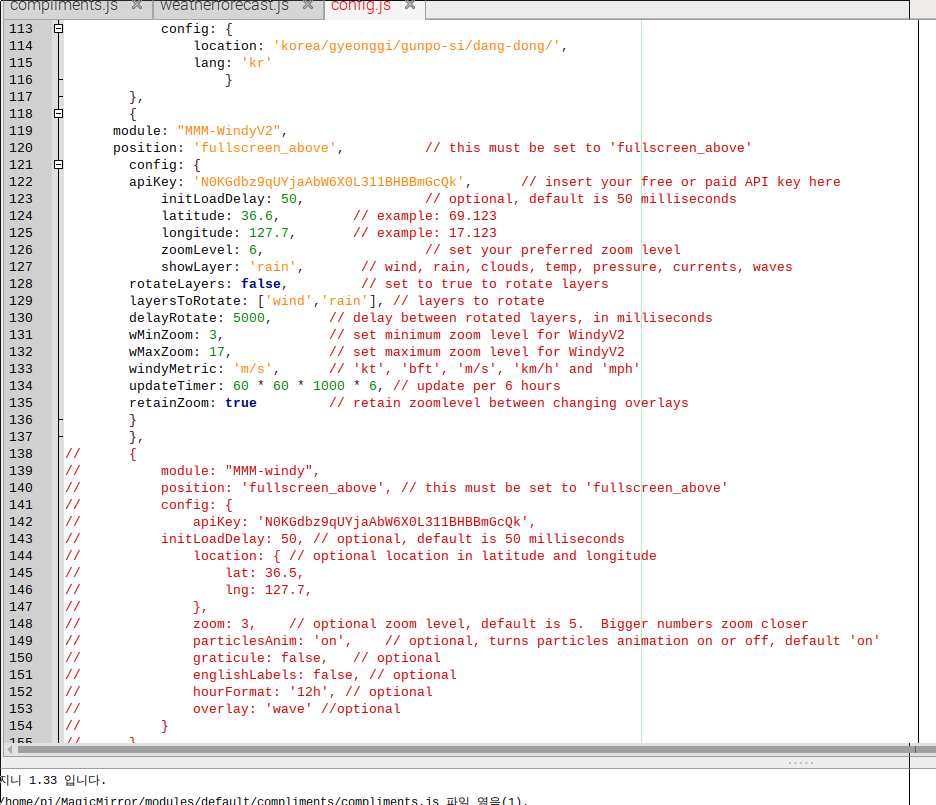
here is my cord.
broadcastNewsUpdates: true
}
},
{
module: ‘MMM-AirQuality’,
position: ‘top_right’,
config: {
location: ‘korea/gyeonggi/gunpo-si/dang-dong/’,
lang: ‘kr’
}
},
{
module: “MMM-WindyV2”,
position: ‘fullscreen_above’, // this must be set to ‘fullscreen_above’
config: {
apiKey: ‘N0KGdbz9qUYjaAbW6X0L311BHBBmGcQk’, // insert your free or paid API key here
initLoadDelay: 50, // optional, default is 50 milliseconds
latitude: 127.7, // example: 69.123
longitude: 36.6, // example: 17.123
zoomLevel: 6, // set your preferred zoom level
showLayer: ‘rain’, // wind, rain, clouds, temp, pressure, currents, waves
rotateLayers: false, // set to true to rotate layers
layersToRotate: [‘wind’,‘rain’], // layers to rotate
delayRotate: 5000, // delay between rotated layers, in milliseconds
wMinZoom: 3, // set minimum zoom level for WindyV2
wMaxZoom: 17, // set maximum zoom level for WindyV2
windyMetric: ‘m/s’, // ‘kt’, ‘bft’, ‘m/s’, ‘km/h’ and ‘mph’
updateTimer: 60 * 60 * 1000 * 6, // update per 6 hours
retainZoom: true // retain zoomlevel between changing overlays
}
},
// {
// module: “MMM-windy”,
// position: ‘fullscreen_above’, // this must be set to ‘fullscreen_above’
// config: {
// apiKey: ‘N0KGdbz9qUYjaAbW6X0L311BHBBmGcQk’,
// initLoadDelay: 50, // optional, default is 50 milliseconds
// location: { // optional location in latitude and longitude
// lat: 36.5,
// lng: 127.7,
// },
// zoom: 3, // optional zoom level, default is 5. Bigger numbers zoom closer
// particlesAnim: ‘on’, // optional, turns particles animation on or off, default ‘on’
// graticule: false, // optional
// englishLabels: false, // optional
// hourFormat: ‘12h’, // optional
// overlay: ‘wave’ //optional
// }
// },]
};/*************** DO NOT EDIT THE LINE BELOW ***************/
if (typeof module !== “undefined”) {module.exports = config;} -
@davidsung Just a thought here and is very common. If you copied and pasted the config example from Github then it will not work. Go through and edit all your ’ and " and change them. For some reason they do not copy well and create errors.
Give that a try first!
-
@davidsung Does seem to be related to the quotes. Also, please always remove your API Keys prior to posting. ;-)
-
@cowboysdude thx , I will try that way :)
-
@mumblebaj thx for ur reply, :) I didn’t thought about API key. will remove that


Hello! It looks like you're interested in this conversation, but you don't have an account yet.
Getting fed up of having to scroll through the same posts each visit? When you register for an account, you'll always come back to exactly where you were before, and choose to be notified of new replies (either via email, or push notification). You'll also be able to save bookmarks and upvote posts to show your appreciation to other community members.
With your input, this post could be even better 💗
Register Login