Read the statement by Michael Teeuw here.
Calendar module shows entries outer range
-
Hello Together,
My MM use the standard calendar modules. And the data come from an import via vdirsyncer ICS file. The calendar shows all events with the same day include from outside of the defined range in config file.Parameters in CONFIG.JS:
MaximumNumberOfDays: 30
MaximumEntries: 10
GetRelative: 0Example:
at date 2022/03/07 will show- Birthday of Jan-Peter Friday 03/11/2022
- Party at Rico Friday 06/11/2022
- Wedding anniversary Sunday 08/13/2022
- …
It looks like a filter is „ill“…
Any ideas?
THX, Uwe
-
@monkye thanks for the ics file…
reviewing the events, this is a bug in the RRULE processor the calendar module uses
but not our codehttps://github.com/jakubroztocil/rrule/issues/275
if you remove the BYMONTHDAY=11
RRULE:FREQ=YEARLY;WKST=MO;INTERVAL=1;BYMONTHDAY=11then it works as expected
just for info, this issue was opened on Sep 5, 2018 and has not yet been fixed
so I am not hopeful on a more timely resolution -
-
@sdetweil No problem, the url’s are not a secret :-).
{ module: "calendar", position: "top_left", // This can be any of the regions. Best results in left or right regions. fetchInterval: 240000, config: { maximumNumberOfDays: 30, maximumEntries: 10, getRelative: 0, calendars: [ { symbol: "birthday-cake", url: "http://localhost:8080/modules/default/calendars/1.ics", }, { symbol: "calendar-check-o", url: "https://www.zaoe.de/ical/8231/_1-3-4-6/23/" } ] } }, -
And here a picture - SORRY german only
The Lines marking the events out of date range
red: december
blue: august
yellow: july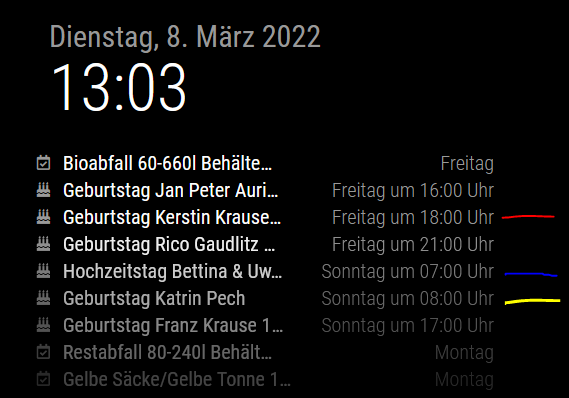
-
@monkye but those say Friday and Sunday…
show me the vevent from the ics
use the url
curl -sL url >somfile.icsthen edit the ics w a text editor, it’s just a text file
each event does
BEGIN:VEVENT . . . END:VEVENT -
@sdetweil Can I sent you a board mail?
-
@monkye u can send text to my email. same userid at gmail
-
@sdetweil I sent you the mail to your account. Thank you in advance
-
@monkye thanks for the ics file…
reviewing the events, this is a bug in the RRULE processor the calendar module uses
but not our codehttps://github.com/jakubroztocil/rrule/issues/275
if you remove the BYMONTHDAY=11
RRULE:FREQ=YEARLY;WKST=MO;INTERVAL=1;BYMONTHDAY=11then it works as expected
just for info, this issue was opened on Sep 5, 2018 and has not yet been fixed
so I am not hopeful on a more timely resolution -
Many, many THANKS to you. I‘m happy that you resolve this problem
-
Workaround:
A little script solve the problem. In the ICS-file at HOME directory will the „BYMONTHDAY“ part deleted.sed -r 's/INTERVAL=1;BYMONTHDAY=[0-9][0-9]?/INTERVAL=1/g' / ~/mycalendar.ics -
@monkye nice!
Hello! It looks like you're interested in this conversation, but you don't have an account yet.
Getting fed up of having to scroll through the same posts each visit? When you register for an account, you'll always come back to exactly where you were before, and choose to be notified of new replies (either via email, or push notification). You'll also be able to save bookmarks and upvote posts to show your appreciation to other community members.
With your input, this post could be even better 💗
Register Login