Read the statement by Michael Teeuw here.
Any modules that could display a livestream
-
In particular i want to be able to display bbc one from the live iplayer (https://www.bbc.co.uk/iplayer/live/bbcone), such that the news could be watched in the morning! can this video be directly embedded into a module?
-
{ module: 'MMM-iFrame-Ping', position: 'middle_center', // This can be any of the regions. config: { // See 'Configuration options' for more information. url: "https://", //url to display height:"100%", width:"100%", autoRefresh: false, //set to false for video updateInterval: 1, //in min. Only if autoRefresh: true displayLastUpdate: true, width: "100%", // Optional. Default: 100% height: "400px", //Optional. Default: 100px scrolling: "no" }}, -
@JerryP does it work with the latest mm?
-
@tanvir586
For me in Holland is the BBC live stream no go. Butt YouTube or a other site is working at mini mirror version 2.18 -
@JerryP I installed it today but I get black screen. I wanted to display a website (not youtube or any live stream site). Can you post your config if it’s ok with you.
-
the config is on top
-
-
@sdetweil thanks mate. It worked. But unfortunately my website is not showing. Its showing everything els but not mine.
-
@tanvir586 open the developers window, ctrl-shift-i, select the console tab and scroll up to see any error messages, usually red text
-
@sdetweil 0|MagicMir | [26.03.2022 18:28.36.253] [ERROR] (node:19533) electron: Failed to load URL: https://mawaqit.net/en/shah-jalal-mosque-cardiff-cf24-4nj-united-kingdom with error: ERR_BLOCKED_BY_RESPONSE
-
@tanvir586 yep. basically they check to see if you requested the info from their site page
-
This post is deleted! -
@sdetweil is there anything I can do to get it work?
-
@tanvir586 another idea: have a look at my old post https://forum.magicmirror.builders/topic/14422/solved-displaying-part-of-a-website-google-sheets-graph/2?_=1648325230070 and align it to your needs.
Thomas -
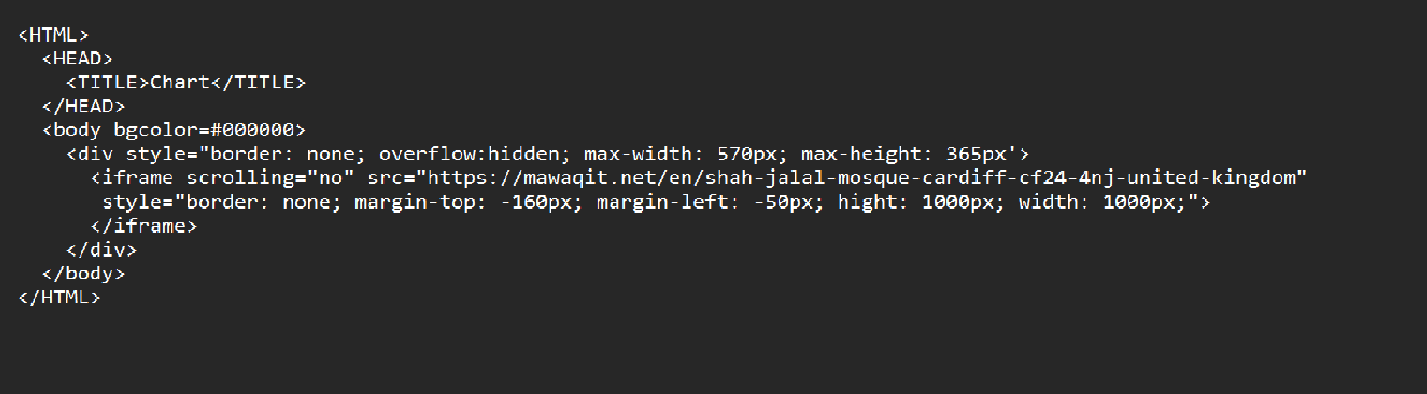
@thgmirror hi I still didn’t work. I’m posting my html and cofig. and there is no error on log.
Chartand config
{ module: 'MMM-iFrame-Ping', position: 'middle_center', // This can be any of the regions. config: { // See 'Configuration options' for more information. url: "/modules/mychart.html", //url to display height:"100%", width:"100%", autoRefresh: true, //set to false for video updateInterval: 1, //in min. Only if autoRefresh: true displayLastUpdate: true, width: "100%", // Optional. Default: 100% height: "400px", //Optional. Default: 100px scrolling: "no" } }, -
-
@tanvir586 Can you please post the https://maga… link here…it will be easier to check it:-)
-
-
S sdetweil referenced this topic on
-
@tanvir586 OK, no chance with my way…your webside prohibits to display it in an iframe…
-
@thgmirror thanks for trying 😊



Hello! It looks like you're interested in this conversation, but you don't have an account yet.
Getting fed up of having to scroll through the same posts each visit? When you register for an account, you'll always come back to exactly where you were before, and choose to be notified of new replies (either via email, or push notification). You'll also be able to save bookmarks and upvote posts to show your appreciation to other community members.
With your input, this post could be even better 💗
Register Login