Read the statement by Michael Teeuw here.
MMM-CalendarExt3
-
@Rakutsi no… the stuff shown on the screen isn’t broadcast to the other modules…
but you could add an ext3 eventTransformer to add it back on (if you know bd, and some pattern in the event subject)
-
@sdetweil thanks then i know.
well i dont know how to use the eventFilter for that, is there any example then i could try?
I am not the best at those kind of things. Mostly copy paste and trial and error. -
@Rakutsi see the doc and the ext3 wiki (at the module github page)
-
this was the solution i came up with.
eventTransformer: (event) => {
    const currentYear = new Date().getFullYear();
    const age = currentYear - event.firstYear;

    event.title = `${event.title} (${age} year)`;

    return event;
},
Chatgpt is my friend.
-
@Rakutsi awesome!
-
@czabel said in MMM-CalendarExt3:
Do you have any insight as to how to change my CSS to get the icons to show up for every event? As I mentioned, my current setup makes my non-fullday events colored in, but this deletes the icon. The icon is still there for the real fullday events. I’d like to keep the icon, if at all possible. Thank you!
Sorry for the late reply. I was on vacation.
Append these codes to your
custom.css/* custom.css */ .CX3 .event.singleday .headline.useSymbol .symbol { color: var(--oppositeColor); }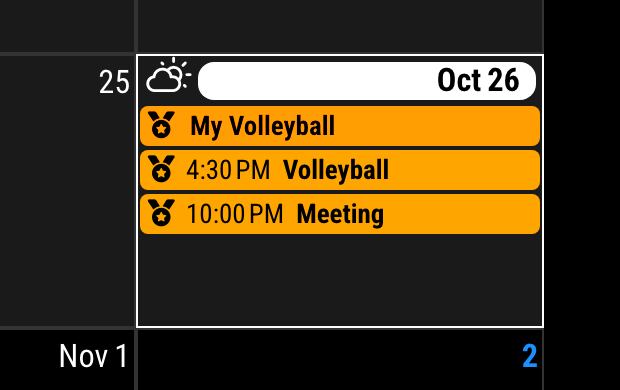
-
@MMRIZE said in MMM-CalendarExt3:
… Sorry for the late reply…No problem at all, I appreciate the time you spend helping on here.
With that CSS adjustment, the events in the calendar look perfect now, thank you.
But I have a new problem that seems to have just shown up: the volleyball icon that I’m using in the eventTransformer is now being applied to the Legend somehow:
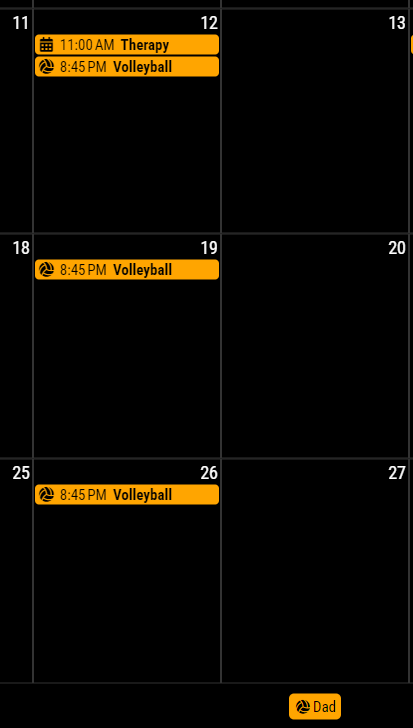
You can see the events are great (volleyball has the icon, other events are the default)This is especially odd because in the base calendar config, I specify
useSymbol: falsefor the “Dad” calendar, but this element is somehow getting the .useSymbol class.Oh, I just found in a search another user that has this issue, link here
-
@czabel
Well, that is not the bug, however you might be uncomfortable.
It is designed to get the symbol from thefirst(internally structured) event of the calendar group.
Because the default calendar module will broadcast only the events themselves, not the meta-information from the calendar to which the event belonged, So there is no easy way to distinguish thedefault symbolof the specific calendar.To be honest, getting the
defaultsymbol fromconfigof ONLY the defaultcalendarmodule might be easy, but this module is designed to take events from any other possible modules, so I cannot assume all the user will get the events from thedefault calendarmodule only.Not so easy. Has somebody any idea?
-
I probably don’t understand enough about how this system works to help much, but isn’t every calendar entry a separate event, which is why the eventTransformer works to change the individual icons? How is it that this icon spills over into the Legend entry, and not just the specific calendar entries?
In any case, what about adding a new config option to
hideLegendIconsthat forcibly removes the CSS tag, or something like that? -
You can simply append this code to your
css/custom.css.CX3 .legend.useSymbol .symbol { display: none; } -
Recently I noticed my Calendars disappear after a few hours. I’m not sure when it started. If I VNC into my mirror and refresh or restart the mirror they come back only to stop appearing a few hours later. I see no errors in the log.
I’m using
MMM-CalendarExt3 and MMM-CalendarExt3Agenda in conjunction with MMM-Scenes, the instances that are only on specific scenes are the ones that disappear. I have another instance of MMM-CalendarExt3Agenda that is on all the scenes and that one seems to stay, so I’m wondering if it’s an MMM-Scenes issue.Edit: I’m also using MMM-Pir. I’m wondering if that might be doing something.
-
@gonzonia mmm-pir is supposed to put the mirror to sleep if there is no movement
And Scenes make logical pages. Like MMM-pages, or carousel
So you have multiple things making content hide
-
@sdetweil I know. It used to all work great. I don’t think Scenes has updated in a while.
MMM-CalendarExt3 and MMM-pir have both had updates though.To clarify, when I say disappear, I mean that they are no longer on the screen.Not just that the data is empty. The headers, dates, etc. All not visible. I’ve just restarted recently, I’ll try to look at the page source next time it happens.
-
Also, I’m using the xrandr mode for mmm-pir since I’m in Raspbian 11 and when I use dpms it doesn’t wake the screen for some reason.
-
@gonzonia when a module is hidden , nothing shows
-
My wife takes appointments for her business, so she has a lot of events each day she works. I want to be able to merge back-to-back events and show the start time of the first event and the end time of the last event to reduce the number of entries on the calendar.
Ideally, I would like something that could account for gaps between appointments as well since she will still be at work. Ie) I can set the transformer to combine all events that are <= 2 hours apart, and it will show me the start time of the first event and the end time of the last event. I know it’s asking for a lot, and it’s probably not even possible, but I wanted to ask.
-
@Ragged4310
Could you show me the example of the events? -
@MMRIZE said in MMM-CalendarExt3:
@Ragged4310
Could you show me the example of the events?
I would like to consolidate the events with the little yellow massage person if its possible since she is gone for the whole time and it hogs up the event space. I tried using chatgpt and perplexity, but everytime they gave me something the calendar would not load.
For Dec 11 she has 3 appointments back to back, instead of it taking up 3 lines I would prefer if I could get it to show 2:00PM - 7:00PM for one event.
For Dec 23, she currently only has 2 appointments and there’s a small gap. Since the gap is < 2 hours I would like if I could consolidate that as well so it would show 10:00AM - 2:00PM.
I don’t know the event transformer too well, so I’m not sure if it can handle something like that.
Edit- Another thing I thought of… if it is possible to merge…
Is there a way to store how many events were merged? I’ll use the Dec 11 for the example again. If I can merge all 3 events into one, could I have it stored in a variable where I can display (3) at the end of the event to indicate there were 3 events? -
@Ragged4310
Now I c. I’ll try, wait a little. -
@Ragged4310
Instead ofeventTransformer, we’ll useeventPayloadbecause, this conversion should be applied to whole events, not a single event.Insert this property into your config section of CX3 in
config/config.js/* `MMM-CalendarExt3` config section in config/config.js */ eventPayload: (payload) => { const fulldays = payload.filter(ev => ev.fullDayEvent === true) const singleEvents = payload.filter(ev => ev.fullDayEvent === false).sort((a, b) => a.startDate - b.startDate || a.endDate - b.endDate) const EventsArranged = singleEvents.reduce((acc, ev) => { const dateObj = new Date(+ev.startDate) const key = `${ev.title}-${new Date(dateObj).toLocaleDateString('en-CA')}` if (!acc.has(key)) { acc.set(key, [ev]) } else { acc.get(key).push(ev) } return acc }, new Map()) const collapsed = Array.from(EventsArranged.entries()).map(([ key, value ]) => { const newEvent = { ...value[ 0 ] } if (value.length > 1) { newEvent.title = newEvent.title + ` <sub class="collapsed">${value.length}</sub>` newEvent.endDate = Math.max(...value.map(ev => ev.endDate)) newEvent.startDate = Math.min(...value.map(ev => ev.startDate)) } return newEvent }) return [ ...fulldays, ...collapsed ] },And to beautify, add some CSS code into
css/custom.css/* css/custom.css */ .CX3 .title sub::after, #CX3_POPOVER .title sub::after { content: "]"; } .CX3 .title sub::before, #CX3_POPOVER .title sub::before { content: "["; }It will work like;
BEFORE
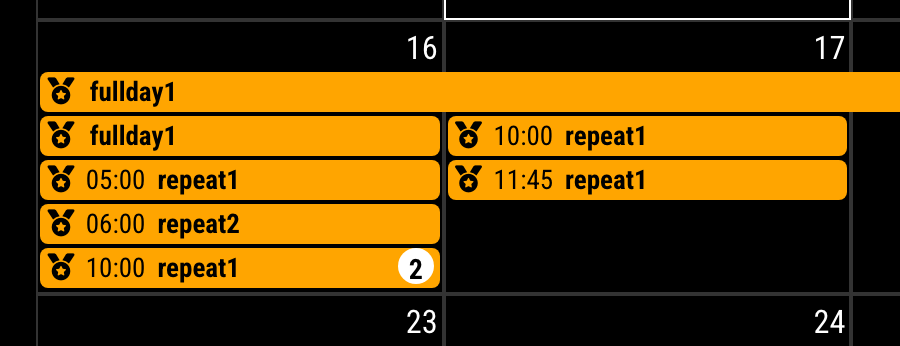
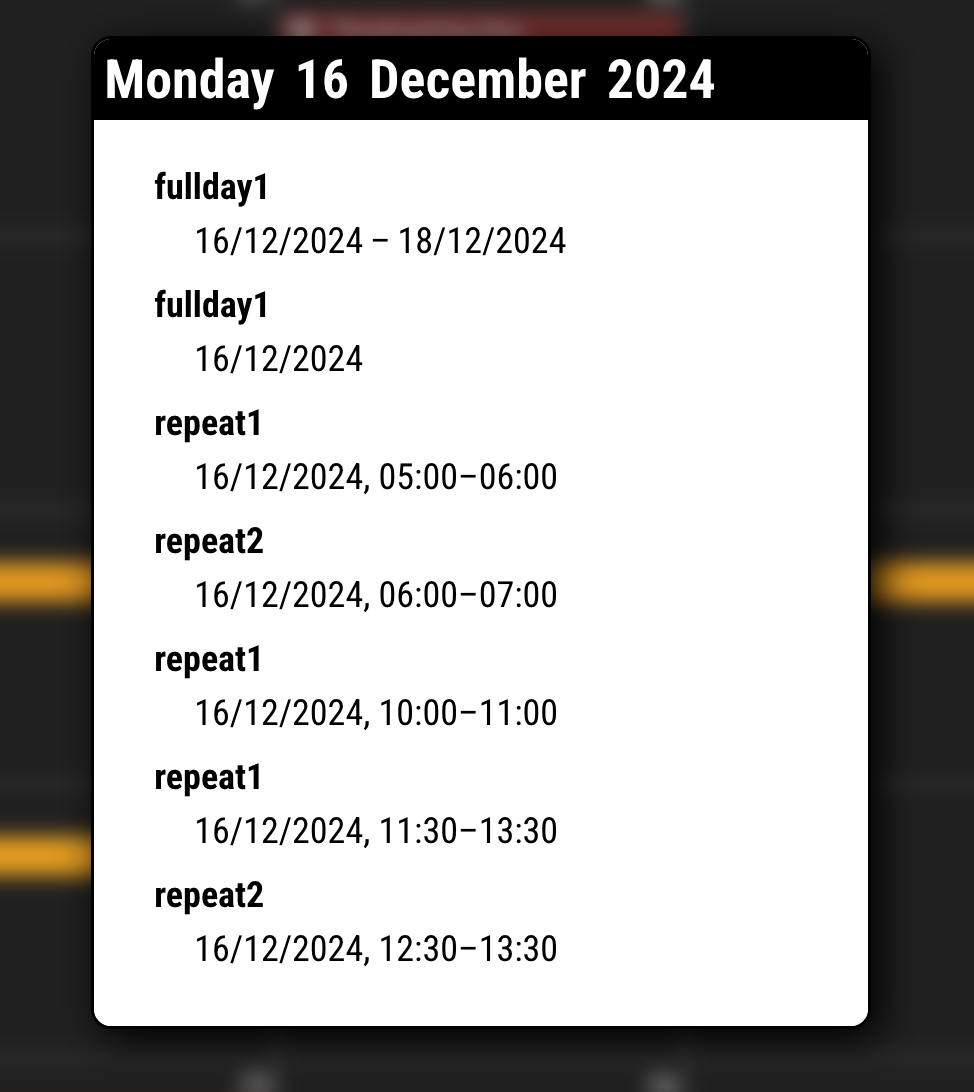
AFTER
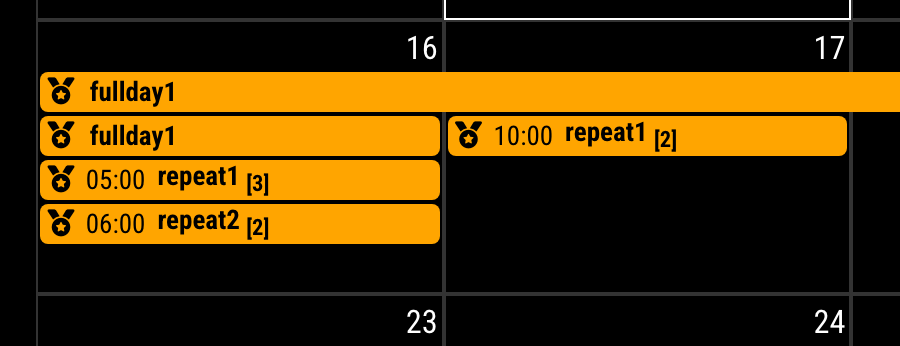
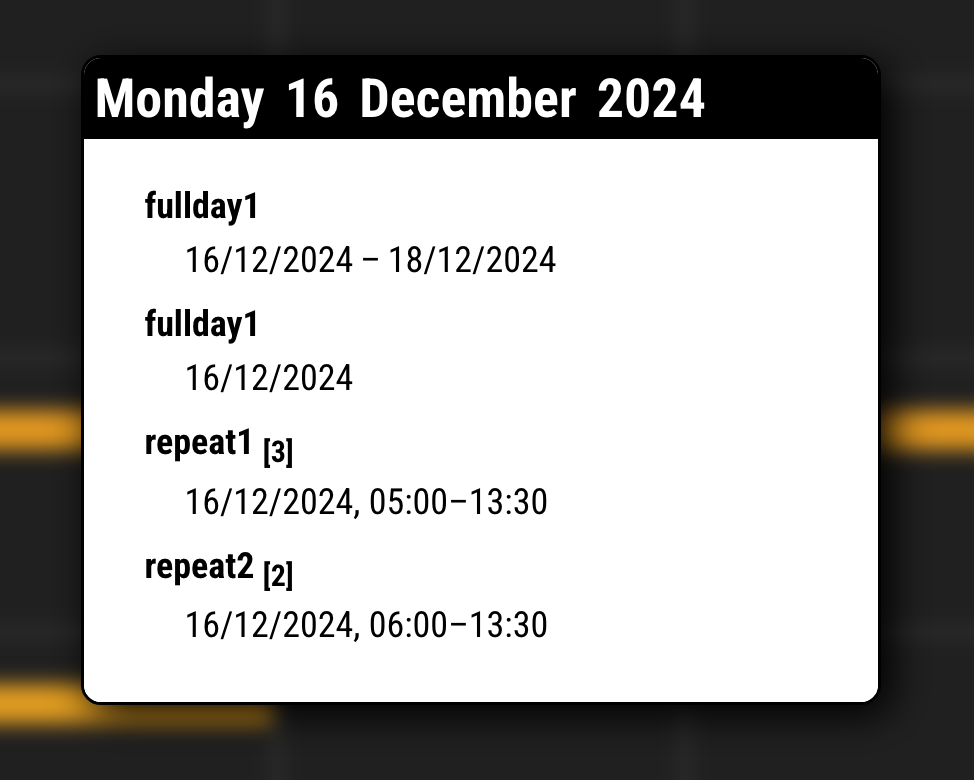
- This code will not affect the fullday events.
- Not considered every aspect, like inter-day events or untested errors.
Hello! It looks like you're interested in this conversation, but you don't have an account yet.
Getting fed up of having to scroll through the same posts each visit? When you register for an account, you'll always come back to exactly where you were before, and choose to be notified of new replies (either via email, or push notification). You'll also be able to save bookmarks and upvote posts to show your appreciation to other community members.
With your input, this post could be even better 💗
Register Login