MagicMirror Forum
    • Recent
    • Tags
    • Unsolved
    • Solved
    • MagicMirror² Repository
    • Documentation
    • 3rd-Party-Modules
    • Donate
    • Discord
    • Register
    • Login
    A New Chapter for MagicMirror: The Community Takes the Lead
    Read the statement by Michael Teeuw here.

    MMM-CalendarExt3Agenda

    Scheduled Pinned Locked Moved Utilities
    224 Posts 30 Posters 362.3k Views 32 Watching
    Loading More Posts
    • Oldest to Newest
    • Newest to Oldest
    • Most Votes
    Reply
    • Reply as topic
    Log in to reply
    This topic has been deleted. Only users with topic management privileges can see it.
    • BKeyportB Online
      BKeyport Module Developer @MMRIZE
      last edited by

      @MMRIZE Question for ya - how do you hide empty days? I would love to do that.

      thanks!

      The "E" in "Javascript" stands for "Easy"

      luisestradaL 1 Reply Last reply Reply Quote 0
      • luisestradaL Offline
        luisestrada @BKeyport
        last edited by

        @BKeyport

        I think it’s this

        Show the days only which has event on the day.
        .CX3A .agenda .cell[data-events-counts="0"] {
          display: none;
        }
        
        BKeyportB 1 Reply Last reply Reply Quote 1
        • luisestradaL Offline
          luisestrada @MMRIZE
          last edited by

          @MMRIZE I changed the module weatherProvider to “openweathermap”, for the type “forecast” and now it works.

          I kept “envcanada” for the type “current”, though.
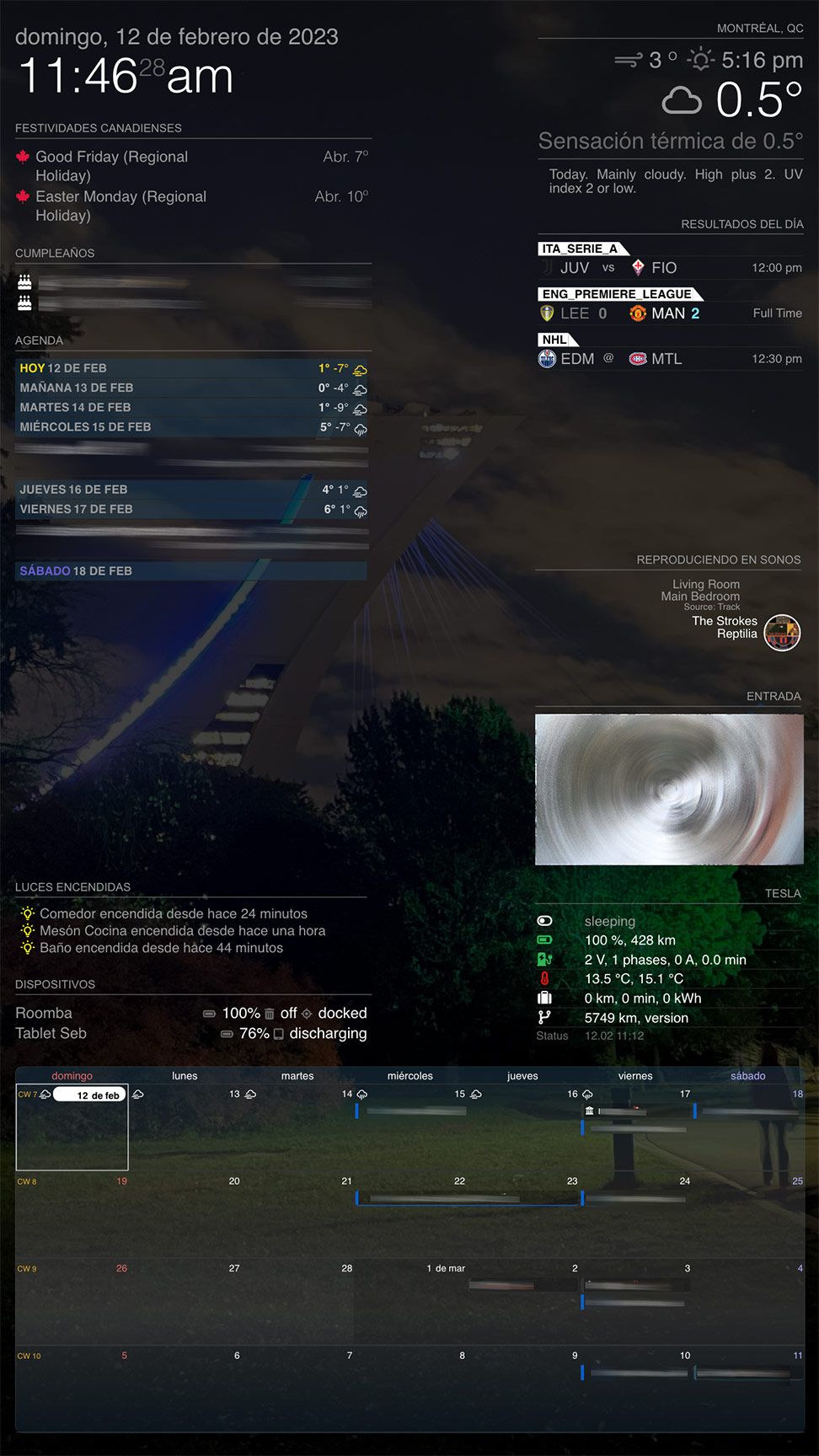
          New Screen Shot 2023-02-12 at 11.46.24 AM.jpg

          M 1 Reply Last reply Reply Quote 0
          • BKeyportB Online
            BKeyport Module Developer @luisestrada
            last edited by

            @luisestrada said in MMM-CalendarExt3Agenda:

            Show the days only which has event on the day.
            .CX3A .agenda .cell[data-events-counts=“0”] {
            display: none;
            }

            Perfect. Thank you.

            The "E" in "Javascript" stands for "Easy"

            1 Reply Last reply Reply Quote 1
            • M Offline
              MMRIZE @luisestrada
              last edited by MMRIZE

              @luisestrada
              Hmmm. maybe the Locale issue. Could you send me your whole configuration(But to make things simple, drop out all other modules except MMM-CX3 and Weather(envCanada)) (eouia0819@gmail.com)

              By the way, What’s the Tesla module?

              BKeyportB luisestradaL 2 Replies Last reply Reply Quote 0
              • BKeyportB Online
                BKeyport Module Developer @MMRIZE
                last edited by

                @MMRIZE I’m not quite sure how to do this -

                I want to filter one calendar source only. This source is the schedule of an entire league, and I only want to include the “Seattle” Team. Can you help me with the filter code so I can do so?

                Thanks!

                The "E" in "Javascript" stands for "Easy"

                M 1 Reply Last reply Reply Quote 0
                • M Offline
                  MMRIZE @BKeyport
                  last edited by

                  @BKeyport
                  How can you distinguish? The target team name is included in the title of the event?

                  BKeyportB 1 Reply Last reply Reply Quote 0
                  • BKeyportB Online
                    BKeyport Module Developer @MMRIZE
                    last edited by

                    @MMRIZE 🏈 in the title for the one I want, and/or calendar name is “XFL”

                    The "E" in "Javascript" stands for "Easy"

                    S 2 Replies Last reply Reply Quote 0
                    • S Offline
                      sdetweil @BKeyport
                      last edited by

                      @BKeyport

                      eventFilter: (ev) => {
                      	if (ev.title.search('XFL') > -1) {Set color, whatever; }
                      	return true
                      },
                      

                      Sam

                      How to add modules

                      learning how to use browser developers window for css changes

                      BKeyportB 1 Reply Last reply Reply Quote 0
                      • BKeyportB Online
                        BKeyport Module Developer @sdetweil
                        last edited by

                        @sdetweil XFL isn’t in the title - just the calendar name.

                        The "E" in "Javascript" stands for "Easy"

                        1 Reply Last reply Reply Quote 0
                        • S Offline
                          sdetweil @BKeyport
                          last edited by

                          @BKeyport said in MMM-CalendarExt3Agenda:

                          in the title for the one I want,

                          XFL isn’t in the title

                          ???
                          which is it,?

                          Sam

                          How to add modules

                          learning how to use browser developers window for css changes

                          BKeyportB 1 Reply Last reply Reply Quote 0
                          • BKeyportB Online
                            BKeyport Module Developer @sdetweil
                            last edited by

                            @sdetweil finish reading my statement. What’s unique abou that calendar is two things:

                            1. In the title, the football emoji. (stripped by a transform)
                            2. The calendar name is “XFL”

                            The "E" in "Javascript" stands for "Easy"

                            M 1 Reply Last reply Reply Quote 0
                            • M Offline
                              MMRIZE @BKeyport
                              last edited by

                              @BKeyport
                              You may use “calendarSet: [ … ]” in configuration to allow specific calendars only.
                              Or you can use “calendarName” property in the transformer function.

                              1 Reply Last reply Reply Quote 0
                              • luisestradaL Offline
                                luisestrada @MMRIZE
                                last edited by luisestrada

                                @MMRIZE Sorry I could not reply sooner.

                                The Tesla module is the module below

                                MMM-TeslaLogger https://github.com/spitzlbergerj/MMM-TeslaLogger

                                I use Teslamate to extract the data from the car.

                                I will send you my calendar code to your email.

                                I also realized the last event (Saturday, Feb 18, in my screenshot) shows in my calendar but not in the agenda, If I take less days it does not show the last event. I did not see the issue when the last day was the 23rd, probably because the event started on the 22nd.

                                1 Reply Last reply Reply Quote 0
                                • M Offline
                                  MMRIZE
                                  last edited by

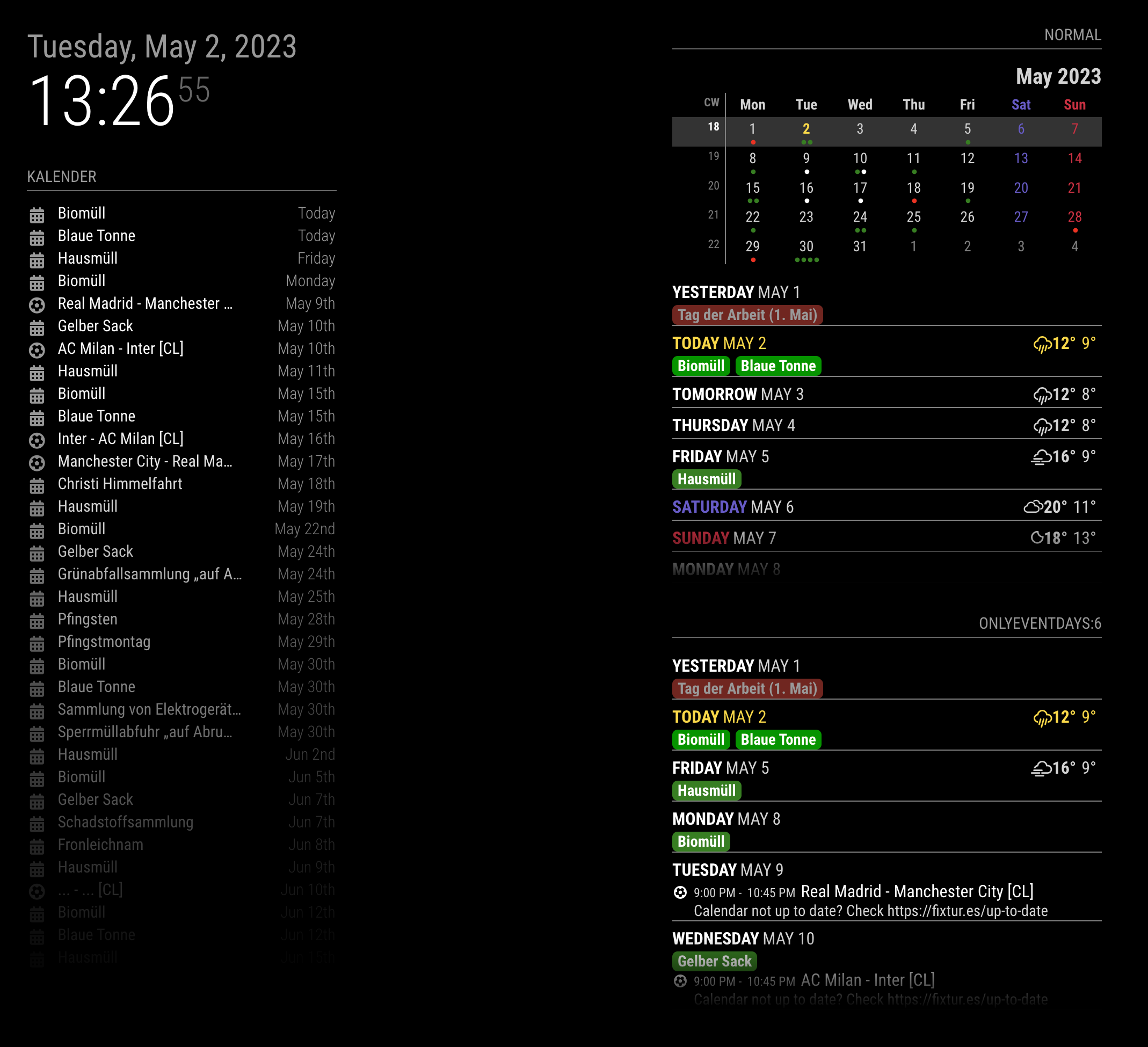
                                  1.2.0 (2023-04-25)

                                  • ADDED: weatherNotification, eventNotification - To get data from 3rd party module which is not compatible with default modules.
                                  • ADDED: weatherPayload, eventPayload - To manipulate or to convert received payload itself on time. (e.g. Convert Celcius unit to Fahrenheit unit)
                                  • ADDED: Hiding day cell which has no event : onlyEventDays: n
                                  • CHANGED : Display whole month events in miniCalendar regardless of agenda showing (despite endDayIndex or onlyEventDays)
                                  • CHANGED: Shared library to fix many issues.
                                  • CHANGED: Timing of eventFilter and eventTransformer is delayed for better-handling event data after regularized
                                  • FIXED : Pooling events with multi-calendar modules’ notification
                                  • FIXED: position issue (I hope so…)
                                  • FIXED: some typo.
                                  • FIXED: flickering for many reasons (logic error to treat notifications)
                                  sc

                                  BKeyportB 1 Reply Last reply Reply Quote 0
                                  • BKeyportB Online
                                    BKeyport Module Developer @MMRIZE
                                    last edited by

                                    @MMRIZE

                                    Broke: My install… Nothing is coming up. I’ve attempted removing my custom CSS, which doesn’t help, so I’m figuring it’s something in my config. Here’s one of the 3 instances.

                                    Nothing showing up in the logs, which are set for info, log, warn, error, and debug.

                                    		{
                                    			module: "MMM-CalendarExt3Agenda", // https://github.com/MMRIZE/MMM-CalendarExt3Agenda
                                    			position: "top_left",
                                    			config: {
                                    				instanceId: "1",
                                    				showMiniMonthCalendar: false,
                                    				firstDayOfWeek: 0,
                                    				startDayIndex: 0,
                                    				endDayIndex: 99,
                                    				minimalDaysOfNewYear: 1,
                                    				animationSpeed: 0,
                                    				useSymbol: false,
                                    				useWeather: false,
                                    				calendarSet: ["Main", "Utility"],
                                    				eventTransformer: (ev) => {
                                    					if (ev.title.search("⚾") > -1) {
                                    						ev.title = ev.title.replace("⚾️ ","");
                                    					}
                                    					if (ev.title.search("Bowling") > -1) {
                                    						ev.color = 'yellow';
                                    					}
                                    					if (ev.title.search("🏈") > -1) {
                                    						ev.title = ev.title.replace("🏈 ","");
                                    					}
                                    					return ev
                                    				},
                                    			},
                                    		},
                                    

                                    The "E" in "Javascript" stands for "Easy"

                                    S 1 Reply Last reply Reply Quote 0
                                    • S Offline
                                      sdetweil @BKeyport
                                      last edited by

                                      @BKeyport its all in the browser, so open the developers window, console tab

                                      put ext3 in the filter field

                                      Sam

                                      How to add modules

                                      learning how to use browser developers window for css changes

                                      BKeyportB 1 Reply Last reply Reply Quote 0
                                      • BKeyportB Online
                                        BKeyport Module Developer @sdetweil
                                        last edited by BKeyport

                                        @sdetweil You really think I forgot to check that?

                                        91ae6bc0-8b98-4c31-8ff5-27a2cc1e34e4-image.png

                                        I did forget to look at the console, though:
                                        76a5903e-4d2d-46f3-9ff0-1a95d7e9f9ea-image.png

                                        The "E" in "Javascript" stands for "Easy"

                                        M 1 Reply Last reply Reply Quote 0
                                        • S Offline
                                          sdetweil
                                          last edited by

                                          no idea that the ‘not prepared yet’ means

                                          Sam

                                          How to add modules

                                          learning how to use browser developers window for css changes

                                          BKeyportB 1 Reply Last reply Reply Quote 0
                                          • BKeyportB Online
                                            BKeyport Module Developer @sdetweil
                                            last edited by

                                            @sdetweil Same. I figure there’s an option somewhere that’s preventing me from loading it fully. I’m sure @MMRIZE will have it fixed right away.

                                            The "E" in "Javascript" stands for "Easy"

                                            1 Reply Last reply Reply Quote 0

                                            Hello! It looks like you're interested in this conversation, but you don't have an account yet.

                                            Getting fed up of having to scroll through the same posts each visit? When you register for an account, you'll always come back to exactly where you were before, and choose to be notified of new replies (either via email, or push notification). You'll also be able to save bookmarks and upvote posts to show your appreciation to other community members.

                                            With your input, this post could be even better 💗

                                            Register Login

                                            • 1
                                            • 2
                                            • 7
                                            • 8
                                            • 9
                                            • 10
                                            • 11
                                            • 12
                                            • 9 / 12
                                            • First post
                                              Last post
                                            Enjoying MagicMirror? Please consider a donation!
                                            MagicMirror created by Michael Teeuw.
                                            Forum managed by Sam, technical setup by Karsten.
                                            This forum is using NodeBB as its core | Contributors
                                            Contact | Privacy Policy


