Read the statement by Michael Teeuw here.
MMM-CalendarExt3Agenda
-
@sdetweil that worked, thanks!
-
Dear all, please help!
I 'm going mad, because I absolutely cannot identify the “error”
I’m using Ext3Aganda “successfully” but I’ve stolen some code and now as I try to optimize I run in an unexpected behaviour.
In the Module call I’ve inserted an eventTransformer (seen this block several times around).
(see code below):// Kalenderübersicht (Agendaview) { module: "MMM-CalendarExt3Agenda", position: "top_left", //header: "Wichtige Termine", config: { eventTransformer: (ev) => { const customEvents = [ { keyword: "Restmüll", symbol: ["fa-regular fa-trash-can"], color: "grey" }, { keyword: "Papier", symbol: ["fa-solid fa-dumbbell"], color: "blue" }, { keyword: "Gelber Sack", symbol: ["fa-solid fa-arrows-spin"], color: "yellow" }, { keyword: "Biomüll", symbol: ["fa-regular fa-trash-can"], color: "black" }, { keyword: "Restmüll & Papier & Gelber Sack", symbol: ["fa-regular fa-trash-can"], color: "fuchsia" }, { keyword: "Reise", symbol: "fa-solid fa-briefcase", color: "cyan"}, { keyword: "Arzt", symbol: "fa-solid fa-user-doctor", color: "red"}, { keyword: "Grillen", symbol: "fa-solid fa-grill-hot", color: "red"}, { keyword: "Flug", symbol: "fas fa-plane", color: "Gold"}, { keyword: "Flughafen", symbol: "fas fa-plane", color: "Gold"}, { keyword: "Urlaub", symbol: "fas fa-plane", color: "Gold"}, { keyword: "Krankenhaus", symbol: "fa-solid fa-hospital", color: "red"}, { keyword: "Fahrt", symbol: "fas fa-car", color: "cyan"}, { keyword: "Auto", symbol: "fas fa-car", color: "cyan"}, { keyword: "Hochzeit", symbol: "fa-solid fa-heart", color: "gold"}, { keyword: "Abendessen", symbol: "fas fa-utensils", color: "yellow"}, { keyword: "Restaurant", symbol: "fas fa-utensils", color: "yellow"}, { keyword: "Geburtstag", symbol: "fas fa-birthday-cake", color: "white"}, { keyword: "Workshop", symbol: "fa-solid fa-screwdriver-wrench", color: "white"}, { keyword: "Service", symbol: "fa-solid fa-screwdriver-wrench", color: "white"}, { keyword: "Friseur", symbol: "fa-solid fa-scissors", color: "White"}, { keyword: "Rad", symbol: "fas fa-biking", color: "White"}, { keyword: "Fahrrad", symbol: "fas fa-biking", color: "White"}, { keyword: "Zahnarzt", symbol: "fa-solid fa-tooth", color: "White"}, { keyword: "Arzt", symbol: "fa-solid fa-stethoscope", color: "White"}, { keyword: "Kino", symbol: "fa-solid fa-film", color: "White"}, { keyword: "Film", symbol: "fa-solid fa-film", color: "White"}, { keyword: "Trainig", symbol: "fa-solid fa-book", color: "White"}, { keyword: "Party", symbol: "fa-solid fa-ticket-simple", color: "White"}, { keyword: "Theater", symbol: "fa-solid fa-ticket-simple", color: "White"}, ] const found = customEvents.find((condition) => { return ev.title.search(condition.keyword) !== -1 }) if (found) { ev.symbol = [ found.symbol ], ev.color = found.color } if (ev.title.search("Restmüll") !== -1) { ev.symbol = [ "fa-regular fa-trash-can" ], ev.isFullday = [true], ev.color = "grey" } if (ev.title.search("Papier") !== -1) { //ev.symbol = [ "fa-regular fa-trash-can" ], ev.isFullday = [true], ev.color = "blue" } if (ev.title.search("Gelber Sack") !== -1) { //ev.symbol = [ "fa-solid fa-arrows-spin" ], ev.isFullday = [true], ev.color = "yellow" } if (ev.title.search("Biomüll") !== -1) { ev.symbol = [ "fa-regular fa-trash-can" ], ev.isFullday = [true], ev.color = "black" } if (ev.title.search("Restmüll & Papier & Gelber Sack") !== -1) { //ev.symbol = [ "fa-regular fa-trash-can" ], ev.isFullday = [true], ev.title = "Alle Tonnen", ev.color = "fuchsia" } return ev }, // end Eventtransformer // useWeather: false , showMiniMonthCalendar: false, //onlyEventDays: 10 -- Nur Tage mit terminen anzeigen ist in der custom.css eingetragen, DAS funktioniert... endDayIndex: 30, } // end config CalenderExt3Agenda }, // End module CalenderExt3AgendaIf I try to delete/comment the “ev.symbol” definition in first or second last of the “if statements” in the event transformer the calendar don’t show up anymore - reproducable.
SAME behaviour “not showing up of complete calendar” occurs if I delete the complete “IF” block from the event transformer.
What I have seen (but not understood): if I insert the complete event transformer block the opening and closing bracket of the config part are not identified as corresponding
(I use sublime editor which marks the corresponding brackets on hovering).But I cannot find a bracket error …
Any clue?
THANKS a LOT!
(for my understanding: The main part of the “found” function is redundantly repeated in the following “IF” waterfall - right? - So from my understanding the “found” mechanism should be sufficient to do the color/icon job and the if-cascade is obsolete (with exception of the fullday assignment - which I have added to the stolen code).
Or do I miss something?)Ralf
-
@rkorell
…
I just had an idea and checked the console for ext2 messages…CX3_shared.mjs:155 Uncaught (in promise) TypeError: symbol.match is not a function at CX3_shared.mjs:155:32 at Array.forEach (<anonymous>) at renderSymbol (CX3_shared.mjs:151:18) at renderEventAgenda (CX3_shared.mjs:256:3) at drawAgenda (MMM-CalendarExt3Agenda.js:362:22) at Class.draw (MMM-CalendarExt3Agenda.js:500:11) at Class.getDom (MMM-CalendarExt3Agenda.js:189:16) at main.js:132:35 at new Promise (<anonymous>) at updateDom (main.js:112:10)is shown there if I comment the named lines …
- I will double check.
Ralf
-
@rkorell
In addition there is a “[CX3A] Module is not prepared yet, wait a while.”
Warning - this seems to be an already resolved issue?
I’ve installed the modules within the current week and just tried to “git pull” - "already up to date! … -
@rkorell said in MMM-CalendarExt3Agenda:
In addition there is a “[CX3A] Module is not prepared yet, wait a while.”
its just a warning/informational message… doesn’t cause a problem
-
@sdetweil O.K., thanks!
-
For Your Information:
as per Sam’s tip I will ignore the “not prepared” message.
For the described problem I’ve chosen the “hard” (not nice) approach:
I’ve eliminated the “intelligent” approach to set color and symbol with a functional design and have “hard” coded evere single condition.- Not brillant, but: works.
- For my perception it is even much faster to load.
in the washup with this I finally also resolved my color problem (described in an other thread) with two very simple CSS modifications - the given guidance led to no result, I’ve T&E’rrored
.CX3A .event .title {
        color: var(--calendarColor);
}
.CX3A .event .time {
        color: var(--calendarColor);
}
as the appropriate items to set the color for singl events to the icon color.
The “hard” variant of my X3A module is now as folelows:
		{
		  module: "MMM-CalendarExt3Agenda",
		  position: "top_left",
		  //header: "Wichtige Termine",
		  config: {
			  			eventTransformer: (ev) => {
				            if (ev.title.search("Restmüll") !== -1) {ev.isFullday = [true], ev.color = "grey" }
				            if (ev.title.search("Papier") !== -1) {ev.isFullday = [true], ev.color = "blue"}
				            if (ev.title.search("Gelber Sack") !== -1) {ev.isFullday = [true],ev.color = "yellow"}
				            if (ev.title.search("Biomüll") !== -1) {ev.isFullday = [true],ev.color = "black"}
							if (ev.title.search("Restmüll & Papier & Gelber Sack") !== -1) {ev.isFullday = [true],ev.title = "Alle Tonnen",ev.color = "fuchsia"}
							if (ev.title.search("Reise") !== -1) {ev.symbol = [ "fa-solid fa-briefcase" ],ev.color = "cyan" }
							if (ev.title.search("Arzt") !== -1) { ev.symbol = [ "fa-solid fa-user-doctor" ], ev.color = "red"  }
							if (ev.title.search("Grillen") !== -1) { ev.symbol = [ "fa-solid fa-grill-hot" ], ev.color = "red"  }
							if (ev.title.search("Flug") !== -1) { ev.symbol = [ "fa-solid fa-plane" ], ev.color = "Gold"  }
							if (ev.title.search("Urlaub") !== -1) { ev.symbol = [ "fa-solid fa-plane" ], ev.color = "Gold"  }
							if (ev.title.search("Krankenhaus") !== -1) { ev.symbol = [ "fa-solid fa-hospital" ], ev.color = "red"  }
							if (ev.title.search("Fahrt") !== -1) { ev.symbol = [ "fa-solid fa-car" ], ev.color = "cyan"  }
							if (ev.title.search("Auto") !== -1) { ev.symbol = [ "fa-solid fa-car" ], ev.color = "cyan"  }
							if (ev.title.search("Hochzeit") !== -1) { ev.symbol = [ "fa-solid fa-heart" ], ev.color = "Gold"  }
							if (ev.title.search("Hochzeitstag") !== -1) { ev.isFullday = [true],  ev.symbol = [ "fa-solid fa-heart" ], ev.color = "Gold"  }
							if (ev.title.search("Abendessen") !== -1) { ev.symbol = [ "fa-solid fa-utensils" ], ev.color = "yellow"  }
							if (ev.title.search("Restaurant") !== -1) { ev.symbol = [ "fa-solid fa-utensils" ], ev.color = "yellow"  }
							if (ev.title.search("Geburtstag") !== -1) { ev.isFullday = [true], ev.symbol = [ "fa-solid fa-birthday-cake" ], ev.color = "green"  }
							if (ev.title.search("Workshop") !== -1) { ev.symbol = [ "fa-solid fa-screwdriver-wrench" ], ev.color = "white"  }
							if (ev.title.search("Service") !== -1) { ev.symbol = [ "fa-solid fa-screwdriver-wrench" ], ev.color = "green"  }
							if (ev.title.search("Friseur") !== -1) { ev.symbol = [ "fa-solid fa-scissors" ], ev.color = "white"  }
							if (ev.title.search("Rad") !== -1) { ev.symbol = [ "fa-solid fa-biking" ], ev.color = "red"  }
							if (ev.title.search("Fahrrad") !== -1) { ev.symbol = [ "fa-solid fa-biking" ], ev.color = "red"  }
							if (ev.title.search("Zahnarzt") !== -1) { ev.symbol = [ "fa-solid fa-fa-tooth" ], ev.color = "red"  }
							if (ev.title.search("Arzt") !== -1) { ev.symbol = [ "fa-solid fa-stethoscope" ], ev.color = "red"  }
							if (ev.title.search("Kino") !== -1) { ev.symbol = [ "fa-solid fa-film" ], ev.color = "blue"  }
							if (ev.title.search("Film") !== -1) { ev.symbol = [ "fa-solid fa-film" ], ev.color = "blue"  }
							if (ev.title.search("Training") !== -1) { ev.symbol = [ "fa-solid fa-book" ], ev.color = "cyan"  }
							if (ev.title.search("Party") !== -1) { ev.symbol = [ "fa-solid fa-ticket-simple" ], ev.color = "green"  }
							if (ev.title.search("Theater") !== -1) { ev.symbol = [ "fa-solid fa-ticket-simple" ], ev.color = "green"  }
			            return ev
				        }, // end Eventtransformer

						// useWeather: false ,
						showMiniMonthCalendar: false,
						//onlyEventDays: 10  -- Nur Tage mit terminen anzeigen ist in der custom.css eingetragen, DAS funktioniert...
						endDayIndex: 30,

		      	  } // end config CalenderExt3Agenda

		},  // End module CalenderExt3Agenda
It would be nice if I can get some information regarding background of the errors described above…
Regards,
Ralf -
@rkorell
Do you have any sketch for AS-IS and TO-BE? -
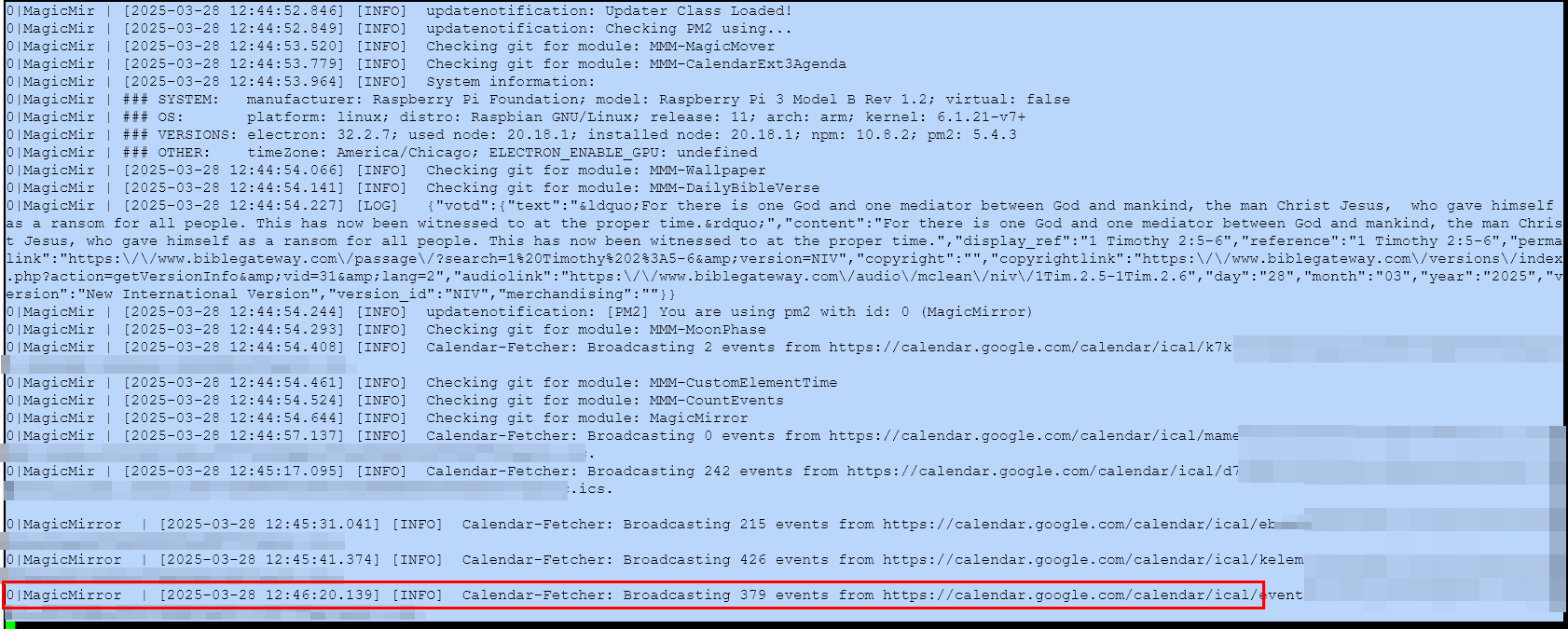
I’m currently fighting with a problem that I have one calendar that doesn’t always show up. I don’t know if it’s a timing thing or what. I put in waitFetch: 120000 to see if that would give it more time to load, but it doesn’t always help. Sometimes all the calendars show up. Sometimes one is missing, and it’s always the same one.
It shows the Calender-Fetcher as Broadcasting events from the calendar, but they just don’t show up on the screen. Anyone have any ideas what the problem might be?
-
@Kelemvor there is an open issue where the node helper says it is broadcasting, but the module doesn’t get the notification .
https://github.com/MagicMirrorOrg/MagicMirror/issues/3380
if you change the order of calendars in default calendar, does it continue to fail the same?
and you have the clipping fix on , right?
-
@sdetweil I do have the Clipping thing on. Right now, the problem calendar is the second one in the config area of the main calendar module. I’ll swap it with the first one and see what happens.
-
Well, swapping the order seems like it might have helped. I restarted MM a few times and it seems like they are all showing up now. I’ll keep an eye on it. :)
Thanks -
Anyone know how to get CX3A to completely hide when not in use? Example:

The blank space is a CX3A instance that the earliest event is 47 days away as of writing - I have calendar set to only get 30 days ahead.
relevant code:
	module: "calendar", // Built in
			// position: "top_left",  // Curr7ently hidden
			config: {
				animationSpeed: 0,
				broadcastEvents: true,
				broadcastPastEvents: true,
				fetchInterval: 60000, // minimum 1 minute.
				maximumNumberOfDays: 30,
				maximumEntries: 999999,
				calendars: [
                                     (insert calendar list here)
{ module: "MMM-CalendarExt3Agenda", // https://github.com/MMRIZE/MMM-CalendarExt3Agenda position: "bottom_left", config: { showMiniMonthCalendar: false, calendarSet: ["Kraken"], instanceId: "2", refreshInterval: 3600000, // Should be one hour waitFetch: 1, firstDayOfWeek: 0, startDayIndex: 1, endDayIndex: 30, animationSpeed: 0, useSymbol: true, useWeather: false, onlyEventDays: 1, }, },:root { --color-text: #999; --color-text-dimmed: #666; --color-text-bright: #fff; --color-background: #000; --font-primary: "Roboto Condensed"; --font-secondary: "Roboto"; --font-size: 24px; --font-size-xsmall: .75rem; --font-size-small: 1rem; --font-size-medium: 1rem; --font-size-large: 1rem; --font-size-xlarge: 1rem; --gap-body-top: 60px; --gap-body-right: 60px; --gap-body-bottom: 60px; --gap-body-left: 60px; --gap-modules: 30px; } .region .container { display: block; } /* adjust modules to display side by side */ .MMM-CalendarExt3Agenda { display: inline-flex; margin-right: 5px; margin-left: 5px; }(plus font-size adjustments to use the variables, and elimination of the description field, not shown)
-
@BKeyport there is nothing built in, but you might be able to use css to do this
i used google search for
css count of child elements
and got this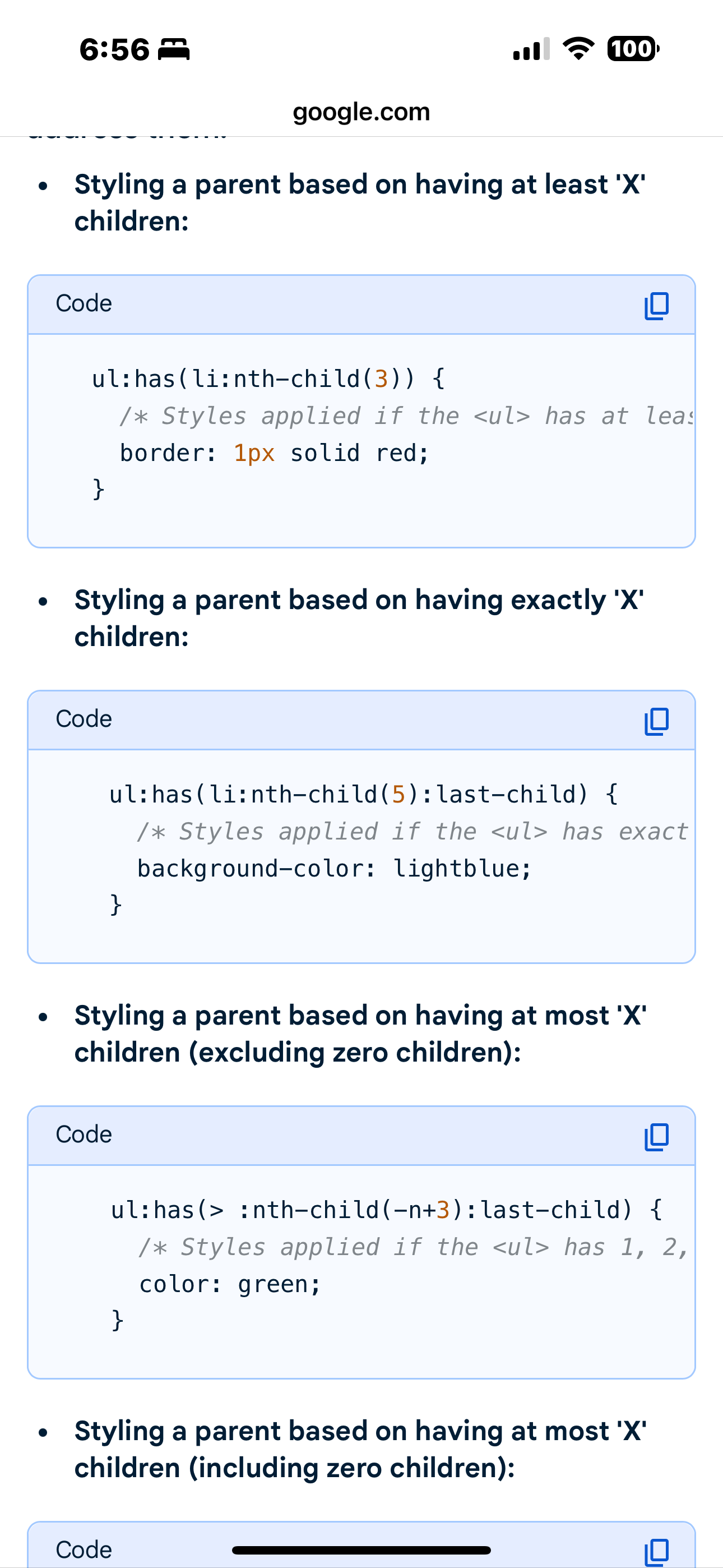
notice the third choice (excluding no children)
so maybe you can target with no children display:none for the module has(= 0)
-
@sdetweil I’m not understanding, and I can’t find anything that makes sense to me when I search the same.
Here’s what I know - CX3A generates exactly 3 DIVs inside the module div when empty:
<div id="module_4_MMM-CalendarExt3Agenda" class="module MMM-CalendarExt3Agenda MMM-CalendarExt3Agenda" style="order: 0;">
    <header class="module-header" style="display: none;">undefined</header>
    <div class="module-content">
        <div class="bodice CX3A_undefined CX3A">
            <div class="agenda"></div>
        </div>
    </div>
</div>
It generates more when visible.
Should I be targeting like
.MMM-CalendarExt3Agenda:has(div:nth-child(3):last-child) {?
-
given this article
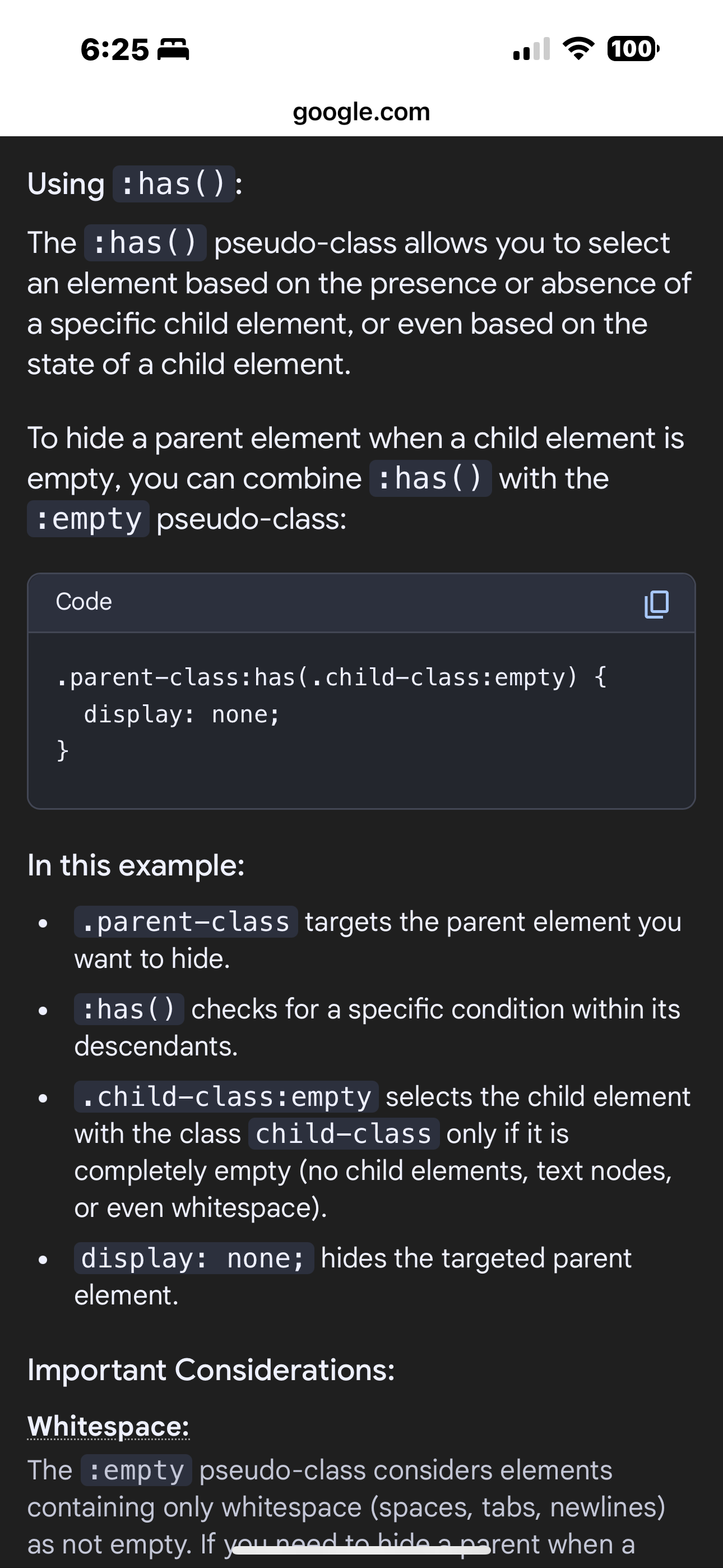
i think this should work, as the div with the agenda class has no children, aka: is empty
.MMM-CalendarExt3Agenda:has(.agenda:empty) { display:none; } -
Hi,
Having an issue with CX3A not displaying events. I have below the module configurations. The calendar setup for CX3 works perfectly, and they’re all defined in the default calendar module. The header appears for the Agenda in the bottom right as well, just no events are displayed. I know there was a clipping issue with the maxEntries on the default calendar. I have them all set to 100, and this is a fresh install of MM and all the modules as of this morning, so I didn’t think that was an issue. I’m also not seeing any errors logged while MM is running. I must be missing something.
{ module: "MMM-CalendarExt3", position: "top_center", config: { mode: "week", instanceId: "basicCalendar", locale: "en-US", maxEventLines: 8, weeksInView: 5, weekIndex: 0, fontSize: 26, calendarSet: ["John", "Jane", "Joe", "Jill", "Family", "Important"], refreshInterval: 30 * 60 * 1000, } }, { module: "MMM-CalendarExt3Agenda", position: "top_right", header: "Next 3 Days", config: { instanceId: "basicAgenda", locale: "en-US", startDayIndex: 0, endDayIndex: 3, calendarSet: ["John", "Jane", "Joe", "Jill", "Family", "Important"], refreshInterval: 30 * 60 * 1000, } } -
@FMancuso5 see this post
https://forum.magicmirror.builders/post/127508 -
@sdetweil I added it, and it seemed to delete all the calendars, so I removed it, and they’re still gone.
They are broadcasting correctly from calendar.
I’ve restarted both the server and the client.ACK!
-
@BKeyport again watch out for waitFetch and refreshInterval
if the events come AFTER waitfetch (default 5 seconds)
they wait til refreshInterval (default 30 minutes)

Hello! It looks like you're interested in this conversation, but you don't have an account yet.
Getting fed up of having to scroll through the same posts each visit? When you register for an account, you'll always come back to exactly where you were before, and choose to be notified of new replies (either via email, or push notification). You'll also be able to save bookmarks and upvote posts to show your appreciation to other community members.
With your input, this post could be even better 💗
Register Login