MagicMirror Forum
    • Recent
    • Tags
    • Unsolved
    • Solved
    • MagicMirror² Repository
    • Documentation
    • 3rd-Party-Modules
    • Donate
    • Discord
    • Register
    • Login
    A New Chapter for MagicMirror: The Community Takes the Lead
    Read the statement by Michael Teeuw here.

    Online Radio

    Scheduled Pinned Locked Moved Entertainment
    52 Posts 4 Posters 25.4k Views 4 Watching
    Loading More Posts
    • Oldest to Newest
    • Newest to Oldest
    • Most Votes
    Reply
    • Reply as topic
    Log in to reply
    This topic has been deleted. Only users with topic management privileges can see it.
    • T Offline
      tanvir586 @wishmaster270
      last edited by

      @wishmaster270 I’m not getting any sound.
      config is right?

      	{
      		module: "MMM-MplayerRadio",
      		header: "Radio",
      		position: "top_center",
      		config: {
      			stations: [
      				{
      					title: "Almubarak",
      					url: "https://relay.emasjidlive.uk/almubarakradio",
      					logo: "https://almubarakradio.com/wp-content/uploads/2021/04/logorectangle-1024x326.png",
      					customCommand: "/home/pi/MagicMirror/modules/MMM-MplayerRadio/scripts/streamlinkWrapper.bash",
      					customCommandArgs: ["10", "30", "###URL###"],
      				},
      			],
      		},
      	},
      

      I added this line aswell
      customCommandArgs: [“-I”,“dummy”, “–http-reconnect”, “–http-continuous”, “###URL###”],

      but didn’t work

      T 1 Reply Last reply Reply Quote 0
      • T Offline
        tanvir586 @tanvir586
        last edited by

        @tanvir586 If I used this config then the sound works but open vlc in separate windows

        {
        	module: "MMM-MplayerRadio",
        	header: "Radio",
        	position: "top_center",
        	config: {
        		stations: [
        			{
        				title: "Almubarak",
        				url: "https://relay.emasjidlive.uk/almubarakradio",
        				logo: "https://almubarakradio.com/wp-content/uploads/2021/04/logorectangle-1024x326.png",
        

        customCommand: “/usr/bin/vlc”,
        customCommand: “/home/pi/MagicMirror/modules/MMM-MplayerRadio/scripts/streamlinkWrapper.bash”,
        customCommandArgs: [“10”, “30”, “###URL###”],
        },
        ],
        },
        },

        1 Reply Last reply Reply Quote 0
        • T Offline
          tanvir586
          last edited by

          If I use this config then vlc open is separate window and it’s looks like this.

          	{
          		module: "MMM-MplayerRadio",
          		header: "Radio",
          		position: "top_center",
          		config: {
          			stations: [
          				{
          					title: "Almubarak",
          					url: "https://relay.livemasjid.com:8443/activestream",
          					logo: "https://almubarakradio.com/wp-content/uploads/2021/04/logorectangle-1024x326.png",
          					customCommand: "/home/pi/MagicMirror/modules/MMM-MplayerRadio/scripts/streamlinkWrapper.bash",
          					customCommand: "/usr/bin/vlc",
          					customCommandArgs: ["10", "30", "###URL###"],
          				},
          			],
          		},
          	},
          

          picture ;-
          20221025_185152 (1).jpg

          wishmaster270W 1 Reply Last reply Reply Quote 0
          • wishmaster270W Offline
            wishmaster270 Module Developer @tanvir586
            last edited by wishmaster270

            @tanvir586 Sorry, i am not at my pc at the moment. You only need the first customCommand line. The one with vlc is wrong.
            You can try to run the run the command directly on the shell and see what happens.

            /home/pi/MagicMirror/modules/MMM-MplayerRadio/scripts/streamlinkWrapper.bash 10 30 https://relay.emasjidlive.uk/almubarakradio
            

            You can end it by pressing CRTL+c

            T 1 Reply Last reply Reply Quote 0
            • T Offline
              tanvir586 @wishmaster270
              last edited by

              @wishmaster270 Hi, it’s says this

              tanvir@raspberrypi:~ $ /home/pi/MagicMirror/modules/MMM-MplayerRadio/scripts/streamlinkWrapper.bash 10 30 https://relay.emasjidlive.uk/almubarakradio
              bash: /home/pi/MagicMirror/modules/MMM-MplayerRadio/scripts/streamlinkWrapper.bash: No such file or directory

              T 1 Reply Last reply Reply Quote 0
              • T Offline
                tanvir586 @tanvir586
                last edited by

                @tanvir586 and I installed mplayer.

                wishmaster270W 1 Reply Last reply Reply Quote 0
                • wishmaster270W Offline
                  wishmaster270 Module Developer @tanvir586
                  last edited by

                  @tanvir586 Are you sure you are running the latest version of the module?
                  The error says that the wrapper script I added yesterday does not exist.
                  Can you please check the script folder and check if the file is executable?

                  T 1 Reply Last reply Reply Quote 0
                  • T Offline
                    tanvir586 @wishmaster270
                    last edited by

                    @wishmaster270 I’ve updated yesterday. I’ll check again now

                    1 Reply Last reply Reply Quote 0
                    • T Offline
                      tanvir586
                      last edited by

                      20221025_210349.jpg

                      Should I reinstall? Or delete the module and fresh install?

                      wishmaster270W 1 Reply Last reply Reply Quote 0
                      • wishmaster270W Offline
                        wishmaster270 Module Developer @tanvir586
                        last edited by

                        @tanvir586 You installed to a different user. Your path will be

                        /home/tanvir/MagicMirror/modules/MMM-MplayerRadio/scripts/streamlinkWrapper.bash
                        
                        T 2 Replies Last reply Reply Quote 0
                        • T Offline
                          tanvir586 @wishmaster270
                          last edited by

                          @wishmaster270 ok I’ll check shortly.

                          1 Reply Last reply Reply Quote 0
                          • T Offline
                            tanvir586 @wishmaster270
                            last edited by

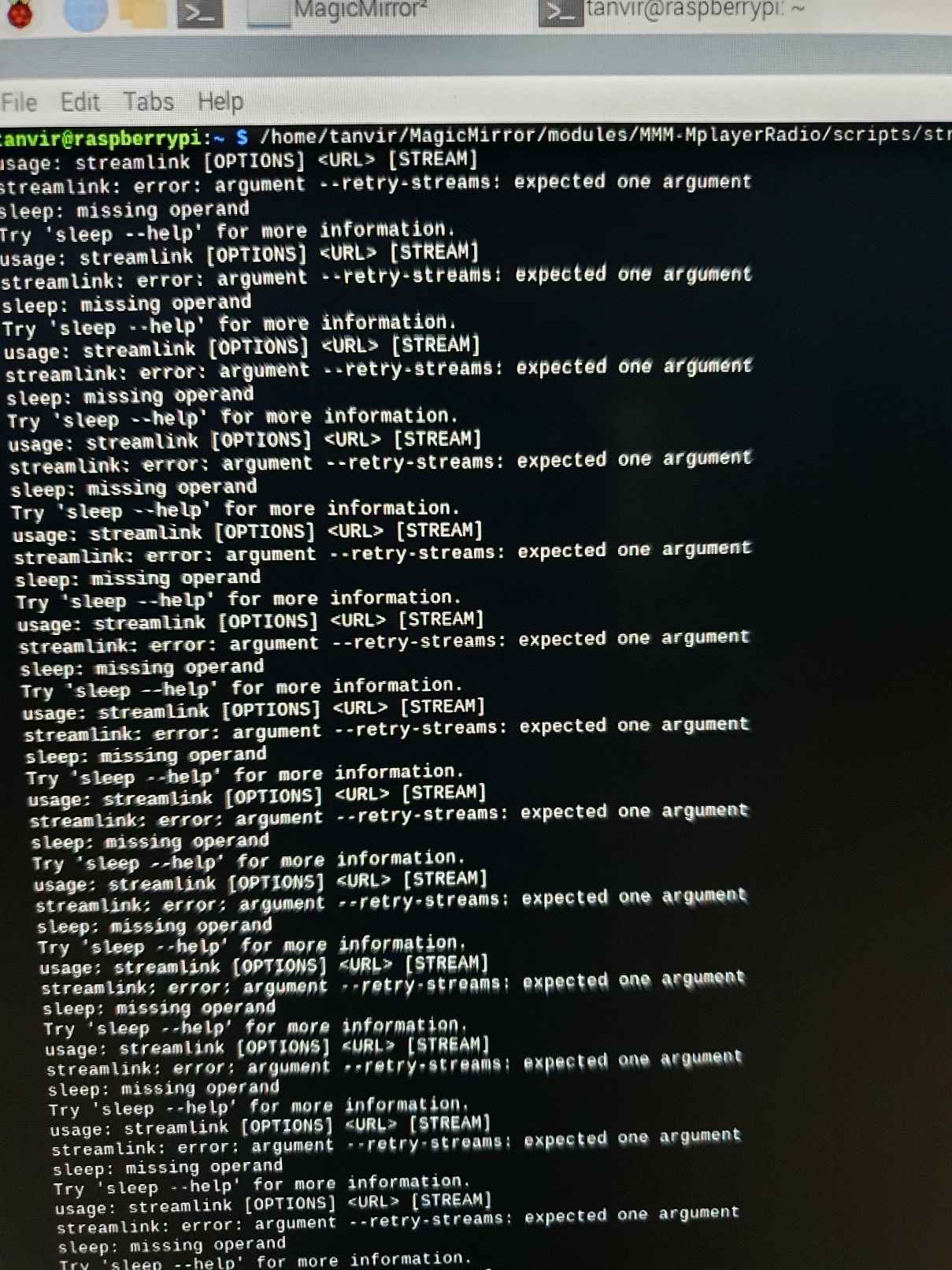
                            @wishmaster270 Hi mate…
                            It’s cotinueslly showing this20221025_222054.jpg
                            wishmaster270W 1 Reply Last reply Reply Quote 0
                            • wishmaster270W Offline
                              wishmaster270 Module Developer @tanvir586
                              last edited by

                              @tanvir586

                              It looks like you use the right version but only the path in the “customCommand” option was wrong. With the following config it should work:

                              	{
                              		module: "MMM-MplayerRadio",
                              		header: "Radio",
                              		position: "top_center",
                              		config: {
                              			stations: [
                              				{
                              					title: "Almubarak",
                              					url: "https://relay.emasjidlive.uk/almubarakradio",
                              					logo: "https://almubarakradio.com/wp-content/uploads/2021/04/logorectangle-1024x326.png",
                              					customCommand: "./modules/MMM-MplayerRadio/scripts/streamlinkWrapper.bash",
                              					customCommandArgs: ["10", "30", "###URL###"],
                              				},
                              			],
                              		},
                              	},
                              
                              T 2 Replies Last reply Reply Quote 0
                              • T Offline
                                tanvir586 @wishmaster270
                                last edited by

                                @wishmaster270 Hi… the sound works perfectly. thank you very much. now just waiting now for the radio go offline and come back online. will text you back.

                                1 Reply Last reply Reply Quote 0
                                • T Offline
                                  tanvir586 @wishmaster270
                                  last edited by

                                  @wishmaster270 Hi. The Radio just came back online but no luck. Is doesn’t come online itself.

                                  wishmaster270W 1 Reply Last reply Reply Quote 0
                                  • wishmaster270W Offline
                                    wishmaster270 Module Developer @tanvir586
                                    last edited by

                                    @tanvir586 Hi, bad to hear that.
                                    At the moment I do not have any other idea.

                                    T 1 Reply Last reply Reply Quote 0
                                    • T Offline
                                      tanvir586 @wishmaster270
                                      last edited by

                                      @wishmaster270 That’s fine mate. Really appreciated you helping. Thank you very much.

                                      1 Reply Last reply Reply Quote 0
                                      • T Offline
                                        tanvir586
                                        last edited by

                                        Hi mate started using your module back again. now I’m using a station which is 24/7. all working very good. just one help I need now. just wanna to reduce the size of the control Wrapper. I edit the mplayer-radio.css file. I was able to reduce the top part but the bottom part is not reducing. I edit
                                        .mradio .controlWrapper {
                                        padding-top: 5px;
                                        width: 100%;

                                        and add hight: 100%;

                                        but it did not work. anything I can do on this?

                                        wishmaster270W 1 Reply Last reply Reply Quote 0
                                        • wishmaster270W Offline
                                          wishmaster270 Module Developer @tanvir586
                                          last edited by

                                          @tanvir586
                                          Hi,

                                          first of all: Please do not edit any files in the module folder. You will get into problems with the next update. All CSS of the module can be overridden by copying the things you want to change to custom.css and edit it there.
                                          second: Please use the ```YOUR CODE``` notation when pasting code.

                                          Now to your problem :beaming_face_with_smiling_eyes:
                                          The size of the controlWrapper depends of the buttons in it and their margin. So instead of changing the controlWrapper you could reduce the size of the buttons instead:

                                          .mradio .controlWrapper .button {
                                              height: 30px;
                                              width: 30px;
                                              margin-left: 5px;
                                              margin-right: 5px;
                                          }
                                          

                                          If you want to reduce the size of the space between the stations and the buttons this is mostly the field where the stream information will be displayed (if provided and you are using mplayer to play, which you do not as i remember).
                                          If do not want the stream information to be displayed you can set the the option showStreamInfo to false in the module configuration.

                                          T 1 Reply Last reply Reply Quote 0
                                          • T Offline
                                            tanvir586 @wishmaster270
                                            last edited by

                                            @wishmaster270 Hi thanks mate 😊. I changed showStreamInfo to false and its worked well for me. Not changing anything. Thanks for this grate module.

                                            N 1 Reply Last reply Reply Quote 0

                                            Hello! It looks like you're interested in this conversation, but you don't have an account yet.

                                            Getting fed up of having to scroll through the same posts each visit? When you register for an account, you'll always come back to exactly where you were before, and choose to be notified of new replies (either via email, or push notification). You'll also be able to save bookmarks and upvote posts to show your appreciation to other community members.

                                            With your input, this post could be even better 💗

                                            Register Login

                                            • 1
                                            • 2
                                            • 3
                                            • 3 / 3
                                            • First post
                                              Last post
                                            Enjoying MagicMirror? Please consider a donation!
                                            MagicMirror created by Michael Teeuw.
                                            Forum managed by Sam, technical setup by Karsten.
                                            This forum is using NodeBB as its core | Contributors
                                            Contact | Privacy Policy
