Read the statement by Michael Teeuw here.
MMM-Fritz-Box-Callmonitor: Notification formatting
-
After changing some lines as suggested by sdetweil the MagicMirror loads again.
@Jan-0 said in MMM-Fritz-Box-Callmonitor: Notification formatting:
python3 fritz-access.py -u ‘’ -p ‘’
The filename is fritz_access.py. So after executing it I got
 print json.dumps({"filename": file, "content": content})
          ^
SyntaxError: invalid syntax
This was easily solded by changing it to
print (json.dumps({"filename": file, "content": content}))(Just adding round brackets) - that was a change from Python2 to Python3.However it was followed by the next error
urllib2does not work in Python 3. According to stackoverflow urllib.error and urllib.request must be used for Python3.Are you sure you uploaded the right code to github? It seems you accidentally uploaded th old python2 code!
-
-
@wishmaster270
I uploaded my changes in the branch code_update_2023 and did not pullit to the master of the fork.
I will have a look at the pull requests tomorrow. -
@wishmaster270 This is great.
I can confirm that executingfritz_acces.pywith username and password now works! It results in some structured data:<Call><Id>4373</Id><Type>3</Type><Called>0123456789</Called><Caller>SIP: 9328727</Caller><CallerNumber>54321</CallerNumber><Name>Some fancy Name</Name><Numbertype>sip</Numbertype><Device>Tardis</Device><Port>13</Port><Date>03.09.22 12:55</Date><Duration>0:02</Duration><Count></Count><Path /></Call>I also get the module to show however it does not show active nor missed calls. It just shows “no call”, the spinner and the phonebook.
I used this config:
			module: 'MMM-FRITZ-Box-Callmonitor-py3',
			position: 'bottom_left',
			header: "Verpasste Anrufe",
			config: {
				username: "foo",
				password: "bar",
				reloadContactsInterval: 24*60,
				minimumCallLength: 0,
				showContactsStatus: true,
				maximumCallDistance: 60*6,
				maximumCalls: 4,
				fade: false,
				debug: true,
			}
		},
So I guess the communication between the js and the py is faulty.
I would like to help you with your formatting though in the end…
-
@coernel
The pythons script is only responsible to fetch the call history and the phonebook of the fritz box. The call notification is handled by java script.
So should see a alter containing the (wrong formatted) phone number for each incoming call.Are you sure you activated the call notification on your fritz box by dialing
#96*5*with a phone connected to the box (DECT phone works as well).
Edit:
I do not think the formatting problem is related to this module. As of the documentation of the alert module it should be possible to send either simple text or html formatted text.
As a debug test i tried to send html formatted text with one of my other modules which ends in the same problem -
@wishmaster270 known bug. fixed in next release
-
@sdetweil
I should have checked that. Thank you for the link.
With the current develop branch the formatting works as expected, too.Edit: If the comment is removed of the translation files the translations work as well and the right title is displayed
-
@wishmaster270 and @Jan-0 Is there now a current repository with the issues fixed? I would love to use the module as well.
Also it should be added here : https://github.com/MichMich/MagicMirror/wiki/3rd-party-modules -
@Jan-0 said in MMM-Fritz-Box-Callmonitor: Notification formatting:
Hi,
I’m referring to this module (https://github.com/paviro/MMM-FRITZ-Box-Callmonitor). Although it is quite outdated, I still like it and I was able to transfer it to an python3 environment. However, since some update (don’t know which one), the notification (“alert”) is not formatted properly.
The reason seems to be in line 85 of the file MMM-FRITZ-Box-Callmonitor.js:
// Override socket notification handler.
socketNotificationReceived: function(notification, payload) {
if (notification === “call”) {
//Show alert on UI
this.sendNotification(“SHOW_ALERT”, {
title: this.translate(“title”),
message: “” + payload + “”,
imageFA: “phone”
});//Set active Alert to current call this.activeAlert = payload; }There are two problems: 1) the title is not translated but printed, 2) the message is not formatted but the formatting information is printed verbosely.
Unfortunately, I’m neither an expert in the MagicMirror syntax nor in javascript. Could somebody give me a hint how I need to adopt the code?To fix this, you can remove the quotes and use template literals instead. Template literals allow you to include variables and formatting within a string using backticks (
) instead of quotes. Here's how you can modify the code to use template literals: socketNotificationReceived: function(notification, payload) { if (notification === "call") { //Show alert on UI this.sendNotification("SHOW_ALERT", { title: this.translate("title"), message:${payload}`,
imageFA: “phone”
});//Set active Alert to current call this.activeAlert = payload;}
}
As for the translation issue, you need to make sure that the translate function is correctly configured in your module. The translate function should be defined in the getTranslations function in the module’s node_helper.js file. Here’s an example of how to define the translate function:
getTranslations: function() {
return {
en: “translations/en.json”,
de: “translations/de.json”
};
},translate: function(key) {
return this.translate(key);
}
This assumes that you have translation files for English and German located in the translations folder of your module. You may need to modify this code to match the structure of your module.I hope this helps! Let me know if you have any other questions.
-
@coernel
Hi,
as i can see this fork https://github.com/drtorchwood/MMM-FRITZ-Box-Callmonitor-py3/tree/code_update_2023 contains all changes needed.
But you will need to either use the current development version of MagicMirror or wait for the next release which i think is planned for 2022-04-01 to get the alerts formatted correctly. -
@wishmaster270 said in MMM-Fritz-Box-Callmonitor: Notification formatting:
@coernel
Hi,
as i can see this fork https://github.com/drtorchwood/MMM-FRITZ-Box-Callmonitor-py3/tree/code_update_2023 contains all changes needed.
But you will need to either use the current development version of MagicMirror or wait for the next release which i think is planned for 2022-04-01 to get the alerts formatted correctly.This is great however I just get this:

Is this the formatting error we are talking about without the Core update? If yes I am willing to wait. But this for me looks like more than a formatting setting!Callmonitor definately is enabled via Fritz!Phone. And username and password are correct - I can access the Fritz!Box and the user has the view and edit settings:
Benutzer mit dieser Berechtigung können alle Einstellungen der FRITZ!Box sehen und bearbeiten.Any help would be appreciated!
-
@coernel
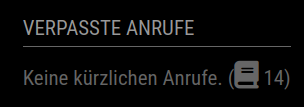
The view you show indicates that there are no recent calls and that the fetch of the telephone book is still running or was not successful. But it is the normal view. The calls will be signaled as alerts. So make sure you have the defaultalertmodule activated in your config.js:{ module: "alert", },The formatting will only be wrong in the alert.
Please make sure to check the following things, too:
- You cloned the right fork with the following command?
cd ~/MagicMirror/modules
git clone git@github.com:drtorchwood/MMM-FRITZ-Box-Callmonitor-py3.git
Edit:
* You use the right branch by calling the following commands?
As of 2023-02-25 the changes are merged to the master branch of the fork. So no need to change to thecode_update_2023branch anymore.- You installed the JavaScript dependencies?
cd ~/MagicMirror/modules/MMM-FRITZ-Box-Callmonitor-py3 npm install- You installed the Python dependencies?
sudo pip3 install fritzconnection- You activated the call monitor service of the box by dialing the following number with one of your phones?
#96*5*- You configured the right IP address in config.js with option
fritzIP. Default is 192.168.178.1?
		{
			module: 'MMM-FRITZ-Box-Callmonitor-py3',
			position: 'bottom_left',
			header: "Verpasste Anrufe",
			config: {
				username: "foo",
				password: "bar",
				fritzIP: "10.18.8.1",
				reloadContactsInterval: 50,
				minimumCallLength: 0,
				showContactsStatus: true,
				maximumCallDistance: 60*6,
				maximumCalls: 4,
				fade: false,
				debug: true,
			}
		},
If the call monitor service is not activated on the fritz box you will see a message like this in the logs:
[24.02.2023 16:31.29.944] [ERROR] Error: connect ECONNREFUSED 192.168.178.1:1012
    at TCPConnectWrap.afterConnect [as oncomplete] (node:net:1494:16) {
  errno: -111,
  code: 'ECONNREFUSED',
  syscall: 'connect',
  address: '192.168.178.1,
  port: 1012
}
And again the call monitor service is independent of username and password. The credentials are used to fetch the telephone book and the past calls only.
Thats how the default view looks in my case:
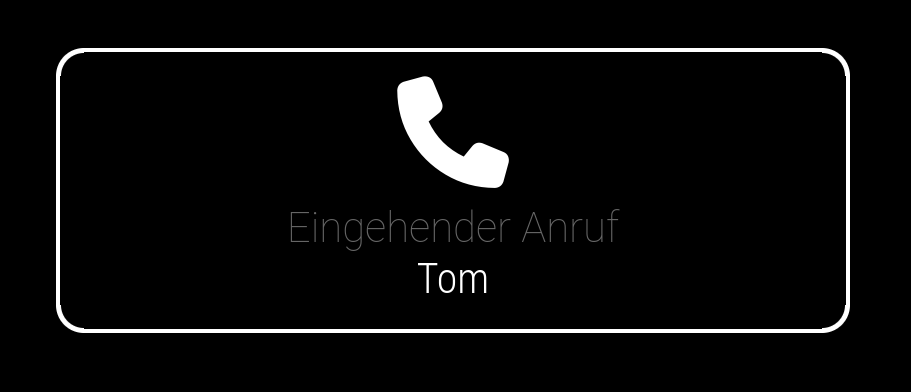
And thats how it looks if there is a incomming call:
If you do not use the current development branch of MagicMirror there may be some html code in the alert and it will look like
<span style='font-size:30px'>Tom</span>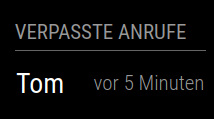
-
@coernel I now also pushed the changes into the master https://github.com/drtorchwood/MMM-FRITZ-Box-Callmonitor-py3/tree/master
-
@Jan-0
This is so cool! It does work now. Has it been published to the list of modules?
If you or @wishmaster270 are somewhere near Cologne you or are invited for a free professional solo session of Feldenkrais Functional Integration or a free professional singing lesson! -
@coernel
Great to hear and you are welcome. I try to help where I can.
I live about 30km south of Munich but thanks for your invitation. -
Hi Everybody out there using MMM-FRITZ-Box-Callmonitor,
I would love to use this Module, but I’m not really in the mod to code or to find errors.
I tried to install your new branch under PiOS “Bookworm” but I get some errors using
“sudo apt-get install python-dev libxml2-dev libxslt1-dev zlib1g-dev && sudo pip install fritzconnection”!
The first error is: " E: For Package »python-dev« exists no Installationscandidate."
The second error for pip install is: “externally-managed-environment …”
How can I solve these problems?
Sorry for my bad english, I’m german and over 60 years old.
Thanks for helping. -
@xIExodusIx that’s due to changes in the handling of the python packages. I installed “fritzconnection” in a virtual environment:
python -m venv venv

source venv/bin/activate

python -m pip install fritzconnection
to make the Callmonitor use the fritzconnection, I edited the nodehelper.js (in ~/MagicMirror/modules/MMM-FritzBox-Callmonitor-py3) in line 212 to look like this (user is “pi”, must be adapted if you use another user):
pythonPath: '/home/pi/venv/bin/python',Don’t know if it’s the best solution, but it works.
-
@rabbit83ka you can set the venv in the mm.sh that starts MagicMirror
then you don’t need to do that
-
@sdetweil Thanks, so it should look like this?
#!/bin/bash # This file is still here to keep PM2 working on older installations. cd ~/MagicMirror export PYTHONPATH="/home/pi/venv/bin/python" DISPLAY=:0 npm start -
@rabbit83ka no, execute the venv command to set the virtual environment in place of the export
the same venv command you did before running pip

Hello! It looks like you're interested in this conversation, but you don't have an account yet.
Getting fed up of having to scroll through the same posts each visit? When you register for an account, you'll always come back to exactly where you were before, and choose to be notified of new replies (either via email, or push notification). You'll also be able to save bookmarks and upvote posts to show your appreciation to other community members.
With your input, this post could be even better 💗
Register Login