MagicMirror Forum
    • Recent
    • Tags
    • Unsolved
    • Solved
    • MagicMirror² Repository
    • Documentation
    • 3rd-Party-Modules
    • Donate
    • Discord
    • Register
    • Login
    A New Chapter for MagicMirror: The Community Takes the Lead
    Read the statement by Michael Teeuw here.

    ALT not doing anything

    Scheduled Pinned Locked Moved Solved Troubleshooting
    44 Posts 6 Posters 22.0k Views 5 Watching
    Loading More Posts
    • Oldest to Newest
    • Newest to Oldest
    • Most Votes
    Reply
    • Reply as topic
    Log in to reply
    This topic has been deleted. Only users with topic management privileges can see it.
    • bugsounetB Offline
      bugsounet Banned @sdetweil
      last edited by bugsounet

      @sdetweil no,no it’s a 32Bits OS with X64 kernel

      It’s now the new rule for 32Bits version

      you can have 32bits kernel with 32bits Os by editing /boot/config.txt

      and adding this line at the end:
      arm_64bit=0

      result is:

      pi@raspberrypi:~/MagicMirror $ uname -a
      Linux raspberrypi 6.1.21-v7l+ #1642 SMP Mon Apr  3 17:22:30 BST 2023 armv7l GNU/Linux
      

      by default arm_64bit=1 for apply x64 kernel

      1 Reply Last reply Reply Quote 0
      • ankonaskiff17A Offline
        ankonaskiff17 @sdetweil
        last edited by ankonaskiff17

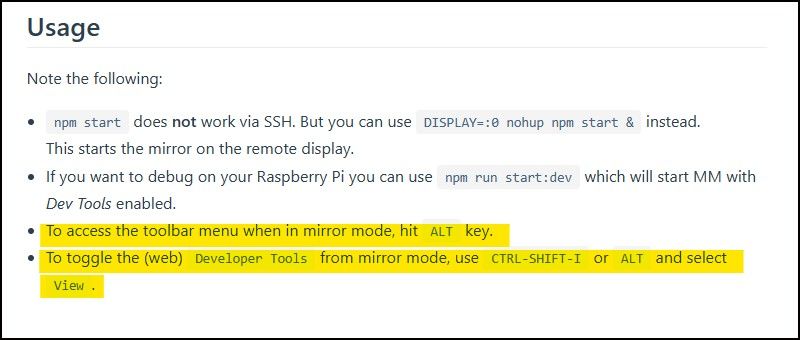
        @sdetweil This is why ALT
        Using Alt.jpg

        In any case neither ALT, ALT+Spacebar or CTL+m allow me to easily move back and forth between configuring and checking the Magic Mirror.

        This is all being done on Pi4B’s BTW.
        I have formatted the sd card on the original Pi4B now 4 times and installed MM 4 times right behing the Pi OS fresh install. 64 bit

        After you made mention of 32 bit I took a second Pi 4B, installed 32 bit Pi OS and then right behind I installed MM

        The existing, functioning MM is fine. I hit ALT and it does just what the attached picture says it should do.

        So I have two Pi 4B’s, one of which is running 32 bit Pi OS and one running 64 bit Pi OS.
        Neither will let me get access to the toolbar in any combination of keystrokes.

        S 1 Reply Last reply Reply Quote 0
        • S Do not disturb
          sdetweil @ankonaskiff17
          last edited by

          @ankonaskiff17 “usage”, oh you mean the DOC… hahaha…

          things change way too fast

          Sam

          How to add modules

          learning how to use browser developers window for css changes

          ankonaskiff17A 2 Replies Last reply Reply Quote 0
          • ankonaskiff17A Offline
            ankonaskiff17 @sdetweil
            last edited by ankonaskiff17

            @sdetweil Hitting ALT always worked in the past and continues to work on the older MM. I don’t pull these things out of thin air. I get your point about documentation though.
            You mentioned early in this conversation about that being something that is done in Electron. Electron is way beyond my knowledge level. But searching Google it seems that somewhere in Electron there is titleBarStyle and it is currently set to hidden . I haven’t a clue as to how to run that to ground but almost like someone was messing with the code trying to make a kiosk but didn’t do that locally.

            1 Reply Last reply Reply Quote 0
            • ankonaskiff17A Offline
              ankonaskiff17 @sdetweil
              last edited by

              @sdetweil This is in regards to auto-starting MM.
              When installing NPM per the documentation, do you install at ~$ or at/MagicMirror $
              It isn’t real clear because half way through that sequence it has cd ~ which you could take to mean you are installing npm at the MagicMirror level then you back up to put the auto start script at root?

              I kinda-sorta think I understand what is going on with this ALT problem but I’m out of gas and will confirm in the morning.

              S 1 Reply Last reply Reply Quote 0
              • S Do not disturb
                sdetweil @ankonaskiff17
                last edited by sdetweil

                @ankonaskiff17 npm is installed globally (-g)
                effectively as root… system wide

                the pm2 install for auto start is to execute the command output from the command, pm2 startup

                and npm (node package manager). is what loads the dependencies listed in package.json (npm install) and then executes the command listed in the scripts section of package.json (npm start, or npm run xxxxx, see the list)

                I posted the command line parms to launch chromium instead of electron, so try that and see what keyboard handling there is…

                Sam

                How to add modules

                learning how to use browser developers window for css changes

                ankonaskiff17A 1 Reply Last reply Reply Quote 0
                • ankonaskiff17A Offline
                  ankonaskiff17 @sdetweil
                  last edited by

                  @sdetweil It’s alive.

                  S 1 Reply Last reply Reply Quote 0
                  • S Do not disturb
                    sdetweil @ankonaskiff17
                    last edited by

                    @ankonaskiff17 which. prior, this w chromium, it’s Tuesday?

                    Sam

                    How to add modules

                    learning how to use browser developers window for css changes

                    ankonaskiff17A 1 Reply Last reply Reply Quote 0
                    • ankonaskiff17A Offline
                      ankonaskiff17 @sdetweil
                      last edited by ankonaskiff17

                      @sdetweil I took two identical Pi 4B’s, formatted them intalled 64 bit PI OS on both.
                      Then installed MM 2.22.0 on one and 2.23.0 on the other.
                      No VNC or SSH, start to finish.

                      2.22.0 I hit ALT (only) and the expected toolbar with VIEW then Toggle Full Screen and the Open Developer Tools come up as I am accustomed to.

                      2.23.0 exhibits that same unexpected behavior that started us down this road.

                      The whole ALT+F11 is WAY WAY beyond me but it does shrink the size of the MM overlay. Unfortunately it does not give you Open Developer Tools so that is a problem.

                      Beyond that, I am clueless. Why 2.22.0 works as desired and 2.23.0 doesn’t is way out beyond my level of knowledge.

                      I never got to the Chromium stuff you described but more than happy to run that down on the Pi with 2.23.0 on it.
                      Once I saw that 2.22.0 install give me what I wanted I was going see if I could repeat that.

                      S 1 Reply Last reply Reply Quote 0
                      • S Do not disturb
                        sdetweil @ankonaskiff17
                        last edited by

                        @ankonaskiff17 yes, the electron version changed between 22 and 23…

                        so, we are back to the original statement… something changed in electron…

                        Sam

                        How to add modules

                        learning how to use browser developers window for css changes

                        ankonaskiff17A 3 Replies Last reply Reply Quote 0
                        • ankonaskiff17A Offline
                          ankonaskiff17 @sdetweil
                          last edited by

                          @sdetweil You won’t get any argument out of me on that score.
                          As I said, glad to help if I can just as long as you tell me what to do.

                          1 Reply Last reply Reply Quote 0
                          • ankonaskiff17A Offline
                            ankonaskiff17 @sdetweil
                            last edited by

                            @sdetweil I’m calling it a wrap for today but is there a way to make the developer tools to open that is not “open developer tools”?

                            I did something yesterday and that launched but when you move the mouse around it is like it is behind the MM window. If it wasn’t doing that you could right click page and bring that up up.

                            Reason I ask is I did see some Electron errors yesterday but I’ve seen them in past so I just ignored.

                            1 Reply Last reply Reply Quote 0
                            • ankonaskiff17A Offline
                              ankonaskiff17 @sdetweil
                              last edited by

                              @sdetweil Can you tell me how to easily capture/install the prior 2.20.0 version ether direct to the Pi I want to install MM on. I have two upcoming MM projects and while the one Pi is ready, it is going to be a simple build as far as MM’s go so will knock it out pretty quickly.

                              I have successfully installed that earlier version twice but still way more hunting and pecking than is desireable. Plus it would be good to know more generally.

                              Is sudo rm -r MagicMirror the best way to remove the problematic 2.23.0version? That is what I have been doing and since I have only just installed MM and no modules it seemed like that would do what I needed.

                              S 1 Reply Last reply Reply Quote 0
                              • S Do not disturb
                                sdetweil @ankonaskiff17
                                last edited by sdetweil

                                @ankonaskiff17 you can rename it

                                mv MagicMirror new_name

                                later rm -rf MagicMirror to delete it
                                I posted on the github issue on how to git clone a tag
                                and where to find the tags
                                each release is saved as a tag

                                Sam

                                How to add modules

                                learning how to use browser developers window for css changes

                                ankonaskiff17A 3 Replies Last reply Reply Quote 0
                                • ankonaskiff17A Offline
                                  ankonaskiff17 @sdetweil
                                  last edited by

                                  @sdetweil Thank you.

                                  I’ve piddled around with computers since THE computer was a Tandy Something Something I bought at a Radio Shack when they and hardware focused mom & pop computer stores were the only way to buy/build a NOT $7,000.00 IBM. There was an EGG Computer store as big as a Best Buy big box store in Charlotte, NC I used to go to and drool at all the hardware.

                                  Been several multi-year gaps in there for sure but I can always rely on computers to tax my brain. Just like this.

                                  I appreciate your help and patience.

                                  1 Reply Last reply Reply Quote 0
                                  • ankonaskiff17A Offline
                                    ankonaskiff17 @sdetweil
                                    last edited by

                                    @sdetweil I assume it is on you all to resolve MM’s conflict with the newest version of Electron?
                                    I could see that going both ways. If new version of Electron broke EVERYONE’s application that uses Electron is different than if it only breaks one or two applications.

                                    1 Reply Last reply Reply Quote 0
                                    • ankonaskiff17A Offline
                                      ankonaskiff17 @sdetweil
                                      last edited by

                                      @sdetweil I went to the Github Issue to see what you wrote and I don’t see anything relating to to how to retrieve an older version of the repository. All my Googling I had found how each version has tag associated with it but I can’t find in the issue stream anywhere.

                                      S 2 Replies Last reply Reply Quote 1
                                      • S Do not disturb
                                        sdetweil @ankonaskiff17
                                        last edited by sdetweil

                                        @ankonaskiff17 issue stream?

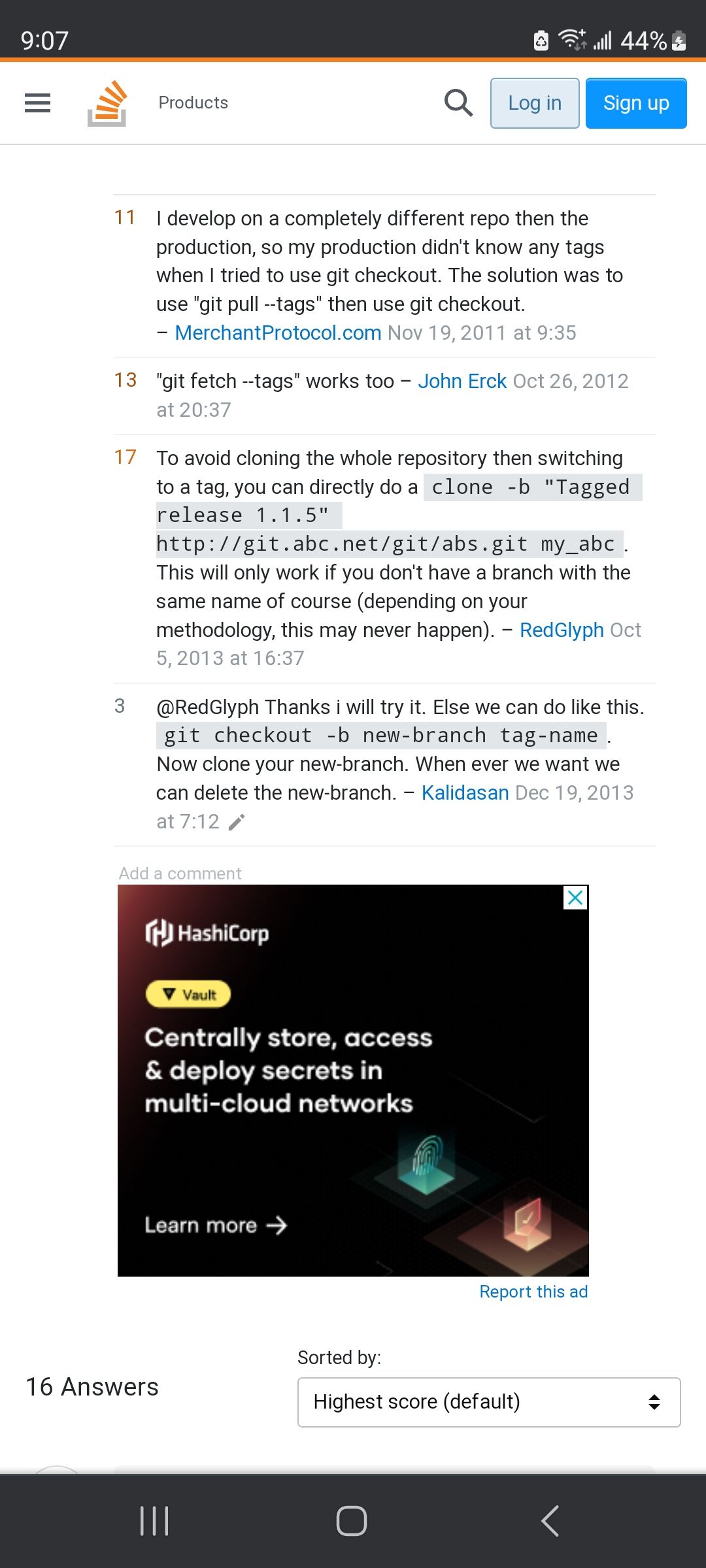
                                        have to look at the changelog of the tag

                                        you should be able to

                                        git checkout -b branch_name tagname
                                        

                                        I think.

                                        but if you used my script to install, then I strip out all the extra branches to save space

                                        so you would have to use the clone approach
                                        Screenshot_20230622_210722_Chrome.jpg

                                        Sam

                                        How to add modules

                                        learning how to use browser developers window for css changes

                                        1 Reply Last reply Reply Quote 0
                                        • S Do not disturb
                                          sdetweil @ankonaskiff17
                                          last edited by

                                          @ankonaskiff17 I did this

                                          git clone -b v2.19.0 https://github.com/MichMich/MagicMirror.git mm2.19
                                          

                                          to get the v2.19.0 tag into the folder called mm2.19

                                          if you don’t have the name at the end the folder will be MagicMirror
                                          (and fail if there is one already)

                                          Sam

                                          How to add modules

                                          learning how to use browser developers window for css changes

                                          ankonaskiff17A 1 Reply Last reply Reply Quote 0
                                          • ankonaskiff17A Offline
                                            ankonaskiff17 @sdetweil
                                            last edited by ankonaskiff17

                                            @sdetweil Used your script and worked like a charm. Didnt put in mm2.22 at end since I had no previous install.

                                            Then did the various appropriate steps from the “official” manual install, like node and everything running as desired.


                                            S ankonaskiff17A 2 Replies Last reply Reply Quote 0

                                            Hello! It looks like you're interested in this conversation, but you don't have an account yet.

                                            Getting fed up of having to scroll through the same posts each visit? When you register for an account, you'll always come back to exactly where you were before, and choose to be notified of new replies (either via email, or push notification). You'll also be able to save bookmarks and upvote posts to show your appreciation to other community members.

                                            With your input, this post could be even better 💗

                                            Register Login

                                            • 1
                                            • 2
                                            • 3
                                            • 2 / 3
                                            • First post
                                              Last post
                                            Enjoying MagicMirror? Please consider a donation!
                                            MagicMirror created by Michael Teeuw.
                                            Forum managed by Sam, technical setup by Karsten.
                                            This forum is using NodeBB as its core | Contributors
                                            Contact | Privacy Policy