Read the statement by Michael Teeuw here.
MagicMirror using the wrong time
-
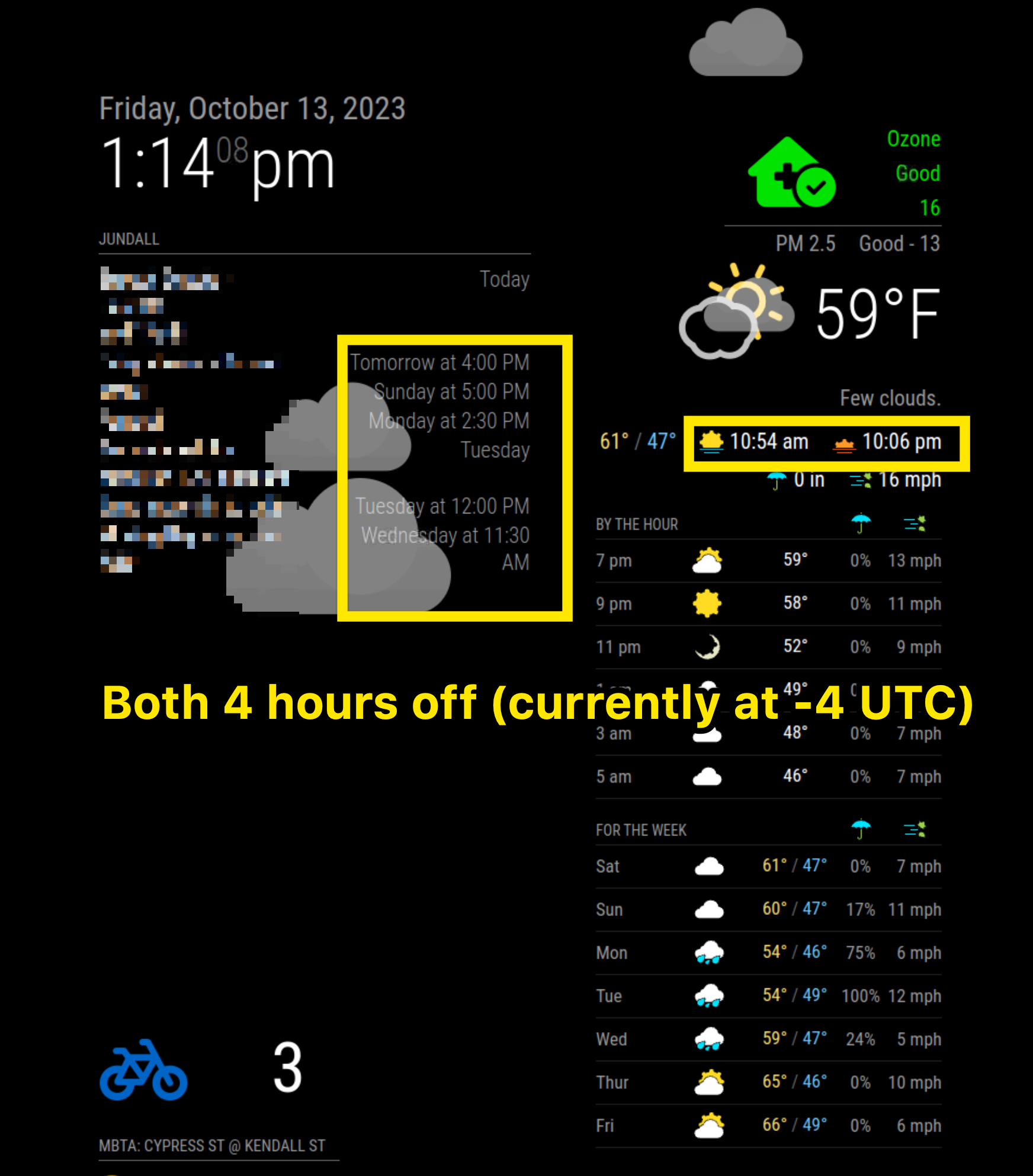
After a recent update, any module that is displaying a time is showing the UTC time and not my local timezone. The default clock module supports adding a timezone, so I’ve been able to add it there and the time is thus correct. The default calendar module and MMM-OpenWeatherForecast do not support adding timezones and are showing 4 hours off (see screenshot).
Unsure of what I need to attach to aid in troubleshooting, so please let me know what will help.
So far, I’ve done some searching and I’ve seen posts related to timezones for the calendar module but they have since been resolved.
My rpi shows the right time on the taskbar and typing date into the console shows the right date and time.
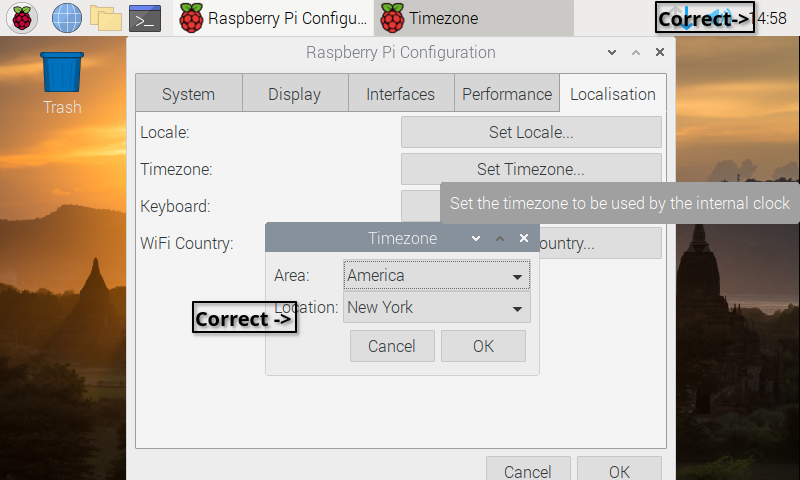
I have confirmed that my rpi is setup for the right timezone (America/New York), the right locale en-US.UTF-8
- Using Raspbian version 10
- MagicMirror is at 2.25.0
-
@sdetweil
I pulled out another Pi, flashed the OS and installed MM using the script you referenced earlier. It’s working perfectly. I’m still completely baffled. I’ve triple checked on the original SD image - it works as expected on the previous version of MM, but not on the current one… Ah well –Thank you for taking so much time to look into this, and I am sorry for having wasted so much of your time.
-
@rcberg3 another user posted similar
https://forum.magicmirror.builders/topic/18079/default-clock-wrong-after-update
-
@rcberg3 I’m having exactly the same issue. Also on Raspbian 10 and MM 2.25.0. I was able to set the timeZone in the clock module, but the calendar is still off. Has there been any further info on this? Is there another posting I should be looking at?
-
@blissb calendar uses the system timezone
set in the preferences, from the desktop -
@sdetweil Thanks for the quick reply - but what you are saying isn’t what I’m seeing… Please let me know what I’m missing. I’d be really grateful!
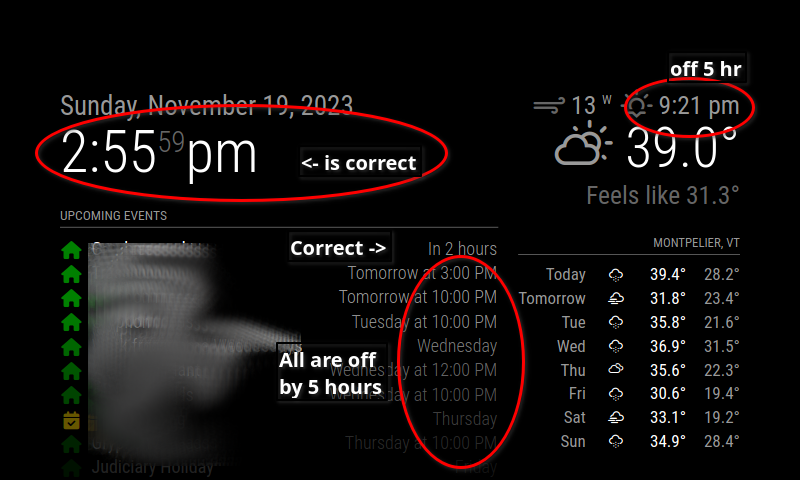
Time and timezone are set correctly on the two RPi systems. Time / date are showing correctly on the Raspbian desktop, and in the MM Clock module (after setting the timezone option). So, clearly, I’m missing something. Raspi-config has the correct timezone (America/New_York)
Clock module is correct after adding timeZone to config.js, but not the calendar or weather:
-
@blissb
Maybe your RPI is not synchronized with time server. RPI (not 5) has not RTC feature, so it should be synced it’s time sometimes. -
@blissb can you add ,“DEBUG”
to the log level in config.jsthen do
from on the terminal window docd ~/MagicMirror npm start > somefile.txtwait til the calendar is up, then Ctrl+q to stop mm
then examine the somefile.txt
search for ‘initial’
-
@sdetweil
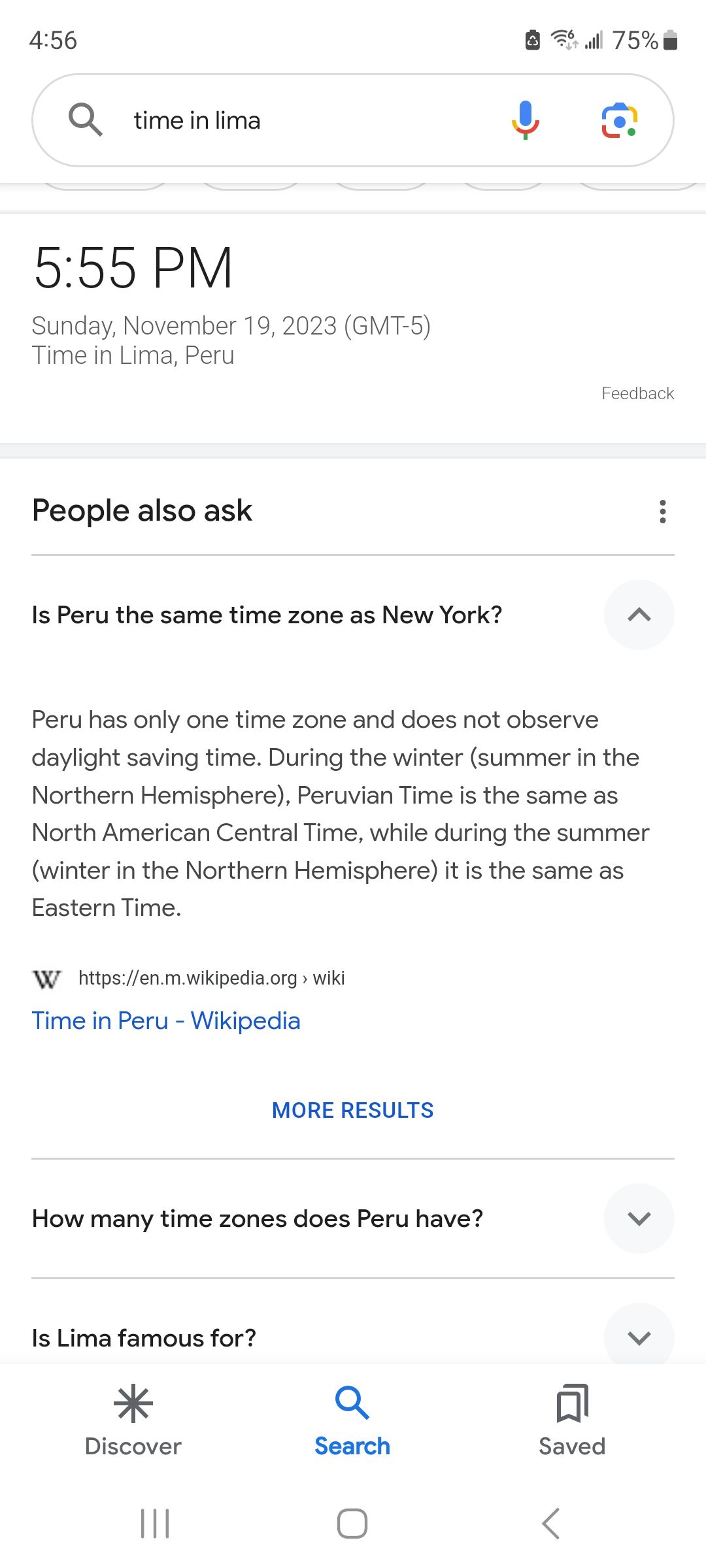
I replied to this, but then received a notice that my submission was rejected. I don’t know why.The debug file has over 200 entries referencing “initial tz =” with both “America/New_York” and “America/Lima.” I do not know why Lima would be anywhere in my configs, but I believe it’s the same time as New York, so I’m not sure that’s instructive.
I will also add there seems to be an “initial tz=” entry each followed immediately by “corrected tz=” with the same value.
-
@blissb not the same all the time
could you pull a complete section…
thru “saving event”
or send the file to me same userid as here at Gmail. -
@blissb
Again, I’m not seeing the same thing you are… weird.
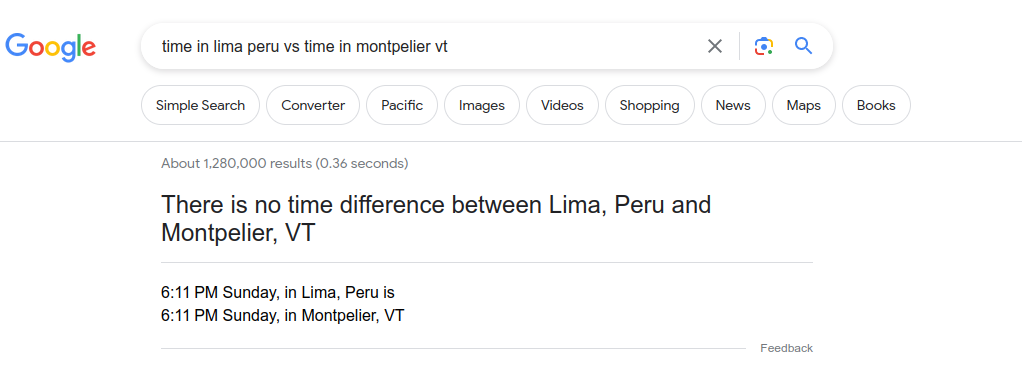
-
@sdetweil
I think this is what you were asking for?
[19.11.2023 17:30.43.315] [DEBUG] Event:
{“type”:“VEVENT”,“params”:[],“created”:“2023-11-18T21:17:38.000Z”,“lastmodified”:“2023-11-19T03:21:20.000Z”,“dtstamp”:“2023-11-19T03:21:20.000Z”,“uid”:“cade6f8b-b662-4ad6-bb41-6cdf47266ba9”,“summary”:“Gryphon meds”,“status”:“CONFIRMED”,“rrule”:{“_cache”:{“all”:false,“before”:[],“after”:[],“between”:[]},“origOptions”:{“tzid”:“America/New_York”,“dtstart”:“2023-11-18T22:00:00.000Z”,“freq”:3,“until”:“2023-12-03T05:00:00.000Z”},“options”:{“freq”:3,“dtstart”:“2023-11-18T22:00:00.000Z”,“interval”:1,“wkst”:0,“count”:null,“until”:“2023-12-03T05:00:00.000Z”,“tzid”:“America/New_York”,“bysetpos”:null,“bymonth”:null,“bymonthday”:[],“bynmonthday”:[],“byyearday”:null,“byweekno”:null,“byweekday”:null,“bynweekday”:null,“byhour”:[22],“byminute”:[0],“bysecond”:[0],“byeaster”:null}},“MOZ-LASTACK”:“20231119T032120Z”,“start”:“2023-11-18T22:00:00.000Z”,“datetype”:“date-time”,“end”:“2023-11-18T23:00:00.000Z”,“sequence”:“2”,“MOZ-GENERATION”:“1”,“ec75586d-206f-4821-9a50-81af9612d507”:{“type”:“VALARM”,“params”:[],“action”:“DISPLAY”,“trigger”:“PT0S”,“description”:“Default Mozilla Description”,“end”:“2023-11-20T22:30:36.369Z”}}
[19.11.2023 17:30.43.317] [DEBUG] start: Sat Nov 18 2023 17:00:00 GMT-0500 (GMT-05:00)
[19.11.2023 17:30.43.319] [DEBUG] end:: Sat Nov 18 2023 18:00:00 GMT-0500 (GMT-05:00)
[19.11.2023 17:30.43.320] [DEBUG] duration: 3600000
[19.11.2023 17:30.43.322] [DEBUG] title: Gryphon meds
[19.11.2023 17:30.43.346] [DEBUG] Search for recurring events between: Sun Nov 19 2023 17:30:43 GMT-0500 (GMT-05:00) and Sun Nov 17 2024 23:59:59 GMT-0500 (GMT-05:00)
[19.11.2023 17:30.43.398] [DEBUG] Title: Gryphon meds, with dates: [“2023-11-20T22:00:00.000Z”,“2023-11-21T22:00:00.000Z”,“2023-11-22T22:00:00.000Z”,“2023-11-23T22:00:00.000Z”,“2023-11-24T22:00:00.000Z”,“2023-11-25T22:00:00.000Z”,“2023-11-26T22:00:00.000Z”,“2023-11-27T22:00:00.000Z”,“2023-11-28T22:00:00.000Z”,“2023-11-29T22:00:00.000Z”,“2023-11-30T22:00:00.000Z”,“2023-12-01T22:00:00.000Z”,“2023-12-02T22:00:00.000Z”]
[19.11.2023 17:30.43.400] [DEBUG] event.recurrences: undefined
[19.11.2023 17:30.43.402] [DEBUG] recurring date is Mon Nov 20 2023 17:00:00 GMT-0500 (GMT-05:00) offset is 300
[19.11.2023 17:30.43.405] [DEBUG] recurring date is Mon Nov 20 2023 17:00:00 GMT-0500 (GMT-05:00) offset is 5 Hour is 17
[19.11.2023 17:30.43.407] [DEBUG] Corrected startDate: Mon Nov 20 2023 17:00:00 GMT-0500 (GMT-05:00)
[19.11.2023 17:30.43.408] [DEBUG] initial tz=America/New_York
[19.11.2023 17:30.43.409] [DEBUG] corrected tz=America/New_York
[19.11.2023 17:30.43.411] [DEBUG] start date/time=Sat Nov 18 2023 17:00:00 GMT-0500 (GMT-05:00)
[19.11.2023 17:30.43.413] [DEBUG] start offset=-300
[19.11.2023 17:30.43.415] [DEBUG] start date/time w tz =Sat Nov 18 2023 17:00:00 GMT-0500 (GMT-05:00)
[19.11.2023 17:30.43.418] [DEBUG] event date=Mon Nov 20 2023 17:00:00 GMT-0500 (GMT-05:00)
[19.11.2023 17:30.43.419] [DEBUG] event offset=-300 hour=17 event date=Mon Nov 20 2023 17:00:00 GMT-0500 (GMT-05:00)
[19.11.2023 17:30.43.421] [DEBUG] adjustHours=0
[19.11.2023 17:30.43.422] [DEBUG] duration: 3600000
[19.11.2023 17:30.43.428] [DEBUG] saving event: false -
@blissb cool, now find one with Lima
-
Not an exhaustive search – but so far every single “Lima” entry has been an all-day event, and I’m not seeing a “saving event” line for any of the ones I’ve checked so far. Here’s an example:
[19.11.2023 18:25.21.190] [DEBUG] Event:
{“type”:“VEVENT”,“params”:[],“created”:“2023-11-14T21:23:37.000Z”,“dtstamp”:“2023-11-14T21:23:54.000Z”,“lastmodified”:“2023-11-14T21:23:54.000Z”,“sequence”:“2”,“uid”:“dd7170db-8f64-43ec-9dca-ed806d4c35a2”,“start”:“2023-11-24T05:00:00.000Z”,“datetype”:“date”,“end”:“2023-11-25T05:00:00.000Z”,“status”:“CONFIRMED”,“summary”:“Judiciary Holiday”}
[19.11.2023 18:25.21.191] [DEBUG] start: Fri Nov 24 2023 00:00:00 GMT-0500 (GMT-05:00)
[19.11.2023 18:25.21.192] [DEBUG] end:: Sat Nov 25 2023 00:00:00 GMT-0500 (GMT-05:00)
[19.11.2023 18:25.21.193] [DEBUG] duration: 86400000
[19.11.2023 18:25.21.194] [DEBUG] title: Judiciary Holiday
[19.11.2023 18:25.21.195] [DEBUG] if no tz, guess based on now
[19.11.2023 18:25.21.195] [DEBUG] initial tz=America/Lima
[19.11.2023 18:25.21.196] [DEBUG] corrected tz=America/Lima
[19.11.2023 18:25.21.197] [DEBUG] start date/time=Fri Nov 24 2023 00:00:00 GMT-0500 (GMT-05:00)
[19.11.2023 18:25.21.198] [DEBUG] start offset=-300
[19.11.2023 18:25.21.200] [DEBUG] start date/time w tz =Fri Nov 24 2023 00:00:00 GMT-0500 (GMT-05:00)
[19.11.2023 18:25.21.201] [DEBUG] event date=Fri Nov 24 2023 00:00:00 GMT-0500 (GMT-05:00)
[19.11.2023 18:25.21.202] [DEBUG] event offset=-300 hour=0 event date=Fri Nov 24 2023 00:00:00 GMT-0500 (GMT-05:00)
[19.11.2023 18:25.21.203] [DEBUG] adjustHours=0
[19.11.2023 18:25.21.203] [DEBUG] Processing entry… -
[19.11.2023 18:25.21.195] [DEBUG] if no tz, guess based on now [19.11.2023 18:25.21.195] [DEBUG] initial tz=America/Limathat means the system timezone is set to Lima.
-
And yet it is not according to everything I can see.
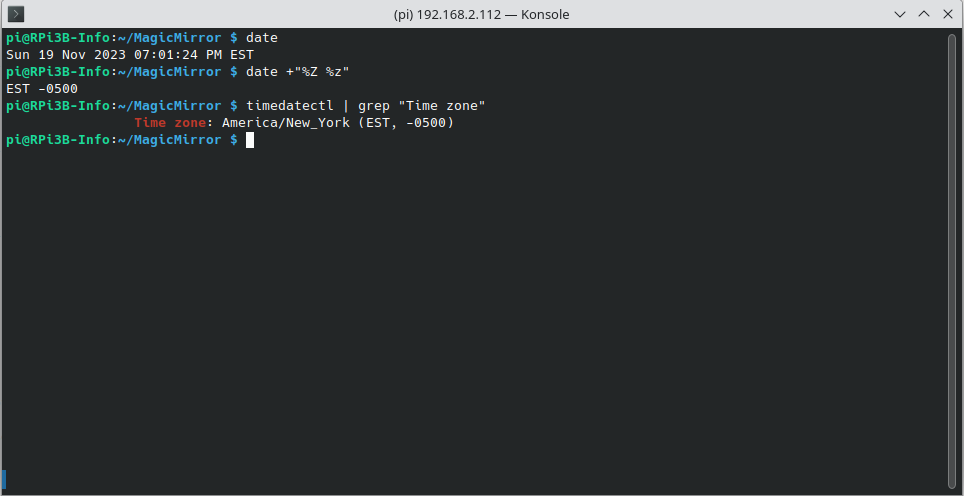
-
@blissb how about thru the preferences, in the menu, top left on the desktop
this is a pi, yes? -
@sdetweil
I know I haven’t said it, but I really appreciate you looking at this… it’s been driving me nuts since the last update messed things up.I just tested hard-coding the timezone in calendarfetcherutils.js – replaced “moment.tz.guess()” with “America/New_York” on line 29. That has removed the “Lima” entries in the debug log, but it has not corrected the time issue.
Yes, I’m running on a Pi. Here’s what’s in preferences:
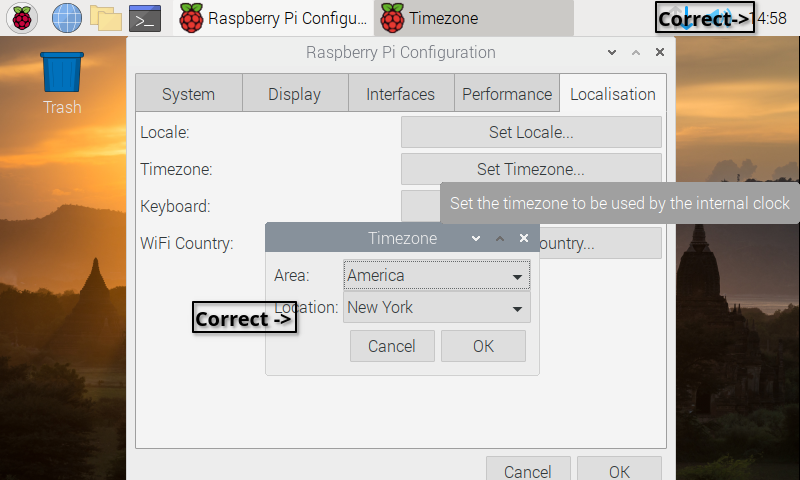
-
@blissb what is the locale above the tz?
-
On my second MagicMirror I restored the backup of the last version of MM, and made no other changes. The debug info shows no instances of the “lima” timezone, and all times are correct.
I went back to the most recent version, reran with debug, and the “Lima” instance is back, as are the wrong times.
I’ll be reverting to the previous version of MM for the moment, but please let me know if there’s anything else I can do to help with troubleshooting this really annoying issue!
-
@sdetweil
Locale is:
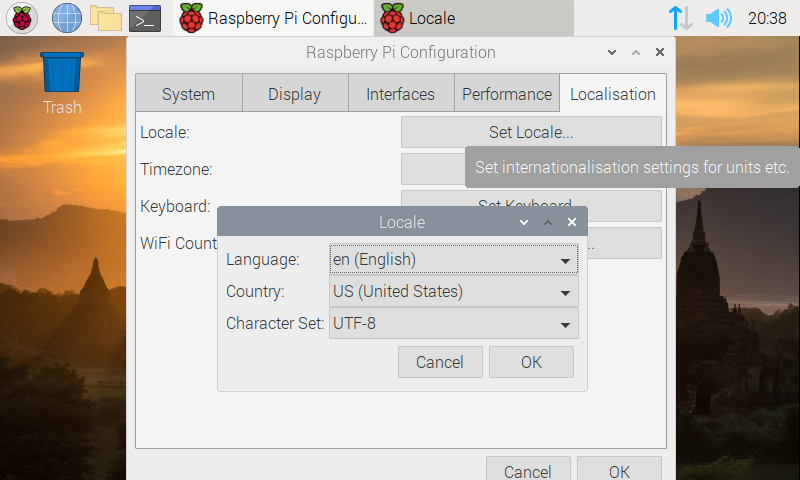
Hello! It looks like you're interested in this conversation, but you don't have an account yet.
Getting fed up of having to scroll through the same posts each visit? When you register for an account, you'll always come back to exactly where you were before, and choose to be notified of new replies (either via email, or push notification). You'll also be able to save bookmarks and upvote posts to show your appreciation to other community members.
With your input, this post could be even better 💗
Register Login