MagicMirror Forum
    • Recent
    • Tags
    • Unsolved
    • Solved
    • MagicMirror² Repository
    • Documentation
    • 3rd-Party-Modules
    • Donate
    • Discord
    • Register
    • Login
    A New Chapter for MagicMirror: The Community Takes the Lead
    Read the statement by Michael Teeuw here.

    MMM-Remote-Control

    Scheduled Pinned Locked Moved Solved Troubleshooting
    9 Posts 4 Posters 2.7k Views 4 Watching
    Loading More Posts
    • Oldest to Newest
    • Newest to Oldest
    • Most Votes
    Reply
    • Reply as topic
    Log in to reply
    This topic has been deleted. Only users with topic management privileges can see it.
    • D Offline
      Dennis-010
      last edited by

      Hey all,

      After troubleshooting the calendar module with the help of Sam I stumpled upon a new “problem”.

      I installed the MMM-Remote-Control module to be able to use motion sensors and HASS to turn on/off the screen/monitor.

      The module works flawlessly exept for the monitor on and off command. I can start, restart and turn off the pi with the module.
      I’m using a Pi4 with 2 micro hdmi ports, monitor isd plugged in hdmi0 (left port) Already tried on a different monitor for testing purose.

      Also already changed the output commands to

      'xrandr -d :0 --output HDMI-1 --auto',
      
                  {
                      module: 'MMM-Remote-Control',
                      // uncomment the following line to show the URL of the remote control on the mirror
                      // position: 'bottom_left',
                      // you can hide this module afterwards from the remote control itself
                      config: {
                          customCommand: {  // Optional, See "Using Custom Commands" below
                            monitorOnCommand: 'xrandr -d :0 --output HDMI-1 --auto',
                            monitorOffCommand: 'xrandr -d :0 --output HDMI-1 --off'
                          },
                          showModuleApiMenu: true, // Optional, Enable the Module Controls menu
                          secureEndpoints: true, // Optional, See API/README.md
                          // uncomment any of the lines below if you're gonna use it
                          // customMenu: "custom_menu.json", // Optional, See "Custom Menu Items" below
                          // apiKey: "", // Optional, See API/README.md for details
                          // classes: {} // Optional, See "Custom Classes" below
                  }
                  },
      
      S 1 Reply Last reply Reply Quote 0
      • J Offline
        Jessendelft @Dennis-010
        last edited by Jessendelft

        @Dennis-010

        Thanks for figuring all of this out. I also reverted back to the X11 window driver.
        For completeness, just add --rotate right to the command:

        customCommand: {  // Optional, See "Using Custom Commands" below
          monitorOnCommand: 'xrandr -d :0 --output HDMI-1 --auto --rotate right',
          monitorOffCommand: 'xrandr -d :0 --output HDMI-1 --off'
        },

        
        1 Reply Last reply Reply Quote 0
        • S Do not disturb
          sdetweil @Dennis-010
          last edited by sdetweil

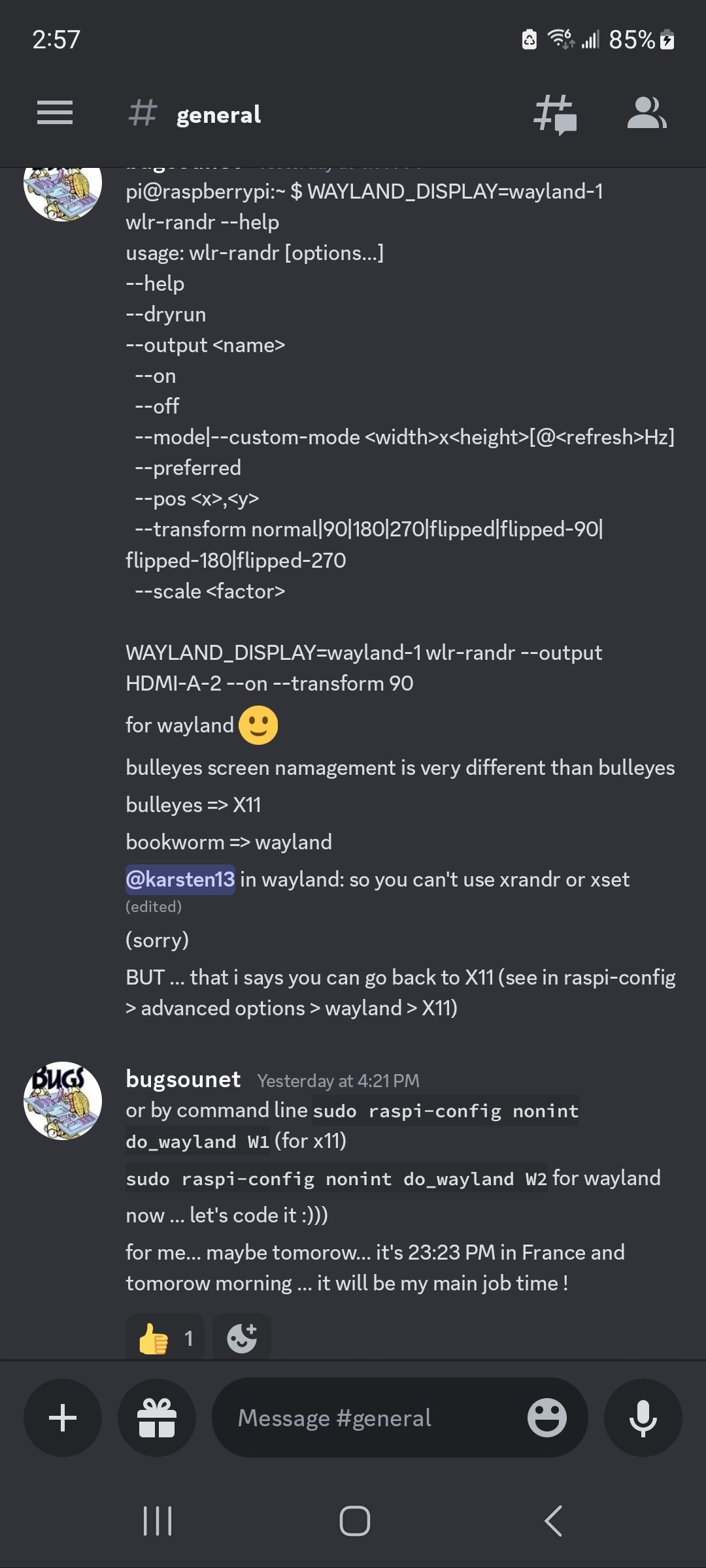
          @Dennis-010 pi4 bookworm uses the new Wayland display system instead of x11…
          xrandr doesn’t work

          from discord last night

          Screenshot_20231026_145754_Discord.jpg

          Sam

          How to add modules

          learning how to use browser developers window for css changes

          D 1 Reply Last reply Reply Quote 0
          • D Offline
            Dennis-010 @sdetweil
            last edited by

            @sdetweil

            Ah have not found that on Google yet,
            Is there a custom line available to have this fixed?

            S 1 Reply Last reply Reply Quote 0
            • S Do not disturb
              sdetweil @Dennis-010
              last edited by

              @Dennis-010 sorry, don’t know what you mean ‘custom line’

              i don’t know if any of us know what to do yet… wayland right now is only setup on pi4… apparently there is a setting in raspiconfig to got back to x11…

              Sam

              How to add modules

              learning how to use browser developers window for css changes

              D 1 Reply Last reply Reply Quote 0
              • D Offline
                Dennis-010 @sdetweil
                last edited by

                @sdetweil said in MMM-Remote-Control:

                @Dennis-010 sorry, don’t know what you mean ‘custom line’

                Well, I started with:

                monitorOnCommand: "echo 'on 0.0.0.0' | cec-client -s -d 1",
                

                Then changd it to:

                monitorOnCommand: 'xrandr -d :0 --output HDMI-1 --auto',
                

                So I was wondering if there was a new “custom” line of code I can use. But u already said thast there might be no solution yet.

                S 1 Reply Last reply Reply Quote 0
                • S Do not disturb
                  sdetweil @Dennis-010
                  last edited by

                  @Dennis-010 he had another post

                  yeah ! just found for wayland 
                  [3:58 PM]
                  for turn on: pi@raspberrypi:~ $ WAYLAND_DISPLAY=wayland-1 wlr-randr --output HDMI-A-2 --on
                  [3:58 PM]
                  for turn off: pi@raspberrypi:~ $ WAYLAND_DISPLAY=wayland-1 wlr-randr --output HDMI-A-2 --off
                  

                  Sam

                  How to add modules

                  learning how to use browser developers window for css changes

                  ankonaskiff17A D 2 Replies Last reply Reply Quote 0
                  • ankonaskiff17A Offline
                    ankonaskiff17 @sdetweil
                    last edited by

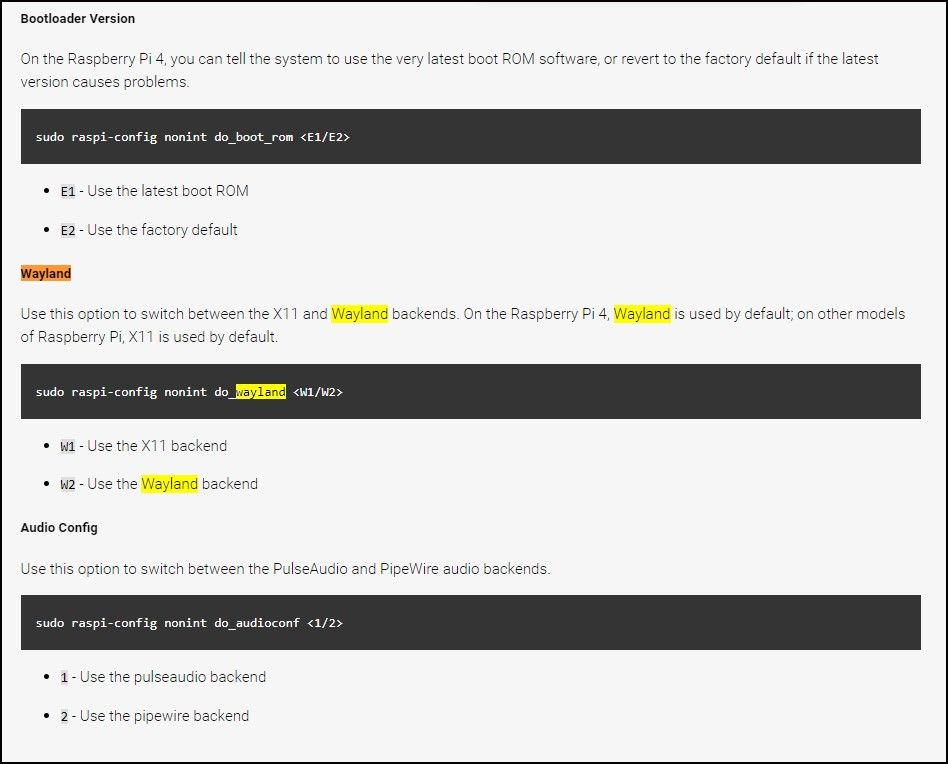
                    @sdetweil Saw this and I maybe putting out old news because most people do
                    sudo raspi-config and then hit enter. Saw some text that appear to type in
                    sudo raspi-config nonint do_wayland <W1/W2> with

                    W1 - Use the X11 backendWayland.jpg
                    W2 - Use the Wayland backend

                    1 Reply Last reply Reply Quote 0
                    • D Offline
                      Dennis-010 @sdetweil
                      last edited by

                      @sdetweil

                      That line infortunatly did not do the trick.

                      I used the revert option from @ankonaskiff17 to revert back to X11 and now the commands are working again.
                      Only thing now is: when monitor turns back on it’s set back to landscape instead of 90 degrees right portrait.

                      I remember seeing a fix for that somewhere, so I’ll be looking for that.

                      J 1 Reply Last reply Reply Quote 0
                      • J Offline
                        Jessendelft @Dennis-010
                        last edited by Jessendelft

                        @Dennis-010

                        Thanks for figuring all of this out. I also reverted back to the X11 window driver.
                        For completeness, just add --rotate right to the command:

                        customCommand: {  // Optional, See "Using Custom Commands" below
                          monitorOnCommand: 'xrandr -d :0 --output HDMI-1 --auto --rotate right',
                          monitorOffCommand: 'xrandr -d :0 --output HDMI-1 --off'
                        },
                        
                        1 Reply Last reply Reply Quote 0

                        Hello! It looks like you're interested in this conversation, but you don't have an account yet.

                        Getting fed up of having to scroll through the same posts each visit? When you register for an account, you'll always come back to exactly where you were before, and choose to be notified of new replies (either via email, or push notification). You'll also be able to save bookmarks and upvote posts to show your appreciation to other community members.

                        With your input, this post could be even better 💗

                        Register Login

                        • 1 / 1
                        • First post
                          Last post
                        Enjoying MagicMirror? Please consider a donation!
                        MagicMirror created by Michael Teeuw.
                        Forum managed by Sam, technical setup by Karsten.
                        This forum is using NodeBB as its core | Contributors
                        Contact | Privacy Policy