MagicMirror Forum
    • Recent
    • Tags
    • Unsolved
    • Solved
    • MagicMirror² Repository
    • Documentation
    • 3rd-Party-Modules
    • Donate
    • Discord
    • Register
    • Login
    A New Chapter for MagicMirror: The Community Takes the Lead
    Read the statement by Michael Teeuw here.

    Modifying the Config File

    Scheduled Pinned Locked Moved Unsolved Troubleshooting
    101 Posts 7 Posters 170.8k Views 7 Watching
    Loading More Posts
    • Oldest to Newest
    • Newest to Oldest
    • Most Votes
    Reply
    • Reply as topic
    Log in to reply
    This topic has been deleted. Only users with topic management privileges can see it.
    • S Offline
      sdetweil @jimb
      last edited by sdetweil

      @jimb it says you have to download the file

      http://bulk.openweathermap.org/sample/city.list.json.gz
      

      means you have to download it, then unzip it from where ever it was downloaded (usually the ~/Downloads folder)

      Sam

      How to add modules

      learning how to use browser developers window for css changes

      1 Reply Last reply Reply Quote 0
      • R Offline
        rrslssr
        last edited by

        Hello. I too am a Noob. Here is what I entered into my config.ps file,
        which is located in the ~/MagicMirror/config directory:

                    {
                            module: "weather",
                            units: "imperial",
                            windUnits: "imperial",
                            tempUnits: "imperial",
                            position: "top_right",
                            header: "Weather Forecast",
                            config: {
                                    weatherProvider: "openweathermap",
                                    type: "forecast",
                                    units: "imperial",
                                    windUnits: "imperial",
                                    tempUnits: "imperial",
                                    location: "Your-City",
                                    locationID: "Your-Location-ID", //ID from http://bulk.openweathermap.org/sample/city.list.json.gz; unzip the gz file and find your city
                                    apiKey: "Your-Newly-Created-apiKey"
                            }
                    },
        

        As sdetweil stated, you have to download the file: http://bulk.openweathermap.org/sample/city.list.json.gz, unzip it and search for the city closest to your location. This will give you the values for location: and locationID: ( “Your-City” and “Your-Location-ID” ).
        I found that searching for the 2-letter state value allowed me to find my location quicker.

        Then, you need to create a free account at https://openweathermap.org/ to obtain the apiKey that will be automatically created with your new account.

        BTW, the “imperial” values result in Fahrenheit and MPH values. You can change the values or delete those lines if you want Metric values as that is the module’s default.

        Take care.

        S 1 Reply Last reply Reply Quote 0
        • S Offline
          sdetweil @rrslssr
          last edited by

          @rrslssr said in Modifying the Config File:

          BTW, the “imperial” values result in Fahrenheit and MPH values

          of course… that is the well known technical name for not Metric

          Sam

          How to add modules

          learning how to use browser developers window for css changes

          1 Reply Last reply Reply Quote 0
          • J Offline
            jimb
            last edited by

            Sam, thanks for your response. I thought the file may have been part of the installation. I’ll grab it, thanks

            S 1 Reply Last reply Reply Quote 0
            • S Offline
              sdetweil @jimb
              last edited by sdetweil

              @jimb its not, because it changes all the time, and its not our info

              Sam

              How to add modules

              learning how to use browser developers window for css changes

              1 Reply Last reply Reply Quote 0
              • J Offline
                jimb
                last edited by

                Another question everything is displaying OK and working except the two weather feeds. Both indicate “Loading” and just sit there…

                I researched the City, City ID, and obtained an API key from OpenWeather. Is there a way to run them separately on their own, or do I need to troubleshoot it?

                Config:Check does not show any errors. Thanks

                S 1 Reply Last reply Reply Quote 0
                • S Offline
                  sdetweil @jimb
                  last edited by

                  @jimb weather is done all in the browser, so open the browser developers window.

                  ctrl-shift-i on the browser keyboard, select the console tab and put weath in the filter field

                  show any errors… I suspect 401, not authorized.

                  you are using a v3 API key, so have to add the apiVersion:“3.0”
                  to the weather module config

                  Sam

                  How to add modules

                  learning how to use browser developers window for css changes

                  1 Reply Last reply Reply Quote 0
                  • J Offline
                    jimb
                    last edited by

                    Sorry, your reply is higher than my limited knowledge :
                    Do I have to enter some line(s) in the config file? I had no success with the browser instructions.

                    S 1 Reply Last reply Reply Quote 0
                    • S Offline
                      sdetweil @jimb
                      last edited by

                      @jimb notjing in config.js. we are trying to look at the errors from the module

                      so you need to use the browser you are viewing mm with

                      three keys on the keyboard.
                      ctrl-shift-i

                      or npm start dev
                      to start mm with the dev window open

                      then select the console tab

                      Sam

                      How to add modules

                      learning how to use browser developers window for css changes

                      1 Reply Last reply Reply Quote 0
                      • UncleRogerU Offline
                        UncleRoger @jimb
                        last edited by

                        @jimb I will always defer to @sdetweil 's greater knowledge and intelligence but another option is (I hope, anyway, since it’s what I’m using) to use the latitude and longitude of your location. I have the weather module set up to show my wife’s school using the coordinates. (We are known for our microclimates here – her school 2 miles away may have completely different weather from what we have at home.)

                        To get the coordinates, I went to maps.google.com, clicked on a location, then copied the resulting URL. It should look like this:

                        https://www.google.com/maps/@37.7761918,-122.4222641,16.25z?entry=ttu
                        

                        The first number after the @ sign is the latitude; the second is the longitude. So you could put in your config file:

                        lat: 37.7761918,
                        lon: -122.4222641,
                        

                        and it will show the weather for your location (or the San Francisco War Memorial Opera House in that example). This might be handy if you’re not near a city listed in the file.

                        UncleRogerU 1 Reply Last reply Reply Quote 0
                        • UncleRogerU Offline
                          UncleRoger @UncleRoger
                          last edited by

                          And now, having actually looked at the file in question, I see it includes latitude and longitude for each entry. Very cool.

                          1 Reply Last reply Reply Quote 0
                          • J Offline
                            jimb
                            last edited by

                            Sam, some progress. Operating in “dev” mode I do show status 401 unauthorized . However I am unable to 'place the ‘V 3.0’ in a way/place where it is recognized correctly. I tried placing it on its own “3.0” “API id…” and inside the quote mark "3.0 API ID …

                            That gives me a syntax error and blows up the config file.

                            S 1 Reply Last reply Reply Quote 0
                            • S Offline
                              sdetweil @jimb
                              last edited by sdetweil

                              @jimb all the parms to a module go inside the modules
                              config:{} section

                              things to the left of : do not need quotes
                              things to the right of : do not need quotes if they are true/false, or a number

                              otherwise they need quotes. single or double doesn’t.mattet as long as both ends are the same.

                              also for each.parm you add, it needs to tell the interpreter if there is more after it. do this by adding a trailing comma

                              the apiVersion Parm

                              should look like this

                              {
                                 module:"weather",
                                 position mmmmm , 
                                  config:{
                                          apiVersion:3.0,
                                           whatever other parms
                                   }
                              }
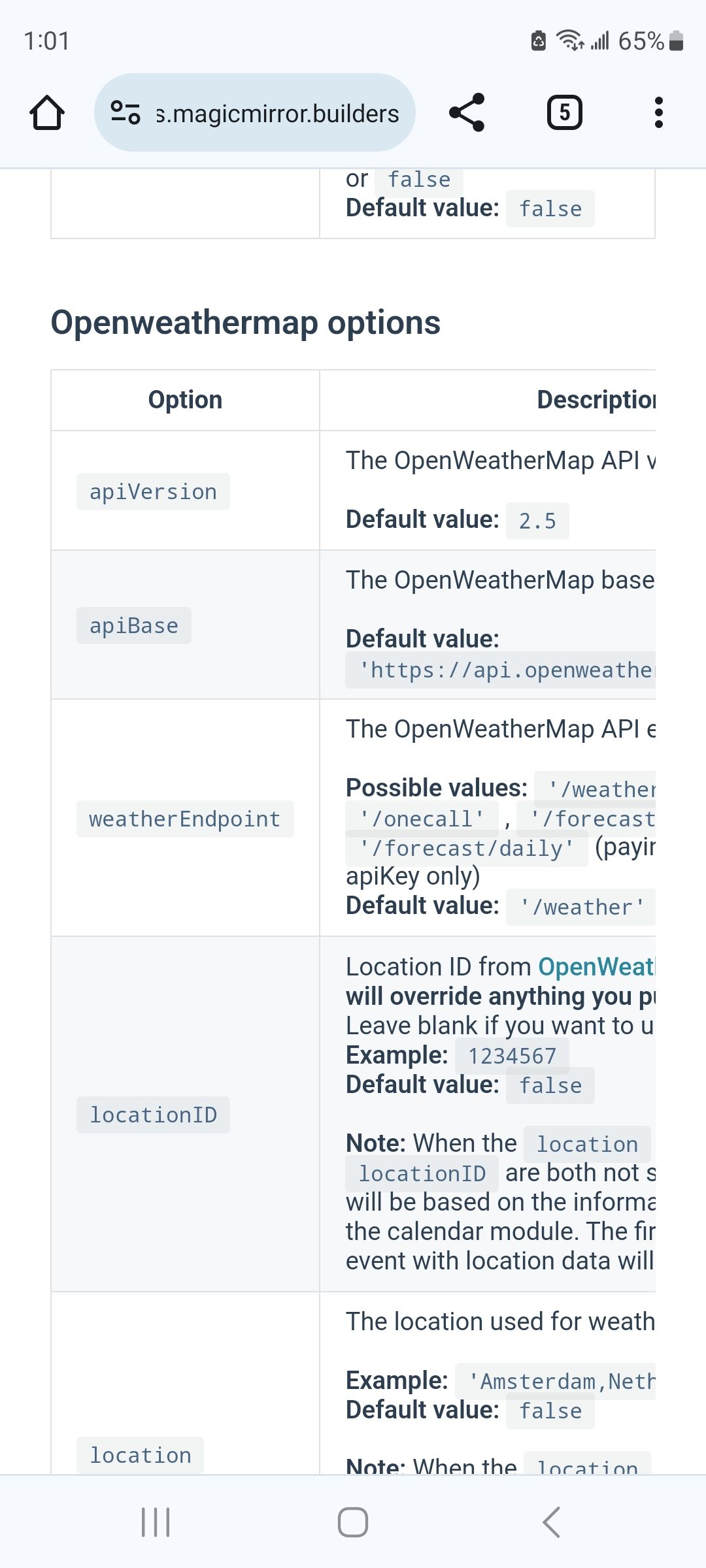
                              

                              Screenshot_20231115_130115_Chrome.jpg

                              Sam

                              How to add modules

                              learning how to use browser developers window for css changes

                              1 Reply Last reply Reply Quote 0
                              • J Offline
                                jimb
                                last edited by

                                Sam, I seem to be deeper in the weeds. After adding the apiVersion:3.0 parameter just below the config identifier in the config file -

                                running dev displays the following error-

                                Uncaught SyntaxError: Unexpected identifier 'weather identifie ‘weatherProvider’

                                and the config file blows up.

                                Do I need to add this on some other line?

                                S 1 Reply Last reply Reply Quote 0
                                • S Offline
                                  sdetweil @jimb
                                  last edited by

                                  @jimb after the config: for the module

                                  Sam

                                  How to add modules

                                  learning how to use browser developers window for css changes

                                  1 Reply Last reply Reply Quote 0
                                  • J Offline
                                    jimb
                                    last edited by

                                    Sam, that’s where I put it. I can’t cut and paste here because I’m on a different computer than the Pi.

                                    S 1 Reply Last reply Reply Quote 0
                                    • S Offline
                                      sdetweil @jimb
                                      last edited by

                                      @jimb said in Modifying the Config File:

                                      Sam, that’s where I put it. I can’t cut and paste here because I’m on a different computer than the Pi.

                                      turn on ssh, and install the bitvise or winscp ssh clients

                                      then you can do everything from your PC. it’s SOOOOO much better

                                      Sam

                                      How to add modules

                                      learning how to use browser developers window for css changes

                                      1 Reply Last reply Reply Quote 0
                                      • J Offline
                                        jimb
                                        last edited by

                                        Sam , After adding the commas to the end of the version Iine I ran it with the check on the config file- All OK. I ran MM in Dev mode and now am getting a 401 error when it attempts to load the openweather resource files. So I seem to not be passing the version or ID string>

                                        S 1 Reply Last reply Reply Quote 0
                                        • S Offline
                                          sdetweil @jimb
                                          last edited by

                                          @jimb can you show the config for the weather module…

                                          Sam

                                          How to add modules

                                          learning how to use browser developers window for css changes

                                          1 Reply Last reply Reply Quote 0
                                          • J Offline
                                            jimb
                                            last edited by

                                            Sam, as a last resort (operating from 2 computers) I attemped to take a picture with my phone and copy that here. No luck. I hear you about working from my PC on the pi, but beyond my experience level. I could try and copy to another place or system?

                                            S 1 Reply Last reply Reply Quote 0

                                            Hello! It looks like you're interested in this conversation, but you don't have an account yet.

                                            Getting fed up of having to scroll through the same posts each visit? When you register for an account, you'll always come back to exactly where you were before, and choose to be notified of new replies (either via email, or push notification). You'll also be able to save bookmarks and upvote posts to show your appreciation to other community members.

                                            With your input, this post could be even better 💗

                                            Register Login

                                            • 1
                                            • 2
                                            • 3
                                            • 4
                                            • 5
                                            • 6
                                            • 1 / 6
                                            • First post
                                              Last post
                                            Enjoying MagicMirror? Please consider a donation!
                                            MagicMirror created by Michael Teeuw.
                                            Forum managed by Sam, technical setup by Karsten.
                                            This forum is using NodeBB as its core | Contributors
                                            Contact | Privacy Policy