MagicMirror Forum
    • Recent
    • Tags
    • Unsolved
    • Solved
    • MagicMirror² Repository
    • Documentation
    • 3rd-Party-Modules
    • Donate
    • Discord
    • Register
    • Login
    A New Chapter for MagicMirror: The Community Takes the Lead
    Read the statement by Michael Teeuw here.

    Modifying the Config File

    Scheduled Pinned Locked Moved Unsolved Troubleshooting
    101 Posts 7 Posters 170.8k Views 7 Watching
    Loading More Posts
    • Oldest to Newest
    • Newest to Oldest
    • Most Votes
    Reply
    • Reply as topic
    Log in to reply
    This topic has been deleted. Only users with topic management privileges can see it.
    • S Do not disturb
      sdetweil @jimb
      last edited by

      @jimb said in Modifying the Config File:

      only mistake I made was making the MM auto-install.

      u mean auto start??? install was my script

      ssh doesn’t work unless you enable it on the pi

      desktop, menu top left,
      preferences
      raspberry pi configuration
      then the itnerfaces tab, click the slide on the ssh row,
      then press ok…

      if latest os, then you don’t have to boot

      open a terminal window on pi
      type

      ip addr
      

      you should see like this

      pi@raspberrypi4:~ $ ip addr
      1: lo: <LOOPBACK,UP,LOWER_UP> mtu 65536 qdisc noqueue state UNKNOWN group default qlen 1000
          link/loopback 00:00:00:00:00:00 brd 00:00:00:00:00:00
          inet 127.0.0.1/8 scope host lo
             valid_lft forever preferred_lft forever
          inet6 ::1/128 scope host 
             valid_lft forever preferred_lft forever
      2: eth0: <BROADCAST,MULTICAST,UP,LOWER_UP> mtu 1500 qdisc mq state UP group default qlen 1000
          link/ether dc:a6:32:20:b0:94 brd ff:ff:ff:ff:ff:ff
          inet 192.168.2.44/24 brd 192.168.2.255 scope global dynamic noprefixroute eth0
             valid_lft 50521sec preferred_lft 36219sec
          inet6 fe80::a5a6:f1d1:50e7:1c5/64 scope link 
             valid_lft forever preferred_lft forever
      3: wlan0: <NO-CARRIER,BROADCAST,MULTICAST,UP> mtu 1500 qdisc pfifo_fast state DOWN group default qlen 1000
          link/ether dc:a6:32:20:b0:95 brd ff:ff:ff:ff:ff:ff
      

      in this setup my wifi (wlan0) is not connected but my ethernet (eth0) is

         inet 192.168.2.44
      

      doesn’t matter what the PC says…

      do you have a guest network at home and did u connect the pi to that?

      can’t connect to it from home network if so… intentional firewall…

      Sam

      How to add modules

      learning how to use browser developers window for css changes

      1 Reply Last reply Reply Quote 0
      • J Offline
        jimb
        last edited by

        Sam, the Pi is connected via wireless. Yes, I meant autorun on my first post. I did change the Pi configuration to allow SSH. I have Eero mesh AP’s connected to my home network. I don’t know how to check if access is being blocked to the Pi. Since everything is fresh on the install it makes sense that the network is the culprit. The reason I went with a new install was to enable pasting config, etc. files here on the forum.

        S 1 Reply Last reply Reply Quote 0
        • S Do not disturb
          sdetweil @jimb
          last edited by sdetweil

          @jimb i understand… if you can use a terminal window on the pi, can you ping xxxx, where xxxx is the hostname or ip address of the windows pc?

          what is the output of ip addr ?

          i know it stinks, but you can post a pic, third icon from the right above the forum post editor

          Sam

          How to add modules

          learning how to use browser developers window for css changes

          S 1 Reply Last reply Reply Quote 0
          • S Do not disturb
            sdetweil @sdetweil
            last edited by sdetweil

            @jimb I’d also suggest trying my MMM-Config module, which presents a form for config.js including outside modules… all done with discovery of the installed modules and there parms…

            some modules cause trouble… but there are ways around with some extra work… it may not be for you… another pile of work to learn, it it doesn’t work…

            https://github.com/sdetweil/MMM-Config

            it doesn’t help with module install, only configure

            Sam

            How to add modules

            learning how to use browser developers window for css changes

            1 Reply Last reply Reply Quote 0
            • J Offline
              jimb
              last edited by

              Sam,
              OK progress on the network front. I spent some time yesterday on the phone with eero tech support. At rhe end they suggested connecting my PC wirelessly and seeing if I could ping the rasberry. It works. I can ping and SSH/Putty into the pi, but have an additional snag. It accepts the login and sends a password request. BUT, I can’t enter anything- the keyboard is dead at that point.

              S 1 Reply Last reply Reply Quote 0
              • S Do not disturb
                sdetweil @jimb
                last edited by sdetweil

                @jimb ok, sounds like the wifi network is a guest, not connected to the regular ethernet network…

                don’t use putty

                open a cmd.exe window

                ssh user_name@machine_ip
                

                add one of the tools

                winscp or bitvise ssh clients

                they will give you a filemanager view of the files and an ssh window ,
                per system you connect to…

                bitvise also provides a filemanager view of the pc filesystem , so you can drag/drop files in either direction… (you would only do that for logs to pc, of special bug fix file , to pi)

                Sam

                How to add modules

                learning how to use browser developers window for css changes

                1 Reply Last reply Reply Quote 0
                • J Offline
                  jimb
                  last edited by sdetweil

                  Sam, success! I have d/l’d the SSH gui program and here is my config.js file. I have deleted my apiKey

                  modules: [
                  		{
                  			module: "alert",
                  		},
                  		{
                  			module: "updatenotification",
                  			position: "top_bar"
                  		},
                  		{
                  			module: "clock",
                  			position: "top_left"
                  		},
                  		{
                  			module: "calendar",
                  			header: "US Holidays",
                  			position: "top_left",
                  			config: {
                  				calendars: [
                  					{
                  						fetchInterval: 7 * 24 * 60 * 60 * 1000,
                  						symbol: "calendar-check",
                  						url: "https://ics.calendarlabs.com/76/mm3137/US_Holidays.ics"
                  					}
                  				]
                  			}
                  		},
                  		{
                  			module: "compliments",
                  			position: "lower_third"
                  		},
                  		{
                  			module: "weather",
                  			position: "top_right",
                  			config: {
                  				weatherProvider: "openweathermap",
                  				apiVersion: "3.0",
                  				lat: 33.50872,
                  				lon: -96.612213,
                  				weatherEndpoint: "/onecall",
                  				type: "current",
                  				location: "Houston",
                  				locationID: "4699066", //ID from http://bulk.openweathermap.org/sample/city.list.json.gz; unzip the gz file and find your city
                  				apiKey: "8eca2aec"
                  			}
                  		},
                  		{
                  			module: "weather",
                  			position: "top_right",
                  			header: "Weather Forecast",
                  			config: {
                  				weatherProvider: "openweathermap",
                  				apiVersion: "3.0",
                  				lat: 33.50872,
                  				lon: -96.612213,
                  				weatherEndpoint: "/onecall",
                  				type: "forecast",
                  				location: "Houston",
                  				locationID: "4699066", //ID from http://bulk.openweathermap.org/sample/city.list.json.gz; unzip the gz file and find your city
                  				apiKey: "8
                  "
                  			}
                  		},
                  		{
                  			module: "newsfeed",
                  			position: "bottom_bar",
                  			config: {
                  				feeds: [
                  					{
                  						title: "New York Times",
                  
                  S 1 Reply Last reply Reply Quote 0
                  • S Do not disturb
                    sdetweil @jimb
                    last edited by sdetweil

                    @jimb missing some at the bottom

                    I assume the apikey with a new line inside is a removal edit problem

                    always wrap config.js content in code block

                    paste into editor
                    blank line above and below
                    select pasted text
                    hit button </>

                    Sam

                    How to add modules

                    learning how to use browser developers window for css changes

                    1 Reply Last reply Reply Quote 0
                    • J Offline
                      jimb
                      last edited by sdetweil

                      Sam, here is a copy of the config.js (with the apiKey deleted)

                      let config = {
                      	address: "localhost",	// Address to listen on, can be:
                      							// - "localhost", "127.0.0.1", "::1" to listen on loopback interface
                      							// - another specific IPv4/6 to listen on a specific interface
                      							// - "0.0.0.0", "::" to listen on any interface
                      							// Default, when address config is left out or empty, is "localhost"
                      	port: 8080,
                      	basePath: "/",			// The URL path where MagicMirror² is hosted. If you are using a Reverse proxy
                      					  		// you must set the sub path here. basePath must end with a /
                      	ipWhitelist: ["127.0.0.1", "::ffff:127.0.0.1", "::1"],	// Set [] to allow all IP addresses
                      															// or add a specific IPv4 of 192.168.1.5 :
                      															// ["127.0.0.1", "::ffff:127.0.0.1", "::1", "::ffff:192.168.1.5"],
                      															// or IPv4 range of 192.168.3.0 --> 192.168.3.15 use CIDR format :
                      															// ["127.0.0.1", "::ffff:127.0.0.1", "::1", "::ffff:192.168.3.0/28"],
                      
                      	useHttps: false, 		// Support HTTPS or not, default "false" will use HTTP
                      	httpsPrivateKey: "", 	// HTTPS private key path, only require when useHttps is true
                      	httpsCertificate: "", 	// HTTPS Certificate path, only require when useHttps is true
                      
                      	language: "en",
                      	locale: "en-US",
                      	logLevel: ["INFO", "LOG", "WARN", "ERROR"], // Add "DEBUG" for even more logging
                      	timeFormat: 12,
                      	units: "imperial",
                      
                      	modules: [
                      		{
                      			module: "alert",
                      		},
                      		{
                      			module: "updatenotification",
                      			position: "top_bar"
                      		},
                      		{
                      			module: "clock",
                      			timezone: "America/Chicago",
                      			showPeriodUpper: "true",
                      			showDate: "true",
                      			position: "top_left",
                      		},
                      	{
                      			module: "calendar",
                      			header: "US Holidays",
                      			position: "top_left",
                      			config: {
                      				calendars: [
                      					{
                      						fetchInterval: 7 * 24 * 60 * 60 * 1000,
                      						symbol: "calendar-check",
                      						url: "https://ics.calendarlabs.com/76/mm3137/US_Holidays.ics"
                      					}
                      				]
                      			}
                      		},
                      		{
                      			module: "compliments",
                      			position: "lower_third"
                      		},
                      		{			
                      			module: "weather",
                      			units: "imperial",
                      			windUnits: "imperial",
                      			tempUnits: "imperial",
                      			showPeriodUpper: "true",
                      			appendLocationNameToHeader: "true",
                      			colored: "true",
                      			position: "top_right",
                      			config: {
                      				apiVersion:"3.0",
                      				weatherProvider: "openweathermap",
                      				weatherEndpoint:"/onecall",
                      				lat: "33.50872",
                      				lon: "-96.612213",
                      				type: "current",
                      				location: "Houston",
                      				locationID: "4699066", //ID from http://bulk.openweathermap.org/sample/city.list.json.gz; unzip the gz file and find your city
                      				apiKey: "8acfbcab123ce212",
                      			}
                      		},
                      		{
                      			module: "weather",
                      			units: "imperial",
                      			winUnits: "imperial",
                      			tempUnits: "imperial",
                      			showPeriodUpper: "true",
                      			appendLocationNaneToHeader: "true",
                      			colored: "true",
                      			position: "top_right",
                      			header: "Weather Forecast",
                      			config: {
                       				apiVersion:"3.0",
                       				weatherProvider: "openweathermap",
                      				weatherEndpoint:"/onecall",
                      				lat: "33.50872",
                       				lon:"-96.612213",	
                       				type: "forecast",
                           				location: "Houston",
                      				locationID: "4699066", //ID from http://bulk.openweathermap.org/sample/city.list.json.gz; unzip the gz file and find your city
                      					apiKey: "8eca2acaacfbcab123ce212",
                      			}
                      		},
                      		{
                      			module: "newsfeed",
                      			position: "bottom_bar",
                      			config: {
                      				feeds: [
                      					{
                      						title: "New York Times",
                      						url: "https://rss.nytimes.com/services/xml/rss/nyt/HomePage.xml"
                      					}
                      				],
                      				showSourceTitle: true,
                      				showPublishDate: true,
                      				broadcastNewsFeeds: true,
                      				broadcastNewsUpdates: true
                      			}
                      		},
                      	]
                      };
                      
                      /*************** DO NOT EDIT THE LINE BELOW ***************/
                      if (typeof module !== "undefined") {module.exports = config;}
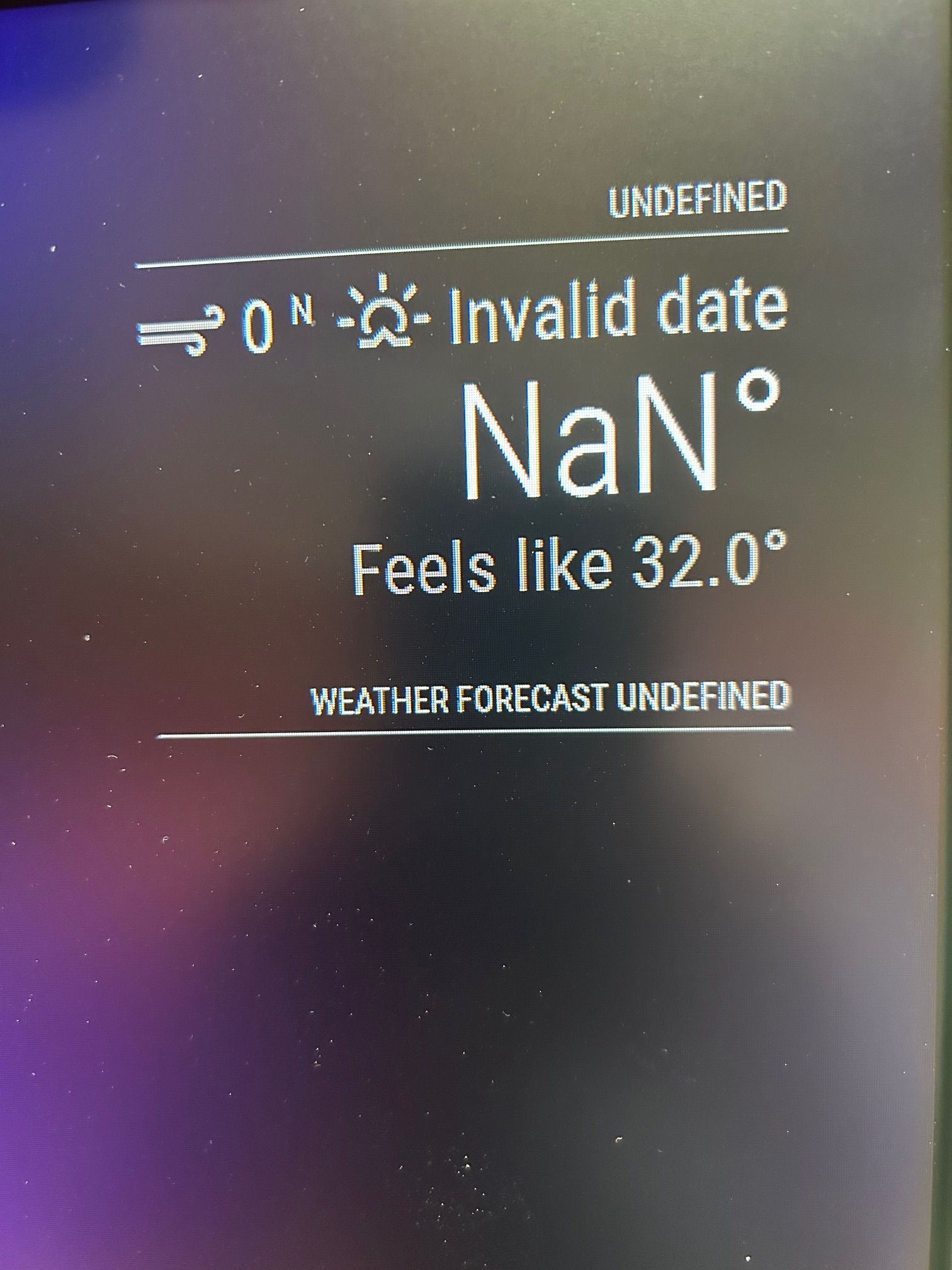


                      Screen.jpg

                      1 Reply Last reply Reply Quote 0
                      • J Offline
                        jimb
                        last edited by

                        Sam, I tried to do the Ctrl-Shift_i keypress in the browser, but nothing happened. Do I need to do this at a certain point in time or from a certain place. The reason is because I’m still getting the 401-unauthorized messages if I perform the npm start dev process during application start.

                        S 3 Replies Last reply Reply Quote 0
                        • S Do not disturb
                          sdetweil @jimb
                          last edited by

                          @jimb weird… always works for me.

                          I meant to test w my apikeys today.

                          will get to it

                          Sam

                          How to add modules

                          learning how to use browser developers window for css changes

                          1 Reply Last reply Reply Quote 0
                          • S Do not disturb
                            sdetweil @jimb
                            last edited by

                            @jimb well, I used your exact weather config, and used my openweather api key , and it worked perfectly
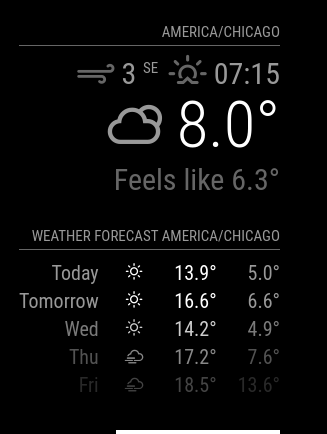
                            Screenshot 2023-12-04 8.45.24 PM.png

                            Sam

                            How to add modules

                            learning how to use browser developers window for css changes

                            1 Reply Last reply Reply Quote 0
                            • S Do not disturb
                              sdetweil @jimb
                              last edited by

                              @jimb and you’ve got some stuff out of position

                              this is the more correct layout

                                              {                       
                                                      module: "weather",
                                                    position: "top_right",
                                                     config:{
                                                         units: "imperial",
                                                         windUnits: "imperial",
                                                         tempUnits: "imperial",
                                                         showPeriodUpper: "true",
                                                         appendLocationNameToHeader: "true",
                                                         colored: "true",
                                      //              position: "top_right",
                                      //              config: {
                                                              apiVersion:"3.0",
                                                              weatherProvider: "openweathermap",
                                                              weatherEndpoint:"/onecall",
                                                              lat: "29.8155405", //"33.50872",
                                                              lon: "-96.0607878", //"-96.61",
                                                              type: "current",
                                                              //location: "Houston",
                                                              //locationID: "4699066", //ID from http://bulk.openweathermap.org/sample/city.list.json.gz; unzip the gz file and fi>
                                                              apiKey:""
                                                      }
                                              },
                                GNU nano 6.2                                                       config/config.js                                                                
                                              {
                                                      module: "weather",
                                                      position:"top_right",
                                                      header: "Weather Forecast",
                                                      config:{
                                                          units: "imperial",
                                                         winUnits: "imperial",
                                                         tempUnits: "imperial",
                                                        showPeriodUpper: "true",
                                                        appendLocationNaneToHeader: "true",
                                                        colored: "true",
                                                      //position: "top_right",
                                                      //header: "Weather Forecast",
                                                      //config: {
                                                              apiVersion:"3.0",
                                                              weatherProvider: "openweathermap",
                                                              weatherEndpoint:"/onecall",
                                                              lat: "33.50872",
                                                              lon:"-96.612213",       
                                                              type: "forecast",
                                                              //location: "Houston",
                                                              //locationID: "4699066", //ID from http://bulk.openweathermap.org/sample/city.list.json.gz; unzip the gz file and fi>
                                                                      apiKey:"// "
                                                      }
                                              }, 
                              

                              Sam

                              How to add modules

                              learning how to use browser developers window for css changes

                              1 Reply Last reply Reply Quote 0
                              • J Offline
                                jimb
                                last edited by

                                Sam, that’s helpful, thanks! The items out of alignment happened when I deleted some of my apiKey. The original is perfectly straight. Since it worked with your Key, a couple of questions.

                                1. Does your Key have 28 digits?
                                2. Can you answer my question concerning the Ctrl-Shift-i keys to display the browser data. Can I stop the MM app and load the browser, or…
                                  JimB
                                S 1 Reply Last reply Reply Quote 0
                                • S Do not disturb
                                  sdetweil @jimb
                                  last edited by sdetweil

                                  @jimb my apikey has 33 characters

                                  it is the default key in openweather (I have multiple)

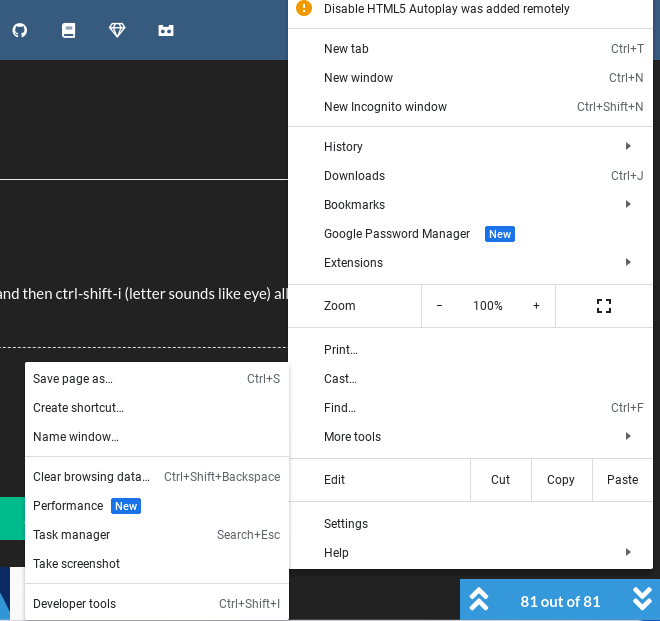
                                  i just brought up MM, and used my chromebook to bring up the page… and then ctrl-shift-i (letter sounds like eye) all at once, opened the dev window

                                  you can do those three keys on any webpage, its a toggle… on/off

                                  using normal chrome, you can use the 3 dot menu to get there too
                                  Screenshot 2023-12-05 12.51.15 PM.png

                                  Sam

                                  How to add modules

                                  learning how to use browser developers window for css changes

                                  1 Reply Last reply Reply Quote 0
                                  • J Offline
                                    jimb
                                    last edited by

                                    Sam, why is it always the simple things :-)
                                    I found a simple link that allowed me to test the openweather api link:
                                    http://api.openweathermap.org/data/2.5/forecast?id=524901&appid={API Key}
                                    I saw the 2.5 and changed it to 3.0 and got a 401 error. I changed it back to 2.5 and it worked. I tried commenting out the 3.0 & /onecall items in config.js and got a “config.js not found” error when running MM. I had used (/*) in the leftmost column as a ‘ignore line’ comment. So, I deleted the 4 lines from config.js and it worked fine except for a teensy error “displaying Howe instead of Houston” in the display. I have no idea where that came from. I wonder why the fourth largest city in the US isn’t listed in the pull-down menu?
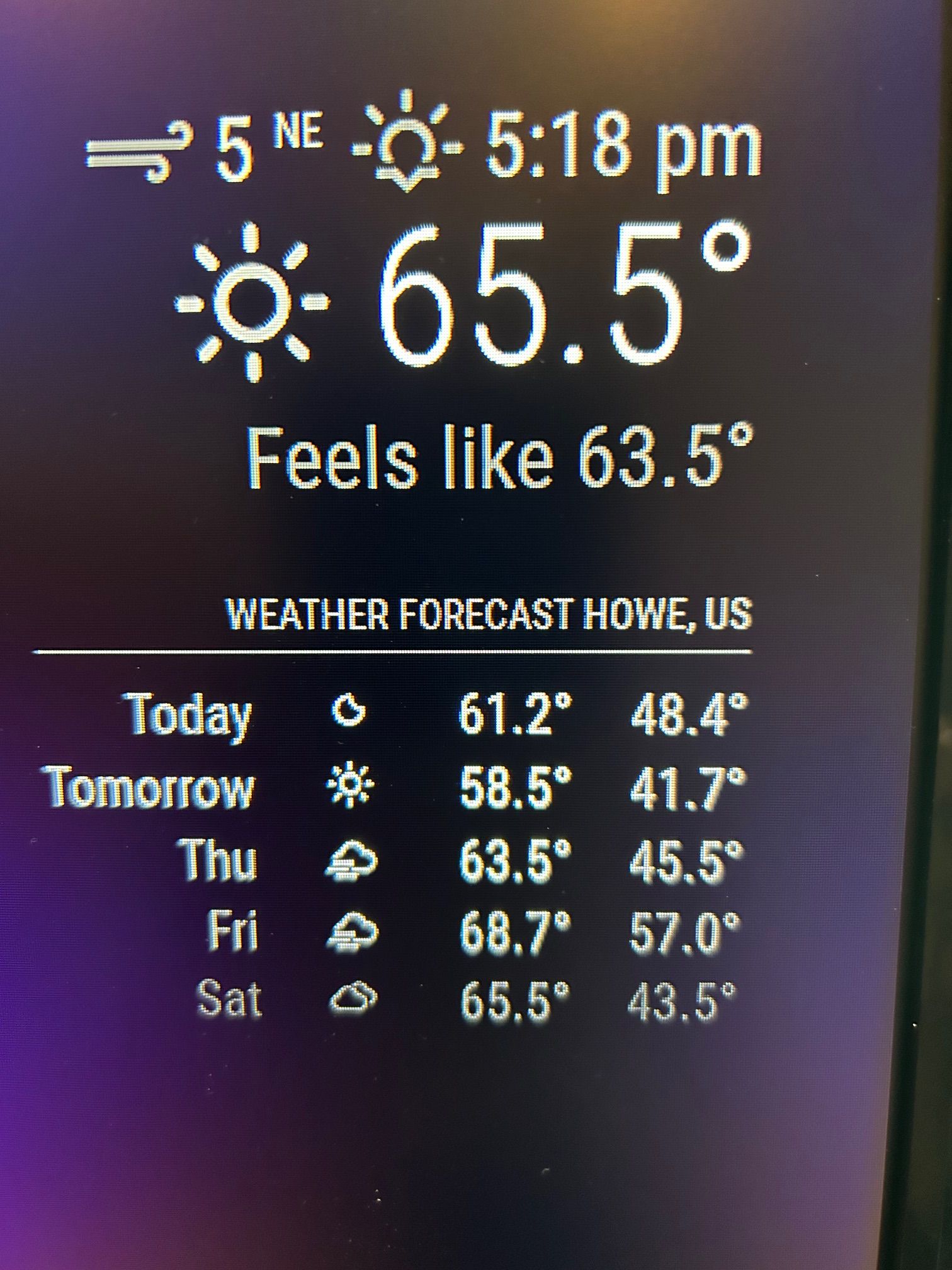
                                    IMG_2036.jpg

                                    Now, I’m going to see if I can add additional modules.
                                    Thanks for your very patient help!!

                                    S BKeyportB 2 Replies Last reply Reply Quote 1
                                    • S Do not disturb
                                      sdetweil @jimb
                                      last edited by

                                      @jimb awesome… making progress!!!

                                      Sam

                                      How to add modules

                                      learning how to use browser developers window for css changes

                                      1 Reply Last reply Reply Quote 0
                                      • BKeyportB Offline
                                        BKeyport Module Developer @jimb
                                        last edited by

                                        @jimb it’s always the simplest solution… ALWAYS.

                                        The "E" in "Javascript" stands for "Easy"

                                        1 Reply Last reply Reply Quote 0
                                        • J Offline
                                          jimb
                                          last edited by

                                          Sam, into the weeds once again :-)

                                          I read the readme and comments on your MMM-Config module. I was stumped immediately by your comment: “clone this repo” into the config directory. I’m assuming this this is done via WinSCP remotely into the Pi, but have no clue. Some more Linux…

                                          S 1 Reply Last reply Reply Quote 0
                                          • S Do not disturb
                                            sdetweil @jimb
                                            last edited by sdetweil

                                            @jimb hm… I don’t see those words
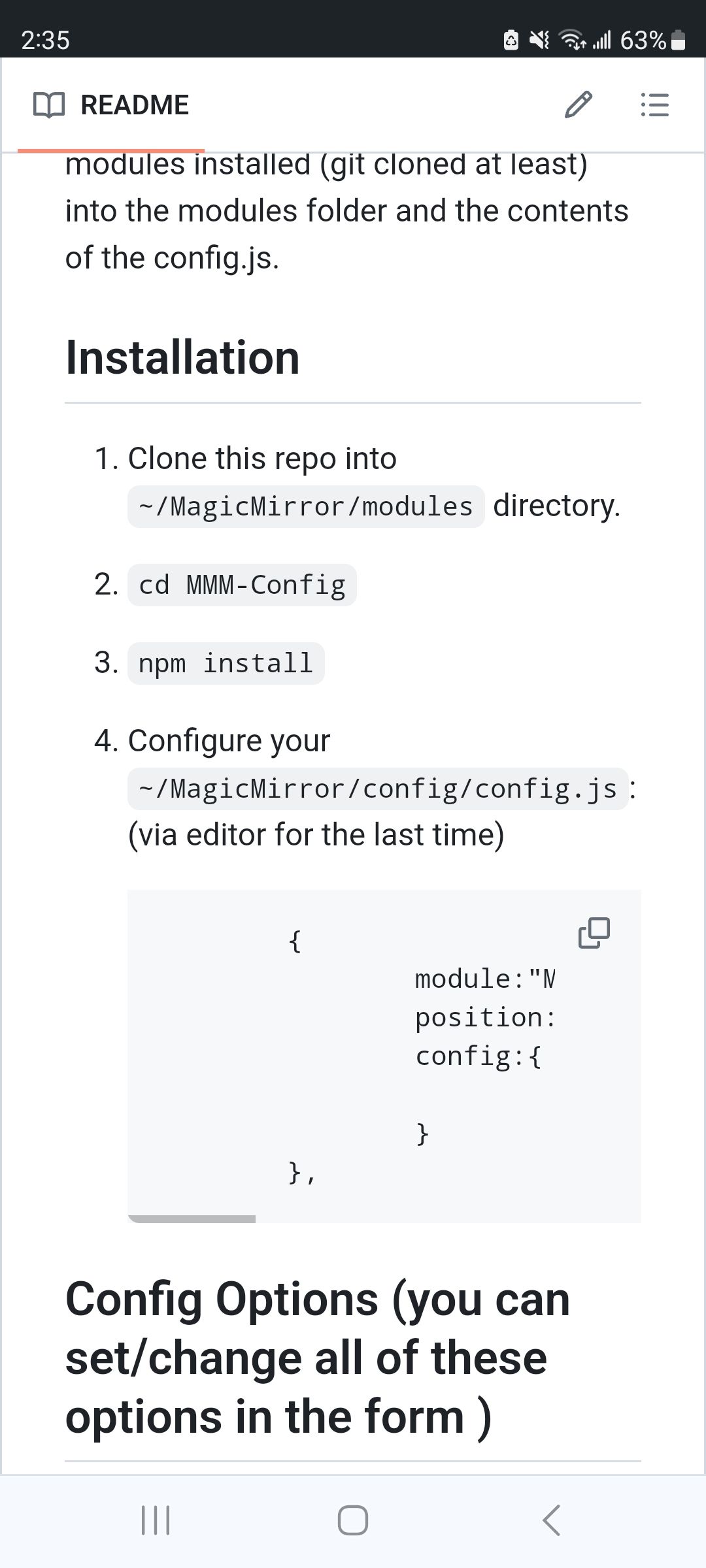
                                            Screenshot_20231207_143507_Chrome.jpg

                                            git clone is done via command line

                                            ALL commands are done via command line

                                            command line is terminal or ssh terminal window

                                            Sam

                                            How to add modules

                                            learning how to use browser developers window for css changes

                                            1 Reply Last reply Reply Quote 0

                                            Hello! It looks like you're interested in this conversation, but you don't have an account yet.

                                            Getting fed up of having to scroll through the same posts each visit? When you register for an account, you'll always come back to exactly where you were before, and choose to be notified of new replies (either via email, or push notification). You'll also be able to save bookmarks and upvote posts to show your appreciation to other community members.

                                            With your input, this post could be even better 💗

                                            Register Login

                                            • 1
                                            • 2
                                            • 3
                                            • 4
                                            • 5
                                            • 6
                                            • 1 / 6
                                            • First post
                                              Last post
                                            Enjoying MagicMirror? Please consider a donation!
                                            MagicMirror created by Michael Teeuw.
                                            Forum managed by Sam, technical setup by Karsten.
                                            This forum is using NodeBB as its core | Contributors
                                            Contact | Privacy Policy