Read the statement by Michael Teeuw here.
birthdaylist
-
-
thanks for this module, first of all.
upcoming months are sorted correctly, but current month is on the bottom. how can we get current month on top?
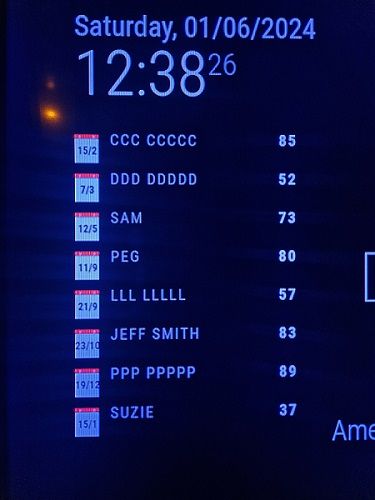
-
@pulser I’ll look at it
-
-
Maybe other idea for “day/month”?
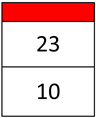
Possible? -
@MyMirror not without some redesign.
the image we picked originally was only supposed to hold the day number
there is no up/down room, each line would have to get tallerand for US the month would have to come first…
so it gets harder and harder…
anyone that wants to try, fork the module and go for it…
-
work smoothly. thanks.
-
@sdetweil
Hmm, but now something is wrong with the calculation of the age.
I have the following bdl.csv:birth, name 08/01/1940,aaa 84 10/01/1963,bbb 61 15/01/1964,ccc 60 05/02/1964,Oliver 60 06/02/1974,Frank 50and the result (made via my cell phone, as I can’t currently get the MagicMirror to start on my PC (mstsc)):
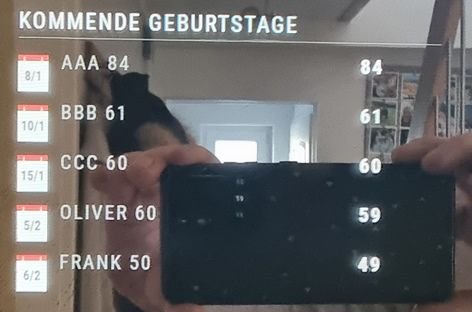
The birthdays from the coming month are now 1 year “too young”. -
@MyMirror ok, will look. I didn’t change any of that, just sort
-
@MyMirror fixed… git pull in the module folder to update
I was only comparing the day of the month (as its the current month, right!!.. nope…!)
so if the bd month is > then the current month OR they are the same month but the bd DAY is > than today… show the projected age then …
-
@sdetweil
Unfortunately not quite :disappointed_face:
Now the age from the current month is no longer correct
Same bdl.csv as above
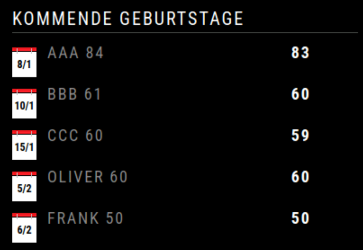
-
@MyMirror git pull again… I made two changes… hoped I would update before you pulled… oops
-
@sdetweil
Many thanks for the adjustments.
Now it looks good.
:thumbs_up_medium-light_skin_tone:
Hello! It looks like you're interested in this conversation, but you don't have an account yet.
Getting fed up of having to scroll through the same posts each visit? When you register for an account, you'll always come back to exactly where you were before, and choose to be notified of new replies (either via email, or push notification). You'll also be able to save bookmarks and upvote posts to show your appreciation to other community members.
With your input, this post could be even better 💗
Register Login