MagicMirror Forum
    • Recent
    • Tags
    • Unsolved
    • Solved
    • MagicMirror² Repository
    • Documentation
    • 3rd-Party-Modules
    • Donate
    • Discord
    • Register
    • Login
    A New Chapter for MagicMirror: The Community Takes the Lead
    Read the statement by Michael Teeuw here.

    Calendar not updating

    Scheduled Pinned Locked Moved Unsolved Troubleshooting
    95 Posts 4 Posters 78.6k Views 6 Watching
    Loading More Posts
    • Oldest to Newest
    • Newest to Oldest
    • Most Votes
    Reply
    • Reply as topic
    Log in to reply
    This topic has been deleted. Only users with topic management privileges can see it.
    • S Do not disturb
      sdetweil @matt216
      last edited by

      @matt216 I used that event in an ICS and it displays just fine.

      so I think this is not the events but some communications problem.

      the fact that you have it working with another local hosting server tells me it’s something other than the data

      Sam

      How to add modules

      learning how to use browser developers window for css changes

      1 Reply Last reply Reply Quote 0
      • M Offline
        matt216
        last edited by

        Initial testing with the apache version of the baikal container looks promising (I’m currently having problems with the nginx version). Will continue testing along these lines…

        M 1 Reply Last reply Reply Quote 0
        • M Offline
          matt216 @matt216
          last edited by matt216

          OK interesting. I created a brand new calendar server. Empty. Added one event to it and configured the mirror calendar module to use this server. It shows the one single event ok. I added a second new event to the calendar and this also shows on the mirror. Seems to work as expected - new events are showing!

          Then I import my whole famlly calendar and run the same test. I now have 5 family events showing on the calendar. But if I add a new event that should show within my 5 events, it does not show. :(

          Debug logs >somefile.txt show the mirror is picking up the new event from the ics file, it’s just not showing on the display.

          1 Reply Last reply Reply Quote 0
          • M Offline
            matt216
            last edited by

            @sdetweil I wonder if I could run a nightly cron job to purge the calendar module or something similar…? Not sure how the calendar fetcher works.
            It still feels like the calendar will load an ics link ok the first time, but is not displaying events created since that first load.
            Nightly purge and re-connect would be acceptable, I think. Any advice there?

            S 1 Reply Last reply Reply Quote 0
            • S Do not disturb
              sdetweil @matt216
              last edited by

              @matt216 there is no way to programmatically trigger a calendar refresh. you have to restart mm

              but you could do this w pm2

              pm2 restart MagicMirror
              

              (or it’s number)

              in the current state does the broadcasting message indicate a change in number of events?

              Sam

              How to add modules

              learning how to use browser developers window for css changes

              M 1 Reply Last reply Reply Quote 0
              • M Offline
                matt216 @sdetweil
                last edited by

                @sdetweil yes, the broadcasting event number increases by 1 when I add my new event, but the event does not show on the display.

                S 1 Reply Last reply Reply Quote 0
                • S Do not disturb
                  sdetweil @matt216
                  last edited by sdetweil

                  @matt216 can u show me the cal config again… as far as I can tell, the ONLY reason its not displayed is that the count (maximumEntries) clips off the total number of events

                  actually there are more conditions… in calendar.js
                  but they are all configurable

                  			for (const e in calendar) {
                  				const event = JSON.parse(JSON.stringify(calendar[e])); // clone object
                  
                  				if (this.config.hidePrivate && event.class === "PRIVATE") {
                  					// do not add the current event, skip it
                  					continue;
                  				}
                  				if (limitNumberOfEntries) { (//called with true) 
                  					if (event.endDate < maxPastDaysCompare) {
                  						continue;
                  					}
                  					if (this.config.hideOngoing && event.startDate < now) {
                  						continue;
                  					}
                  					if (this.config.hideDuplicates && this.listContainsEvent(events, event)) {
                  						continue;
                  					}
                  					if (--remainingEntries < 0) {
                  						break;
                  					}
                  				}
                  

                  and after filtering them out , apply the number of days limit and max entries limit

                  		// Limit the number of days displayed
                  		// If limitDays is set > 0, limit display to that number of days
                  		if (this.config.limitDays > 0) {
                  			let newEvents = [];
                  			let lastDate = today.clone().subtract(1, "days").format("YYYYMMDD");
                  			let days = 0;
                  			for (const ev of events) {
                  				let eventDate = moment(ev.startDate, "x").format("YYYYMMDD");
                  				// if date of event is later than lastdate
                  				// check if we already are showing max unique days
                  				if (eventDate > lastDate) {
                  					// if the only entry in the first day is a full day event that day is not counted as unique
                  					if (!this.config.limitDaysNeverSkip && newEvents.length === 1 && days === 1 && newEvents[0].fullDayEvent) {
                  						days--;
                  					}
                  					days++;
                  					if (days > this.config.limitDays) {
                  						continue;
                  					} else {
                  						lastDate = eventDate;
                  					}
                  				}
                  				newEvents.push(ev);
                  			}
                  			events = newEvents;
                  		}
                  
                  		return events.slice(0, this.config.maximumEntries);
                  

                  Sam

                  How to add modules

                  learning how to use browser developers window for css changes

                  M 1 Reply Last reply Reply Quote 0
                  • M Offline
                    matt216 @sdetweil
                    last edited by

                    @sdetweil

                    {
                    			module: "calendar",
                    			header: "--- Calendar testing ---",
                    			position: "top_left",
                    			config: {
                    				fetchInterval: 120000,
                    				timeFormat: 'absolute',
                    				maximumEntries: 5,
                    				broadcastPastEvents: false,
                    				calendars: [
                    					{
                    						url: 'https://my.cal.url/dav.php/calendars/family/default?export',
                    						auth: 	{
                    							user: 'family',
                    							pass: 'pass',
                    							method: 'basic'
                    							}
                    					}
                    					]
                    				}
                    		},


                    With the maximumEntries I currently have events showing several days in the future. When I am adding events to test this, I add the event to start just a few hours in the future so that it should show within the 5 events.

                    S 1 Reply Last reply Reply Quote 0
                    • S Do not disturb
                      sdetweil @matt216
                      last edited by

                      @matt216 lets make that maximumEvents: 20

                      for this test

                      Sam

                      How to add modules

                      learning how to use browser developers window for css changes

                      M 1 Reply Last reply Reply Quote 0
                      • M Offline
                        matt216 @sdetweil
                        last edited by

                        @sdetweil Updated to 20. This now shows calendar entries all the way to early May but the test event that starts at 20:00 this evening does not show. There are actually lots of events over the next few days that are not showing.

                        S 1 Reply Last reply Reply Quote 0
                        • S Do not disturb
                          sdetweil @matt216
                          last edited by sdetweil

                          @matt216 ok, lets add some debugging , then we can see what is received in the UI module and what is processed for display (after filtering)

                          ~/MagicMirror/modules/default/calendar/calendar.js

                          about line 219

                          		const events = this.createEventList(true);
                          		Log.log("events to process="+JSON.stringify(events))  // add this line 
                          		const wrapper = document.createElement("table");
                          

                          and around line 582

                          		for (const calendarUrl in this.calendarData) {
                          			const calendar = this.calendarData[calendarUrl];
                          			Log.log("before filter events="+JSON.stringify(calendar))  // add this line
                          			let remainingEntries = this.maximumEntriesForUrl(calendarUrl);
                          

                          then in the browser developers window (ctrl-shift-i to open) select the console tab,
                          add cal to the filter field

                          you will see these two blocks

                          before filter events=[{"title":"Henry swim at Y","startDate":"1705156800000","endDate":"1705159200000","fullDayEvent":false,"recurringEvent":true,"class":"","firstYear":2024,"location":false,"geo":false,"description":false},{"title":"Henry swim at Y","startDate":"1705761600000","endDate":"1705764000000","fullDayEvent":false,"recurringEvent":true,"class":"","firstYear":2024,"location":false,"geo":false,"description":false},{"title":"Henry swim at Y","startDate":"1706366400000","endDate":"1706368800000","fullDayEvent":false,"recurringEvent":true,"class":"","firstYear":2024,"location":false,"geo":false,"description":false},{"title":"Henry swim at Y","startDate":"1706971200000","endDate":"1706973600000","fullDayEvent":false,"recurringEvent":true,"class":"","firstYear":2024,"location":false,"geo":false,"description":false},{"title":"Henry swim at 
                          

                          and then

                          events to process=[{"title":"Henry swim at Y","startDate":"1705156800000","endDate":"1705159200000","fullDayEvent":false,"recurringEvent":true,"class":"","firstYear":2024,"location":false,"geo":false,"description":false,"url":"http://localhost:8090/modules/default/calendar/JUSTONE.ICS","today":false,"dayBeforeYesterday":false,"yesterday":false,"tomorrow":true,"dayAfterTomorrow":false},{"title":"Henry swim at Y","startDate":"1705761600000","endDate":"1705764000000","fullDayEvent":false,"recurringEvent":true,"class":"","firstYear":2024,"location":false,"geo":false,"description":false,"url":"http://localhost:8090/modules/default/calendar/JUSTONE.IC
                          

                          Sam

                          How to add modules

                          learning how to use browser developers window for css changes

                          S M 2 Replies Last reply Reply Quote 0
                          • S Do not disturb
                            sdetweil @sdetweil
                            last edited by sdetweil

                            @matt216 the before filter is what was sent from the parser
                            the events to process is what will be shown, limited to maximumEntries in length

                            Sam

                            How to add modules

                            learning how to use browser developers window for css changes

                            M 1 Reply Last reply Reply Quote 0
                            • M Offline
                              matt216 @sdetweil
                              last edited by

                              @sdetweil Thanks Sam. Will have a go and report back.

                              S 1 Reply Last reply Reply Quote 0
                              • S Do not disturb
                                sdetweil @matt216
                                last edited by

                                @matt216 you can also use this web site

                                https://codebeautify.org/jsonvalidator?/jsonvalidate
                                

                                to paste in the data (from [ to ]) and then push the format button (in pink) to make it more readable, ctrl-f will allow you to search for the entry you are looking for
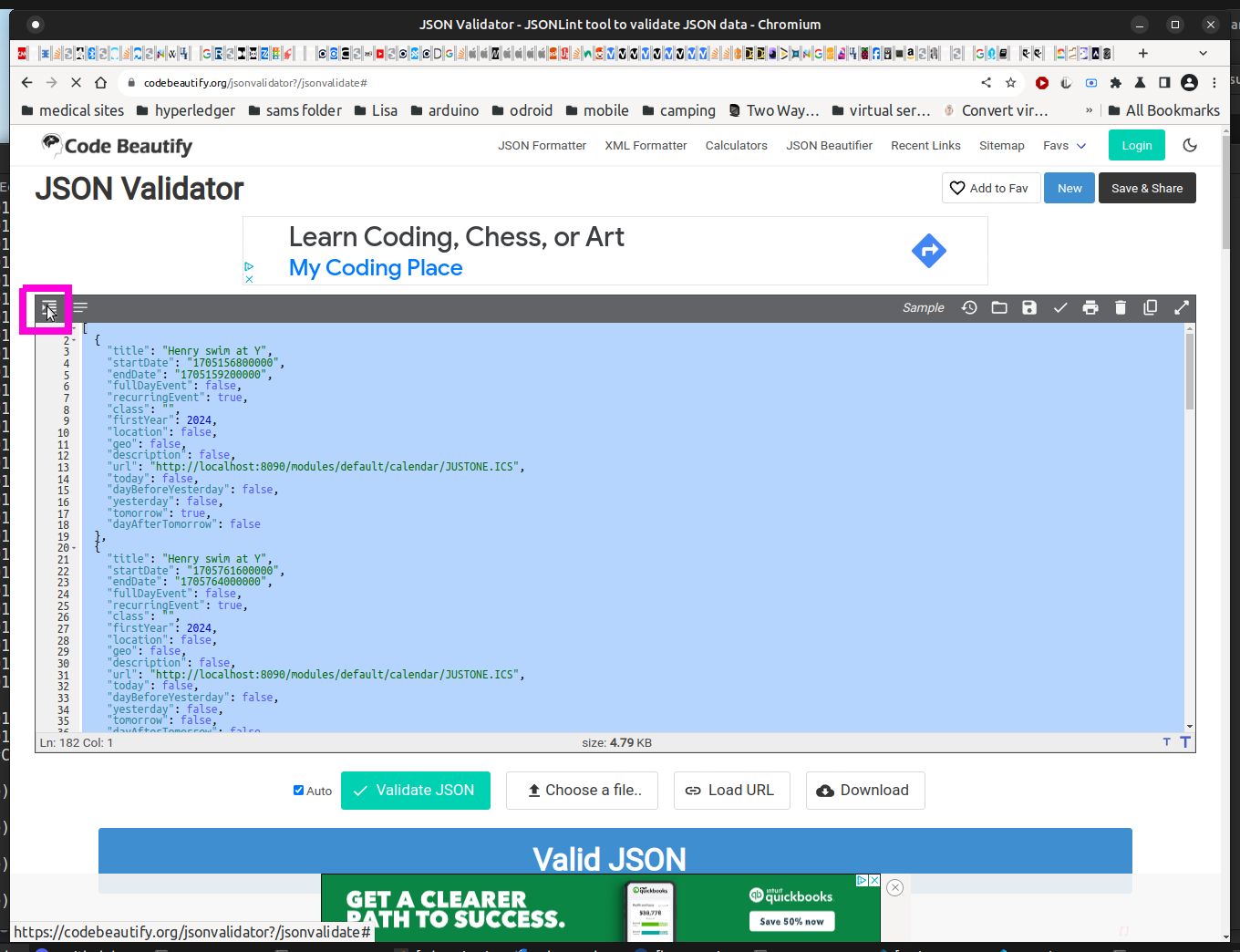
                                Screenshot at 2024-01-12 10-27-11.png

                                Sam

                                How to add modules

                                learning how to use browser developers window for css changes

                                M 1 Reply Last reply Reply Quote 0
                                • M Offline
                                  matt216 @sdetweil
                                  last edited by

                                  @sdetweil good tip, thanks.

                                  Little update - I put maximumEntries back to 5 and all my events showed up! But then I added another event, pm2 restart and they disappeared again :weary_face:

                                  We’re getting closer! I think you’re on to something with the maximumEntries effect. And also handling between back and front end.

                                  I’ll have a go with editing calendar.js this weekend and report back.

                                  Thanks

                                  1 Reply Last reply Reply Quote 0
                                  • M Offline
                                    matt216 @sdetweil
                                    last edited by

                                    @sdetweil Hi Sam.
                                    The before filter section is not showing the events that are missing. So not sent from the parser…?
                                    The events to process section reflects what is seen in the before filter section.

                                    Over the weekend the calendar looked good, but come Monday morning lots of events are missing. The mirror is currently showing events 10 days in the future even though there are plenty of events before then.

                                    I have had a play with module config maximumEntries and limitDays to see if anything improves, but with no luck.

                                    Thanks again,
                                    Matt

                                    S 1 Reply Last reply Reply Quote 0
                                    • S Do not disturb
                                      sdetweil @matt216
                                      last edited by

                                      @matt216 ok, go back to the prior parser

                                      cd ~/MagicMirror
                                      npm install node-ical@0.16.1
                                      

                                      restart MM

                                      Sam

                                      How to add modules

                                      learning how to use browser developers window for css changes

                                      M 1 Reply Last reply Reply Quote 0
                                      • M Offline
                                        matt216 @sdetweil
                                        last edited by matt216

                                        @sdetweil said in Calendar not updating:

                                        node-ical@0.16.1

                                        Done. Different events shown on the mirror - events over the next few days rather than 10 days away! - but still events not displaying.

                                        Browser dev tools indicate they’re sitll not getting parsed.
                                        Server pm2 logs do show the events are being picked up from the calendar server e.g.

                                        0|MagicMirror  | {"type":"VEVENT","params":[],"created":"2024-01-16T10:33:48.000Z","end":"2024-01-19T15:00:00.000Z","dtstamp":"2024-01-16T10:33:49.000Z","start":"2024-01-19T14:00:00.000Z","datetype":"date-time","lastmodified":"2024-01-16T10:33:48.000Z","sequence":"0","summary":"Alex bike","transparency":"OPAQUE","uid":"66D38BB9-70EA-486B-A297-58C2E0F3642C","url":{"params":{"VALUE":"URI"},"val":""},"APPLE-CREATOR-IDENTITY":"com.apple.mobilecal","APPLE-CREATOR-TEAM-IDENTITY":"0000000000"}


                                        is not showing on the display and is not showing in browser devtools.

                                        S 1 Reply Last reply Reply Quote 0
                                        • S Do not disturb
                                          sdetweil @matt216
                                          last edited by

                                          @matt216 can u show the rest of the debug on that event?

                                          Sam

                                          How to add modules

                                          learning how to use browser developers window for css changes

                                          M 1 Reply Last reply Reply Quote 0
                                          • M Offline
                                            matt216 @sdetweil
                                            last edited by

                                            @sdetweil Hi Sam.
                                            For a test I created an event in my calendar called test111 and verified server sync across several devices. This event starts in a few hours time so should be at the top of the events displayed on the mirror. I then stopped and started pm2.

                                            Here are the magicmirror debug logs for the event:

                                            [19.01.2024 08:41.23.286] [DEBUG] Event:
                                            {"type":"VEVENT","params":[],"created":"2024-01-19T08:39:52.000Z","lastmodified":"2024-01-19T08:40:05.000Z","dtstamp":"2024-01-19T08:40:05.000Z","uid":"7383cead-3ce7-4a50-80d0-cf214e98caac","summary":"test111","start":"2024-01-19T11:00:00.000Z","datetype":"date-time","end":"2024-01-19T12:00:00.000Z","transparency":"OPAQUE"}
                                            [19.01.2024 08:41.23.287] [DEBUG] start: Fri Jan 19 2024 11:00:00 GMT+0000 (Greenwich Mean Time)
                                            [19.01.2024 08:41.23.287] [DEBUG] end:: Fri Jan 19 2024 12:00:00 GMT+0000 (Greenwich Mean Time)
                                            [19.01.2024 08:41.23.287] [DEBUG] duration: 3600000
                                            [19.01.2024 08:41.23.287] [DEBUG] title: test111
                                            [19.01.2024 08:41.23.288] [DEBUG] initial tz=Europe/London
                                            [19.01.2024 08:41.23.288] [DEBUG] corrected tz=Europe/London
                                            [19.01.2024 08:41.23.288] [DEBUG] start date/time=Fri Jan 19 2024 11:00:00 GMT+0000 (Greenwich Mean Time)
                                            [19.01.2024 08:41.23.288] [DEBUG] start offset=0
                                            [19.01.2024 08:41.23.289] [DEBUG] start date/time w tz =Fri Jan 19 2024 11:00:00 GMT+0000 (Greenwich Mean Time)
                                            [19.01.2024 08:41.23.289] [DEBUG] event date=Fri Jan 19 2024 11:00:00 GMT+0000 (Greenwich Mean Time)
                                            [19.01.2024 08:41.23.289] [DEBUG] event offset=0 hour=11 event date=Fri Jan 19 2024 11:00:00 GMT+0000 (Greenwich Mean Time)
                                            [19.01.2024 08:41.23.289] [DEBUG] adjustHours=0
                                            [19.01.2024 08:41.23.290] [DEBUG] Processing entry...
                                            [19.01.2024 08:41.23.297] [INFO]  Calendar-Fetcher: Broadcasting 621 events from https://my.cal.url
                                            

                                            But in dev tools the event does not appear in the before filter events or events to process console sections which, i think, would indicate it’s not being parsed through to the UI…?

                                            For comparison, if it helps, an event that is being parsed through looks like this in the logs (with a couple of bits redacted for privacy):

                                            [19.01.2024 08:41.45.109] [DEBUG] Event:
                                            {"type":"VEVENT","params":[],"created":"2024-01-05T14:17:41.000Z","end":"2024-01-20T21:00:00.000Z","dtstamp":"2024-01-16T18:42:50.000Z","start":"2024-01-20T17:00:00.000Z","datetype":"date-time","lastmodified":"2024-01-16T18:42:49.000Z","location":"redacted","sequence":"2","summary":"Jarv birthday beers","transparency":"OPAQUE","uid":"7DF90CA7-D3BA-4519-96F7-944D027F79DE","url":{"params":{"VALUE":"URI"},"val":""},"APPLE-CREATOR-IDENTITY":"com.apple.mobilecal","APPLE-CREATOR-TEAM-IDENTITY":"0000000000","APPLE-STRUCTURED-LOCATION":{"params":{"VALUE":"URI","X-ADDRESS":"redacted","X-APPLE-MAPKIT-HANDLE":"redacted","X-APPLE-RADIUS":141.1751152233582,"X-APPLE-REFERENCEFRAME":1,"X-TITLE":"redacted"},"val":"geo:redacted"}}
                                            [19.01.2024 08:41.45.109] [DEBUG] start: Sat Jan 20 2024 17:00:00 GMT+0000 (Greenwich Mean Time)
                                            [19.01.2024 08:41.45.110] [DEBUG] end:: Sat Jan 20 2024 21:00:00 GMT+0000 (Greenwich Mean Time)
                                            [19.01.2024 08:41.45.110] [DEBUG] duration: 14400000
                                            [19.01.2024 08:41.45.110] [DEBUG] title: Jarv birthday beers
                                            [19.01.2024 08:41.45.110] [DEBUG] initial tz=Europe/London
                                            [19.01.2024 08:41.45.110] [DEBUG] corrected tz=Europe/London
                                            [19.01.2024 08:41.45.111] [DEBUG] start date/time=Sat Jan 20 2024 17:00:00 GMT+0000 (Greenwich Mean Time)
                                            [19.01.2024 08:41.45.111] [DEBUG] start offset=0
                                            [19.01.2024 08:41.45.111] [DEBUG] start date/time w tz =Sat Jan 20 2024 17:00:00 GMT+0000 (Greenwich Mean Time)
                                            [19.01.2024 08:41.45.112] [DEBUG] event date=Sat Jan 20 2024 17:00:00 GMT+0000 (Greenwich Mean Time)
                                            [19.01.2024 08:41.45.112] [DEBUG] event offset=0 hour=17 event date=Sat Jan 20 2024 17:00:00 GMT+0000 (Greenwich Mean Time)
                                            [19.01.2024 08:41.45.112] [DEBUG] adjustHours=0
                                            [19.01.2024 08:41.45.113] [DEBUG] Processing entry...
                                            

                                            Thanks again.

                                            S 1 Reply Last reply Reply Quote 0

                                            Hello! It looks like you're interested in this conversation, but you don't have an account yet.

                                            Getting fed up of having to scroll through the same posts each visit? When you register for an account, you'll always come back to exactly where you were before, and choose to be notified of new replies (either via email, or push notification). You'll also be able to save bookmarks and upvote posts to show your appreciation to other community members.

                                            With your input, this post could be even better 💗

                                            Register Login

                                            • 1
                                            • 2
                                            • 3
                                            • 4
                                            • 5
                                            • 4 / 5
                                            • First post
                                              Last post
                                            Enjoying MagicMirror? Please consider a donation!
                                            MagicMirror created by Michael Teeuw.
                                            Forum managed by Sam, technical setup by Karsten.
                                            This forum is using NodeBB as its core | Contributors
                                            Contact | Privacy Policy