MagicMirror Forum
    • Recent
    • Tags
    • Unsolved
    • Solved
    • MagicMirror² Repository
    • Documentation
    • 3rd-Party-Modules
    • Donate
    • Discord
    • Register
    • Login
    A New Chapter for MagicMirror: The Community Takes the Lead
    Read the statement by Michael Teeuw here.

    MMM Hue Lights is not updated

    Scheduled Pinned Locked Moved Unsolved Troubleshooting
    39 Posts 3 Posters 20.5k Views 3 Watching
    Loading More Posts
    • Oldest to Newest
    • Newest to Oldest
    • Most Votes
    Reply
    • Reply as topic
    Log in to reply
    This topic has been deleted. Only users with topic management privileges can see it.
    • J Offline
      JoeFranz @sdetweil
      last edited by

      @sdetweil Nothing about the Hue lights is displayed

      S 1 Reply Last reply Reply Quote 0
      • S Offline
        sdetweil @JoeFranz
        last edited by

        @JoeFranz not even loading it?

        Sam

        How to add modules

        learning how to use browser developers window for css changes

        J 1 Reply Last reply Reply Quote 0
        • J Offline
          JoeFranz @sdetweil
          last edited by

          @sdetweil After “npm start mm” nothing from the hue-lights module is shown. Do I have to enter something else?

          S 1 Reply Last reply Reply Quote 0
          • S Offline
            sdetweil @JoeFranz
            last edited by

            @JoeFranz it’s not npm start mm

            it’s npm start

            if you were trying to use pm2 to start
            the
            pm2 start mm

            show the config entry for hue module, xx out any key…

            Sam

            How to add modules

            learning how to use browser developers window for css changes

            J 1 Reply Last reply Reply Quote 0
            • J Offline
              JoeFranz @sdetweil
              last edited by sdetweil

              @sdetweil

              {
                  			module: 'mmm-hue-lights',
                  			position: 'top_right', // pick whichever position you want
                  			config: {
                      			bridgeIp: '192.168.178.68',
                      			user: 'xxxxxxxxxxx',
              				displayType: 'grid',
              				displayMode: 'groups',
              				minimalGrid: true,
              				minimalList: true,
              				alignment: 'center',
              				
                      			// ... and whatever else configuration options you want to use
                  		}
              		},
              
              S 1 Reply Last reply Reply Quote 0
              • S Offline
                sdetweil @JoeFranz
                last edited by

                @JoeFranz seems like you should get some message

                we put in new messages this release if we couldn’t find the folder or js file that matches the module name. so that’s not it

                Sam

                How to add modules

                learning how to use browser developers window for css changes

                S 1 Reply Last reply Reply Quote 0
                • S Offline
                  sdetweil @sdetweil
                  last edited by

                  @JoeFranz I always seem to have to push the button on my hue bridge whenever i add a new app to talk to those lights

                  Sam

                  How to add modules

                  learning how to use browser developers window for css changes

                  J 1 Reply Last reply Reply Quote 0
                  • J Offline
                    JoeFranz @sdetweil
                    last edited by

                    @sdetweil Ok, I don’t really understand. Does that mean the module no longer works with the new MM version?
                    It’s the mmm-hue-lights module, not Mitch’s MMM-Hue.
                    Then I’ll try that :-)

                    S mumblebajM 2 Replies Last reply Reply Quote 0
                    • S Offline
                      sdetweil @JoeFranz
                      last edited by

                      @JoeFranz I don’t know. never tried it.

                      Sam

                      How to add modules

                      learning how to use browser developers window for css changes

                      1 Reply Last reply Reply Quote 0
                      • mumblebajM Offline
                        mumblebaj Module Developer @JoeFranz
                        last edited by mumblebaj

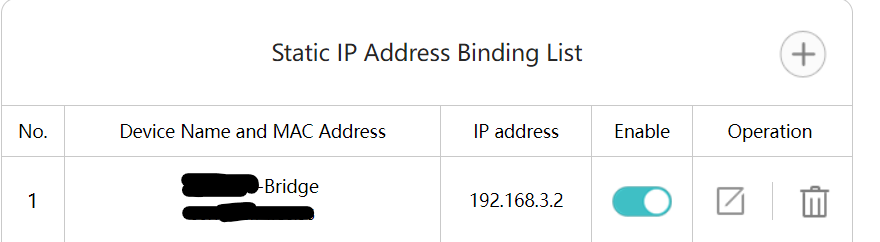
                        @JoeFranz Does your bridge have the same IP address? It could be that the IP for the bridge has changed. I added a fixed IP for my bridge to the router so that it never changes.
                        3d4f6e77-b09f-4fbc-bd12-fc5e1dcfec01-image.png

                        Check out my modules at: https://github.com/mumblebaj?tab=repositories
                        Check my blog-post: https://mumblebaj.xyz/
                        Check my MM Container: https://hub.docker.com/repository/docker/mumblebaj/magicmirror/general

                        J 1 Reply Last reply Reply Quote 0
                        • J Offline
                          JoeFranz @mumblebaj
                          last edited by

                          @mumblebaj
                          Yes, the bridge still has the same address. It works for about 1-2 hours after starting, but then the display no longer updates :-(

                          mumblebajM 1 Reply Last reply Reply Quote 0
                          • mumblebajM Offline
                            mumblebaj Module Developer @JoeFranz
                            last edited by

                            @JoeFranz You could try my MMM-PhilipsHue module.

                            Unfortunately I am not sure what the issue is with the one you are using. Are you seeing any errors for the module popup anywhere?

                            Check out my modules at: https://github.com/mumblebaj?tab=repositories
                            Check my blog-post: https://mumblebaj.xyz/
                            Check my MM Container: https://hub.docker.com/repository/docker/mumblebaj/magicmirror/general

                            J 2 Replies Last reply Reply Quote 0
                            • J Offline
                              JoeFranz @mumblebaj
                              last edited by

                              @mumblebaj
                              No errors are displayed :-(

                              1 Reply Last reply Reply Quote 0
                              • J Offline
                                JoeFranz @mumblebaj
                                last edited by

                                @mumblebaj How can I display errors?

                                mumblebajM 1 Reply Last reply Reply Quote 0
                                • mumblebajM Offline
                                  mumblebaj Module Developer @JoeFranz
                                  last edited by

                                  @JoeFranz Depends on how you start your mirror. If you use npm start then you can check in the console window. If you pm2 then you can do pm2 logs and check the logs for any errors. You can also check the Developers Window, press Ctrl + shift + i keys together and check the console tab. You can filter by typing the module name in the filter box and check if there are any errors shown there. Or as suggested, you could give my module a try and see if that works for you.

                                  Check out my modules at: https://github.com/mumblebaj?tab=repositories
                                  Check my blog-post: https://mumblebaj.xyz/
                                  Check my MM Container: https://hub.docker.com/repository/docker/mumblebaj/magicmirror/general

                                  J 1 Reply Last reply Reply Quote 0
                                  • J Offline
                                    JoeFranz @mumblebaj
                                    last edited by

                                    @mumblebaj No errors are shown anywhere :-(

                                    mumblebajM 1 Reply Last reply Reply Quote 0
                                    • mumblebajM Offline
                                      mumblebaj Module Developer @JoeFranz
                                      last edited by

                                      @JoeFranz Have you tried using my version?

                                      Check out my modules at: https://github.com/mumblebaj?tab=repositories
                                      Check my blog-post: https://mumblebaj.xyz/
                                      Check my MM Container: https://hub.docker.com/repository/docker/mumblebaj/magicmirror/general

                                      J 1 Reply Last reply Reply Quote 0
                                      • J Offline
                                        JoeFranz @mumblebaj
                                        last edited by JoeFranz

                                        @mumblebaj I tried Mitch’s (https://github.com/MitchSS/MMM-Hue). That seems similar to yours. However, I have problems excluding individual rooms or zones using “hideGroupsWithString”. How do I enter multiple zones in the line?
                                        "hideGroupsWithString: “Entertainment Area 1”, “Garden” doesn’t work. So I haven’t let it run for a long time and don’t know if it works. But I’ll try it :-)

                                        mumblebajM 2 Replies Last reply Reply Quote 0
                                        • mumblebajM Offline
                                          mumblebaj Module Developer @JoeFranz
                                          last edited by

                                          @JoeFranz Apologies, I cannot assist with that. Have no idea how his module works.

                                          Check out my modules at: https://github.com/mumblebaj?tab=repositories
                                          Check my blog-post: https://mumblebaj.xyz/
                                          Check my MM Container: https://hub.docker.com/repository/docker/mumblebaj/magicmirror/general

                                          J 1 Reply Last reply Reply Quote 0
                                          • J Offline
                                            JoeFranz @mumblebaj
                                            last edited by

                                            @mumblebaj Ok, I installed it and am trying it out. However, I would like to exclude several groups in the line “hideGroupsWithString”. How do I enter multiple groups in the line?

                                            mumblebajM 1 Reply Last reply Reply Quote 0

                                            Hello! It looks like you're interested in this conversation, but you don't have an account yet.

                                            Getting fed up of having to scroll through the same posts each visit? When you register for an account, you'll always come back to exactly where you were before, and choose to be notified of new replies (either via email, or push notification). You'll also be able to save bookmarks and upvote posts to show your appreciation to other community members.

                                            With your input, this post could be even better 💗

                                            Register Login

                                            • 1
                                            • 2
                                            • 1 / 2
                                            • First post
                                              Last post
                                            Enjoying MagicMirror? Please consider a donation!
                                            MagicMirror created by Michael Teeuw.
                                            Forum managed by Sam, technical setup by Karsten.
                                            This forum is using NodeBB as its core | Contributors
                                            Contact | Privacy Policy