MagicMirror Forum
    • Recent
    • Tags
    • Unsolved
    • Solved
    • MagicMirror² Repository
    • Documentation
    • 3rd-Party-Modules
    • Donate
    • Discord
    • Register
    • Login
    A New Chapter for MagicMirror: The Community Takes the Lead
    Read the statement by Michael Teeuw here.

    node_helper.js is not working?

    Scheduled Pinned Locked Moved Solved Troubleshooting
    49 Posts 3 Posters 24.7k Views 3 Watching
    Loading More Posts
    • Oldest to Newest
    • Newest to Oldest
    • Most Votes
    Reply
    • Reply as topic
    Log in to reply
    This topic has been deleted. Only users with topic management privileges can see it.
    • S Offline
      sdetweil @vandy2424
      last edited by

      @vandy2424 bizarre, ok try this

      cd ~
      find . -type f -name config.js
      

      there was a path resolve fix for config.js in this release

      Sam

      How to add modules

      learning how to use browser developers window for css changes

      V 1 Reply Last reply Reply Quote 0
      • V Offline
        vandy2424 @sdetweil
        last edited by

        @sdetweil it returned the same location:

        jackson@raspberrypi:~ $ find . -type f -name config.js
        ./Documents/MagicMirror/config/config.js
        
        S 1 Reply Last reply Reply Quote 0
        • S Offline
          sdetweil @vandy2424
          last edited by

          @vandy2424 weird. the console output doesn’t match…

          ok, another thing, MagicMirror not running

          ps -ef | grep -i magic
          

          Sam

          How to add modules

          learning how to use browser developers window for css changes

          V 1 Reply Last reply Reply Quote 0
          • S Offline
            sdetweil @vandy2424
            last edited by sdetweil

            @vandy2424 according to the backend log, calendar was not a loaded module, so never get any data, loading… will be the only output

            Sam

            How to add modules

            learning how to use browser developers window for css changes

            V 1 Reply Last reply Reply Quote 0
            • V Offline
              vandy2424 @sdetweil
              last edited by

              @sdetweil Hopefully this is what you were looking for here:

              jackson@raspberrypi:~ $ ps -ef | grep -i magic
              jackson   1781   806  0 08:21 ?        00:05:02 geany /home/jackson/Documents/MagicMirror/modules/MMM-Cocktails/node_helper.js
              jackson   6037  1698  0 18:17 pts/0    00:00:00 grep --color=auto -i magic
              
              S 1 Reply Last reply Reply Quote 0
              • S Offline
                sdetweil @vandy2424
                last edited by

                @vandy2424 well, it’s something…

                Sam

                How to add modules

                learning how to use browser developers window for css changes

                1 Reply Last reply Reply Quote 0
                • V Offline
                  vandy2424 @sdetweil
                  last edited by

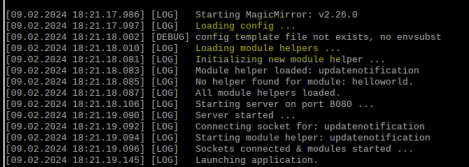
                  @sdetweil This is true, but in the backend log, none of my modules say they were loaded, and never have. Just mentions loading config and loading module helpers.
                  1359b8fd-32d2-4fbd-98e8-89ff78df43ca-image.png

                  The clock & weather still work without showing they were loaded on the backend. (maybe this doesn’t matter since they don’t use a node_helper.js class).

                  S 1 Reply Last reply Reply Quote 0
                  • S Offline
                    sdetweil @vandy2424
                    last edited by

                    @vandy2424 correct , weirdness…

                    Sam

                    How to add modules

                    learning how to use browser developers window for css changes

                    1 Reply Last reply Reply Quote 0
                    • M Offline
                      MMRIZE @vandy2424
                      last edited by

                      @vandy2424
                      Try ‘localhost’ or real IP instead of ‘0.0.0.0’.

                      V 1 Reply Last reply Reply Quote 0
                      • V Offline
                        vandy2424 @MMRIZE
                        last edited by

                        @MMRIZE
                        I tried both localhost and the IP of my PI (LAN) and neither resolved the issue. Also, whether it matters or not, changing these also did not remove the WebSocket warning shown in the dev console.

                        M 1 Reply Last reply Reply Quote 0
                        • M Offline
                          MMRIZE @vandy2424
                          last edited by MMRIZE

                          @vandy2424
                          Really weird.
                          Of course you are probably running MM as Electron standalone(not server/client). Hmmmm… How about your port forwarding on port 8080 on your home router or firewall? Something makes your ws not working.
                          Or… there is another process which is using that port as another ws instance.(but seems not possible… hmmmm) or proxy something maybe…

                          But I can’t guess any more sorry.

                          V 1 Reply Last reply Reply Quote 0
                          • V Offline
                            vandy2424 @MMRIZE
                            last edited by vandy2424

                            @MMRIZE
                            Yeah I’m not currently port forwarding at all right now and would have no reason to for 8080 anyways. But I really appreciate all your help! I can tell you that when I did a clean install of the Raspberry Pi OS, I have only installed MM and its dependencies.

                            All my libraries should be up to date. Maybe there is some strange clash going on with my library versions? Maybe I try to go to versions that you guys use (if they’re even different than mine)? Just some thoughts.

                            I’m glad that we are all at least on the same page of the strangeness going on here. Hopefully a lightbulb will pop up at some point and we can resolve the issue. Thanks again! :)

                            S 2 Replies Last reply Reply Quote 0
                            • S Offline
                              sdetweil @vandy2424
                              last edited by

                              @vandy2424 ok the updatenotification and helloworld modules come from the js/defaults.js

                              I don’t see the path yet that does both.

                              Sam

                              How to add modules

                              learning how to use browser developers window for css changes

                              1 Reply Last reply Reply Quote 0
                              • S Offline
                                sdetweil @vandy2424
                                last edited by

                                @vandy2424 can you do

                                cd  ~/Documents/MagicMirror/config
                                ls -laF
                                

                                Sam

                                How to add modules

                                learning how to use browser developers window for css changes

                                V 1 Reply Last reply Reply Quote 0
                                • V Offline
                                  vandy2424 @sdetweil
                                  last edited by

                                  @sdetweil Yes, here is the output:

                                  jackson@raspberrypi:~/Documents/MagicMirror/config $ ls -LaF
                                  ./  ../  config.js*  config.js.sample  .config.js.swp
                                  
                                  S 1 Reply Last reply Reply Quote 0
                                  • S Offline
                                    sdetweil @vandy2424
                                    last edited by

                                    @vandy2424 lower case L

                                    -laF

                                    Sam

                                    How to add modules

                                    learning how to use browser developers window for css changes

                                    V 1 Reply Last reply Reply Quote 0
                                    • V Offline
                                      vandy2424 @sdetweil
                                      last edited by

                                      @sdetweil Apologies.

                                      jackson@raspberrypi:~/Documents/MagicMirror/config $ ls -laF
                                      total 20
                                      drwxr-xr-x  2 jackson jackson 4096 Feb  9 19:19 ./
                                      drwxr-xr-x 18 jackson jackson 4096 Feb  2 10:27 ../
                                      -rwxrwxrwx  1 root    root    1998 Feb  9 19:19 config.js*
                                      -rw-r--r--  1 jackson jackson 3534 Feb  2 10:27 config.js.sample
                                      -rw-r--r--  1 jackson jackson 1024 Feb  2 12:12 .config.js.swp
                                      
                                      S 1 Reply Last reply Reply Quote 0
                                      • S Offline
                                        sdetweil @vandy2424
                                        last edited by

                                        @vandy2424

                                        change the permissions owner and group
                                        exit the editor

                                        sudo chown jackson config.js
                                        sudo chgrp jackson config.js

                                        Sam

                                        How to add modules

                                        learning how to use browser developers window for css changes

                                        V 1 Reply Last reply Reply Quote 0
                                        • V Offline
                                          vandy2424 @sdetweil
                                          last edited by

                                          @sdetweil Okay I ran both of those commands.

                                          S 1 Reply Last reply Reply Quote 0
                                          • S Offline
                                            sdetweil @vandy2424
                                            last edited by

                                            @vandy2424 and try starting mm again

                                            Sam

                                            How to add modules

                                            learning how to use browser developers window for css changes

                                            V 1 Reply Last reply Reply Quote 0

                                            Hello! It looks like you're interested in this conversation, but you don't have an account yet.

                                            Getting fed up of having to scroll through the same posts each visit? When you register for an account, you'll always come back to exactly where you were before, and choose to be notified of new replies (either via email, or push notification). You'll also be able to save bookmarks and upvote posts to show your appreciation to other community members.

                                            With your input, this post could be even better 💗

                                            Register Login

                                            • 1
                                            • 2
                                            • 3
                                            • 2 / 3
                                            • First post
                                              Last post
                                            Enjoying MagicMirror? Please consider a donation!
                                            MagicMirror created by Michael Teeuw.
                                            Forum managed by Sam, technical setup by Karsten.
                                            This forum is using NodeBB as its core | Contributors
                                            Contact | Privacy Policy