MagicMirror Forum
    • Recent
    • Tags
    • Unsolved
    • Solved
    • MagicMirror² Repository
    • Documentation
    • 3rd-Party-Modules
    • Donate
    • Discord
    • Register
    • Login
    A New Chapter for MagicMirror: The Community Takes the Lead
    Read the statement by Michael Teeuw here.

    MagicMirror stutters and doesn't run smoothly

    Scheduled Pinned Locked Moved Hardware
    25 Posts 3 Posters 12.7k Views 3 Watching
    Loading More Posts
    • Oldest to Newest
    • Newest to Oldest
    • Most Votes
    Reply
    • Reply as topic
    Log in to reply
    This topic has been deleted. Only users with topic management privileges can see it.
    • D Offline
      drx1984
      last edited by

      Hello everyone, can someone tell me why my Magic Mirror always stutters?
      My system runs on an IntelNuc i5 32GB RAM 250SSD.
      That should be enough to run stutter-free and smoothly??
      I’ve already tried the MagicMirror on Windows and RasbianOS and it still stutters on both operating systems.
      I have all the standard modules and additional modules like:

      • https://github.com/Eunanibus/MMM-Globe
      • https://github.com/darickc/MMM-BackgroundSlideshow
      • https://github.com/shin10/MMM-FF-digital-rain
      • https://github.com/AdamMoses-GitHub/MMM-ImageSlideshow
        decorated with five pages.

      Can someone help me??

      Thanks

      S 1 Reply Last reply Reply Quote 0
      • S Do not disturb
        sdetweil @drx1984
        last edited by

        @drx1984 is this on MagicMirror 2.26?

        this is more than likely caused by the workload of the two modules globe and rain which make heavy use of drawing operations.

        in 2.26 we turned off the electron gpu to eliminate errors for most users.
        you can turn on the gpu by setting the environment variable

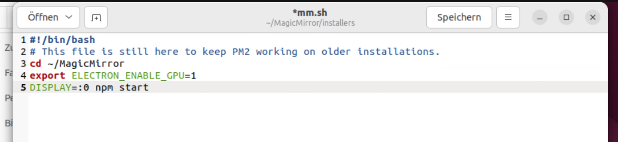
        export ELECTRON_ENABLE_GPU=1
        

        before launching MagicMirror with npm start

        if you used my Linux install script and selected to use pm2, then the script is

        ~/MagicMirror/installers/mm.sh
        

        a test to see if this will help is to launch a native browser (edge on windows, chromium on linux) and open the MM page
        http://localhost:8080

        you can also do that from a different system if you have enabled remote access in the MM config.js

        Sam

        How to add modules

        learning how to use browser developers window for css changes

        D 1 Reply Last reply Reply Quote 0
        • D Offline
          drx1984 @sdetweil
          last edited by

          @sdetweil
          @sdetweil
          yes I installed the latest MagicMirror installation under Ubuntu with this automatic script:
          bash -c “$(curl -sL https://raw.githubusercontent.com/sdetweil/MagicMirror_scripts/master/raspberry.sh)”

          where can you change the value of “ELECTRON_ENABLE_GPU=1”?
          or under ~/MagicMirror/installers/mm.sh >change it like in the picture?
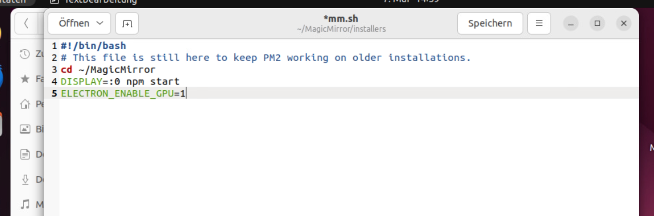
          mmm-1.png

          I have enough performance with my hardware.

          Thanks for your help.

          S 1 Reply Last reply Reply Quote 0
          • S Do not disturb
            sdetweil @drx1984
            last edited by sdetweil

            @drx1984 swap lines 4 and 5. and you forgot the ‘export’ keyword on line 5

            in Linux, by default environment variable are not passed to children processes

            and yes the script was mine.

            Sam

            How to add modules

            learning how to use browser developers window for css changes

            D 1 Reply Last reply Reply Quote 0
            • D Offline
              drx1984 @sdetweil
              last edited by

              @sdetweil
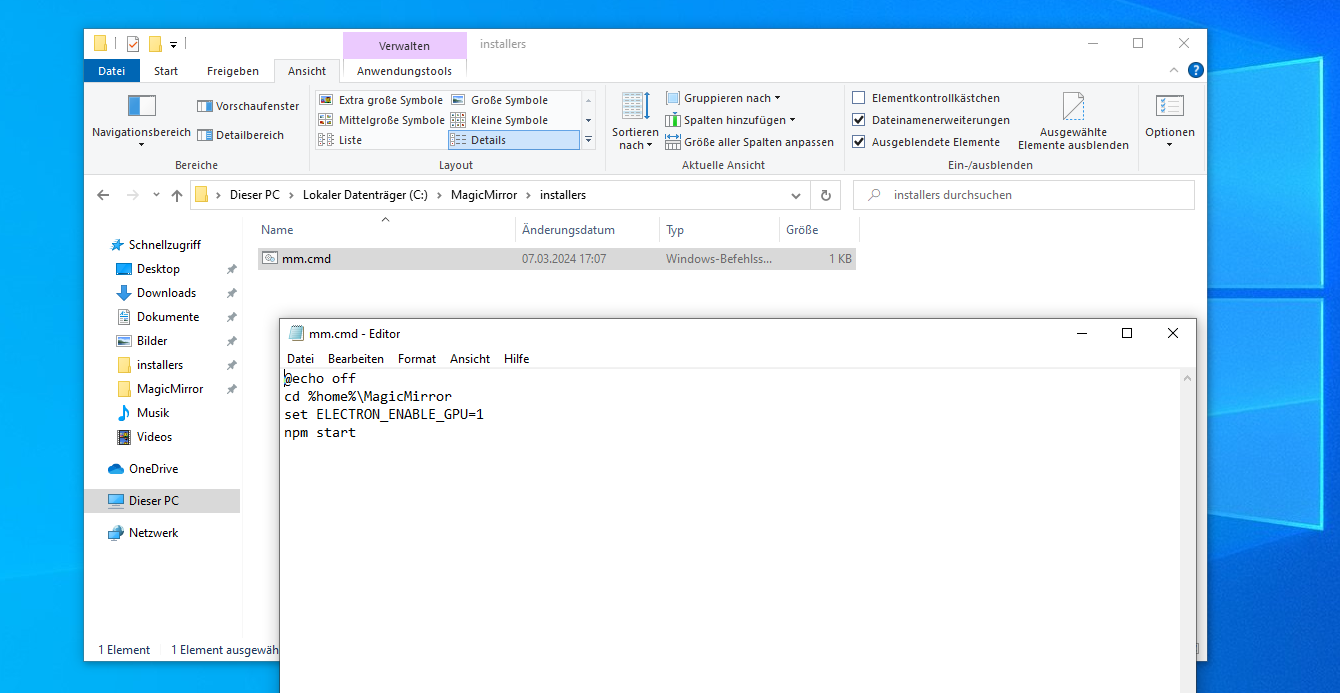
              aha ok, you mean like this:
              mmm-2.png

              ?

              S 1 Reply Last reply Reply Quote 0
              • S Do not disturb
                sdetweil @drx1984
                last edited by sdetweil

                @drx1984 yes…

                then

                pm2 status
                

                to see what apps pm2 controls
                then

                pm2 restart xxx
                

                where xxx is the number on the row, or the name on the row
                examples

                pm2 restart 0 
                

                or

                pm2 restart MagicMirror
                

                Sam

                How to add modules

                learning how to use browser developers window for css changes

                D 1 Reply Last reply Reply Quote 0
                • D Offline
                  drx1984 @sdetweil
                  last edited by

                  @sdetweil OK, thanks, I’ll test it.
                  Question: Is it possible to switch on exactly the same parameters for the GPU with MagicMirror in Windows?
                  export ELECTRON_ENABLE_GPU=1 ?

                  S 1 Reply Last reply Reply Quote 0
                  • S Do not disturb
                    sdetweil @drx1984
                    last edited by

                    @drx1984 yes, you just don’t use the ‘export’ keyword on Windows

                    we don’t supply a .cmd file for Windows, and I don’t provide the install script or install pm2.

                    but its all the same functionally…

                    Sam

                    How to add modules

                    learning how to use browser developers window for css changes

                    D 1 Reply Last reply Reply Quote 0
                    • D Offline
                      drx1984 @sdetweil
                      last edited by

                      @sdetweil aha ok then to line 4:
                      ELECTRON_ENABLE_GPU=1

                      S 1 Reply Last reply Reply Quote 0
                      • S Do not disturb
                        sdetweil @drx1984
                        last edited by

                        @drx1984 if you are running under windows native… you don’t need to run in lsr
                        if you ARE running under lsr, then u need the ‘export’

                        just open cmd.exe and follow instructions in doc…
                        have to manually install nodejs on windows and git.

                        then a windows mm.cmd file

                        @echo off
                        cd %home%\MagicMirror
                        ELECTRON_ENABLE_GPU=1
                        npm start 
                        

                        then execute

                        %home%\mm.cmd
                        

                        Sam

                        How to add modules

                        learning how to use browser developers window for css changes

                        D 1 Reply Last reply Reply Quote 0
                        • D Offline
                          drx1984 @sdetweil
                          last edited by

                          @sdetweil what do you mean by LSR? what does that mean?
                          I have now done this:
                          Of course, with “npm run server” it runs in the browser.
                          but how do I do it natively on the computer itself? When I enter the command “npm run start” there is an error in the cmd, something with the display.
                          I wonder if I did everything correctly, as you described it.
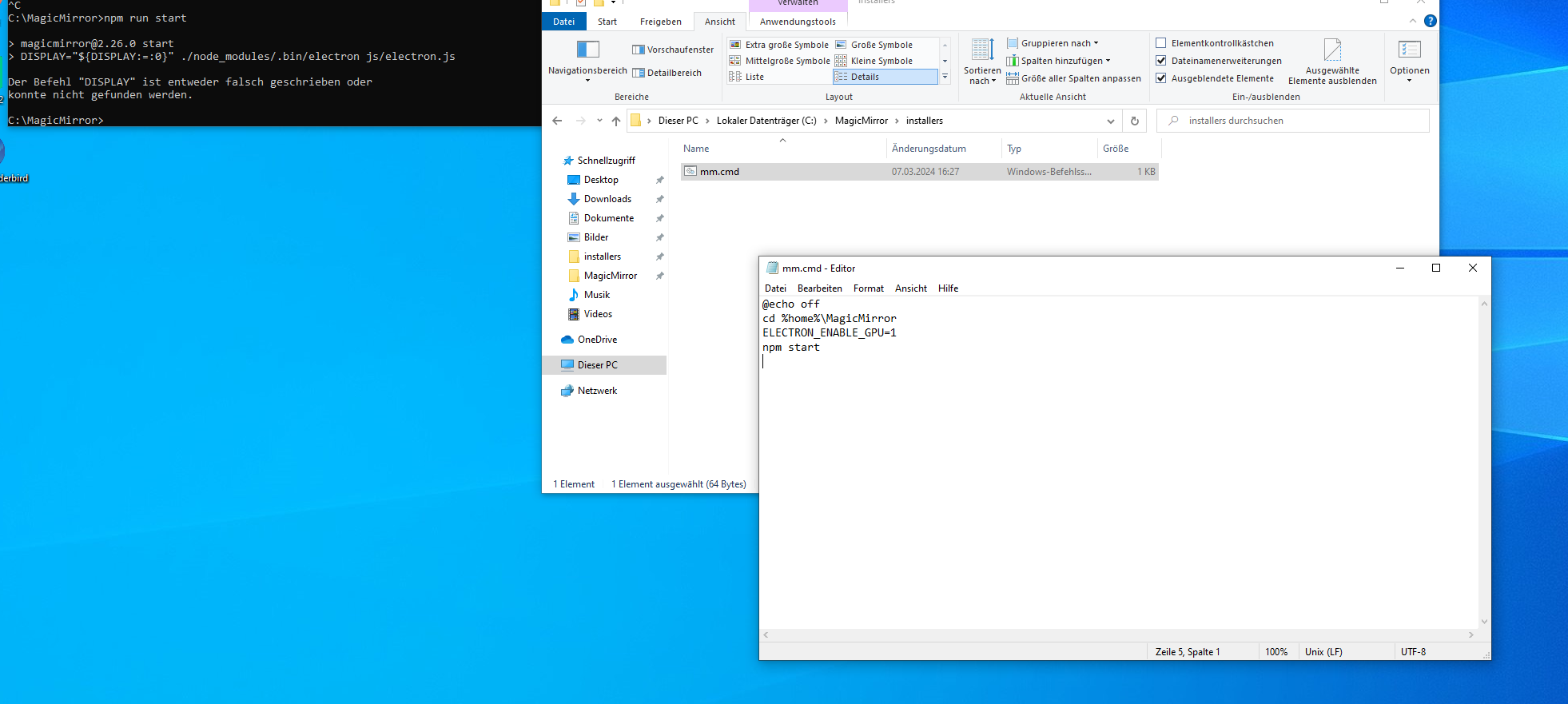
                          mmm-3.PNG

                          S 1 Reply Last reply Reply Quote 0
                          • S Do not disturb
                            sdetweil
                            last edited by

                            @drx1984 DISPLAY… you didn’t follow all the instructions …

                            see https://docs.magicmirror.builders/getting-started/installation.html#other-operating-systems

                            LSR (you can install the linux system runtime under windows too) …

                            Sam

                            How to add modules

                            learning how to use browser developers window for css changes

                            D 1 Reply Last reply Reply Quote 0
                            • S Do not disturb
                              sdetweil @drx1984
                              last edited by

                              @drx1984 said in MagicMirror stutters and doesn't run smoothly:

                              Of course, with “npm run server” it runs in the browser.
                              but how do I do it natively on the computer itself?

                              i don’t understand your question…

                              MM is a browser app.
                              it runs in Electron, (default), Chromium, Firefox, Edge, Safari, Midori, …

                              Sam

                              How to add modules

                              learning how to use browser developers window for css changes

                              1 Reply Last reply Reply Quote 0
                              • D Offline
                                drx1984 @sdetweil
                                last edited by

                                @sdetweil oh yes sry, I saw it, ok now I have adapted the Package.jason and it is now running.

                                Did I do that correctly with the mm.cmd file so that the GPU is active? It still stutters or the clock module is also lagging behind :-(

                                Do you speak German too?

                                S 1 Reply Last reply Reply Quote 0
                                • S Do not disturb
                                  sdetweil @drx1984
                                  last edited by

                                  @drx1984 I don’t speak German, but can use translators to read/reply.

                                  I mislead you, for Windows to set the env variable you have to use set

                                  set ELECTRON_ENABLE_GPU=1
                                  

                                  Sam

                                  How to add modules

                                  learning how to use browser developers window for css changes

                                  D 1 Reply Last reply Reply Quote 0
                                  • D Offline
                                    drx1984 @sdetweil
                                    last edited by

                                    @sdetweil So you mean?
                                    mmm-4.PNG

                                    …unbelievable does it require so much power? of the stottort anyway.

                                    the IntelNuc is powerful enough, right?
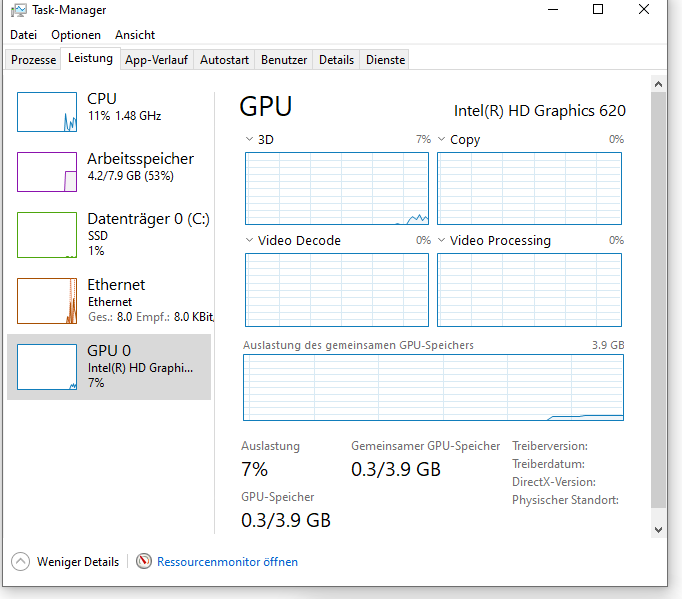
                                    task.PNG

                                    S bheplerB 2 Replies Last reply Reply Quote 0
                                    • S Do not disturb
                                      sdetweil @drx1984
                                      last edited by sdetweil

                                      @drx1984 yes, set ELECTRON_ENABLE_GPU=1

                                      powerful enough? I do not know…
                                      drawing lots of things on the screen takes lots of power. the screen is very slow compared to the processor…

                                      I don’t run either of those module.

                                      Sam

                                      How to add modules

                                      learning how to use browser developers window for css changes

                                      D 1 Reply Last reply Reply Quote 0
                                      • D Offline
                                        drx1984 @sdetweil
                                        last edited by

                                        @sdetweil yes certainly more than a Raspi 4 or 5.
                                        then are the script and path correct?
                                        I don’t notice any difference and it still stutters.

                                        S 1 Reply Last reply Reply Quote 0
                                        • S Do not disturb
                                          sdetweil @drx1984
                                          last edited by sdetweil

                                          @drx1984 yes, looks OK.

                                          I would try to run one module at a time

                                          to disable the other, add

                                          disabled: true,
                                          

                                          after the module: line
                                          so you don’t have to redo config.js

                                          we don’t officially support Windows, so I don’t know if you have to do something else to enable gpu for electron.

                                          you could try running under edge, at

                                          http://localhost:8080
                                          

                                          Sam

                                          How to add modules

                                          learning how to use browser developers window for css changes

                                          D 1 Reply Last reply Reply Quote 0
                                          • D Offline
                                            drx1984 @sdetweil
                                            last edited by

                                            @sdetweil yes, I have already tried the exact same configuration under Linux. > unfortunately it stutters there too.
                                            That’s why I thought I’d try it on Windows level.
                                            I will probably install Ubuntu on the Intelnuc again >because Windwos is not official, as you say.

                                            But I don’t think it will stutter anymore, unfortunately.

                                            S 1 Reply Last reply Reply Quote 0

                                            Hello! It looks like you're interested in this conversation, but you don't have an account yet.

                                            Getting fed up of having to scroll through the same posts each visit? When you register for an account, you'll always come back to exactly where you were before, and choose to be notified of new replies (either via email, or push notification). You'll also be able to save bookmarks and upvote posts to show your appreciation to other community members.

                                            With your input, this post could be even better 💗

                                            Register Login

                                            • 1
                                            • 2
                                            • 2 / 2
                                            • First post
                                              Last post
                                            Enjoying MagicMirror? Please consider a donation!
                                            MagicMirror created by Michael Teeuw.
                                            Forum managed by Sam, technical setup by Karsten.
                                            This forum is using NodeBB as its core | Contributors
                                            Contact | Privacy Policy