MagicMirror Forum
    • Recent
    • Tags
    • Unsolved
    • Solved
    • MagicMirror² Repository
    • Documentation
    • 3rd-Party-Modules
    • Donate
    • Discord
    • Register
    • Login
    A New Chapter for MagicMirror: The Community Takes the Lead
    Read the statement by Michael Teeuw here.

    Can anyone revive AviationWX, PilotWX, or TAF

    Scheduled Pinned Locked Moved Unsolved Requests
    36 Posts 3 Posters 11.9k Views 3 Watching
    Loading More Posts
    • Oldest to Newest
    • Newest to Oldest
    • Most Votes
    Reply
    • Reply as topic
    Log in to reply
    This topic has been deleted. Only users with topic management privileges can see it.
    • S Do not disturb
      sdetweil @FSAHD
      last edited by sdetweil

      @FSAHD ok, here is the partially updated MMM-aviationwx

      https://github.com/sdetweil/MMM-aviationwx

      there is a file of the output sent back from the node_helper( this morning) in formatted json (sample-data.txt)

      so you can see the field names and values…

      I marked in the MMM-aviationwx.js in getDom() where all this needs to be corrected with correct variable names and values…

      as an example

            var icao = airport.id;
      

      airport.id is now airport.station_id
      “station_id”: “KSFO”,

      Sam

      How to add modules

      learning how to use browser developers window for css changes

      F 1 Reply Last reply Reply Quote 0
      • F Offline
        FSAHD @sdetweil
        last edited by

        @sdetweil Thanks again for the help.

        I think I have all the variables updated. Im c urrently working on trying to get the dependencies to install on my pi so I can test.

        You were a big help and I see where I went wrong in a lot of places when I was trying to build from scratch. It was a lot of simple mistakes lol

        S 2 Replies Last reply Reply Quote 1
        • S Do not disturb
          sdetweil @FSAHD
          last edited by sdetweil

          @FSAHD great news.

          dependencies?

          package.json has them all for the module
          so npm install will do all for the module

          use my install script for mm

          Sam

          How to add modules

          learning how to use browser developers window for css changes

          F 1 Reply Last reply Reply Quote 0
          • S Do not disturb
            sdetweil @FSAHD
            last edited by

            @FSAHD a lot of simple mistakes…

            computers do things fast. whatever we tell them… lol

            Sam

            How to add modules

            learning how to use browser developers window for css changes

            1 Reply Last reply Reply Quote 0
            • F Offline
              FSAHD @sdetweil
              last edited by

              @sdetweil I tried that after I cloned the git into the modules folder.

              I ended up getting this error.

              I also don’t remember if I used your script for this instance of mm or if I installed manually if that makes any difference
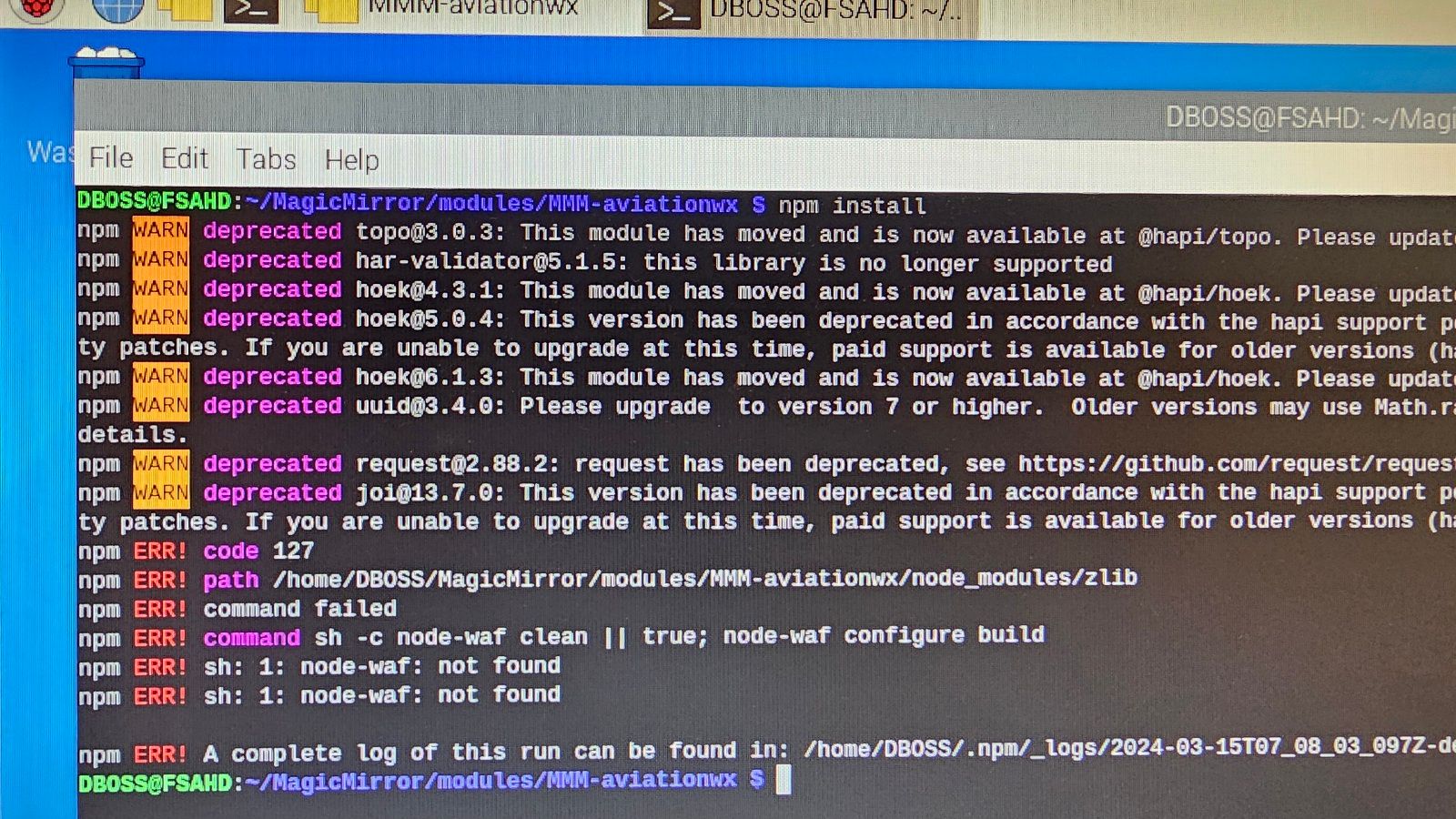
              20240315_030845.jpg

              S 2 Replies Last reply Reply Quote 0
              • S Do not disturb
                sdetweil @FSAHD
                last edited by

                @FSAHD ok, let me look at it in a couple hours

                Sam

                How to add modules

                learning how to use browser developers window for css changes

                mumblebajM 1 Reply Last reply Reply Quote 0
                • mumblebajM Offline
                  mumblebaj Module Developer @sdetweil
                  last edited by

                  @sdetweil I think to resolve just do npm uninstall request and will remove request from the package,json. Else it will try to install it and you will run into the errors above.

                  Check out my modules at: https://github.com/mumblebaj?tab=repositories
                  Check my blog-post: https://mumblebaj.xyz/
                  Check my MM Container: https://hub.docker.com/repository/docker/mumblebaj/magicmirror/general

                  S 1 Reply Last reply Reply Quote 0
                  • S Do not disturb
                    sdetweil @mumblebaj
                    last edited by sdetweil

                    @mumblebaj but the code uses request…

                    It downloads a now gz folder, with one xml file in it… I tried to use fetch and couldn’t get it to unzip the file in stream…
                    2 days, gave up

                    I installed ok on a pi4 after doing my script install
                    warnings but no failures

                    npm WARN deprecated hoek@6.1.3: This module has moved and is now available at @hapi/hoek. Please update your dependencies as this version is no longer maintained an may contain bugs and security issues.
                    npm WARN deprecated uuid@3.4.0: Please upgrade  to version 7 or higher.  Older versions may use Math.random() in certain circumstances, which is known to be problematic.  See https://v8.dev/blog/math-random for details.
                    npm WARN deprecated request@2.88.2: request has been deprecated, see https://github.com/request/request/issues/3142
                    npm WARN deprecated joi@13.7.0: This version has been deprecated in accordance with the hapi support policy (hapi.im/support). Please upgrade to the latest version to get the best features, bug fixes, and security patches. If you are unable to upgrade at this time, paid support is available for older versions (hapi.im/commercial).
                    
                    added 66 packages, and audited 67 packages in 46s
                    
                    2 packages are looking for funding
                      run `npm fund` for details
                    
                    6 vulnerabilities (2 moderate, 4 high)
                    
                    To address issues that do not require attention, run:
                      npm audit fix
                    
                    To address all issues possible (including breaking changes), run:
                      npm audit fix --force
                    
                    Some issues need review, and may require choosing
                    a different dependency.
                    
                    Run `npm audit` for details.
                    sam@raspberrypi4:~/MagicMirror/modules/MMM-aviationwx $ 
                    

                    Sam

                    How to add modules

                    learning how to use browser developers window for css changes

                    mumblebajM 2 Replies Last reply Reply Quote 0
                    • S Do not disturb
                      sdetweil @FSAHD
                      last edited by sdetweil

                      @FSAHD i just pushed a fix to package.json and a new postinstall script

                      git pull to get the updates…(watch out that it doesn’t overwrite your code)
                      then the postinstall script from the module folder

                      ./postinstall
                      

                      it will be called by npm install as well…

                      Sam

                      How to add modules

                      learning how to use browser developers window for css changes

                      1 Reply Last reply Reply Quote 0
                      • mumblebajM Offline
                        mumblebaj Module Developer @sdetweil
                        last edited by

                        @sdetweil I think it is possible with axios. Let me have a look at it. Will fork module from you and see what I can do and push a PR if it works.

                        Check out my modules at: https://github.com/mumblebaj?tab=repositories
                        Check my blog-post: https://mumblebaj.xyz/
                        Check my MM Container: https://hub.docker.com/repository/docker/mumblebaj/magicmirror/general

                        S 1 Reply Last reply Reply Quote 0
                        • S Do not disturb
                          sdetweil @mumblebaj
                          last edited by sdetweil

                          @mumblebaj said in Can anyone revive AviationWX, PilotWX, or TAF:

                          I think it is possible with axios

                          really don’t want axios… better to get native fetch working…
                          thats what I was trying. and you can use node xxx.js to test it without MM in the way…

                          its ‘possible’. just all the different ‘it works like this’ didn’t work.

                          there are two fetches in the node helper… one gets the gz file
                          and one gets an xml file… that one should be easy, but I didn’t want to mix in the same code path

                          Sam

                          How to add modules

                          learning how to use browser developers window for css changes

                          mumblebajM 2 Replies Last reply Reply Quote 0
                          • mumblebajM Offline
                            mumblebaj Module Developer @sdetweil
                            last edited by

                            @sdetweil The below code works fine. Tested it. Having issues with my system at the moment and can’t make the changes. Can you incorporate?

                            async function fetchData(metarUrl, airports) {
                              try {
                                const response = await axios.get(metarUrl, {
                                  responseType: 'arraybuffer', // ensure response is treated as binary
                                  headers: {
                                    'Accept-Encoding': 'gzip', // request gzip compression
                                  },
                                });
                            
                                // Unzip the gzip response
                                const unzippedData = zlib.gunzipSync(response.data).toString();
                            
                                let json_string = convert.toJson(unzippedData);
                                var json = JSON.parse(json_string);
                                var metarData = json.response.data.METAR;
                                var airportData = new Object();
                            
                                var airports = payload.airportList.split(",").map(function (airport) {
                                    airport = airport.trim();
                                    return (airport.length < 4) ? "K" + airport : airport;
                                  });
                            
                                airports.forEach(function (airport) {
                                    metarData.forEach(function (metar) {
                                        if (airport === metar.station_id) {
                                            if (this.debug)
                                                console.log("METAR data found for " + airport);
                                            airportData[airport] = metar;
                                            return; // check next airport in list
                                        }
                                    });
                                    console.log(metarData)
                                });
                              } catch (error) {
                                console.error('Error fetching data:', error);
                              }
                            }
                            

                            Check out my modules at: https://github.com/mumblebaj?tab=repositories
                            Check my blog-post: https://mumblebaj.xyz/
                            Check my MM Container: https://hub.docker.com/repository/docker/mumblebaj/magicmirror/general

                            1 Reply Last reply Reply Quote 0
                            • mumblebajM Offline
                              mumblebaj Module Developer @sdetweil
                              last edited by

                              @sdetweil I can fix the other fetch as well no issues. Give me a few on this one.

                              Check out my modules at: https://github.com/mumblebaj?tab=repositories
                              Check my blog-post: https://mumblebaj.xyz/
                              Check my MM Container: https://hub.docker.com/repository/docker/mumblebaj/magicmirror/general

                              1 Reply Last reply Reply Quote 0
                              • mumblebajM Offline
                                mumblebaj Module Developer @sdetweil
                                last edited by

                                @sdetweil Both calls working.

                                try {
                                        const response = await axios.get(metarUrl, {
                                            responseType: 'arraybuffer', // ensure response is treated as binary
                                            headers: {
                                                'Accept-Encoding': 'gzip', // request gzip compression
                                            },
                                        });
                                
                                        // Unzip the gzip response
                                        const unzippedData = zlib.gunzipSync(response.data).toString();
                                
                                        let json_string = convert.toJson(unzippedData);
                                        var json = JSON.parse(json_string);
                                        var metarData = json.response.data.METAR;
                                        var airportData = new Object();
                                
                                        var airports = payload.airportList.split(",").map(function (airport) {
                                            airport = airport.trim();
                                            return (airport.length < 4) ? "K" + airport : airport;
                                        });
                                
                                        airports.forEach(function (airport) {
                                            metarData.forEach(function (metar) {
                                                if (airport === metar.station_id) {
                                                    if (this.debug)
                                                        console.log("METAR data found for " + airport);
                                                    airportData[airport] = metar;
                                                    return; // check next airport in list
                                                }
                                            });
                                            // console.log(metarData)
                                        });
                                    } catch (error) {
                                        console.error('Error fetching data:', error);
                                    }
                                
                                    const checktype = { "Airspace_Flow_List":"Airspace_Flow", "Ground_Delay_List": "Ground_Delay", "Arrival_Departure_Delay_List": "Delay","Airport_Closure_List":"Airport" }
                                
                                    
                                    try {
                                        const response = await axios.get(FAAUrl);
                                
                                        // Your further processing
                                        let json_string =
                                            //convert.toJson(test_data)     swap comments to use test FAA data
                                            convert.toJson(response.data.toString());
                                        if (this.debug)
                                            console.log("json faa=" + json_string);
                                        const faa_data = JSON.parse(json_string);
                                
                                        if (!Array.isArray(faa_data['AIRPORT_STATUS_INFORMATION'].Delay_type)) {
                                            // save the current entry
                                            const x = faa_data['AIRPORT_STATUS_INFORMATION'].Delay_type
                                            //  init as an array
                                            faa_data['AIRPORT_STATUS_INFORMATION'].Delay_type = []
                                            // add the element into the array
                                            faa_data['AIRPORT_STATUS_INFORMATION'].Delay_type.push(x)
                                        }
                                        // loop thru the delay types
                                        faa_data['AIRPORT_STATUS_INFORMATION'].Delay_type.forEach(t => {
                                            //
                                            if (t.name !== "Airspace Flow Programs") {
                                                // for each the  there are two major keys, name and the list for that type
                                                // get the key of the list
                                                const keyname = Object.keys(t)[1]
                                                // remove the "_list"  part for passing to front end
                                                const key = keyname.split('_').slice(0, -1).join('_')
                                                if (this.debug)
                                                    console.log("key data=" + JSON.stringify(t[keyname][checktype[keyname]]) + "keyname=" + keyname + " key=" + checktype[keyname] + "\n")
                                                if (!Array.isArray(t[keyname][checktype[keyname]])) {
                                                    const x = t[keyname][checktype[keyname]]
                                                    t[keyname][checktype[keyname]] = []
                                                    t[keyname][checktype[keyname]].push(x)
                                                } else {
                                                    console.log("checkytype=" + checktype[keyname])
                                                }
                                                if (this.debug)
                                                    console.log("data=" + Object.keys(faa_data['AIRPORT_STATUS_INFORMATION'].Delay_type)[0] + " data=" + JSON.stringify(t) + " keyname=" + keyname + " key=" + key + " last part=" + JSON.stringify(t[keyname][key]) + "\n")
                                
                                                // look thru all the aaffected airports for this record type
                                                t[keyname][checktype[keyname]].forEach(airport_record => {
                                                    // if the airport is one the user requested
                                                    if (airports.includes('K' + airport_record.ARPT)) {
                                                        if (airportData['K' + airport_record.ARPT]['FAA'] == undefined)
                                                            airportData['K' + airport_record.ARPT]['FAA'] = {}
                                                        // save this data record
                                                        airportData['K' + airport_record.ARPT]['FAA'][key] = airport_record
                                                    }
                                                })
                                            }
                                
                                        });
                                        // Emitting data to Socket
                                        //self.sendSocketNotification("WX_RESULT", airportData);
                                    } catch (error) {
                                        console.error('Error fetching FAA data:', error);
                                    }
                                

                                Check out my modules at: https://github.com/mumblebaj?tab=repositories
                                Check my blog-post: https://mumblebaj.xyz/
                                Check my MM Container: https://hub.docker.com/repository/docker/mumblebaj/magicmirror/general

                                S 1 Reply Last reply Reply Quote 0
                                • S Do not disturb
                                  sdetweil @mumblebaj
                                  last edited by

                                  @mumblebaj thx. but there is a way to not have to use zlib. I just haven’t found any that work

                                  Sam

                                  How to add modules

                                  learning how to use browser developers window for css changes

                                  mumblebajM 1 Reply Last reply Reply Quote 0
                                  • mumblebajM Offline
                                    mumblebaj Module Developer @sdetweil
                                    last edited by

                                    @sdetweil If you want to use fetch you can do the first call as follows.

                                    try {
                                        const response = await fetch(metarUrl, {
                                          headers: {
                                            'Accept-Encoding': 'gzip', // Request gzip compression
                                          },
                                        });
                                    
                                        if (!response.ok) {
                                          throw new Error(`HTTP error! Status: ${response.status}`);
                                        }
                                    
                                        // Read response body as buffer
                                        const buffer = await response.buffer();
                                    
                                        // Manually decompress gzip data
                                        const zlib = require('zlib');
                                        const decompressedData = zlib.gunzipSync(buffer).toString();
                                    

                                    You could use pako.

                                    const decompressedData = pako.inflate(buffer, { to: 'string' });
                                    

                                    Check out my modules at: https://github.com/mumblebaj?tab=repositories
                                    Check my blog-post: https://mumblebaj.xyz/
                                    Check my MM Container: https://hub.docker.com/repository/docker/mumblebaj/magicmirror/general

                                    S 1 Reply Last reply Reply Quote 0
                                    • S Do not disturb
                                      sdetweil @mumblebaj
                                      last edited by sdetweil

                                      @mumblebaj but… you are not supposed to have to do either

                                      Sam

                                      How to add modules

                                      learning how to use browser developers window for css changes

                                      mumblebajM 1 Reply Last reply Reply Quote 0
                                      • mumblebajM Offline
                                        mumblebaj Module Developer @sdetweil
                                        last edited by

                                        @sdetweil I have not seen another way. Sorry…:man_facepalming:

                                        Check out my modules at: https://github.com/mumblebaj?tab=repositories
                                        Check my blog-post: https://mumblebaj.xyz/
                                        Check my MM Container: https://hub.docker.com/repository/docker/mumblebaj/magicmirror/general

                                        F 1 Reply Last reply Reply Quote 0
                                        • F Offline
                                          FSAHD @mumblebaj
                                          last edited by

                                          @mumblebaj @sdetweil fwiw, and I don’t know if this would be any easier for the situation.

                                          There is a site called avwx.rest
                                          (I believe the pilot wx all was using that source)

                                          It’s an API built solely for pilot data
                                          You do need a key but maybe the data will be easier to pull?

                                          https://avwx.docs.apiary.io/#

                                          S 2 Replies Last reply Reply Quote 0
                                          • S Do not disturb
                                            sdetweil @FSAHD
                                            last edited by

                                            @FSAHD I might use that for pilot.

                                            we are just talking about using more current support , so the module lasts longer

                                            Sam

                                            How to add modules

                                            learning how to use browser developers window for css changes

                                            mumblebajM 1 Reply Last reply Reply Quote 0

                                            Hello! It looks like you're interested in this conversation, but you don't have an account yet.

                                            Getting fed up of having to scroll through the same posts each visit? When you register for an account, you'll always come back to exactly where you were before, and choose to be notified of new replies (either via email, or push notification). You'll also be able to save bookmarks and upvote posts to show your appreciation to other community members.

                                            With your input, this post could be even better 💗

                                            Register Login

                                            • 1
                                            • 2
                                            • 1 / 2
                                            • First post
                                              Last post
                                            Enjoying MagicMirror? Please consider a donation!
                                            MagicMirror created by Michael Teeuw.
                                            Forum managed by Sam, technical setup by Karsten.
                                            This forum is using NodeBB as its core | Contributors
                                            Contact | Privacy Policy