MagicMirror Forum
    • Recent
    • Tags
    • Unsolved
    • Solved
    • MagicMirror² Repository
    • Documentation
    • 3rd-Party-Modules
    • Donate
    • Discord
    • Register
    • Login
    A New Chapter for MagicMirror: The Community Takes the Lead
    Read the statement by Michael Teeuw here.

    Open weather Api 3.0

    Scheduled Pinned Locked Moved Utilities
    16 Posts 4 Posters 7.7k Views 5 Watching
    Loading More Posts
    • Oldest to Newest
    • Newest to Oldest
    • Most Votes
    Reply
    • Reply as topic
    Log in to reply
    This topic has been deleted. Only users with topic management privileges can see it.
    • P Offline
      Peter
      last edited by

      Can somebody help this noob?
      I use the default weather module with Open weather provider.
      Somewhere on this forum I read that Api 2.5 will end in June, so I subscribed to Api 3.0.
      Is this free?
      They asked for creditcard numbers, I still hope this is free.
      And can somebody help me with my config; Api 3.0, lat, long , no idea how to put it in my config.
      An example of a working config with Api 3.0 would help me a lot.
      Greetings,
      Peter

      S 2 Replies Last reply Reply Quote 0
      • S Offline
        sdetweil @Peter
        last edited by

        @Peter the same config.js has entries for weather (Openweather is the default provider)

        just add the property
        apiVersion: ‘3.0’,

        and replace the other property values with yours

        the doc for weather is here
        https://docs.magicmirror.builders/modules/weather.html

        you do not need to specify anything that is the same as the doc indicates (like provider)

        as the design is your config.js overrides the defaults for a module.

        read the two links in my signature below. I didn’t write them, they are very helpful

        Sam

        How to add modules

        learning how to use browser developers window for css changes

        1 Reply Last reply Reply Quote 0
        • S Offline
          sdetweil @Peter
          last edited by

          @Peter free for limited number of calls per day

          Sam

          How to add modules

          learning how to use browser developers window for css changes

          P 2 Replies Last reply Reply Quote 0
          • P Offline
            Peter @sdetweil
            last edited by

            @sdetweil after adding the version to my config, the weather module does not start.

            {
            module: “weather”,
            position: “top_right”,
            config: {
            weatherProvider: “openweathermap”,
            apiVersion: ‘3.0’,
            type: “current”,
            location: “Apeldoorn”,
            locationID: “2759705”, //ID from http://bulk.openweathermap.org/sample/city.list.json.gz; unzip the gz file and find your city
            apiKey: “xxxxxxxxxxxxxxxxxxxxxxxxxxkey removed”
            }
            },
            It works fine with Api 2.5, but do I need lat, lon instead of Location and Locatio ID?
            It is confusing.
            Peter

            S 1 Reply Last reply Reply Quote 0
            • P Offline
              Peter @sdetweil
              last edited by

              @sdetweil what does this limited number mean?
              If I use the default settings do I stay under the limit?
              Peter

              1 Reply Last reply Reply Quote 0
              • S Offline
                sdetweil @Peter
                last edited by

                @Peter there are multiple providers under weather, some need locationId, some need location name, some need lat/lon

                the top section of the doc applies to all providers, and further down is specifics for each provider

                if it works, then it works.

                limited calls per day 1000 I think., so their doc says

                divide seconds per day by 1000

                stay under that rate.

                we will next release fixes July 1, every 90 days

                Sam

                How to add modules

                learning how to use browser developers window for css changes

                P 1 Reply Last reply Reply Quote 0
                • P Offline
                  Peter @sdetweil
                  last edited by

                  @sdetweil thanks for your help but I cannot get it working.
                  Maybe somebody else has an idea how to get it working?
                  Peter

                  S 1 Reply Last reply Reply Quote 0
                  • S Offline
                    sdetweil @Peter
                    last edited by sdetweil

                    @Peter I took the sample
                    and added my 3.0 api key… no other changes, I commented out provider as openweather is the default
                    my 2.5 key did not work

                              {
                          module: "weather",
                          position: "top_right",
                          header: "Weather Forecast",
                          config: {
                            //weatherProvider: "openweathermap",
                            type: "forecast",
                            location: "New York",
                            locationID: "5128581", //ID from http://bulk.openweathermap.org/sample/city.list.json.gz; unzip the gz file and find your city
                            apiKey: "mykey"
                          }
                        },
                          {
                            module: "weather",
                            position: "top_right",
                            config: {  // type:"current is default"
                              location: "New York",
                              locationID: "5128581", //ID from http://bulk.openweathermap.org/sample/city.list.json.gz; unzip the gz file and find your city
                              apiKey: "mykey", 
                            }
                          },
                    

                    sorry, had some funky icons in test…
                    also had three instances, picked wrong 2… forecast first, current second
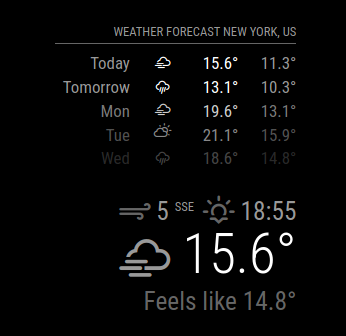
                    Screenshot at 2024-05-04 12-02-46.png

                    Sam

                    How to add modules

                    learning how to use browser developers window for css changes

                    P 1 Reply Last reply Reply Quote 0
                    • P Offline
                      Peter @sdetweil
                      last edited by

                      @sdetweil ok, I did the same, so I removed apiVersion:‘3.0’, now it works.
                      But how can I see if it works on version 2.5 or version 3.0?
                      And how do I recognise a version 3.0 Api key?
                      On the site of Openweather I have several Api keys, but how to recognise a version 3.0?
                      Peter

                      S 1 Reply Last reply Reply Quote 0
                      • S Offline
                        sdetweil @Peter
                        last edited by sdetweil

                        @Peter they don’t tell you. I have many as well.

                        they will tell you to try it… not much use

                        version 3 is only one endpoint, onecall
                        I don’t know how to force the module like that, it changes the endpoint based on the type (current, forecast…)

                        Sam

                        How to add modules

                        learning how to use browser developers window for css changes

                        P 1 Reply Last reply Reply Quote 0
                        • P Offline
                          Peter @sdetweil
                          last edited by

                          @sdetweil ok, I will see what happens when 2.5 stops working.
                          Have a nice day.
                          Peter

                          N 1 Reply Last reply Reply Quote 0
                          • N Offline
                            nkc @Peter
                            last edited by

                            Hi Just to clarify - I just need to change the api version number from 2.5 to 3.0 or Do I need to subscribe again for api version 3.0. ?
                            Thanks,
                            Neel.

                            S 1 Reply Last reply Reply Quote 0
                            • S Offline
                              sdetweil @nkc
                              last edited by

                              @nkc as I understand it yes. 3.0 requires a payment if you exceed the free limit so you must provide a credit card up front.

                              Sam

                              How to add modules

                              learning how to use browser developers window for css changes

                              1 Reply Last reply Reply Quote 0
                              • A Offline
                                aaronaxvig
                                last edited by

                                I found this thread when my usage of the openweathermap.org API stopped working a few days ago. I guess they actually did cut off the API 2.5 users now? Anyways, I have it working using the 3.0 API now. A few comments to help anyone:

                                • I did add my credit card info on my account but I am not 100% sure this was necessary.
                                • I am using the same API key as before.
                                • The locationID value does not appear to work any more. So I have replaced the locationID config lines with lat and lon lines.
                                • The timezone was getting appended to the header so I had to start setting appendLocationNameToHeader to false.

                                Before example:

                                {
                                    module: "weather",
                                    position: "top_right",
                                    header: "Hollywood, FL",
                                    config: {
                                        weatherProvider: "openweathermap",
                                        type: "current",
                                        location: "Hollywood, FL",
                                        locationID: "4158928",
                                        apiKey: "xxxxxxxxxxxxxxxxxxxxxx",
                                        roundTemp: true
                                    }
                                },
                                

                                After example:

                                {
                                    module: "weather",
                                    position: "top_left",
                                    header: "Mandan, ND",
                                    config: {
                                        weatherProvider: "openweathermap",
                                        type: "current",
                                        lat: "46.8258",
                                        lon: "-100.88875",
                                        apiKey: "xxxxxxxxxxxxxxxxxxxxxx",
                                        apiVersion: "3.0",
                                        appendLocationNameToHeader: false,
                                        weatherEndpoint: "/onecall",
                                        roundTemp: true
                                    }
                                },
                                
                                S 1 Reply Last reply Reply Quote 1
                                • S Offline
                                  sdetweil @aaronaxvig
                                  last edited by

                                  @aaronaxvig yes, thanks for articulating that all in one post.

                                  Sam

                                  How to add modules

                                  learning how to use browser developers window for css changes

                                  A 1 Reply Last reply Reply Quote 0
                                  • A Offline
                                    aaronaxvig @sdetweil
                                    last edited by

                                    @sdetweil You’re welcome! I saw afterwards that there is another thread with similar info but this is the one the search engine led me to.

                                    After a few days of use I can see on the OpenWeatherMap.org website Billing section that I am running somewhere around 600 API calls per day. This is with four weather modules in place (for four different locations). So about 150 calls per day per module. The default updateInterval value is 10 minutes which would be 144 per day in theory. I’m going to bump my non-local ones to a 30 minute setting (careful to specify milliseconds i.e. 1,800,000 but without commas of course).

                                    1 Reply Last reply Reply Quote 1

                                    Hello! It looks like you're interested in this conversation, but you don't have an account yet.

                                    Getting fed up of having to scroll through the same posts each visit? When you register for an account, you'll always come back to exactly where you were before, and choose to be notified of new replies (either via email, or push notification). You'll also be able to save bookmarks and upvote posts to show your appreciation to other community members.

                                    With your input, this post could be even better 💗

                                    Register Login

                                    • 1 / 1
                                    • First post
                                      Last post
                                    Enjoying MagicMirror? Please consider a donation!
                                    MagicMirror created by Michael Teeuw.
                                    Forum managed by Sam, technical setup by Karsten.
                                    This forum is using NodeBB as its core | Contributors
                                    Contact | Privacy Policy