MagicMirror Forum
    • Recent
    • Tags
    • Unsolved
    • Solved
    • MagicMirror² Repository
    • Documentation
    • 3rd-Party-Modules
    • Donate
    • Discord
    • Register
    • Login
    A New Chapter for MagicMirror: The Community Takes the Lead
    Read the statement by Michael Teeuw here.

    Show calendar based on IP Address accessed

    Scheduled Pinned Locked Moved Development
    68 Posts 3 Posters 28.4k Views 3 Watching
    Loading More Posts
    • Oldest to Newest
    • Newest to Oldest
    • Most Votes
    Reply
    • Reply as topic
    Log in to reply
    This topic has been deleted. Only users with topic management privileges can see it.
    • S Offline
      Spinster @sdetweil
      last edited by

      @sdetweil I understand about the log. Thank you.

      Regarding the IP address, I am very new to javascript hence trying to get my head around it. Being a C programmer, certain things in JavaScript is still a distant for me. Hope to understand soon.

      Just in case if you have some time, a simple code from you would help me. Please.

      1 Reply Last reply Reply Quote 0
      • S Offline
        Spinster @MMRIZE
        last edited by

        @MMRIZE I understand, Ideally I would like to avoid opening multiple ports and use a common config to serve clients based on their IP. In fact, though DHCP is used by my home server, I have only assigned the IP address to reservations, hence static IP within my home network is not a problem.

        Please suggest a simple code to use a specific calendar based on IP address of the client.

        M 2 Replies Last reply Reply Quote 0
        • M Offline
          MMRIZE @Spinster
          last edited by

          @Spinster
          I’m out of my test PC, so I can’t show atm. (Maybe tomorrow possible, if you couldn’t success until that time)
          You can add custom config attribute map-like object calendarMap in your config.js

          module: "calendar",
          position: "top_left",
          config: {
            calendarMap: {
              "192.168.178.100": ["calendar1", "calendar2"],
              "192.168.178.101": ["calebdar1", "calendar3"],
            },
            calendars: [
              {
                url: " … ",
                name: "calendar1",
              },
          …


          In calendar.js around line 176, when CALENDAR_EVENTS notification coming, you can filter the payload(array of events) of that notification by checking calendarName of each event is matched to this.config.calendarMap.

          Sorry I can’t show the real code now. Maybe some hours later I may be able to. Anyway concept would be like this.

          S 1 Reply Last reply Reply Quote 0
          • S Offline
            Spinster @MMRIZE
            last edited by

            @MMRIZE Great, You have given me an idea, will wait for your code. Please share when possible.

            1 Reply Last reply Reply Quote 0
            • M Offline
              MMRIZE @Spinster
              last edited by

              @Spinster
              Ah I suddenly remember that getting Internal IP with only JavaScript on client browseris hard.
              Hmmm another approach might be needed.

              S 1 Reply Last reply Reply Quote 0
              • S Offline
                sdetweil @MMRIZE
                last edited by

                @MMRIZE that is why you need the express api call…

                I would make a separate module that has ip in div, not shown, but w id

                then call in calendar is document.get…
                compare, your way or on cal entries
                more synchronous…

                Sam

                How to add modules

                learning how to use browser developers window for css changes

                M 1 Reply Last reply Reply Quote 0
                • M Offline
                  MMRIZE @sdetweil
                  last edited by

                  @sdetweil
                  Yes. I thought a small module with node_helper that could return clients’ ip as a result of REST api call from calendar module.

                  S 1 Reply Last reply Reply Quote 0
                  • S Offline
                    sdetweil @MMRIZE
                    last edited by sdetweil

                    @MMRIZE and that module calls its own rest call publishes the address in its getDom() result, with id= on div

                    and then cal module can use synchronous document.getElementsById()

                    to get that value.

                    Sam

                    How to add modules

                    learning how to use browser developers window for css changes

                    S 1 Reply Last reply Reply Quote 0
                    • S Offline
                      sdetweil @sdetweil
                      last edited by sdetweil

                      @MMRIZE @Spinster

                      so the little module is

                      https://github.com/sdetweil/getip

                      and it does correctly return the ip address of the client… tested from 4 different systems to the same MM…

                      see later post for final solution

                      Sam

                      How to add modules

                      learning how to use browser developers window for css changes

                      S 2 Replies Last reply Reply Quote 0
                      • S Offline
                        Spinster @sdetweil
                        last edited by

                        @sdetweil @MMRIZE

                        Wow, you are quick, you have given me some homework. Will use your code and get back with the result.

                        Thank you so much for your patience and understanding.

                        M 1 Reply Last reply Reply Quote 0
                        • S Offline
                          Spinster @sdetweil
                          last edited by

                          @sdetweil

                          I tried your code, but find that once I include getip module in config.js, I am not seeing any output for calendar. Is this the expected output. Without getip module, I find that client_ip = document.getElementById("getip is returning null.Please advice

                          S M 3 Replies Last reply Reply Quote 0
                          • S Offline
                            sdetweil @Spinster
                            last edited by sdetweil

                            @Spinstersee later post

                            Sam

                            How to add modules

                            learning how to use browser developers window for css changes

                            S 1 Reply Last reply Reply Quote 0
                            • M Offline
                              MMRIZE @Spinster
                              last edited by

                              @Spinster
                              By the way, which client are you using? Electron? Or Browser?

                              S 1 Reply Last reply Reply Quote 0
                              • S Offline
                                Spinster @MMRIZE
                                last edited by

                                @MMRIZE Browser as of now.

                                I also tried using express ipfilter, but the problem is I don’t know how to use it in module.js, it is throwing error saying ipfilter not known etc

                                1 Reply Last reply Reply Quote 0
                                • S Offline
                                  sdetweil @Spinster
                                  last edited by sdetweil

                                  @Spinster well, here is a working example, in addition to the other code already

                                  watch out if using address AND MM host system not included. as it won’t show either…
                                  one could make the ipaddress in cal a list (of ip addresses) similar to what @MMRIZE does…
                                  I don’t like adding the extra block,
                                  just add the var to the thing that matters…

                                  see later post

                                  Sam

                                  How to add modules

                                  learning how to use browser developers window for css changes

                                  1 Reply Last reply Reply Quote 0
                                  • M Offline
                                    MMRIZE @Spinster
                                    last edited by MMRIZE

                                    @Spinster
                                    With getip of @sdetweil and MMM-ModuleMonkeyPatch, I did it. (You don’t have to modify the original source code for future-proof.)

                                    Example.
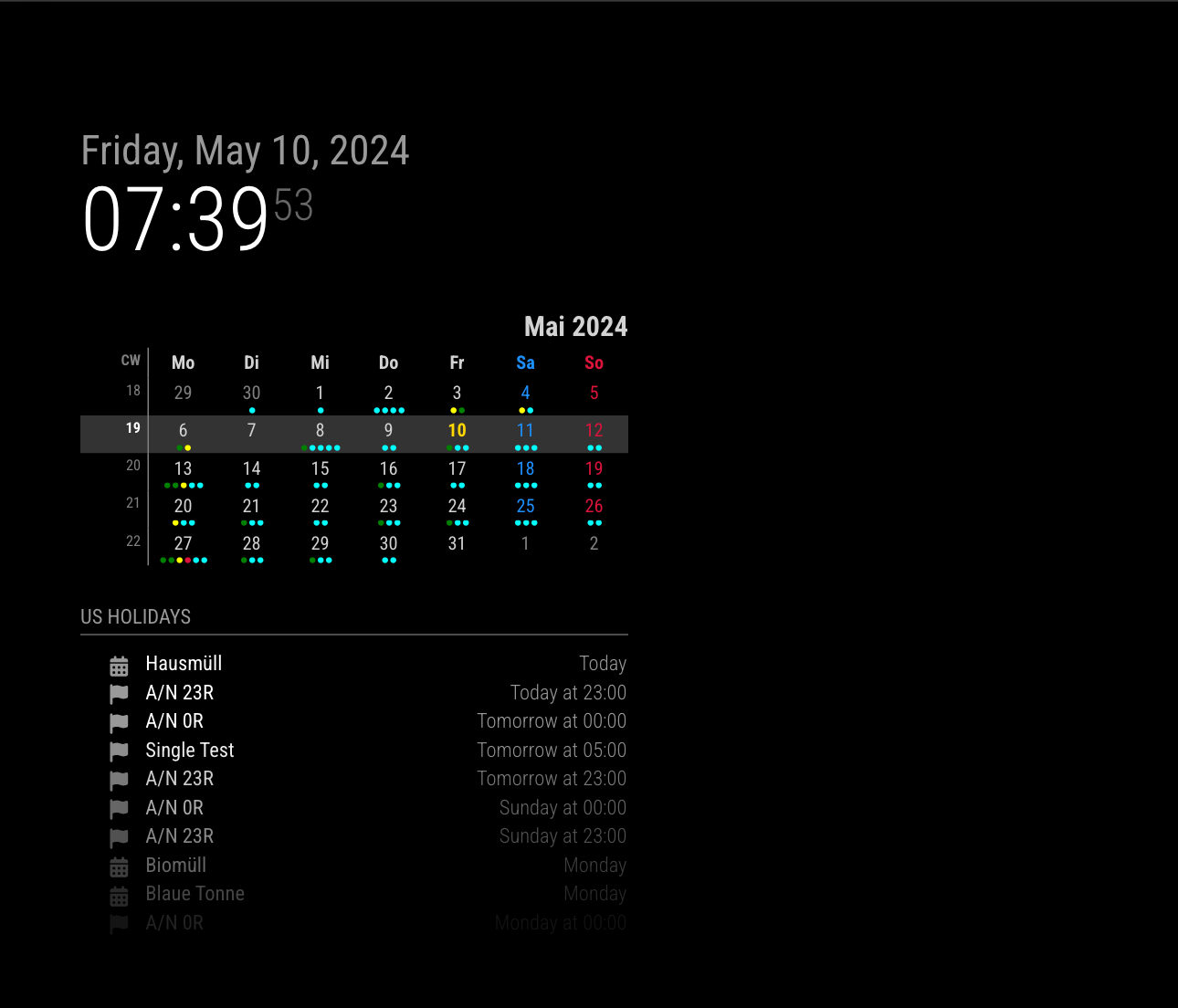
                                    Server is running on 192.168.178.63 and I run 2 clients on 192.168.178.22 and 192.168.178.63.
                                    Both 2 clients can show different set of calendars.

                                    da786ea9-d7f4-4ad4-89ac-88c5621c03c6-image.png

                                    windows.192.168.178.22.png

                                    {
                                    	module: "MMM-ModuleMonkeyPatch",
                                    	config: {
                                    		patches: [
                                    			{
                                    				module: "calendar",
                                    				method: "socketNotificationReceived",
                                    				patch: async function (original, args) {
                                    					const [ notification, payload ] = args
                                    					if (notification === "CALENDAR_EVENTS") {
                                    						const calendarName = this.config.calendars.find((cal) => cal.url === payload?.url)?.name
                                    						const r = await fetch('http://192.168.178.63:8080/modules/getip')
                                    						const ip = JSON.parse(await r.text())?.[ 'address' ] ?? null
                                    						if (!this.config.clientMap?.[ ip ]?.includes(calendarName)) {
                                    							return original(notification, { ...payload, events: [] })
                                    						}
                                    					}
                                    					return original(notification, payload)
                                    				}
                                    			}
                                    		]
                                    	}
                                    },
                                    {
                                    	module: "getip",
                                    },
                                    {
                                    	module: "calendar",
                                    	header: "US Holidays",
                                    	position: "top_left",
                                    	config: {
                                    		clientMap: {
                                    			"192.168.178.63": [ "cal1", "cal2", "cal3" ],
                                    			"192.168.178.22": ["cal3", "cal4", "cal5"]
                                    		},
                                    		calendars: [
                                    			{
                                    				url: "...",
                                    				name: "cal1",
                                    			},
                                    			{
                                    				url: "...",
                                    				name: "cal2",
                                    			},
                                    			{
                                    				url: "...",
                                    				name: "cal3",
                                    			},
                                    
                                    			{
                                    				url: "...",
                                    				name: "cal4",
                                    			},
                                    			{
                                    				url: "...",
                                    				name: "cal5",
                                    			}
                                    		]
                                    	}
                                    },
                                    

                                    TO Improve
                                    Whenever notification CALENDAR_EVENTS coming, getip is called. After first execution, to store IP on the localStorage or cookie would be better.

                                    S S 2 Replies Last reply Reply Quote 0
                                    • S Offline
                                      Spinster @sdetweil
                                      last edited by

                                      @sdetweil will express ipfilter be useful? Similar to whitelist, can we try something

                                      S 1 Reply Last reply Reply Quote 0
                                      • S Offline
                                        sdetweil @Spinster
                                        last edited by

                                        @Spinster no… as its in the wrong place… (inside node_helper…) we NEED the ip address to compare with

                                        just get it and return . one time

                                        Sam

                                        How to add modules

                                        learning how to use browser developers window for css changes

                                        1 Reply Last reply Reply Quote 0
                                        • S Offline
                                          sdetweil @MMRIZE
                                          last edited by sdetweil

                                          @MMRIZE said in Show calendar based on IP Address accessed:

                                          (You don’t have to modify the original source code for future-proof.)

                                          BUT you are fetching cal for system not going to use it… SOME cals are 1000’s of entries especially old
                                          that have to be processed… this is a bad waste of resources…

                                          and this exposes a cal problem, as if u fetch http://xyz on client 1 and client 2 and client 3, we fetch it 3 times. also bad
                                          this could also lead to different clients showing different data between fetchIntervals…

                                          Sam

                                          How to add modules

                                          learning how to use browser developers window for css changes

                                          M 2 Replies Last reply Reply Quote 0
                                          • M Offline
                                            MMRIZE @sdetweil
                                            last edited by

                                            @sdetweil said in Show calendar based on IP Address accessed:

                                            BUT you are fetching cal for system not going to use it… SOME cals are 1000’s of entries especially old
                                            that have to be processed… this is a bad waste of resources…

                                            I Can’t understand your point.
                                            My code is just small injection that does filtering out calendars by condition on socketNotificationReceived. No additional fetching is needed.

                                            S 1 Reply Last reply Reply Quote 0

                                            Hello! It looks like you're interested in this conversation, but you don't have an account yet.

                                            Getting fed up of having to scroll through the same posts each visit? When you register for an account, you'll always come back to exactly where you were before, and choose to be notified of new replies (either via email, or push notification). You'll also be able to save bookmarks and upvote posts to show your appreciation to other community members.

                                            With your input, this post could be even better 💗

                                            Register Login

                                            • 1
                                            • 2
                                            • 3
                                            • 4
                                            • 4 / 4
                                            • First post
                                              Last post
                                            Enjoying MagicMirror? Please consider a donation!
                                            MagicMirror created by Michael Teeuw.
                                            Forum managed by Sam, technical setup by Karsten.
                                            This forum is using NodeBB as its core | Contributors
                                            Contact | Privacy Policy