Read the statement by Michael Teeuw here.
MMM-MealViewer
-
This post is deleted! -
@dadAndEl Nice! Don’t forget to add it to the module list: https://github.com/MagicMirrorOrg/MagicMirror/wiki/3rd-party-modules 🙂
-
@dadAndEl The link to the repo doesn’t work 🤔
-
@dadAndEl Check that it is not set to private as I could not see it as well now.
-
Let’s try this again… new repo link should work.
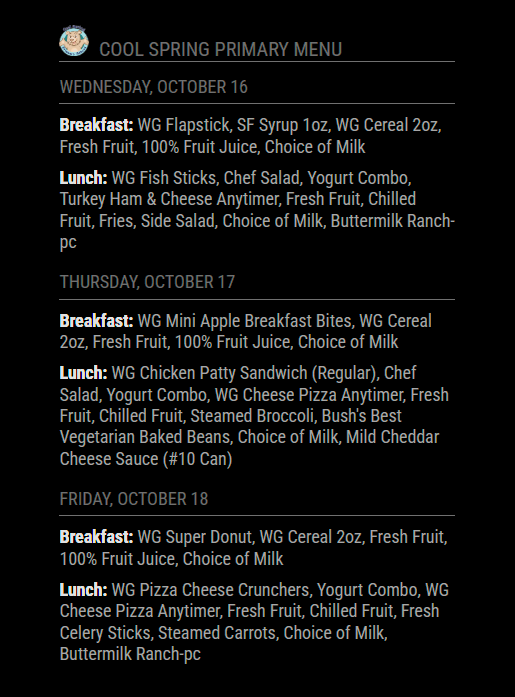
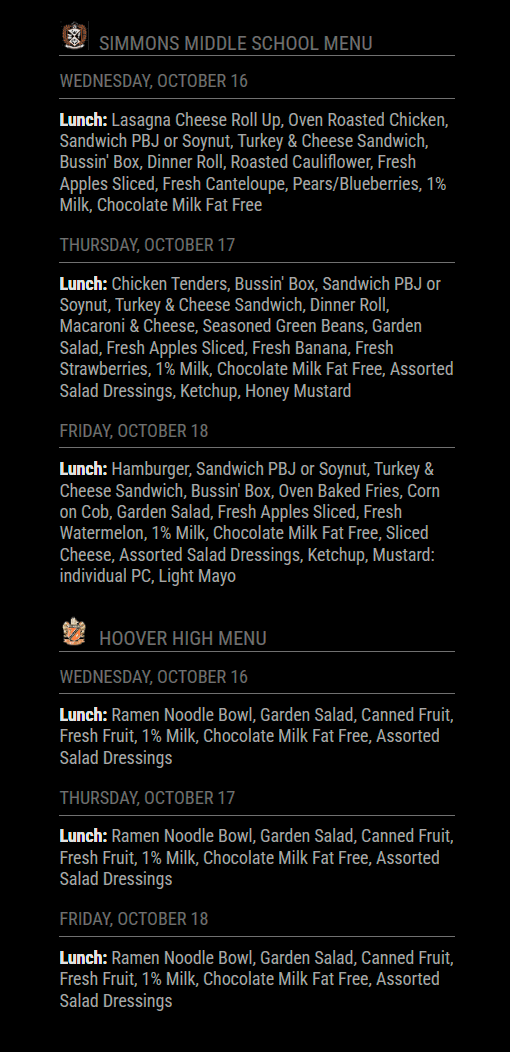
A MagicMirror module for displaying school breakfast and lunch menus from MealViewer. Supports multiple school menus and various configuration options. You can check to see if your school uses MealViewer here.
Single instance:
Multiple instance:
-
Hello @dadandel !
I love this (and more importantly, my WIFE and kiddos love this module - GREAT WORK!
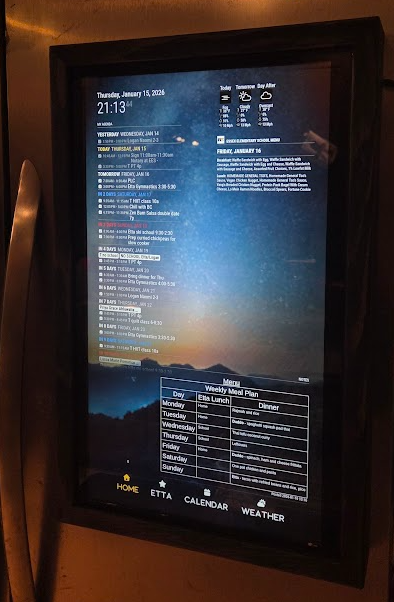
My wife does meal planning, shopping and tasks me with meal prep for the upcoming week on the weekends, so she really wants to see the next week’s school lunches on Friday evening when she’s in the fridge and going through what we have, and what meals my kiddo wants to eat at school and which meals they want to pack a lunch for.
Currently, the getDateRange function (which is super robust, excellent work) is strictly ‘look back’. I did quite a bit of testing (thank you for baking in all the testing and logging logic!!!) and my testing shows that you can maintain all of the robustness and add the ‘look ahead’ my wife is looking for by updating the function just a bit like:
getDateRange: function (startDay, endDay, testMode = false, testDate = null) {
    let today;

    if (testMode && testDate) {
        const [year, month, day] = testDate.split('-').map(Number);
        today = new Date(year, month - 1, day);
        console.log(`Using test date (local timezone): ${today.toLocaleString()}`);
    } else {
        today = new Date();
    }

    const currentDay = today.getDay();
    console.log(`Current day of week: ${currentDay}`);

    // ------------------------------------------------------------
    // Calculate the date for the week's start (most recent startDay)
    // ------------------------------------------------------------
    const startDate = new Date(today);
    const daysToSubtract = ((currentDay - startDay + 7) % 7);
    startDate.setDate(today.getDate() - daysToSubtract);

    console.log(`Days to subtract: ${daysToSubtract}`);
    console.log(`Initial start date: ${startDate.toLocaleString()}`);

    // ------------------------------------------------------------
    // Calculate the end date (inclusive range)
    // ------------------------------------------------------------
    const endDate = new Date(startDate);
    const daysInRange = (endDay - startDay + 7) % 7 + 1;
    endDate.setDate(startDate.getDate() + daysInRange - 1);

    // ------------------------------------------------------------
    // LOOK-AHEAD LOGIC
    // If today is on or after the trigger day (Friday for Mon–Fri),
    // shift the entire range forward by one week
    // ------------------------------------------------------------
    const lookAheadTriggerDay = (startDay + 4) % 7;

    if (currentDay >= lookAheadTriggerDay) {
        console.log("Look-ahead condition met — shifting range to next week");
        startDate.setDate(startDate.getDate() + 7);
        endDate.setDate(endDate.getDate() + 7);
    }

    console.log(`Final start date: ${startDate.toLocaleString()}`);
    console.log(`Final end date: ${endDate.toLocaleString()}`);

    // ------------------------------------------------------------
    // Format output
    // ------------------------------------------------------------
    const formatDate = (date) => {
        const year = date.getFullYear();
        const month = String(date.getMonth() + 1).padStart(2, '0');
        const day = String(date.getDate()).padStart(2, '0');
        return `${month}-${day}-${year}`;
    };

    return {
        start: formatDate(startDate),
        end: formatDate(endDate)
    };
},
-
@ewingfox in this open source world the way to approach this is to submit your update as a pull request to the original module
Then the author doesn’t have to spend time inventing the changes, only reviewing your work
So, on GitHub
Fork the module, now you have a linked copy
git clone your copy, same as you did the original (only one in a place at a time)
Update your copy
git add your changes
git commit your changes to your local copy of the repo
git push. To upload your copy to GitHub, updating your fork
Use GitHub to submit/contribute your changes to the original module, -
@sdetweil as usual - you are very correct lol - this was sheer laziness on my part!
<instinctively ducks to see if my DevOps lead is hurling a pot in my direction, remembers that she’s 7,600 miles away, ducks again anyway>
-
@sdetweil - At work, all of my criteria and commentary lives in jira and my PR’s are pretty lean [read: RTSIDXCMT-11142, accept my d**n PR if you want that bug fix] .
I’d appreciate any feedback on manners/standards for submitting PR to open source projects so I can better align with norms!
https://github.com/ElliAndDad/MMM-MealViewer/pull/4
Thank you for being such an active mod/admin/mentor!
Take care,
E
-
@ewingfox one of the banes of open source is every author has their own style. So a PR here is different than a PR there.
-
Hey everyone! Just released v1.1.0 with some nice updates:
New Features:
- Responsive scaling - module automatically adapts to fit any region width
- Multi-column layout for full-width positions (top_bar, bottom_bar, upper_third, etc.)
- Position-aware styling - right-aligned headers when placed in right positions
Fixes:
- Fixed lookAhead logic to properly trigger on endDay after hideTodayAfter time
Improvements:
- Removed axios dependency - zero runtime dependencies now, just clone and go!
- Added ESLint config and dependabot for better code quality
Screenshots of the new layouts in the README:
https://github.com/double-ratchet/MMM-MealViewer
Let me know if you run into any issues!


Hello! It looks like you're interested in this conversation, but you don't have an account yet.
Getting fed up of having to scroll through the same posts each visit? When you register for an account, you'll always come back to exactly where you were before, and choose to be notified of new replies (either via email, or push notification). You'll also be able to save bookmarks and upvote posts to show your appreciation to other community members.
With your input, this post could be even better 💗
Register Login